
Lead routing for a small sales team: who gets the next lead
Lead routing is the written rule that decides who owns each new lead and how fast they have to act on it. For a team of two to six people, write five or six rules in a fixed order. The existing account owner comes first, then a few overrides such as language, then round robin among whoever is available. Add a response window with a fallback owner and a rule for no-shows, and only then pick the CRM setting.
Round robin works when your leads and your people are roughly alike. When they differ, you route by account, language or deal type first and rotate only what's left. Below you get a method table, a one-page policy filled in for an example team, five test cases and a weekly check.
What is lead routing, and why does a small team need rules for it?
Lead routing means every new lead gets one named owner and a deadline for the first reply, decided by a rule instead of by whoever sees it first. Write the rule down once leads come from more than one place and more than one person can take them. Without it, leads sit in a shared inbox, you hand them out yourself, or people grab the ones that look best.
You probably need written rules if one of these sounds familiar:
- You forward most new leads yourself, and the team waits for you to say who takes them.
- Leads land in a shared inbox and nobody is sure who already replied.
- Two people argue over the same referral, or the promising leads keep landing with one person.
- A buyer writes back after two weeks and nobody knows who spoke to them last.
Slow replies are common: a study published in Harvard Business Review in 2011 audited 2,241 US companies. Only 37% responded to a web lead within an hour, and 23% never responded at all, according to SmartCompany's summary of the study.
The same article cites a second dataset of 1.25 million leads at 42 US companies. There, firms that tried to contact a lead within an hour were nearly seven times as likely to qualify it as those that tried an hour later. The data is old and US-only, so read it as a direction for your team rather than a forecast.
Chrysales' view is that founder-led companies stall when everything runs through the founder. Handing out every lead yourself is part of that, and written rules let your team decide without asking you. That makes routing one of the quicker fixes for a founder-led sales bottleneck.
Which routing method fits 2-6 salespeople?
For most teams of two to six, start with round robin for leads that have no obvious owner. Put two or three overrides in front of it: the existing account owner, language, and maybe deal type. Pure rotation fits when leads and sellers are roughly alike. Once they differ in size, language or skill, the overrides do more of the work than the rotation does.
| Method | How it works | Use it when | Watch out for |
|---|---|---|---|
| Round robin | The next lead goes to the next person in a fixed order | Leads are similar and anyone on the team can handle any of them | It ignores who is busy, away or better at a certain deal |
| Load balanced | The lead goes to whoever has the fewest open records | Workloads differ, for example one person also runs onboarding | Someone sitting on stale leads gets fewer new ones, which can hide a follow-up problem |
| Language or region | The lead goes to the person who speaks the buyer's language or covers the region | You sell in more than one language, such as German and English | One person per language means no cover when they're away |
| Account owner | A lead from a company you already know goes to its current owner | You have clients, open deals or past contacts in the CRM | Messy company records create two owners for one account |
| Skill or deal type | Certain lead types go to the person best at them | One seller is clearly stronger at large or complex deals | The rest of the team sees favoritism unless the criteria are written |
| Modified round robin | An equal base for everyone, plus a share routed by skill | The team grows and people start to specialize | Someone has to review the split regularly |
Jason Lemkin, founder of SaaStr, wrote that he moved from plain rotation to what he calls a modified round robin: everyone got roughly the same base of leads, and 20-30% were routed to specific people. For a small team that's a sensible second stage, once you can name who is better at which deals.
The sales author Anthony Iannarino argues against rotation that rewards waiting your turn: "This kind of system looks fair. But it isn't." (Sales Gravy). If the next lead arrives no matter what, a slow seller and a fast one get the same flow.
The signal to change methods is simple: you keep reassigning leads by hand after the rotation has picked someone. Write the reason for each of those reassignments down, because it usually points to a missing override.
How do you write a one-page lead routing policy?
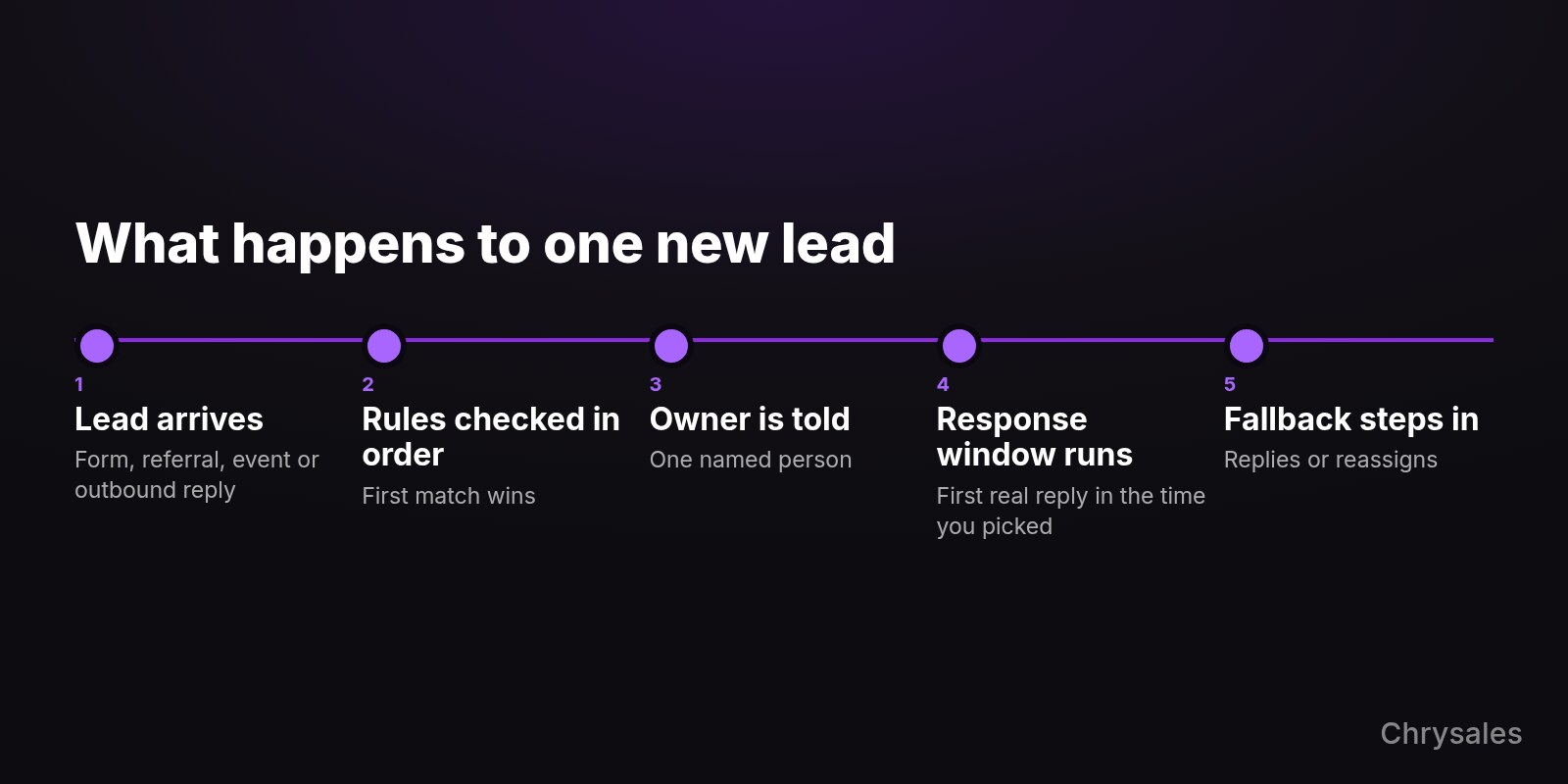
A lead routing policy fits on one page. It says which leads get routed, which rules are checked in which order, and who is in the default rotation. It also sets a response window with a fallback owner, an absence rule, and who owns a lead after a no-show. Write it before you touch the CRM, so the tool copies your rules, then compare it with the filled-in template after the steps.
- Decide what gets routed. List your sources: website form, referrals, events and replies to outbound. Then list what stays out of the rotation, such as spam, job applicants, vendors pitching you, and support requests from clients, which go straight to the account owner.
- Put the rules in priority order. The first rule that matches decides, and nothing below it is checked. A common order is existing owner, then language or region, then deal type, then rotation for everything else. Write down what happens when nothing matches.
- Set the default rotation. Name who is in it and who is out. Rotate only among people who are available that day, and skip anyone marked away.
- Pick a response window and a fallback owner. The window is the time the owner has for a first real reply, and when it passes, the lead moves to the fallback owner, who replies or reassigns. Cybrary ran a version of this for hot leads, described in Clearbit's book on lead qualification: the rep had to reach out within 20 minutes or the lead was reassigned. Pick your own window, since four people who are also on calls all day may not keep a 20-minute promise.
- Write the absence rule. Whoever is on vacation or sick is skipped, and the count starts fresh when they return. In a long-running HubSpot Community thread on even rotation, a user pointed out that a rep back from vacation would otherwise get more leads to catch up.
- Decide who owns no-shows and returning leads. When a setter books the call and a closer takes it, the closer owns the follow-up after a no-show. A lead that comes back within a set period goes to its last owner, and after that it counts as new. If you're still choosing which role to hire first, settle this handoff before the first setter starts.
- Put the policy where the team works. Pin it in the CRM or the shared drive, date it, and name the one person who can change it.
If you sell into DACH and also into the UK or US, put the language rule above the rotation, and give each language a backup person or send it to the fallback.
Here is the template, filled in for a fictional company with 20 employees and four people on leads. Ava is the founder, Ben and Jonas take the calls (Jonas speaks German), and Mia is an appointment setter working outbound. Every number in it is an example choice, not a benchmark.
LEAD ROUTING POLICY - example company (fictional)
Version 1.0 - owner of this page: Ava

1. What gets routed
   Website form, referrals, event contacts, replies to outbound.
   Not routed: spam, job applicants, vendors, support requests
   from clients (these go to the account owner).

2. Rules, checked in this order (first match wins)
   R1  Company already has an owner in the CRM -> that owner
   R2  Reply to Mia's outbound sequence -> Mia books the call,
       the call goes to the next closer in rotation
   R3  Buyer prefers German -> Jonas
   R4  Everything else -> round robin: Ben, Jonas
   R5  Nothing matches, or the matching person is away -> Ava

3. Availability
   Anyone marked away is skipped. No catch-up leads after
   vacation: the count starts fresh.

4. Response window
   First real reply within 1 business hour (our choice).
   Missed -> the lead moves to Ava, who replies or reassigns.

5. No-shows and returning leads
   No-show -> the closer who had the meeting owns follow-up.
   Lead comes back within 90 days -> last owner.
   After 90 days -> treated as a new lead.

6. Founder
   Ava is the fallback (R5) and keeps her three largest
   existing accounts for one more quarter. Then she leaves
   the rotation and hands the accounts to Ben and Jonas.

7. Review
   Checked every Monday in the team meeting. Changes need Ava.
Should you stay in the rotation?
Stay in only on purpose and for a set time. If you stay in the rotation, you become the bottleneck the policy was meant to remove, because leads wait whenever you're in meetings or traveling. Take a narrow role, such as a few existing large accounts or the fallback, write an end date next to it, and hand those leads over when the date arrives.
This is Chrysales' opinion, not a study result: leave the rotation by decision instead of drifting out of it. Drifting out looks like this. You stop taking leads during a busy month, nobody updates the rules, and the leads meant for you sit in limbo.
If you keep one role, the fallback is a useful one. Every lead that lands with you points to a rule that's missing, and you can fix the policy instead of the lead. For the bigger move of handing over your own deals, see how to step out of day-to-day selling without the pipeline dropping.
The video below isn't about routing. In it, Sabir talks about the discipline and systems that running a business takes, and the difference between playing business and actually running one.
How do you set up round robin in your CRM?
Switch on rotation in your CRM after the policy exists. HubSpot and Pipedrive both rotate leads natively, but only on their higher plans. They handle absences differently: HubSpot can skip people set to Away, while in Pipedrive an admin turns off a person's rules and takes them out of the team by hand. Zoho CRM uses assignment rules (Zoho's article doesn't state which editions), and for two or three people a shared sheet works too.
| CRM | Where to find it | Plan needed (as of November 2026) | Absence handling | Distribution |
|---|---|---|---|---|
| HubSpot | Workflow action "Rotate record to owner" | Sales Hub Professional or Enterprise for leads, and each person in the pool needs a Sales or Service Hub Professional or Enterprise seat | "Assign to available users only" skips users set to Away; if everyone is away, the lead ends up with no owner | Round Robin, Load Balanced or Random |
| Pipedrive | Automatic assignment, team method | Professional and higher (Premium and up on the newer plan names) | An admin disables the away person's rules and removes them from teams with rules, by hand | Round robin in sequential order; no minimum or maximum of open leads per person |
| Zoho CRM | Assignment rules | Edition not stated in Zoho's help article | Checks online status (logged in) and/or shift timing | Round robin across the selected users |
| Shared sheet | A next-in-line marker and an away column | Any | People mark themselves away | Manual, in order |
HubSpot's help article on rotating record owners (last updated October 2026) labels lead and deal rotation as beta, so test it on a few leads before you rely on it. When the action assigns a lead to the contact's existing owner, HubSpot strongly recommends adding a fallback user for leads where that fails, which is close to R5 from the template in CRM form.
Pipedrive's automatic assignment can also assign to the existing organization or person owner, so R1 is one rule with that owner as the assignee, and it allows up to 50 rules per entity type. Pipedrive's own team made this switch. According to its case study, leads used to wait until a manager had time to assign them, and the sales team now uses rule-based automatic assignment with round robin. The Pipedrive FAQ adds the catch for small teams: when someone goes on vacation, an admin has to disable the rules set for that person and remove them from any team with rules, by hand.
Zoho CRM's assignment rules rotate among the users you select and can check availability by login status or shift. For a sheet, keep three columns per lead (owner, time it arrived, time of first reply) and one marker for who is next. The sheet fails quietly when people stop updating it, so give one person the job of checking it every day.
How do you test your routing rules before you switch them on?
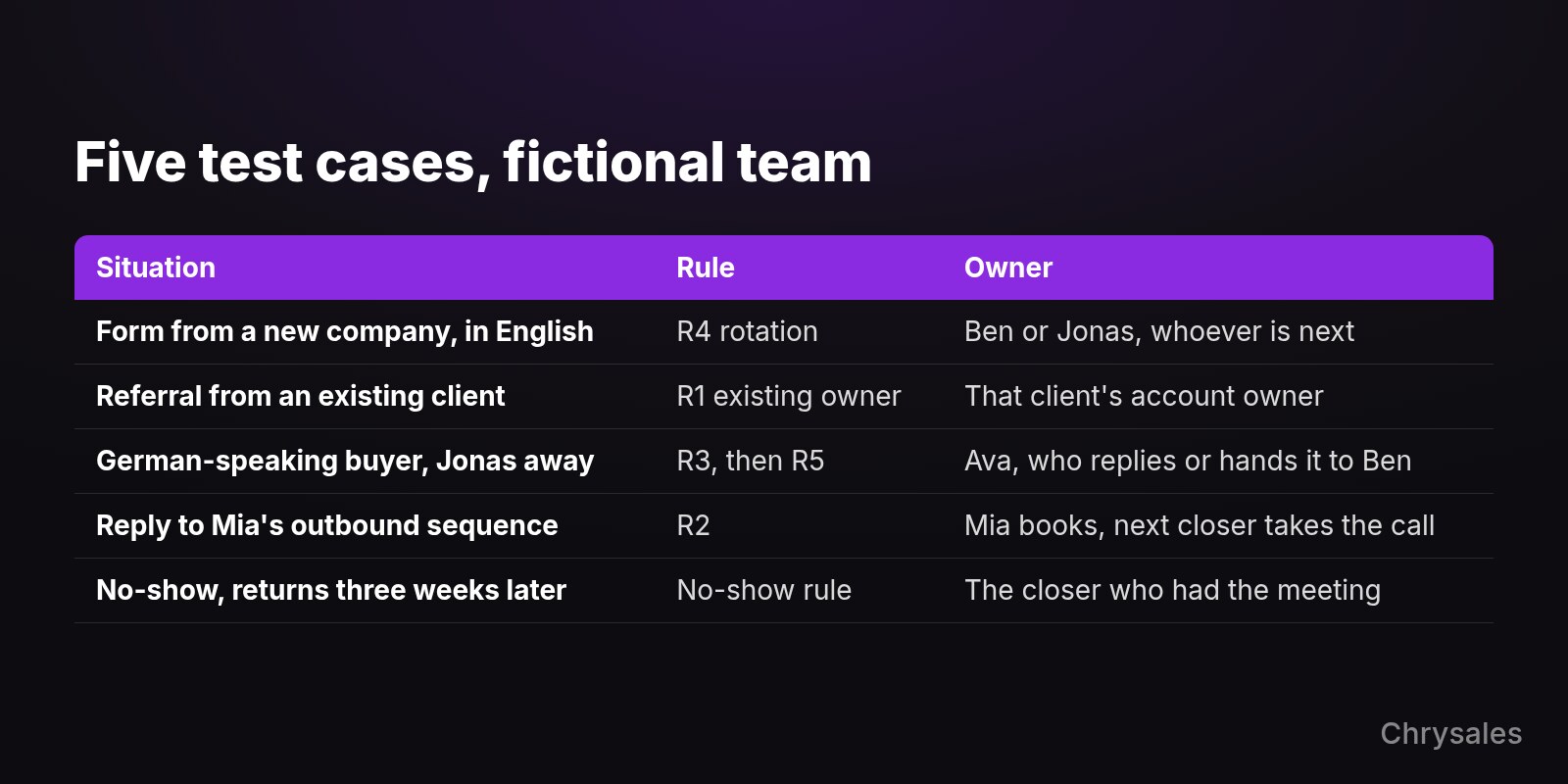
Run five common situations through the policy on paper and write down who should get each lead. If two people could claim it, or nobody can, a rule is missing or sits in the wrong order. The table uses the fictional team from the template; swap in your own cases, especially the ones that caused arguments in the last few months.
| Situation | Rule that fires | Owner |
|---|---|---|
| Form from a new company, in English | R4 rotation | Ben or Jonas, whoever is next and not away |
| Referral from an existing client | R1 existing owner | That client's account owner |
| German-speaking buyer while Jonas is on vacation | R3 matches, Jonas is away, so R5 | Ava, who replies or hands it to Ben |
| Reply to Mia's outbound sequence | R2 | Mia books the call, the next closer in rotation takes it |
| Booked call, no-show, buyer returns three weeks later | No-show rule, within 90 days | The closer who had the original meeting |
Case three deserves the longest discussion. The override names one person, and that person is away, so decide now whether the lead waits, goes to the fallback, or goes to someone who can reply in English. Whatever you choose, write it into the policy.
Run the same test whenever the team changes. A new hire, a departure or a new lead source each changes who should own what.
What should you check every week to see routing works?
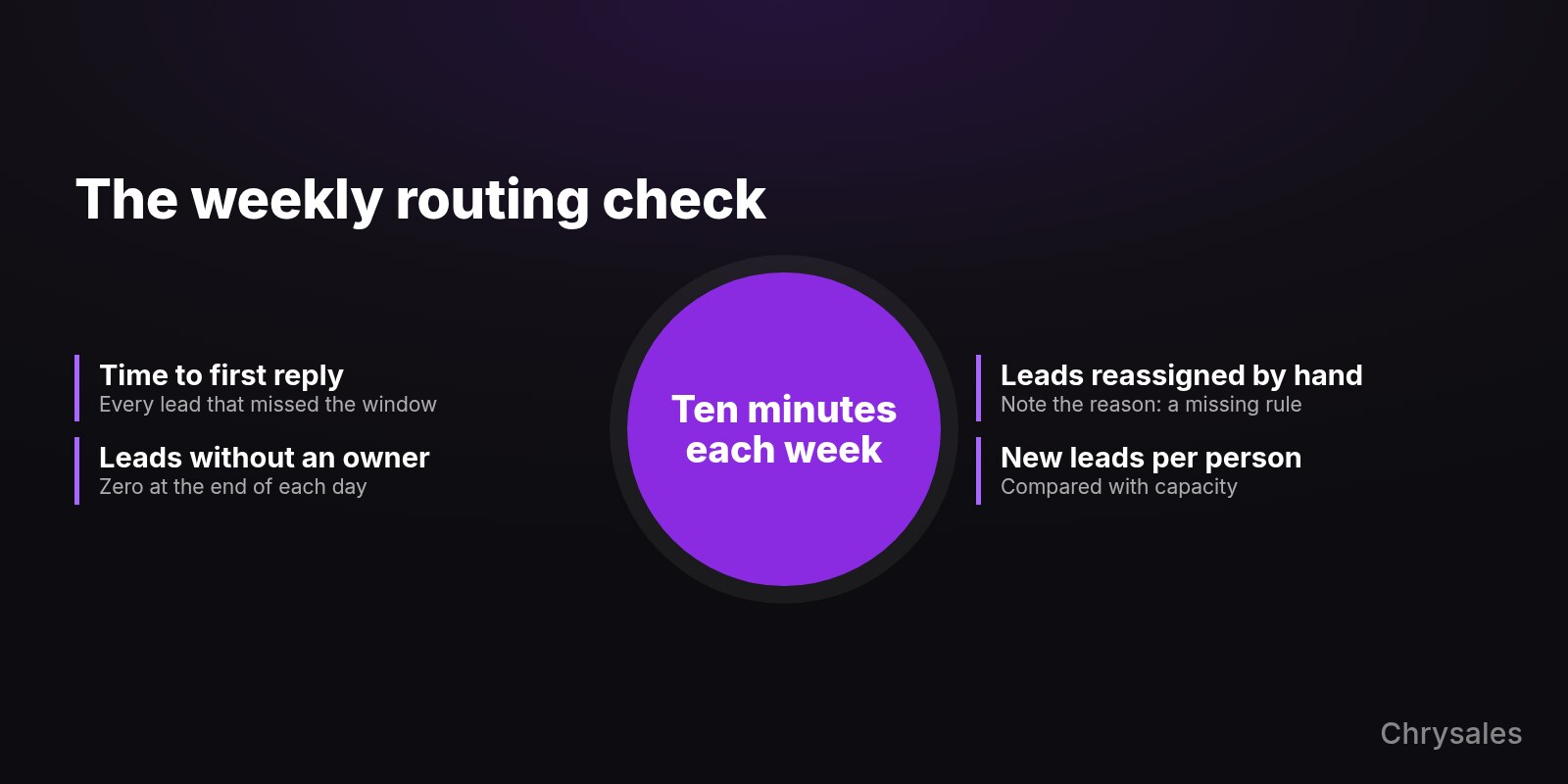
Set aside about ten minutes each week for four numbers from your CRM or a sheet: time to first reply, leads without an owner, leads reassigned by hand, and new leads per person. With a small team the counts are small, so open the individual leads behind each number instead of reading only the totals.
- Time to first reply. Compare it with the window in your policy and look at every lead that missed it.
- Leads without an owner. This should be zero at the end of each day, and each one points to a rule gap or an empty pool.
- Leads reassigned by hand. Each reassignment is a rule you haven't written yet, so note the reason next to it.
- New leads per person. Compare it with each person's capacity rather than with each other, since someone who also runs onboarding takes fewer.
Make this one short item in your weekly sales meeting agenda. Routing decides who owns the lead; after that, follow-up reminders in a simple CRM keep the owner from letting it go quiet.
Common lead routing mistakes
Most routing problems come from rules nobody wrote down, or rules with no plan for absences. Several of the six below appear in vendor guides and community threads, and the last one is Chrysales' view. Each has a fix you can make this week without a new tool.
- A shared pool where people pick. The easy or big leads get taken and the rest wait. Route every lead to one named person, even if that person is the fallback.
- One person assigning by hand. Usually that's you, and leads wait whenever you're busy. Replace it with rules plus a fallback, and be the fallback at most.
- No fallback owner. Nutshell lists letting leads sit unassigned when a rep is unavailable as a common mistake, and in HubSpot a lead gets no owner when everyone in the pool is away. Name a fallback in the policy and in the CRM.
- Rotation that ignores capacity. A person working on three proposals gets the same flow as someone with an empty week. Skip by availability, or use a load-balanced mode if your CRM has one.
- Catch-up leads after vacation. Someone returns and gets a pile to even out the count. Start the count fresh instead.
- Using routing to settle pay fights. If people fight over leads because of how they're paid, the answer is in your commission structure, and no routing rule will fix it.
FAQ
What is round robin lead assignment?
Round robin lead assignment gives each new lead to the next person in a fixed order, then starts again at the top. In HubSpot it's one of three distribution options in the Rotate record to owner action, and Pipedrive's team method also assigns in sequential order. It suits leads that anyone on the team could handle.
Is round robin fair?
Round robin is even in count, but fair needs more than that. People who are away, overloaded or better at certain deals still get the same flow. A modified version, with an equal base and a share routed by skill, answers most of that complaint.
How fast should a salesperson respond to a new lead?
No study gives one right number for every team, so pick a window your team can keep and back it with a fallback owner. The often-cited InsideSales.com and MIT study from 2007, co-authored by the vendor, found that the odds of qualifying a web lead drop 21 times if you call in 30 minutes instead of 5. It covered six companies and phone calls only, and it didn't look at close rates.
Can I do lead routing without a paid CRM plan?
Yes, for two or three people. A shared sheet with a next-in-line marker, an away column and the time of first reply covers it, as long as one person checks it daily. Once you want absent people skipped automatically, look at plans with rotation built in, such as HubSpot Sales Hub Professional or Pipedrive Professional and higher.
Who owns a lead after a no-show?
The person who had the meeting, usually the closer, for a period you set in the policy. Sending the buyer back to the setter adds another handoff to someone who already missed one call. If the lead returns after that period, route it again as a new lead.
Sources
- HubSpot Knowledge Base - Assign and rotate record owners using workflows
- Pipedrive Support - Automatic assignment
- Pipedrive Support - Automatic assignment FAQ
- Pipedrive Support - New Pipedrive plans
- Pipedrive - Automatic assignment case study
- Zoho CRM Help - Set assignment rules
- Harvard Business Review - The Short Life of Online Sales Leads (2011)
- SmartCompany - Are you letting online leads go cold?
- InsideSales.com and MIT - Lead Response Management Study (PDF)
- SaaStr - Should You Round Robin Leads or Make Reps Earn Them?
- Sales Gravy - Why You Should Change Your Approach to Lead Distribution
- Clearbit - Lead routing stages
- HubSpot Community - Workflow Round Robin, rotate leads evenly and in set order
- Nutshell - How to route leads to sales teams
Not sure who should get your next lead, or what happens when that person is out? Book a free strategy call with Chrysales and bring your routing questions. Book a free strategy call

Lead routing is the written rule that decides who owns each new lead and how fast they have to act on it. For a team of two to six people, write five or six rules in a fixed order. The existing account owner comes first, then a few overrides such as language, then round robin among whoever is available. Add a response window with a fallback owner and a rule for no-shows, and only then pick the CRM setting.
Round robin works when your leads and your people are roughly alike. When they differ, you route by account, language or deal type first and rotate only what's left. Below you get a method table, a one-page policy filled in for an example team, five test cases and a weekly check.
What is lead routing, and why does a small team need rules for it?
Lead routing means every new lead gets one named owner and a deadline for the first reply, decided by a rule instead of by whoever sees it first. Write the rule down once leads come from more than one place and more than one person can take them. Without it, leads sit in a shared inbox, you hand them out yourself, or people grab the ones that look best.
You probably need written rules if one of these sounds familiar:
- You forward most new leads yourself, and the team waits for you to say who takes them.
- Leads land in a shared inbox and nobody is sure who already replied.
- Two people argue over the same referral, or the promising leads keep landing with one person.
- A buyer writes back after two weeks and nobody knows who spoke to them last.
Slow replies are common: a study published in Harvard Business Review in 2011 audited 2,241 US companies. Only 37% responded to a web lead within an hour, and 23% never responded at all, according to SmartCompany's summary of the study.
The same article cites a second dataset of 1.25 million leads at 42 US companies. There, firms that tried to contact a lead within an hour were nearly seven times as likely to qualify it as those that tried an hour later. The data is old and US-only, so read it as a direction for your team rather than a forecast.
Chrysales' view is that founder-led companies stall when everything runs through the founder. Handing out every lead yourself is part of that, and written rules let your team decide without asking you. That makes routing one of the quicker fixes for a founder-led sales bottleneck.
Which routing method fits 2-6 salespeople?
For most teams of two to six, start with round robin for leads that have no obvious owner. Put two or three overrides in front of it: the existing account owner, language, and maybe deal type. Pure rotation fits when leads and sellers are roughly alike. Once they differ in size, language or skill, the overrides do more of the work than the rotation does.
| Method | How it works | Use it when | Watch out for |
|---|---|---|---|
| Round robin | The next lead goes to the next person in a fixed order | Leads are similar and anyone on the team can handle any of them | It ignores who is busy, away or better at a certain deal |
| Load balanced | The lead goes to whoever has the fewest open records | Workloads differ, for example one person also runs onboarding | Someone sitting on stale leads gets fewer new ones, which can hide a follow-up problem |
| Language or region | The lead goes to the person who speaks the buyer's language or covers the region | You sell in more than one language, such as German and English | One person per language means no cover when they're away |
| Account owner | A lead from a company you already know goes to its current owner | You have clients, open deals or past contacts in the CRM | Messy company records create two owners for one account |
| Skill or deal type | Certain lead types go to the person best at them | One seller is clearly stronger at large or complex deals | The rest of the team sees favoritism unless the criteria are written |
| Modified round robin | An equal base for everyone, plus a share routed by skill | The team grows and people start to specialize | Someone has to review the split regularly |
Jason Lemkin, founder of SaaStr, wrote that he moved from plain rotation to what he calls a modified round robin: everyone got roughly the same base of leads, and 20-30% were routed to specific people. For a small team that's a sensible second stage, once you can name who is better at which deals.
The sales author Anthony Iannarino argues against rotation that rewards waiting your turn: "This kind of system looks fair. But it isn't." (Sales Gravy). If the next lead arrives no matter what, a slow seller and a fast one get the same flow.
The signal to change methods is simple: you keep reassigning leads by hand after the rotation has picked someone. Write the reason for each of those reassignments down, because it usually points to a missing override.
How do you write a one-page lead routing policy?
A lead routing policy fits on one page. It says which leads get routed, which rules are checked in which order, and who is in the default rotation. It also sets a response window with a fallback owner, an absence rule, and who owns a lead after a no-show. Write it before you touch the CRM, so the tool copies your rules, then compare it with the filled-in template after the steps.
- Decide what gets routed. List your sources: website form, referrals, events and replies to outbound. Then list what stays out of the rotation, such as spam, job applicants, vendors pitching you, and support requests from clients, which go straight to the account owner.
- Put the rules in priority order. The first rule that matches decides, and nothing below it is checked. A common order is existing owner, then language or region, then deal type, then rotation for everything else. Write down what happens when nothing matches.
- Set the default rotation. Name who is in it and who is out. Rotate only among people who are available that day, and skip anyone marked away.
- Pick a response window and a fallback owner. The window is the time the owner has for a first real reply, and when it passes, the lead moves to the fallback owner, who replies or reassigns. Cybrary ran a version of this for hot leads, described in Clearbit's book on lead qualification: the rep had to reach out within 20 minutes or the lead was reassigned. Pick your own window, since four people who are also on calls all day may not keep a 20-minute promise.
- Write the absence rule. Whoever is on vacation or sick is skipped, and the count starts fresh when they return. In a long-running HubSpot Community thread on even rotation, a user pointed out that a rep back from vacation would otherwise get more leads to catch up.
- Decide who owns no-shows and returning leads. When a setter books the call and a closer takes it, the closer owns the follow-up after a no-show. A lead that comes back within a set period goes to its last owner, and after that it counts as new. If you're still choosing which role to hire first, settle this handoff before the first setter starts.
- Put the policy where the team works. Pin it in the CRM or the shared drive, date it, and name the one person who can change it.
If you sell into DACH and also into the UK or US, put the language rule above the rotation, and give each language a backup person or send it to the fallback.
Here is the template, filled in for a fictional company with 20 employees and four people on leads. Ava is the founder, Ben and Jonas take the calls (Jonas speaks German), and Mia is an appointment setter working outbound. Every number in it is an example choice, not a benchmark.
LEAD ROUTING POLICY - example company (fictional)
Version 1.0 - owner of this page: Ava

1. What gets routed
   Website form, referrals, event contacts, replies to outbound.
   Not routed: spam, job applicants, vendors, support requests
   from clients (these go to the account owner).

2. Rules, checked in this order (first match wins)
   R1  Company already has an owner in the CRM -> that owner
   R2  Reply to Mia's outbound sequence -> Mia books the call,
       the call goes to the next closer in rotation
   R3  Buyer prefers German -> Jonas
   R4  Everything else -> round robin: Ben, Jonas
   R5  Nothing matches, or the matching person is away -> Ava

3. Availability
   Anyone marked away is skipped. No catch-up leads after
   vacation: the count starts fresh.

4. Response window
   First real reply within 1 business hour (our choice).
   Missed -> the lead moves to Ava, who replies or reassigns.

5. No-shows and returning leads
   No-show -> the closer who had the meeting owns follow-up.
   Lead comes back within 90 days -> last owner.
   After 90 days -> treated as a new lead.

6. Founder
   Ava is the fallback (R5) and keeps her three largest
   existing accounts for one more quarter. Then she leaves
   the rotation and hands the accounts to Ben and Jonas.

7. Review
   Checked every Monday in the team meeting. Changes need Ava.
Should you stay in the rotation?
Stay in only on purpose and for a set time. If you stay in the rotation, you become the bottleneck the policy was meant to remove, because leads wait whenever you're in meetings or traveling. Take a narrow role, such as a few existing large accounts or the fallback, write an end date next to it, and hand those leads over when the date arrives.
This is Chrysales' opinion, not a study result: leave the rotation by decision instead of drifting out of it. Drifting out looks like this. You stop taking leads during a busy month, nobody updates the rules, and the leads meant for you sit in limbo.
If you keep one role, the fallback is a useful one. Every lead that lands with you points to a rule that's missing, and you can fix the policy instead of the lead. For the bigger move of handing over your own deals, see how to step out of day-to-day selling without the pipeline dropping.
The video below isn't about routing. In it, Sabir talks about the discipline and systems that running a business takes, and the difference between playing business and actually running one.
How do you set up round robin in your CRM?
Switch on rotation in your CRM after the policy exists. HubSpot and Pipedrive both rotate leads natively, but only on their higher plans. They handle absences differently: HubSpot can skip people set to Away, while in Pipedrive an admin turns off a person's rules and takes them out of the team by hand. Zoho CRM uses assignment rules (Zoho's article doesn't state which editions), and for two or three people a shared sheet works too.
| CRM | Where to find it | Plan needed (as of November 2026) | Absence handling | Distribution |
|---|---|---|---|---|
| HubSpot | Workflow action "Rotate record to owner" | Sales Hub Professional or Enterprise for leads, and each person in the pool needs a Sales or Service Hub Professional or Enterprise seat | "Assign to available users only" skips users set to Away; if everyone is away, the lead ends up with no owner | Round Robin, Load Balanced or Random |
| Pipedrive | Automatic assignment, team method | Professional and higher (Premium and up on the newer plan names) | An admin disables the away person's rules and removes them from teams with rules, by hand | Round robin in sequential order; no minimum or maximum of open leads per person |
| Zoho CRM | Assignment rules | Edition not stated in Zoho's help article | Checks online status (logged in) and/or shift timing | Round robin across the selected users |
| Shared sheet | A next-in-line marker and an away column | Any | People mark themselves away | Manual, in order |
HubSpot's help article on rotating record owners (last updated October 2026) labels lead and deal rotation as beta, so test it on a few leads before you rely on it. When the action assigns a lead to the contact's existing owner, HubSpot strongly recommends adding a fallback user for leads where that fails, which is close to R5 from the template in CRM form.
Pipedrive's automatic assignment can also assign to the existing organization or person owner, so R1 is one rule with that owner as the assignee, and it allows up to 50 rules per entity type. Pipedrive's own team made this switch. According to its case study, leads used to wait until a manager had time to assign them, and the sales team now uses rule-based automatic assignment with round robin. The Pipedrive FAQ adds the catch for small teams: when someone goes on vacation, an admin has to disable the rules set for that person and remove them from any team with rules, by hand.
Zoho CRM's assignment rules rotate among the users you select and can check availability by login status or shift. For a sheet, keep three columns per lead (owner, time it arrived, time of first reply) and one marker for who is next. The sheet fails quietly when people stop updating it, so give one person the job of checking it every day.
How do you test your routing rules before you switch them on?
Run five common situations through the policy on paper and write down who should get each lead. If two people could claim it, or nobody can, a rule is missing or sits in the wrong order. The table uses the fictional team from the template; swap in your own cases, especially the ones that caused arguments in the last few months.
| Situation | Rule that fires | Owner |
|---|---|---|
| Form from a new company, in English | R4 rotation | Ben or Jonas, whoever is next and not away |
| Referral from an existing client | R1 existing owner | That client's account owner |
| German-speaking buyer while Jonas is on vacation | R3 matches, Jonas is away, so R5 | Ava, who replies or hands it to Ben |
| Reply to Mia's outbound sequence | R2 | Mia books the call, the next closer in rotation takes it |
| Booked call, no-show, buyer returns three weeks later | No-show rule, within 90 days | The closer who had the original meeting |
Case three deserves the longest discussion. The override names one person, and that person is away, so decide now whether the lead waits, goes to the fallback, or goes to someone who can reply in English. Whatever you choose, write it into the policy.
Run the same test whenever the team changes. A new hire, a departure or a new lead source each changes who should own what.
What should you check every week to see routing works?
Set aside about ten minutes each week for four numbers from your CRM or a sheet: time to first reply, leads without an owner, leads reassigned by hand, and new leads per person. With a small team the counts are small, so open the individual leads behind each number instead of reading only the totals.
- Time to first reply. Compare it with the window in your policy and look at every lead that missed it.
- Leads without an owner. This should be zero at the end of each day, and each one points to a rule gap or an empty pool.
- Leads reassigned by hand. Each reassignment is a rule you haven't written yet, so note the reason next to it.
- New leads per person. Compare it with each person's capacity rather than with each other, since someone who also runs onboarding takes fewer.
Make this one short item in your weekly sales meeting agenda. Routing decides who owns the lead; after that, follow-up reminders in a simple CRM keep the owner from letting it go quiet.
Common lead routing mistakes
Most routing problems come from rules nobody wrote down, or rules with no plan for absences. Several of the six below appear in vendor guides and community threads, and the last one is Chrysales' view. Each has a fix you can make this week without a new tool.
- A shared pool where people pick. The easy or big leads get taken and the rest wait. Route every lead to one named person, even if that person is the fallback.
- One person assigning by hand. Usually that's you, and leads wait whenever you're busy. Replace it with rules plus a fallback, and be the fallback at most.
- No fallback owner. Nutshell lists letting leads sit unassigned when a rep is unavailable as a common mistake, and in HubSpot a lead gets no owner when everyone in the pool is away. Name a fallback in the policy and in the CRM.
- Rotation that ignores capacity. A person working on three proposals gets the same flow as someone with an empty week. Skip by availability, or use a load-balanced mode if your CRM has one.
- Catch-up leads after vacation. Someone returns and gets a pile to even out the count. Start the count fresh instead.
- Using routing to settle pay fights. If people fight over leads because of how they're paid, the answer is in your commission structure, and no routing rule will fix it.
FAQ
What is round robin lead assignment?
Round robin lead assignment gives each new lead to the next person in a fixed order, then starts again at the top. In HubSpot it's one of three distribution options in the Rotate record to owner action, and Pipedrive's team method also assigns in sequential order. It suits leads that anyone on the team could handle.
Is round robin fair?
Round robin is even in count, but fair needs more than that. People who are away, overloaded or better at certain deals still get the same flow. A modified version, with an equal base and a share routed by skill, answers most of that complaint.
How fast should a salesperson respond to a new lead?
No study gives one right number for every team, so pick a window your team can keep and back it with a fallback owner. The often-cited InsideSales.com and MIT study from 2007, co-authored by the vendor, found that the odds of qualifying a web lead drop 21 times if you call in 30 minutes instead of 5. It covered six companies and phone calls only, and it didn't look at close rates.
Can I do lead routing without a paid CRM plan?
Yes, for two or three people. A shared sheet with a next-in-line marker, an away column and the time of first reply covers it, as long as one person checks it daily. Once you want absent people skipped automatically, look at plans with rotation built in, such as HubSpot Sales Hub Professional or Pipedrive Professional and higher.
Who owns a lead after a no-show?
The person who had the meeting, usually the closer, for a period you set in the policy. Sending the buyer back to the setter adds another handoff to someone who already missed one call. If the lead returns after that period, route it again as a new lead.
Sources
- HubSpot Knowledge Base - Assign and rotate record owners using workflows
- Pipedrive Support - Automatic assignment
- Pipedrive Support - Automatic assignment FAQ
- Pipedrive Support - New Pipedrive plans
- Pipedrive - Automatic assignment case study
- Zoho CRM Help - Set assignment rules
- Harvard Business Review - The Short Life of Online Sales Leads (2011)
- SmartCompany - Are you letting online leads go cold?
- InsideSales.com and MIT - Lead Response Management Study (PDF)
- SaaStr - Should You Round Robin Leads or Make Reps Earn Them?
- Sales Gravy - Why You Should Change Your Approach to Lead Distribution
- Clearbit - Lead routing stages
- HubSpot Community - Workflow Round Robin, rotate leads evenly and in set order
- Nutshell - How to route leads to sales teams
Not sure who should get your next lead, or what happens when that person is out? Book a free strategy call with Chrysales and bring your routing questions. Book a free strategy call
Scaling Is Not Hard If You Have The Right Systems
If you’re serious about leveling up your scaling game, you need the right system, the right training, and the right team behind you. We're here to give you the exact tools and strategies top entrepreneurs use to dominate.

Discover the latest tips
View All
Chrysales was formed from the words "chrysalis" the stage where a caterpillar transforms into a butterfly and "sales".
It stands for one thing: sales transformation.Because scaling doesn’t happen by doing more of the same. Scaling only happens when you go through real transformation in your systems, your offer, team and the way you sell.


