.avif)
Should You Buy Leads for Your B2B Business?
Buying leads means paying for contact lists that match your target profile, so you can speed up lead generation and client acquisition. It can support B2B sales when you have a clear system and the right follow up in place.
You can buy a list of 10,000 emails for $200. Sounds like a shortcut to a full pipeline, right?
Most teams who try it get a 0.2% response rate and wonder why their inbox stayed quiet.
Here's the thing: buy leads isn't the problem. It's buying the wrong leads, for the wrong reasons, without a system to follow up.
This guide walks you through when buy leads makes sense, what to look for, how to avoid garbage lists, and how to turn purchased contacts into actual conversations.
What It Actually Means to Buy Leads
When you buy leads, you're paying for a list of contact information. Usually names, emails, phone numbers, company details, and sometimes job titles or firmographics.
You're not buying people who asked to hear from you. You're buying access to people who match a profile.
Most lead data providers scrape public sources, pull from business directories, or aggregate data from partnerships. Some providers verify the data before selling it. Many don't.
The quality gap between a $50 list and a $500 list can be the difference between 3% reply rates and total radio silence.
The Two Main Types of Lead Lists You Can Buy
Cold contact lists are basic. You get names and emails. No indication these people care about what you sell. Think of it like a phone book. The numbers work, but nobody's waiting for your call.
Intent-based leads come with signals. Someone visited a pricing page, downloaded a whitepaper, or searched for a solution like yours. These cost more, but the data includes context.
A 200-person company that just did layoffs is not a hot lead. It's a bad fit, full stop.
What You're Really Paying For
You're not paying for leads. You're paying for time.
Building a list from scratch takes weeks of research, scraping LinkedIn, cross-checking emails, and piecing together org charts. Buying a verified list cuts that to zero.
The question is whether the list you buy is better than what you'd build yourself.
Watch out: A cheap list full of outdated emails wastes more time than it saves. You'll spend days cleaning it, testing emails, and dealing with bounces.
When Buying Leads Actually Makes Sense
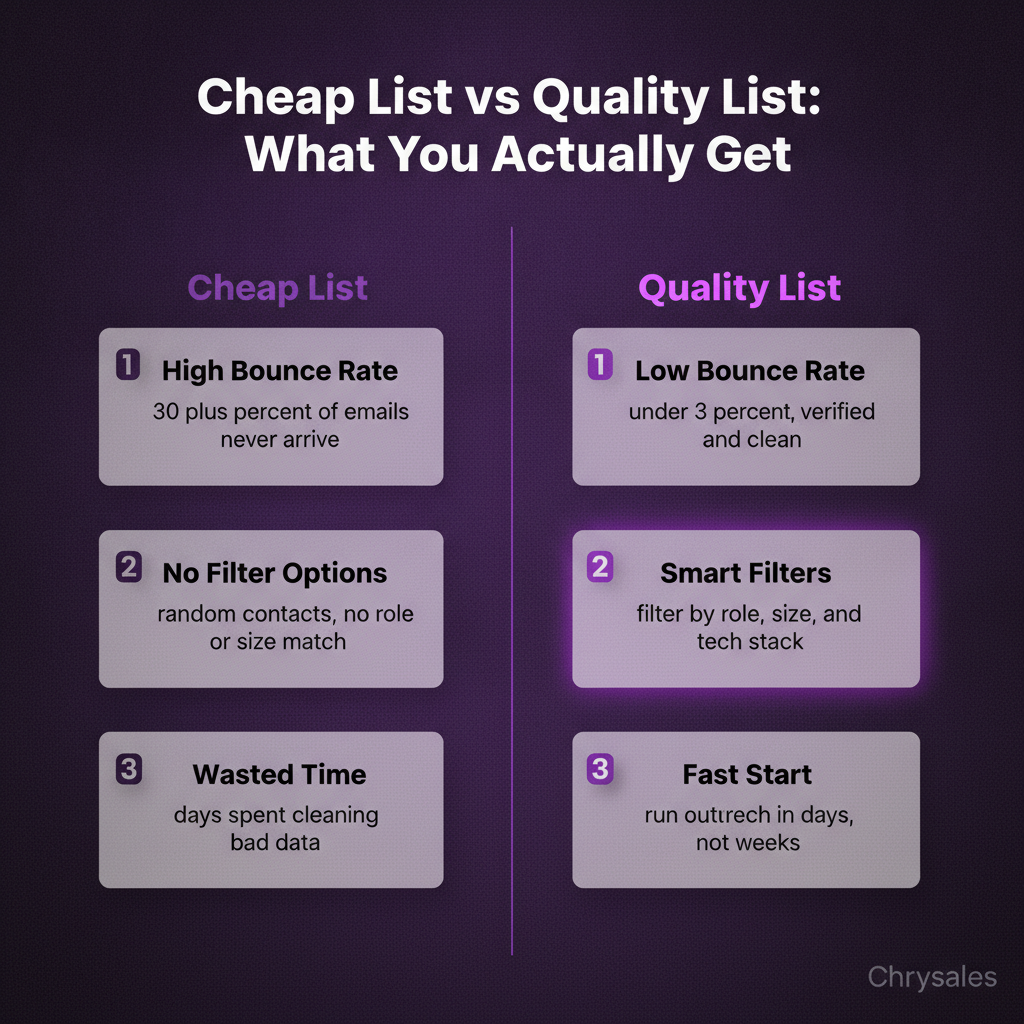
Buying leads works in specific situations. If you're launching a new offer and need to test messaging fast, a small purchased list can get you 50 conversations in two weeks.
If you're entering a new industry and don't know the landscape yet, buying a segmented list gives you a starting point.
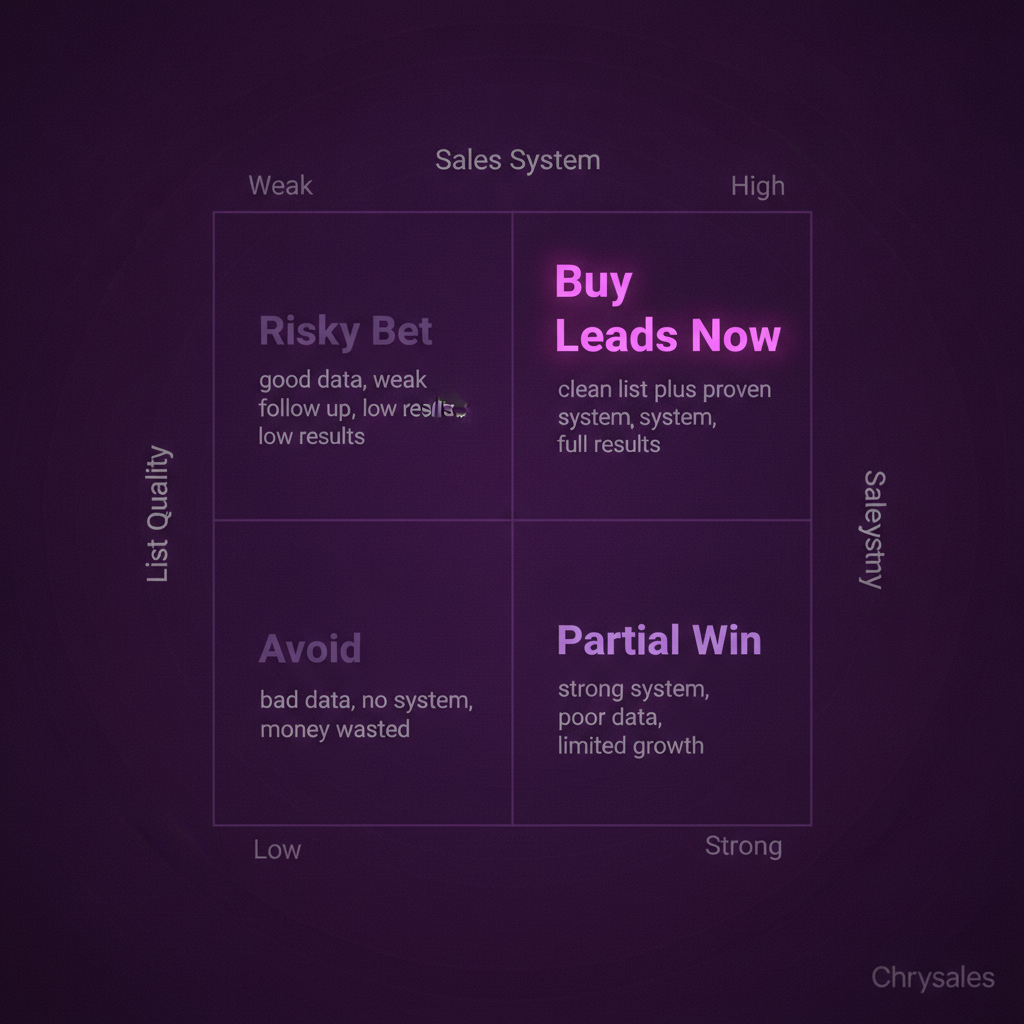
It also works when you already have a strong outbound system. Picture this: you've got a tested cold email sequence, a solid offer, and a follow up cadence that converts. Adding a high quality purchased list is like pouring fuel on a fire that's already burning.
Without the system, you're just lighting matches in the rain.
When It's a Waste of Money
If your offer isn't clear, buying leads won't fix it. If your sales process is a mess, more contacts just mean more people saying no.
If you don't have time to follow up within 48 hours, the list goes stale before you use it.
Most teams buy leads when they should be fixing their sales system first.
We see this all the time with new clients. They spent $2,000 on a list, sent one email, got no replies, and gave up. The list wasn't the problem. The lack of a repeatable follow up process was.
The Best Use Case for Purchased Leads
Here's where buying leads shines: filling the top of a proven funnel.
If you know your cold outreach converts at 2% and you need 100 new conversations this quarter, buy 5,000 verified contacts and run them through your system.
If you're testing a new market and want to validate demand before building a full lead gen system, buy a small segmented list and see what happens.
Pro Tip: Start with 500 contacts, not 5,000. Test the list quality, your messaging, and your follow up before you scale.
How to Evaluate Lead Data Providers
Not all lead vendors are the same. Some sell verified, hand checked data. Others sell scraped junk that bounces on the first send.
Here's how to tell the difference before you hand over your credit card.
Data Accuracy and Verification
Ask how they verify emails. If they say "we scrape LinkedIn," walk away.
Real providers use multi step verification: syntax checks, domain validation, and mailbox pings. They re verify data every 30 to 90 days. Stale data is worthless.
A six month old email list has a 20% to 30% decay rate.
Ask for a sample. Send 20 emails from the sample and track bounces. If more than 5% bounce, the list is low quality. Good B2B lead data should have bounce rates under 3%.
Compliance and Data Sourcing
GDPR and CCPA aren't optional. If you're reaching out to EU contacts or California based companies, you need compliant data.
Ask where the data comes from. Public sources are fine. Scraped private databases are not.
Reputable providers tell you exactly how they sourced the data. If they dodge the question or use vague language like "proprietary methods," it's a red flag.
Segmentation and Filtering Options
A good lead provider lets you filter by company size, industry, job title, location, tech stack, and revenue. If you can only filter by "industry," you'll end up with a bloated list full of bad fits.
Look for technographic data. Knowing a company uses Salesforce, HubSpot, or a specific CRM tells you what tools they're already paying for. That's useful context for your pitch.
Common mistake: Buying the biggest list available instead of the most targeted one. A list of 1,000 hand picked contacts beats 10,000 random ones every time, and you can compare account list builder tools to find the right provider for your segmentation needs.
What to Look for in a Quality Lead List
Quality beats quantity. Always.
A marketing agency we worked with had a list of 8,000 contacts. After cleaning it, only 2,400 were real decision makers at companies that fit their ideal customer profile. They ditched the rest and saw their reply rate jump from 0.8% to 3.2%.
Verified Contact Information
Email accuracy is the baseline. Phone numbers matter if you're doing outbound calls. Direct dials beat switchboard numbers. Mobile numbers are gold if your offer fits a call first approach.
Look for providers that show the last verification date. Data verified last week is better than data verified six months ago.
Relevant Firmographic and Technographic Data
Firmographics tell you company size, revenue, industry, and location. Technographics tell you what software they use. Both matter.
If you sell a tool that replaces Mailchimp, a list of companies using Mailchimp is 10 times more valuable than a generic "marketing managers" list.
Intent signals are the top tier. If someone downloaded a competitor's whitepaper or visited a pricing page in the last 30 days, they're warm. That's the difference between cold outreach and cold outreach that actually works, as detailed in recent B2B sales benchmarks.
List Hygiene and Deliverability
Check for duplicates. If 15% of the list is the same person listed twice, you're paying for air.
Check for role based emails like info@, sales@, or contact@. These addresses are dead ends. You want individual inboxes.
Run the list through an email validation tool before you send. Tools like ZeroBounce or NeverBounce cost a few cents per email and catch bad addresses before they hurt your sender reputation.
How Much Does It Cost to Buy Leads?
Pricing varies wildly. You can buy 1,000 basic B2B contacts for $100 or pay $2 per contact for intent based verified leads.
The middle ground is around $0.30 to $0.80 per contact for clean, segmented B2B data.
Pricing Models
Some providers charge per contact. Others charge monthly for access to a database where you can export a set number of leads.
Some offer credits: you pay $500 for 1,000 credits, and each lead costs 1 to 5 credits depending on data depth.
Be careful with "unlimited" plans. They usually cap exports or throttle access. Read the fine print.
Hidden Costs
Buying the list is just the start. You'll need an email tool, a CRM to manage follow ups, and time to write sequences and track replies.
If you're doing cold calls, add a dialer and calling software. If the list quality is bad, add the cost of your team's wasted time.
Pro Tip: Budget 3x the list cost for the infrastructure and labor to actually use it. A $500 list becomes a $1,500 investment when you add tools and time.
How to Maximize ROI After You Buy Leads
Most cold emails flop because the list is bad, not the words. But even a perfect list fails without a system to activate it.
Here's how to turn purchased contacts into booked calls.
Segment Before You Send
Don't blast the same email to everyone. Split the list by company size, industry, role, or pain point. Write different emails for each segment.
A 10 person consulting firm has different problems than a 200 person tech company.
Use a basic scoring system based on company size, industry fit, and intent signals. Set a simple rule: anything scoring above 70 goes to the top of your call list. Focus your best effort on your best fits.
Build a Multi Touch Sequence
One email doesn't cut it. A good sequence has 5 to 7 touches over 2 to 3 weeks.
Email one introduces the problem. Email two shares a quick win. Email three includes a case study or stat. Email four asks for 15 minutes.
Mix channels. Email, LinkedIn message, phone call. Each touch reinforces the last, and you can learn more about outbound email marketing best practices to build sequences that convert.
We worked with a tech company who added LinkedIn touches to their email sequence. Their reply rate doubled.
Track, Test, and Iterate
Track open rates, reply rates, and bounce rates for every send. If bounces are above 5%, pause and clean the list.
If opens are high but replies are low, your messaging is off. If opens are low, your subject lines need work.
Test one variable at a time. Change the subject line, send from a different domain, or rewrite the first sentence. Run the test on 200 contacts, measure results, then scale what works.
Watch out: Sending too many emails too fast kills your domain reputation. Warm up new domains slowly. Start with 20 emails a day, then scale to 50, then 100 over a few weeks, and review how to send cold emails at scale without hurting deliverability.
Building a System Around Purchased Leads
Buying leads is one tactic. It's not a strategy.
The real win is building a sales system where purchased lead data is just one input, not the whole plan, and you can watch how to build a sales system so powerful clients come to you to see the full framework in action.
Combine Purchased Leads with Owned Outbound
Use purchased lists to fill gaps in your owned pipeline. If you're generating 50 inbound leads a month but need 150 conversations to hit your revenue goal, buy 1,000 targeted contacts and run them through a proven outbound system.
Don't rely on purchased leads forever. Build your own lead generation over time. Outbound systems you control compound. Purchased lists don't.
Automate Follow Up and Scoring
Set up automated sequences in your CRM. When someone replies, tag them and move them to a manual follow up track. When someone opens three emails but doesn't reply, trigger a LinkedIn connection request or a call task.
Score leads based on engagement. Opens, clicks, and replies each add points. When a lead hits a score threshold, your team gets an alert to prioritize them.
Integrate AI and Lead Enrichment
Use AI tools to enrich purchased data. Pull recent company news, funding announcements, hiring activity, or tech stack changes. Context turns a cold email into a relevant one.
AI can also help score and prioritize. Feed your CRM data into a simple lead scoring model and let it rank contacts by likelihood to convert.
We've seen teams cut their prospecting time in half by focusing only on AI scored top 20% of a list, as shown in recent B2B sales and marketing stats.
Pro Tip: Most teams build a 40 step workflow when 12 steps would do the job. Keep your system simple. Email, follow up, score, call. That's it. You can also compare cold email vs cold calling to see which makes you money faster based on your specific market and buyer profile.
Frequently Asked Questions
Q: Is buying leads better than generating your own?
Neither is better. They solve different problems. Buying leads is faster and works when you need to test a new market or fill your pipeline quickly. Generating your own leads takes longer but gives you more control and better long term ROI. The best approach combines both. Use purchased lists to kickstart outreach while you build owned lead gen systems in parallel, and learn how to build a sales system that actually scales for sustainable growth.
Q: How do I know if a lead list is high quality before I buy it?
Ask for a sample of 20 to 50 contacts and test them. Send a few emails and track bounce rates. If bounces are above 5%, the list is low quality. Check if the provider verifies emails regularly and ask where the data comes from. Real providers are transparent about sourcing and re verification schedules. Avoid any vendor that won't share a sample or dodges questions about data accuracy.
Q: What's the difference between buying a list and using a lead database?
Buying a list means you pay once and own the contacts. Using a lead database means you pay monthly for access and export limits. Databases usually have fresher data because they verify contacts continuously. Lists can go stale fast if you don't use them right away. Databases work better if you need ongoing access to new contacts. Lists work better for one time campaigns or market tests.
Q: Can I buy leads and still stay GDPR compliant?
Yes, if the data was sourced legally and you follow outreach rules. Use data from public sources or providers who confirm compliance. Don't email EU contacts without a legitimate interest or consent basis. Include an easy opt out in every message. If you're unsure, consult a lawyer before sending. GDPR violations carry heavy fines. It's worth getting this right from the start.
Q: How many leads should I buy for my first campaign?
Start with 500 to 1,000 contacts. That's enough to test messaging, measure reply rates, and validate list quality without blowing your budget. If the list converts well, scale to 5,000 or 10,000. If it flops, you only wasted a small amount. Testing small lets you learn fast and avoid expensive mistakes. Once you find a provider and a segment that works, then you scale.
Buying leads means paying for contact lists that match your target profile, so you can speed up lead generation and client acquisition. It can support B2B sales when you have a clear system and the right follow up in place.
You can buy a list of 10,000 emails for $200. Sounds like a shortcut to a full pipeline, right?
Most teams who try it get a 0.2% response rate and wonder why their inbox stayed quiet.
Here's the thing: buy leads isn't the problem. It's buying the wrong leads, for the wrong reasons, without a system to follow up.
This guide walks you through when buy leads makes sense, what to look for, how to avoid garbage lists, and how to turn purchased contacts into actual conversations.
What It Actually Means to Buy Leads
When you buy leads, you're paying for a list of contact information. Usually names, emails, phone numbers, company details, and sometimes job titles or firmographics.
You're not buying people who asked to hear from you. You're buying access to people who match a profile.
Most lead data providers scrape public sources, pull from business directories, or aggregate data from partnerships. Some providers verify the data before selling it. Many don't.
The quality gap between a $50 list and a $500 list can be the difference between 3% reply rates and total radio silence.
The Two Main Types of Lead Lists You Can Buy
Cold contact lists are basic. You get names and emails. No indication these people care about what you sell. Think of it like a phone book. The numbers work, but nobody's waiting for your call.
Intent-based leads come with signals. Someone visited a pricing page, downloaded a whitepaper, or searched for a solution like yours. These cost more, but the data includes context.
A 200-person company that just did layoffs is not a hot lead. It's a bad fit, full stop.
What You're Really Paying For
You're not paying for leads. You're paying for time.
Building a list from scratch takes weeks of research, scraping LinkedIn, cross-checking emails, and piecing together org charts. Buying a verified list cuts that to zero.
The question is whether the list you buy is better than what you'd build yourself.
Watch out: A cheap list full of outdated emails wastes more time than it saves. You'll spend days cleaning it, testing emails, and dealing with bounces.
When Buying Leads Actually Makes Sense
Buying leads works in specific situations. If you're launching a new offer and need to test messaging fast, a small purchased list can get you 50 conversations in two weeks.
If you're entering a new industry and don't know the landscape yet, buying a segmented list gives you a starting point.
It also works when you already have a strong outbound system. Picture this: you've got a tested cold email sequence, a solid offer, and a follow up cadence that converts. Adding a high quality purchased list is like pouring fuel on a fire that's already burning.
Without the system, you're just lighting matches in the rain.
When It's a Waste of Money
If your offer isn't clear, buying leads won't fix it. If your sales process is a mess, more contacts just mean more people saying no.
If you don't have time to follow up within 48 hours, the list goes stale before you use it.
Most teams buy leads when they should be fixing their sales system first.
We see this all the time with new clients. They spent $2,000 on a list, sent one email, got no replies, and gave up. The list wasn't the problem. The lack of a repeatable follow up process was.
The Best Use Case for Purchased Leads
Here's where buying leads shines: filling the top of a proven funnel.
If you know your cold outreach converts at 2% and you need 100 new conversations this quarter, buy 5,000 verified contacts and run them through your system.
If you're testing a new market and want to validate demand before building a full lead gen system, buy a small segmented list and see what happens.
Pro Tip: Start with 500 contacts, not 5,000. Test the list quality, your messaging, and your follow up before you scale.
How to Evaluate Lead Data Providers
Not all lead vendors are the same. Some sell verified, hand checked data. Others sell scraped junk that bounces on the first send.
Here's how to tell the difference before you hand over your credit card.
Data Accuracy and Verification
Ask how they verify emails. If they say "we scrape LinkedIn," walk away.
Real providers use multi step verification: syntax checks, domain validation, and mailbox pings. They re verify data every 30 to 90 days. Stale data is worthless.
A six month old email list has a 20% to 30% decay rate.
Ask for a sample. Send 20 emails from the sample and track bounces. If more than 5% bounce, the list is low quality. Good B2B lead data should have bounce rates under 3%.
Compliance and Data Sourcing
GDPR and CCPA aren't optional. If you're reaching out to EU contacts or California based companies, you need compliant data.
Ask where the data comes from. Public sources are fine. Scraped private databases are not.
Reputable providers tell you exactly how they sourced the data. If they dodge the question or use vague language like "proprietary methods," it's a red flag.
Segmentation and Filtering Options
A good lead provider lets you filter by company size, industry, job title, location, tech stack, and revenue. If you can only filter by "industry," you'll end up with a bloated list full of bad fits.
Look for technographic data. Knowing a company uses Salesforce, HubSpot, or a specific CRM tells you what tools they're already paying for. That's useful context for your pitch.
Common mistake: Buying the biggest list available instead of the most targeted one. A list of 1,000 hand picked contacts beats 10,000 random ones every time, and you can compare account list builder tools to find the right provider for your segmentation needs.
What to Look for in a Quality Lead List
Quality beats quantity. Always.
A marketing agency we worked with had a list of 8,000 contacts. After cleaning it, only 2,400 were real decision makers at companies that fit their ideal customer profile. They ditched the rest and saw their reply rate jump from 0.8% to 3.2%.
Verified Contact Information
Email accuracy is the baseline. Phone numbers matter if you're doing outbound calls. Direct dials beat switchboard numbers. Mobile numbers are gold if your offer fits a call first approach.
Look for providers that show the last verification date. Data verified last week is better than data verified six months ago.
Relevant Firmographic and Technographic Data
Firmographics tell you company size, revenue, industry, and location. Technographics tell you what software they use. Both matter.
If you sell a tool that replaces Mailchimp, a list of companies using Mailchimp is 10 times more valuable than a generic "marketing managers" list.
Intent signals are the top tier. If someone downloaded a competitor's whitepaper or visited a pricing page in the last 30 days, they're warm. That's the difference between cold outreach and cold outreach that actually works, as detailed in recent B2B sales benchmarks.
List Hygiene and Deliverability
Check for duplicates. If 15% of the list is the same person listed twice, you're paying for air.
Check for role based emails like info@, sales@, or contact@. These addresses are dead ends. You want individual inboxes.
Run the list through an email validation tool before you send. Tools like ZeroBounce or NeverBounce cost a few cents per email and catch bad addresses before they hurt your sender reputation.
How Much Does It Cost to Buy Leads?
Pricing varies wildly. You can buy 1,000 basic B2B contacts for $100 or pay $2 per contact for intent based verified leads.
The middle ground is around $0.30 to $0.80 per contact for clean, segmented B2B data.
Pricing Models
Some providers charge per contact. Others charge monthly for access to a database where you can export a set number of leads.
Some offer credits: you pay $500 for 1,000 credits, and each lead costs 1 to 5 credits depending on data depth.
Be careful with "unlimited" plans. They usually cap exports or throttle access. Read the fine print.
Hidden Costs
Buying the list is just the start. You'll need an email tool, a CRM to manage follow ups, and time to write sequences and track replies.
If you're doing cold calls, add a dialer and calling software. If the list quality is bad, add the cost of your team's wasted time.
Pro Tip: Budget 3x the list cost for the infrastructure and labor to actually use it. A $500 list becomes a $1,500 investment when you add tools and time.
How to Maximize ROI After You Buy Leads
Most cold emails flop because the list is bad, not the words. But even a perfect list fails without a system to activate it.
Here's how to turn purchased contacts into booked calls.
Segment Before You Send
Don't blast the same email to everyone. Split the list by company size, industry, role, or pain point. Write different emails for each segment.
A 10 person consulting firm has different problems than a 200 person tech company.
Use a basic scoring system based on company size, industry fit, and intent signals. Set a simple rule: anything scoring above 70 goes to the top of your call list. Focus your best effort on your best fits.
Build a Multi Touch Sequence
One email doesn't cut it. A good sequence has 5 to 7 touches over 2 to 3 weeks.
Email one introduces the problem. Email two shares a quick win. Email three includes a case study or stat. Email four asks for 15 minutes.
Mix channels. Email, LinkedIn message, phone call. Each touch reinforces the last, and you can learn more about outbound email marketing best practices to build sequences that convert.
We worked with a tech company who added LinkedIn touches to their email sequence. Their reply rate doubled.
Track, Test, and Iterate
Track open rates, reply rates, and bounce rates for every send. If bounces are above 5%, pause and clean the list.
If opens are high but replies are low, your messaging is off. If opens are low, your subject lines need work.
Test one variable at a time. Change the subject line, send from a different domain, or rewrite the first sentence. Run the test on 200 contacts, measure results, then scale what works.
Watch out: Sending too many emails too fast kills your domain reputation. Warm up new domains slowly. Start with 20 emails a day, then scale to 50, then 100 over a few weeks, and review how to send cold emails at scale without hurting deliverability.
Building a System Around Purchased Leads
Buying leads is one tactic. It's not a strategy.
The real win is building a sales system where purchased lead data is just one input, not the whole plan, and you can watch how to build a sales system so powerful clients come to you to see the full framework in action.
Combine Purchased Leads with Owned Outbound
Use purchased lists to fill gaps in your owned pipeline. If you're generating 50 inbound leads a month but need 150 conversations to hit your revenue goal, buy 1,000 targeted contacts and run them through a proven outbound system.
Don't rely on purchased leads forever. Build your own lead generation over time. Outbound systems you control compound. Purchased lists don't.
Automate Follow Up and Scoring
Set up automated sequences in your CRM. When someone replies, tag them and move them to a manual follow up track. When someone opens three emails but doesn't reply, trigger a LinkedIn connection request or a call task.
Score leads based on engagement. Opens, clicks, and replies each add points. When a lead hits a score threshold, your team gets an alert to prioritize them.
Integrate AI and Lead Enrichment
Use AI tools to enrich purchased data. Pull recent company news, funding announcements, hiring activity, or tech stack changes. Context turns a cold email into a relevant one.
AI can also help score and prioritize. Feed your CRM data into a simple lead scoring model and let it rank contacts by likelihood to convert.
We've seen teams cut their prospecting time in half by focusing only on AI scored top 20% of a list, as shown in recent B2B sales and marketing stats.
Pro Tip: Most teams build a 40 step workflow when 12 steps would do the job. Keep your system simple. Email, follow up, score, call. That's it. You can also compare cold email vs cold calling to see which makes you money faster based on your specific market and buyer profile.
Frequently Asked Questions
Q: Is buying leads better than generating your own?
Neither is better. They solve different problems. Buying leads is faster and works when you need to test a new market or fill your pipeline quickly. Generating your own leads takes longer but gives you more control and better long term ROI. The best approach combines both. Use purchased lists to kickstart outreach while you build owned lead gen systems in parallel, and learn how to build a sales system that actually scales for sustainable growth.
Q: How do I know if a lead list is high quality before I buy it?
Ask for a sample of 20 to 50 contacts and test them. Send a few emails and track bounce rates. If bounces are above 5%, the list is low quality. Check if the provider verifies emails regularly and ask where the data comes from. Real providers are transparent about sourcing and re verification schedules. Avoid any vendor that won't share a sample or dodges questions about data accuracy.
Q: What's the difference between buying a list and using a lead database?
Buying a list means you pay once and own the contacts. Using a lead database means you pay monthly for access and export limits. Databases usually have fresher data because they verify contacts continuously. Lists can go stale fast if you don't use them right away. Databases work better if you need ongoing access to new contacts. Lists work better for one time campaigns or market tests.
Q: Can I buy leads and still stay GDPR compliant?
Yes, if the data was sourced legally and you follow outreach rules. Use data from public sources or providers who confirm compliance. Don't email EU contacts without a legitimate interest or consent basis. Include an easy opt out in every message. If you're unsure, consult a lawyer before sending. GDPR violations carry heavy fines. It's worth getting this right from the start.
Q: How many leads should I buy for my first campaign?
Start with 500 to 1,000 contacts. That's enough to test messaging, measure reply rates, and validate list quality without blowing your budget. If the list converts well, scale to 5,000 or 10,000. If it flops, you only wasted a small amount. Testing small lets you learn fast and avoid expensive mistakes. Once you find a provider and a segment that works, then you scale.
Scaling Is Not Hard If You Have The Right Systems
If you’re serious about leveling up your scaling game, you need the right system, the right training, and the right team behind you. We're here to give you the exact tools and strategies top entrepreneurs use to dominate.

Discover the latest tips
View All.avif)
Chrysales was formed from the words "chrysalis" the stage where a caterpillar transforms into a butterfly and "sales".
It stands for one thing: sales transformation.Because scaling doesn’t happen by doing more of the same. Scaling only happens when you go through real transformation in your systems, your offer, team and the way you sell.
.avif)


