.avif)
How to Get Clients From Linkedin That Actually Pay
How to get clients from LinkedIn means using your profile, content, and messages to move followers from attention to real paid work. LinkedIn has over 900 million users, but most people treat it like a digital resume graveyard. Here's the thing: your followers are already watching. Some of them need exactly what you sell. The problem isn't that LinkedIn doesn't work for client acquisition. It's that most people skip the steps that actually convert attention into paid work. If you've been posting for months with zero results, or your DMs feel like shouting into the void, you're probably missing one of five simple systems. Let's fix that.
Why Most LinkedIn Followers Never Become Clients
Most people assume posting content is enough. It's not. Content gets you followers. A system gets you clients. Picture this: you spend an hour writing a great post about sales strategy. It gets 50 likes and 8 new followers. Cool. But what happens next? Those 8 people see your profile, maybe scroll through a few posts, then disappear. No conversation. No call. No money. That's the gap between having an audience and building a client acquisition machine.
The real issue is treating LinkedIn like Instagram. On Instagram, followers equal reach. On LinkedIn, followers are just the start of a B2B sales process. You need a way to move them from "person who liked your post" to "person sitting on a sales call with you."
Common mistake: Thinking that if you just post more, clients will magically appear. They won't. You need a follow-up system.
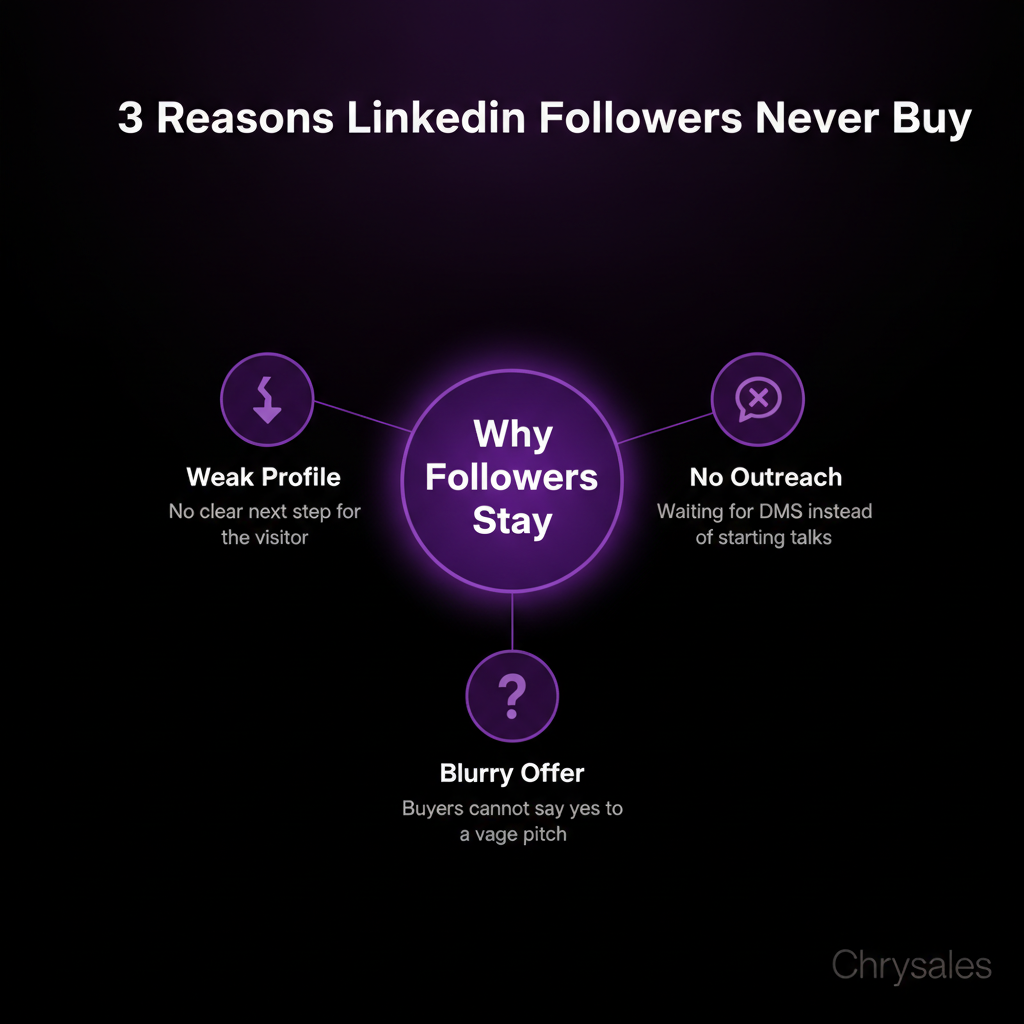
The Three Things That Block Conversion
First, your profile doesn't tell visitors what to do next. It's all about your past jobs and credentials. Zero call to action. A visitor has no idea how to buy from you, even if they want to.
Second, you're not starting conversations. Most people wait for DMs to come in. That's backwards for B2B lead generation. You need to reach out first, especially to people already engaging with your content.
Third, your offer isn't clear. If someone asked "what do you sell and who is it for," could you answer in one sentence? Most can't. Without a sharp offer, even interested followers stay stuck in "maybe later" mode.
Fix Your Profile First (It's Your LinkedIn Sales Page)
Your profile is a landing page, not a resume. If someone clicks through from one of your posts, they should know in 10 seconds what you do and who you help. You can also watch how to find clients who need your services right now for a complete walkthrough of attracting the right prospects.
Rewrite Your Headline
Your headline should answer: "What problem do you solve, and for who?" Skip the job title. Skip the inspirational quote. Make it about the reader.
Bad headline: "Sales Coach | Helping Businesses Grow"
Good headline: "I help B2B companies build sales systems that book 20+ calls a month | Lead generation + closing deals"
The second version tells a specific person (B2B companies) exactly what they get (a system that books calls). It speaks to their pain point: not enough meetings.
Pro Tip: Put a number in your headline if you can back it up. "20+ calls a month" or "€10M+ in client revenue" makes it concrete.
About Section: Write It Like a Sales Page
Most About sections are a career timeline. Yours should be a pitch. Start with the pain point. "If your sales team is inconsistent, and you don't know why some months are great and others tank, this might help."
Then explain what you do and how it works. Keep it to 3-4 short paragraphs. End with a call to action: "Book a call here" or "Send me a DM if this sounds familiar."
A 15-person consulting firm used this exact structure and started getting 2-3 inbound DMs per week from followers who'd been watching quietly for months. The profile change was the trigger. For more detailed tactics on LinkedIn profile optimization for B2B sales, you can see how top performers structure every section to convert visitors into leads.
Featured Section: Show Proof
Add case studies, testimonials, or links to your best content in the Featured section. This is social proof. If someone is deciding whether to DM you, a screenshot of a client win or a testimonial from a real company tips the scale.
Use Content to Filter for Buyers (Not Just Get Likes)
Posting on LinkedIn should do two things: attract the right people and repel the wrong ones. If everyone loves your content but no one buys, your content is too generic.
Post Problem-Aware Content
Problem-aware content calls out a specific pain point your ideal client has right now. It doesn't try to appeal to everyone.
Example: "Most B2B sales teams waste 60% of their outreach on bad-fit leads. If your reply rate is under 2%, the issue isn't your email copy, it's your list."
That post will resonate hard with someone struggling with low reply rates. It will bore everyone else. That's good. You want to attract small sales teams dealing with lead generation problems, not random LinkedIn users who like motivational quotes.
Watch out: If your posts get tons of engagement but zero business results, you're posting for the algorithm, not for your buyer. Shift to narrower, more specific topics.
Share Client Wins and Mini Case Studies
Once every 5-7 posts, share a real result. "A marketing agency we worked with went from 4 calls a month to 18 by fixing their LinkedIn outreach strategy. Here's what changed."
Then break down the 2-3 specific things they did. Keep it short. This type of post does two things: it proves you get results, and it shows what working with you looks like.
Add a Clear CTA Every Few Posts
Every third or fourth post, end with a call to action. "If this is you, send me a DM" or "Comment 'interested' and I'll send you the full breakdown."
Most people skip this because it feels salesy. But if your content genuinely helped someone, they want to know the next step. Make it easy.
Build a LinkedIn DM Outreach System (The Right Way)
Here's where most people either spam or do nothing. Both fail. The move is structured, personalized outreach to people already in your world. For advanced tactics on building a complete LinkedIn outreach strategy for B2B, you can see how to structure your entire prospecting process from list building to closing deals.
Target Engaged Followers First
Start with people who've liked or commented on 2+ of your posts in the last month. They already know who you are. A DM from you won't feel random.
Send a short message: "Hey [name], saw you've been engaging with a few of my posts on sales systems. Curious, are you dealing with [specific problem] right now?"
That's it. No pitch. Just a question. If they reply, you start a conversation. If they don't, move on.
Pro Tip: Use LinkedIn Sales Navigator to filter your followers by company size, industry, and job title. Focus on the 50-100 people who fit your ideal client profile and have engaged recently.
Personalize the First Message (For Real)
Cold LinkedIn outreach fails when it's a copy-paste template. People can smell it instantly. Personalization isn't just using someone's first name. It's referencing something specific.
Bad: "Hi Sarah, I help companies grow their sales. Want to chat?"
Good: "Hi Sarah, saw your post last week about struggling to scale your agency's sales team. That's exactly what we solve. Mind if I share a quick idea that worked for a similar agency?"
The second version shows you actually read her content. It ties your offer to her exact problem. And it offers value before asking for anything.
A tech company we worked with tested this. They sent 100 generic DMs and got 3 replies. Then they sent 50 personalized DMs and got 14 replies. Same offer, same people, just better messaging. If you want to dive deeper into these response rate tactics, learn how to get replies on LinkedIn with message formulas that actually work.
Use a Follow-Up Sequence
Most opportunities happen in message 2 or 3, not message 1. If someone doesn't reply to your first DM, send a follow-up 5-7 days later.
Message 2: "Hey [name], not sure if you saw my last message. No worries if it's not a fit right now. Just wanted to share this quick resource on [topic]: [link]"
You're giving value, not begging for attention. If they still don't reply, let it go. Move to the next person. You can also see proven LinkedIn follow-up sequence templates that show exactly when and what to send in each message for maximum response rates.
Turn LinkedIn Conversations into Sales Calls
Getting replies is step one. Booking calls is step two. Most people mess this up by going for the hard close too fast.
Ask Discovery Questions First
When someone replies to your DM, don't pitch immediately. Ask questions.
"What's your biggest challenge with [topic] right now?"
"How are you handling [specific problem] today?"
"What would change for you if [outcome] happened in the next 90 days?"
These questions do two things: they qualify the lead (are they actually a fit?) and they get the prospect talking about their pain. The more they talk, the more they sell themselves.
Offer the Call as the Next Logical Step
Once you've asked 2-3 questions and confirmed they have the problem you solve, transition naturally.
"Makes sense. This sounds like something we could fix pretty quickly. Want to jump on a 20-minute call this week? I'll show you exactly how we'd build this for your team."
You're not asking for a huge commitment. It's 20 minutes. And you've already established that you understand their problem.
Common mistake: Sending a Calendly link in the first or second message. It feels transactional. Build a tiny bit of rapport first.
Follow Up After No-Shows
About 30% of booked calls will no-show. Don't take it personally. Send a follow-up message an hour later.
"Hey [name], saw we missed each other. Life happens. Want to reschedule for [two specific times]?"
Half the no-shows will rebook. The other half weren't serious. Either way, you know where you stand.
Automate the Repetitive Parts (Without Losing the Personal Touch)
You can't personally message 500 people a week. But you also can't send obvious templates and expect results. The answer is smart automation that feels human. To see how to build a complete system, watch how to build a sales system so powerful clients come to you for the full framework.
Use AI to Draft Personalized Messages at Scale
Tools like Gemini or ChatGPT can help you write personalized first messages if you feed them the right info. Pull a prospect's recent post, their company info, and your core offer. Ask the AI to draft a 3-sentence DM. You still review and tweak each one, but the AI cuts your drafting time by 70%.
One agency we worked with went from sending 10 DMs a day to 40, without the messages feeling robotic.
Pro Tip: Create a simple prompt template. "Write a LinkedIn DM to [name], who works at [company]. They recently posted about [topic]. I help [your offer]. Keep it under 50 words, friendly tone, no pitch, just start a conversation."
Track Your Outreach in a Simple Spreadsheet
At minimum, track: who you messaged, when, their reply status, and next step. This keeps you from messaging the same person twice or forgetting to follow up.
If you're doing serious volume, use a CRM. But a Google Sheet works fine for most small sales teams starting out.
Schedule Content in Batches
Write 5-10 posts in one sitting, then schedule them over the next two weeks. This keeps your profile active without eating your time every day.
Tools like Buffer or LinkedIn's native scheduler work fine. Consistency matters more than perfection. Three posts a week for six months beats posting daily for three weeks, then going silent.
Measure What Actually Matters (And Ignore Vanity Metrics)
Likes and comments feel good, but they don't pay bills. Track metrics that connect to revenue.
Track Your Reply Rate
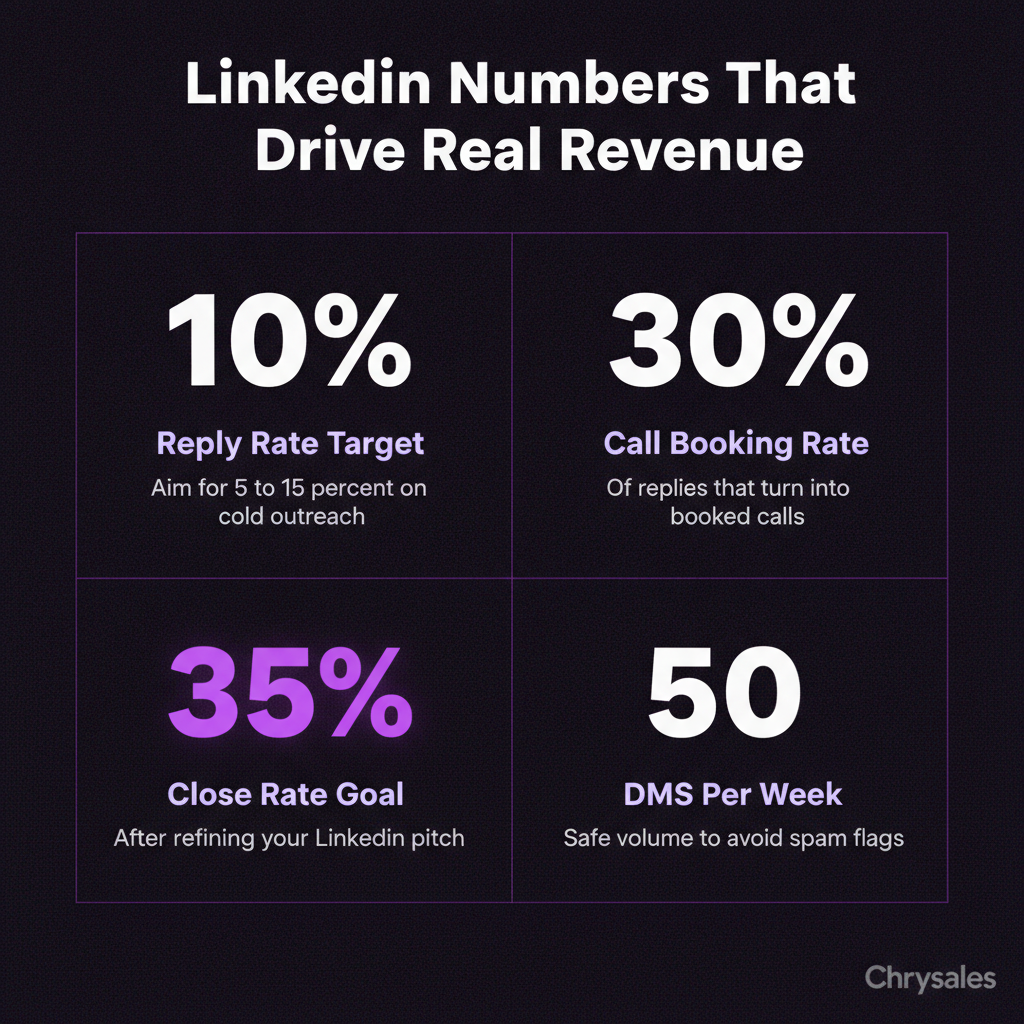
If you send 50 LinkedIn DMs and get 5 replies, that's a 10% reply rate. Industry benchmark for cold LinkedIn outreach is 5-15%. Under 5% means your targeting or messaging is off. For detailed benchmarks and what top performers are achieving, check out the latest LinkedIn outreach benchmarks for 2026 to see where you stand.
Track Call-Booking Rate
Of the people who reply, how many actually book a call? Aim for 30-50%. If it's lower, your discovery questions or call pitch needs work.
Track Close Rate from LinkedIn-Sourced Calls
This is the big one. If LinkedIn books you 10 calls a month and you close 2, that's a 20% close rate. If your offer is strong and your sales process is tight, that number should climb to 30-40% over time.
A 30-person consulting firm tracked this for three months. They realized LinkedIn was booking more calls than referrals, but closing at half the rate. The issue wasn't LinkedIn. It was that LinkedIn leads needed a different pitch than referral leads. Once they adjusted the sales call structure, close rate jumped to 35%.
Watch out: Don't measure LinkedIn success by follower count. We've seen people with 500 highly engaged followers generate more revenue than people with 10,000 random connections.
Frequently Asked Questions
Q: How long does it take to start getting clients from LinkedIn?
If you're starting from scratch, expect 4-8 weeks before your first booked call. That assumes you're posting 3 times a week, sending 20-30 personalized DMs per week, and your profile is dialed in. Some people book calls in week two. Others take three months. The timeline depends on how warm your existing network is and how tight your messaging is. Consistency beats speed here.
Q: Should I use LinkedIn Sales Navigator or is the free version enough?
Free LinkedIn works fine if you have under 500 connections and you're manually filtering who to message. Sales Navigator is worth it once you're doing serious B2B lead generation and need advanced search filters (company size, job title, recent activity). It also gives you more InMail credits. Most small teams can start free and upgrade after 2-3 months when volume picks up.
Q: What if my industry isn't active on LinkedIn?
Almost every B2B industry has decision makers on LinkedIn, even if they don't post much. The key is outbound outreach, not waiting for engagement. If your audience is quiet, focus on DM first strategies. Find the right people using search filters, send personalized messages, and skip the content game. LinkedIn still works, you just use it differently.
Q: How many DMs should I send per week without getting flagged as spam?
LinkedIn's limits change, but a safe zone is 20-30 connection requests per week and 50-70 messages to existing connections. If you're new, start lower (10-15 per week) and ramp up. The key is personalization. Spammy behavior gets flagged fast. If every message is unique and relevant, you're fine. Also, space them out. Don't send 50 messages in one hour.
Q: Can I hire someone to do LinkedIn outreach for me?
Yes, but be careful. Hiring a salesperson or virtual assistant to send DMs works only if they're trained on your offer, your voice, and your targeting. Most "LinkedIn lead gen services" send garbage templates that kill your reputation. If you hire, give them a tight script, review their first 20 messages, and track results weekly. At Chrysales, we help clients hire and train people specifically for this (setters who book calls, not just send messages). The system around the hire matters more than the hire itself.
How to get clients from LinkedIn means using your profile, content, and messages to move followers from attention to real paid work. LinkedIn has over 900 million users, but most people treat it like a digital resume graveyard. Here's the thing: your followers are already watching. Some of them need exactly what you sell. The problem isn't that LinkedIn doesn't work for client acquisition. It's that most people skip the steps that actually convert attention into paid work. If you've been posting for months with zero results, or your DMs feel like shouting into the void, you're probably missing one of five simple systems. Let's fix that.
Why Most LinkedIn Followers Never Become Clients
Most people assume posting content is enough. It's not. Content gets you followers. A system gets you clients. Picture this: you spend an hour writing a great post about sales strategy. It gets 50 likes and 8 new followers. Cool. But what happens next? Those 8 people see your profile, maybe scroll through a few posts, then disappear. No conversation. No call. No money. That's the gap between having an audience and building a client acquisition machine.
The real issue is treating LinkedIn like Instagram. On Instagram, followers equal reach. On LinkedIn, followers are just the start of a B2B sales process. You need a way to move them from "person who liked your post" to "person sitting on a sales call with you."
Common mistake: Thinking that if you just post more, clients will magically appear. They won't. You need a follow-up system.
The Three Things That Block Conversion
First, your profile doesn't tell visitors what to do next. It's all about your past jobs and credentials. Zero call to action. A visitor has no idea how to buy from you, even if they want to.
Second, you're not starting conversations. Most people wait for DMs to come in. That's backwards for B2B lead generation. You need to reach out first, especially to people already engaging with your content.
Third, your offer isn't clear. If someone asked "what do you sell and who is it for," could you answer in one sentence? Most can't. Without a sharp offer, even interested followers stay stuck in "maybe later" mode.
Fix Your Profile First (It's Your LinkedIn Sales Page)
Your profile is a landing page, not a resume. If someone clicks through from one of your posts, they should know in 10 seconds what you do and who you help. You can also watch how to find clients who need your services right now for a complete walkthrough of attracting the right prospects.
Rewrite Your Headline
Your headline should answer: "What problem do you solve, and for who?" Skip the job title. Skip the inspirational quote. Make it about the reader.
Bad headline: "Sales Coach | Helping Businesses Grow"
Good headline: "I help B2B companies build sales systems that book 20+ calls a month | Lead generation + closing deals"
The second version tells a specific person (B2B companies) exactly what they get (a system that books calls). It speaks to their pain point: not enough meetings.
Pro Tip: Put a number in your headline if you can back it up. "20+ calls a month" or "€10M+ in client revenue" makes it concrete.
About Section: Write It Like a Sales Page
Most About sections are a career timeline. Yours should be a pitch. Start with the pain point. "If your sales team is inconsistent, and you don't know why some months are great and others tank, this might help."
Then explain what you do and how it works. Keep it to 3-4 short paragraphs. End with a call to action: "Book a call here" or "Send me a DM if this sounds familiar."
A 15-person consulting firm used this exact structure and started getting 2-3 inbound DMs per week from followers who'd been watching quietly for months. The profile change was the trigger. For more detailed tactics on LinkedIn profile optimization for B2B sales, you can see how top performers structure every section to convert visitors into leads.
Featured Section: Show Proof
Add case studies, testimonials, or links to your best content in the Featured section. This is social proof. If someone is deciding whether to DM you, a screenshot of a client win or a testimonial from a real company tips the scale.
Use Content to Filter for Buyers (Not Just Get Likes)
Posting on LinkedIn should do two things: attract the right people and repel the wrong ones. If everyone loves your content but no one buys, your content is too generic.
Post Problem-Aware Content
Problem-aware content calls out a specific pain point your ideal client has right now. It doesn't try to appeal to everyone.
Example: "Most B2B sales teams waste 60% of their outreach on bad-fit leads. If your reply rate is under 2%, the issue isn't your email copy, it's your list."
That post will resonate hard with someone struggling with low reply rates. It will bore everyone else. That's good. You want to attract small sales teams dealing with lead generation problems, not random LinkedIn users who like motivational quotes.
Watch out: If your posts get tons of engagement but zero business results, you're posting for the algorithm, not for your buyer. Shift to narrower, more specific topics.
Share Client Wins and Mini Case Studies
Once every 5-7 posts, share a real result. "A marketing agency we worked with went from 4 calls a month to 18 by fixing their LinkedIn outreach strategy. Here's what changed."
Then break down the 2-3 specific things they did. Keep it short. This type of post does two things: it proves you get results, and it shows what working with you looks like.
Add a Clear CTA Every Few Posts
Every third or fourth post, end with a call to action. "If this is you, send me a DM" or "Comment 'interested' and I'll send you the full breakdown."
Most people skip this because it feels salesy. But if your content genuinely helped someone, they want to know the next step. Make it easy.
Build a LinkedIn DM Outreach System (The Right Way)
Here's where most people either spam or do nothing. Both fail. The move is structured, personalized outreach to people already in your world. For advanced tactics on building a complete LinkedIn outreach strategy for B2B, you can see how to structure your entire prospecting process from list building to closing deals.
Target Engaged Followers First
Start with people who've liked or commented on 2+ of your posts in the last month. They already know who you are. A DM from you won't feel random.
Send a short message: "Hey [name], saw you've been engaging with a few of my posts on sales systems. Curious, are you dealing with [specific problem] right now?"
That's it. No pitch. Just a question. If they reply, you start a conversation. If they don't, move on.
Pro Tip: Use LinkedIn Sales Navigator to filter your followers by company size, industry, and job title. Focus on the 50-100 people who fit your ideal client profile and have engaged recently.
Personalize the First Message (For Real)
Cold LinkedIn outreach fails when it's a copy-paste template. People can smell it instantly. Personalization isn't just using someone's first name. It's referencing something specific.
Bad: "Hi Sarah, I help companies grow their sales. Want to chat?"
Good: "Hi Sarah, saw your post last week about struggling to scale your agency's sales team. That's exactly what we solve. Mind if I share a quick idea that worked for a similar agency?"
The second version shows you actually read her content. It ties your offer to her exact problem. And it offers value before asking for anything.
A tech company we worked with tested this. They sent 100 generic DMs and got 3 replies. Then they sent 50 personalized DMs and got 14 replies. Same offer, same people, just better messaging. If you want to dive deeper into these response rate tactics, learn how to get replies on LinkedIn with message formulas that actually work.
Use a Follow-Up Sequence
Most opportunities happen in message 2 or 3, not message 1. If someone doesn't reply to your first DM, send a follow-up 5-7 days later.
Message 2: "Hey [name], not sure if you saw my last message. No worries if it's not a fit right now. Just wanted to share this quick resource on [topic]: [link]"
You're giving value, not begging for attention. If they still don't reply, let it go. Move to the next person. You can also see proven LinkedIn follow-up sequence templates that show exactly when and what to send in each message for maximum response rates.
Turn LinkedIn Conversations into Sales Calls
Getting replies is step one. Booking calls is step two. Most people mess this up by going for the hard close too fast.
Ask Discovery Questions First
When someone replies to your DM, don't pitch immediately. Ask questions.
"What's your biggest challenge with [topic] right now?"
"How are you handling [specific problem] today?"
"What would change for you if [outcome] happened in the next 90 days?"
These questions do two things: they qualify the lead (are they actually a fit?) and they get the prospect talking about their pain. The more they talk, the more they sell themselves.
Offer the Call as the Next Logical Step
Once you've asked 2-3 questions and confirmed they have the problem you solve, transition naturally.
"Makes sense. This sounds like something we could fix pretty quickly. Want to jump on a 20-minute call this week? I'll show you exactly how we'd build this for your team."
You're not asking for a huge commitment. It's 20 minutes. And you've already established that you understand their problem.
Common mistake: Sending a Calendly link in the first or second message. It feels transactional. Build a tiny bit of rapport first.
Follow Up After No-Shows
About 30% of booked calls will no-show. Don't take it personally. Send a follow-up message an hour later.
"Hey [name], saw we missed each other. Life happens. Want to reschedule for [two specific times]?"
Half the no-shows will rebook. The other half weren't serious. Either way, you know where you stand.
Automate the Repetitive Parts (Without Losing the Personal Touch)
You can't personally message 500 people a week. But you also can't send obvious templates and expect results. The answer is smart automation that feels human. To see how to build a complete system, watch how to build a sales system so powerful clients come to you for the full framework.
Use AI to Draft Personalized Messages at Scale
Tools like Gemini or ChatGPT can help you write personalized first messages if you feed them the right info. Pull a prospect's recent post, their company info, and your core offer. Ask the AI to draft a 3-sentence DM. You still review and tweak each one, but the AI cuts your drafting time by 70%.
One agency we worked with went from sending 10 DMs a day to 40, without the messages feeling robotic.
Pro Tip: Create a simple prompt template. "Write a LinkedIn DM to [name], who works at [company]. They recently posted about [topic]. I help [your offer]. Keep it under 50 words, friendly tone, no pitch, just start a conversation."
Track Your Outreach in a Simple Spreadsheet
At minimum, track: who you messaged, when, their reply status, and next step. This keeps you from messaging the same person twice or forgetting to follow up.
If you're doing serious volume, use a CRM. But a Google Sheet works fine for most small sales teams starting out.
Schedule Content in Batches
Write 5-10 posts in one sitting, then schedule them over the next two weeks. This keeps your profile active without eating your time every day.
Tools like Buffer or LinkedIn's native scheduler work fine. Consistency matters more than perfection. Three posts a week for six months beats posting daily for three weeks, then going silent.
Measure What Actually Matters (And Ignore Vanity Metrics)
Likes and comments feel good, but they don't pay bills. Track metrics that connect to revenue.
Track Your Reply Rate
If you send 50 LinkedIn DMs and get 5 replies, that's a 10% reply rate. Industry benchmark for cold LinkedIn outreach is 5-15%. Under 5% means your targeting or messaging is off. For detailed benchmarks and what top performers are achieving, check out the latest LinkedIn outreach benchmarks for 2026 to see where you stand.
Track Call-Booking Rate
Of the people who reply, how many actually book a call? Aim for 30-50%. If it's lower, your discovery questions or call pitch needs work.
Track Close Rate from LinkedIn-Sourced Calls
This is the big one. If LinkedIn books you 10 calls a month and you close 2, that's a 20% close rate. If your offer is strong and your sales process is tight, that number should climb to 30-40% over time.
A 30-person consulting firm tracked this for three months. They realized LinkedIn was booking more calls than referrals, but closing at half the rate. The issue wasn't LinkedIn. It was that LinkedIn leads needed a different pitch than referral leads. Once they adjusted the sales call structure, close rate jumped to 35%.
Watch out: Don't measure LinkedIn success by follower count. We've seen people with 500 highly engaged followers generate more revenue than people with 10,000 random connections.
Frequently Asked Questions
Q: How long does it take to start getting clients from LinkedIn?
If you're starting from scratch, expect 4-8 weeks before your first booked call. That assumes you're posting 3 times a week, sending 20-30 personalized DMs per week, and your profile is dialed in. Some people book calls in week two. Others take three months. The timeline depends on how warm your existing network is and how tight your messaging is. Consistency beats speed here.
Q: Should I use LinkedIn Sales Navigator or is the free version enough?
Free LinkedIn works fine if you have under 500 connections and you're manually filtering who to message. Sales Navigator is worth it once you're doing serious B2B lead generation and need advanced search filters (company size, job title, recent activity). It also gives you more InMail credits. Most small teams can start free and upgrade after 2-3 months when volume picks up.
Q: What if my industry isn't active on LinkedIn?
Almost every B2B industry has decision makers on LinkedIn, even if they don't post much. The key is outbound outreach, not waiting for engagement. If your audience is quiet, focus on DM first strategies. Find the right people using search filters, send personalized messages, and skip the content game. LinkedIn still works, you just use it differently.
Q: How many DMs should I send per week without getting flagged as spam?
LinkedIn's limits change, but a safe zone is 20-30 connection requests per week and 50-70 messages to existing connections. If you're new, start lower (10-15 per week) and ramp up. The key is personalization. Spammy behavior gets flagged fast. If every message is unique and relevant, you're fine. Also, space them out. Don't send 50 messages in one hour.
Q: Can I hire someone to do LinkedIn outreach for me?
Yes, but be careful. Hiring a salesperson or virtual assistant to send DMs works only if they're trained on your offer, your voice, and your targeting. Most "LinkedIn lead gen services" send garbage templates that kill your reputation. If you hire, give them a tight script, review their first 20 messages, and track results weekly. At Chrysales, we help clients hire and train people specifically for this (setters who book calls, not just send messages). The system around the hire matters more than the hire itself.
Scaling Is Not Hard If You Have The Right Systems
If you’re serious about leveling up your scaling game, you need the right system, the right training, and the right team behind you. We're here to give you the exact tools and strategies top entrepreneurs use to dominate.

Discover the latest tips
View All.avif)
Chrysales was formed from the words "chrysalis" the stage where a caterpillar transforms into a butterfly and "sales".
It stands for one thing: sales transformation.Because scaling doesn’t happen by doing more of the same. Scaling only happens when you go through real transformation in your systems, your offer, team and the way you sell.
.avif)


