.avif)
Why Your Linkedin Profile Hurts Your B2B Sales
Your LinkedIn profile optimization helps people understand what you do, who you help, and why it matters before they ever send a message. A weak profile hurts B2B sales and lead generation before you even know someone looked.
Your LinkedIn profile gets seen before you send a single email. If it looks like a resume from 2014, most people leave before you even know they stopped by. A weak profile doesn't just fail to help your sales. It actively kills deals. Someone clicks your name after a cold email, sees generic job titles and zero clarity on what you actually do, and ghosts. That's not bad luck. That's LinkedIn profile optimization done wrong, and it's costing you leads every single week.
Your Profile Works Around the Clock (Or It Doesn't)
Think of your LinkedIn profile like a storefront window on the busiest street in town. If the sign is faded and the display is dusty, people walk past. If it's clean and shows exactly what you sell, they come in.
Your profile is live 24/7. People check it after they see your comment on a post. They check it when you send a connection request. They check it before they reply to your cold outreach. Every single time, your profile either builds trust or breaks it.
Most profiles break it. They read like a CV: past job titles, vague responsibilities, no clear reason to care. That works when you're applying for jobs. It does nothing for B2B sales or lead generation.
Here's the thing: if your profile doesn't tell someone what you do, who you help, and why they should care in the first three seconds, you lost them. They're not reading the rest. They're moving on.
What "Optimized" Actually Means
LinkedIn profile optimization isn't about stuffing keywords into every sentence. It's about making your profile answer three questions fast:
- What do you do?
- Who do you help?
- Why should I care?
If someone lands on your profile and can't answer all three in five seconds, it's not optimized. It's just a list of facts about your work history.
Pro Tip: Open your profile in a private browser window. Set a timer for five seconds. If a stranger can't tell what you do and who you help in that time, rewrite your headline and About section today.
Your Headline Is Doing Most of the Work
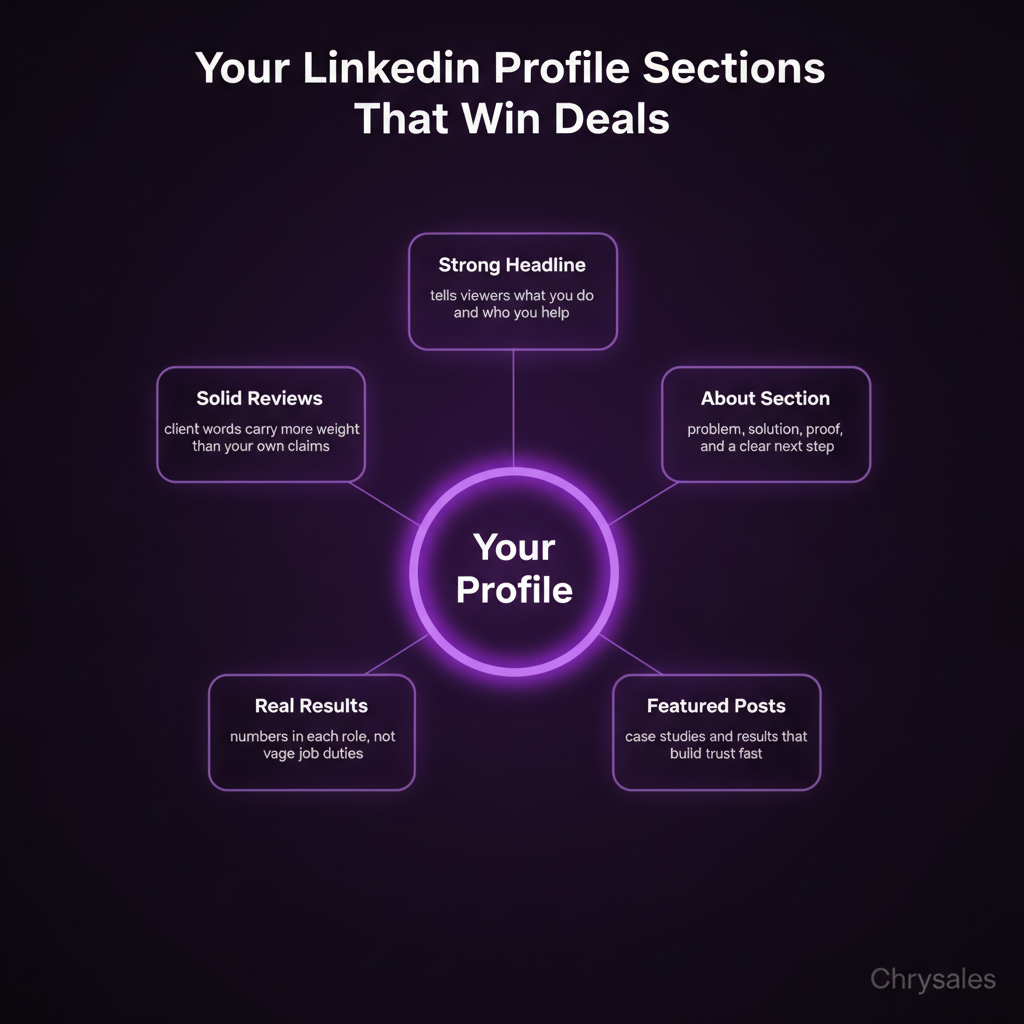
Your headline shows up everywhere. In search results. Under your comments. Next to your name when you send a message. It's the first thing people read, and most people write something like "Sales Manager at ABC Corp" or "Helping businesses grow." Both are useless.
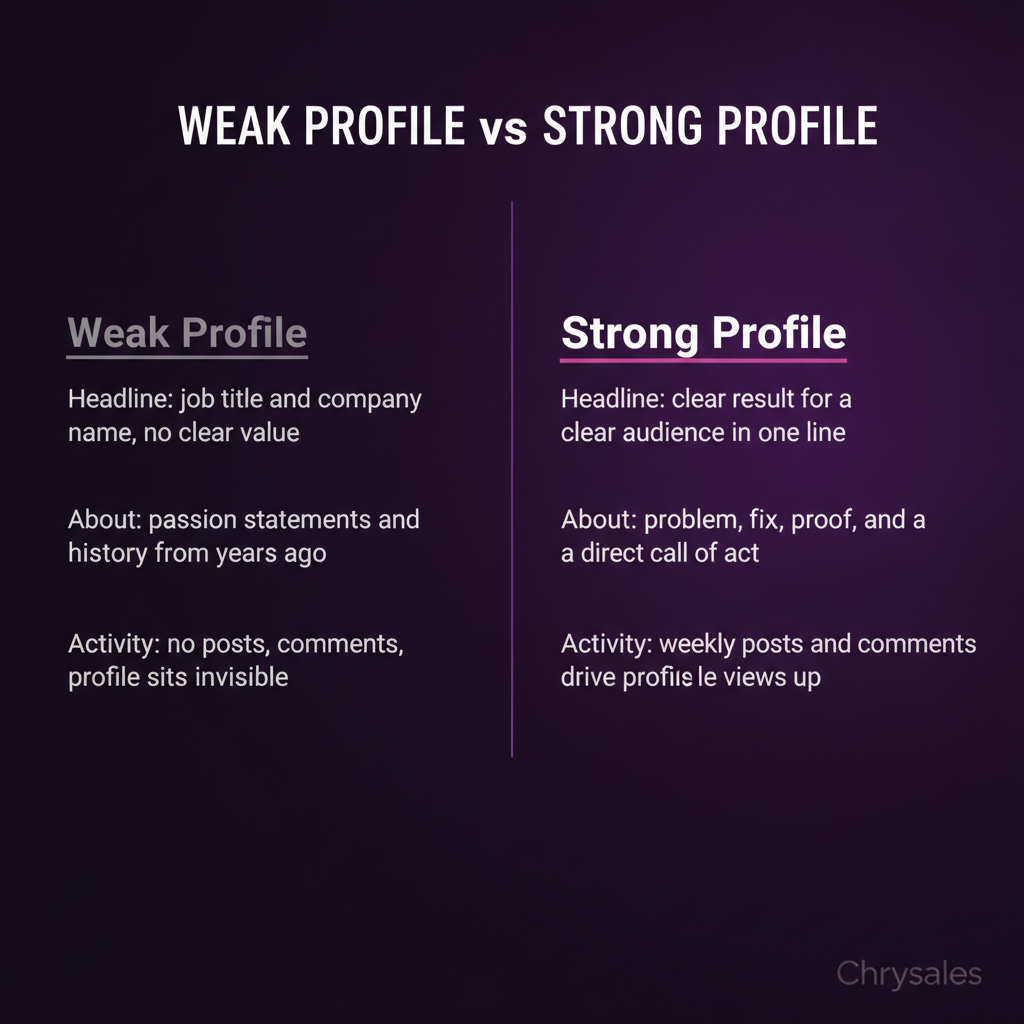
A good headline tells people what you do and who it's for. "Sales Manager at ABC Corp" says nothing. "Building repeatable sales systems for consulting firms" says everything.
The Formula That Works
Here's a simple structure that works every time:
[What you do] for [who you help] to [result they want]
Examples:
- "Building lead generation systems for marketing agencies that need predictable client acquisition"
- "Sales training for B2B teams who want to close more deals without adding headcount"
- "Helping small sales teams automate outreach and book 20+ calls a month"
Notice what's missing: job titles, company names, buzzwords. Your headline isn't about impressing your boss. It's about making strangers want to keep reading.
Watch out: Don't use your headline to list skills. "Sales | Marketing | Lead Gen | B2B" tells nobody what you actually do. Pick one clear message.
The About Section Is Your Sales Pitch
Most About sections start with "I'm passionate about helping businesses succeed" or "With over 10 years of experience in sales..." Delete all of that.
Your About section is not your life story. It's a sales letter. The goal is to make someone think "this person gets my problem" and then take action.
How to Structure It
Start with the problem your reader has. Not what you do. Not your background. Their problem.
Example: "Most consulting firms waste weeks chasing cold leads that never convert. You send 200 emails, book three calls, close zero deals. It's not your emails. It's your list, your offer, or your follow-up system."
Now you have their attention. They're nodding. Next, explain what you do about it:
"I build custom sales systems for B2B businesses. That means better lists, clearer offers, and follow-up that actually books calls. My clients go from random outreach to predictable lead generation in 60 days."
Finish with proof and a call to action:
"I've worked with 500+ sales teams and helped generate over €10M in client revenue. If you want a sales system that works without burning out your team, message me."
That's it. Problem, solution, proof, action. No fluff about passion or journey.
Common mistake: Writing your About section in third person. "John is a sales expert who..." sounds like someone else wrote it. Use "I" and "you." It's a conversation, not a Wikipedia page.
The Featured Section Is Free Real Estate
Most people ignore the Featured section. That's a mistake. It's the first thing someone sees after your headline and About section, and you control exactly what goes there.
Use it to show your best work. Link to:
- A case study or client results post
- A free guide or lead magnet
- A video explaining what you do
- Your best LinkedIn post that got traction
Don't link to your company homepage or a generic "contact us" page. Link to something that builds trust or gives value.
A 25-person marketing agency did this last quarter. They added a Featured post showing how they helped a client book 40 sales calls in 30 days. Three people messaged them about it in the first week. That's inbound lead generation from a section most profiles leave blank.
What to Feature
Pick 3 to 5 items. Keep them focused on one message. If your profile is about sales training, don't feature a post about your weekend hobby. Everything should point to the same offer.
Good picks:
- A post with 50+ comments where you explained a concept
- A PDF guide people can download
- A client testimonial or result screenshot
- A short video (under 2 minutes) where you teach something useful
Bad picks:
- A random article you were mentioned in
- A post with 3 likes from two years ago
- Your company's generic "we're hiring" post
Experience Section: Results, Not Responsibilities
Nobody cares that you "managed a team of five" or "oversaw client relationships." Those are responsibilities. They don't prove you're good at what you do.
Your Experience section should be a list of results. What did you actually accomplish? What changed because you were there?
Instead of: "Managed sales team and developed new client acquisition strategies"
Write: "Built a lead generation system that booked 60 sales calls in 90 days. Hired and trained 3 closers who hit quota in their first month. Increased close rate from 12% to 28% using a custom discovery script."
See the difference? One sounds like a job description. The other sounds like someone who gets things done.
The Numbers Matter
Every bullet point in your Experience section should have a number if possible. Numbers make results real.
- "Improved sales process" is vague
- "Cut sales cycle from 45 days to 18 days" is concrete
Clients trained. Revenue generated. Calls booked. Close rate increase. Time saved. Pick the numbers that matter for your audience and put them front and center.
Pro Tip: If you don't have exact numbers, estimate conservatively. "Helped 200+ sales teams" is better than "worked with many clients." Just don't make up stats you can't back up.
Skills and Endorsements: Easy Wins Most People Skip
The Skills section is boring, but it matters for LinkedIn search. When someone searches "B2B sales training," LinkedIn looks at profiles with those exact words in their skills.
Add 10 to 15 skills that match what your audience searches for. For B2B sales, that's things like:
- Lead generation
- Sales training
- Client acquisition
- B2B lead generation
- Cold outreach
- Sales systems
Don't add 50 random skills. LinkedIn only shows the top few, and you want the right ones up top.
Endorsements Help (A Little)
Endorsements aren't as powerful as recommendations, but they add up. If 40 people endorsed you for "sales training," that's a trust signal.
Ask a few clients or colleagues to endorse your top 3 skills. It takes them 10 seconds and it makes your profile look more active.
Recommendations Are the Proof That Matters
A recommendation from a real client is worth more than anything you write about yourself. Someone else saying you're good at sales carries weight. You saying it doesn't.
Most people have zero recommendations. If you have 3 to 5 solid ones, you stand out.
How to Get Them
Don't wait for people to write recommendations. Ask. Send a message to a client you helped:
"Hey [Name], really enjoyed working with you on [project]. Would you be open to writing a quick LinkedIn recommendation about the results we got? Happy to write one for you as well."
Most people say yes. Make it easy by reminding them what you did: "We worked together on building your outreach system and booked 25 calls in the first month."
The best recommendations mention specific results and what it was like to work with you. "John helped us book 30 sales calls in 6 weeks and was great to work with" beats "John is a sales expert" every time.
Watch out: Recommendations that sound generic hurt more than they help. If someone writes "great professional, highly recommend," that reads fake. Ask for specifics.
Your Activity Feeds the Algorithm (And Your Visibility)
LinkedIn rewards people who post and engage. If your profile has zero activity, the algorithm ignores you. If you post once a week and comment on other posts, LinkedIn shows your profile to more people.
You don't need to post every day. Once or twice a week is enough. Share something useful:
- A lesson you learned working with a client
- A quick tip on lead generation or closing deals
- A result one of your clients got
- A common mistake you see sales teams make
Keep posts short. Three to seven lines is the sweet spot. Write like you're texting a friend, not writing a press release.
Comments Count Too
Commenting on other people's posts gets your name in front of their audience. If someone with 5,000 followers posts about sales, and you drop a smart comment, some of those 5,000 people see your name and click your profile.
Don't write "great post!" Write something that adds to the conversation. A quick story, a counterpoint, or a follow up question. Two or three good comments a week will get you more profile views than a dozen bland ones.
Common mistake: Only posting about yourself. Mix in posts where you share other people's content or highlight a client win. All "me me me" content gets ignored fast. Research shows that posting consistently on LinkedIn improves visibility and engagement, making your profile work harder for your business.
Client Acquisition Starts With Profile Visits
Here's what most people miss: LinkedIn profile optimization isn't about looking impressive. It's about turning profile visits into conversations.
Every week, check who viewed your profile. If someone from your target audience looked at your profile, send them a message. Not a pitch. Just a "hey, saw you checked out my profile, curious what you're working on."
A small consulting firm tried this. They checked profile views every Monday. Out of 40 views a month, they messaged 12 people who fit their ideal client profile. Four replied. Two booked calls. That's how inbound lead generation actually works.
Once your profile is optimized, you can build a sales system that turns profile views into inbound leads and creates a predictable pipeline without cold calling or chasing prospects.
Track What Happens
Most people optimize their profile once and forget about it. The best ones track results:
- How many profile views per week
- How many connection requests after posting
- How many inbound messages from the right audience
- How many of those turn into calls
If your profile views go up but nobody messages you, your profile is interesting but not clear on next steps. Add a stronger call to action in your About section.
If views stay flat, post more and comment more. Activity drives visibility. Understanding how B2B buyers use LinkedIn before they contact sales helps you position your profile as a conversion tool, not just a digital resume.
To make the most of every profile visit, consider how your LinkedIn content and lead generation strategies work together to warm up cold audiences before you ever send a message.
Frequently Asked Questions
Q: How often should I update my LinkedIn profile?
Update your headline and About section whenever your offer or audience changes. Update your Experience section when you hit a new result worth sharing. For most people, a quarterly check is enough. Don't obsess over tweaking every word every week, but don't let your profile sit untouched for two years either. If your profile still says what you were doing in 2022, update it today.
Q: Do I need a professional headshot for LinkedIn?
You don't need a $500 photoshoot, but your profile photo should be clear, recent, and look professional. No sunglasses, no group shots, no blurry selfies. A clean headshot with good lighting makes you look real and approachable. People connect with faces, and a weak photo makes people scroll past. If your current photo is from five years ago or looks like a cropped wedding pic, get a new one this week.
Q: Should I accept every connection request I get?
No. If someone looks like a bot, ignore it. If they're way outside your industry and clearly spamming, ignore it. But if they're in B2B sales, lead generation, or adjacent fields, accept. You never know who might become a client, partner, or referral source. Just don't auto accept everyone. A 2,000 person network of random people is worse than a 500 person network of relevant connections.
Q: Can I use my LinkedIn profile for cold outreach?
Yes, but your profile has to back up your message. If you send a cold message about helping with sales systems, and the person clicks your profile to see a generic resume, they won't reply. Your profile and your outreach have to match. Make sure your headline and About section support whatever you're pitching. And don't pitch in the first message. Start a conversation. Let your profile do the selling. Once you've optimized your profile, learn how to use LinkedIn outreach to book more meetings with prospects who are already warmed up by your content and profile.
Q: How long does it take to see results from optimizing my LinkedIn profile?
Most people see more profile views within a week of updating their headline and About section. Inbound messages and connection requests usually pick up within two to four weeks if you're also posting and engaging regularly. LinkedIn isn't a magic button. You still have to show up, post useful content, and reach out to people. But a strong profile makes everything else work better. One tech company updated their founder's profile and saw profile views jump from 30 a month to 120 in six weeks. Three of those visits turned into sales calls. If you want to improve response rates even further, apply proven frameworks on how to get replies on LinkedIn that complement your optimized profile.
Your LinkedIn profile optimization helps people understand what you do, who you help, and why it matters before they ever send a message. A weak profile hurts B2B sales and lead generation before you even know someone looked.
Your LinkedIn profile gets seen before you send a single email. If it looks like a resume from 2014, most people leave before you even know they stopped by. A weak profile doesn't just fail to help your sales. It actively kills deals. Someone clicks your name after a cold email, sees generic job titles and zero clarity on what you actually do, and ghosts. That's not bad luck. That's LinkedIn profile optimization done wrong, and it's costing you leads every single week.
Your Profile Works Around the Clock (Or It Doesn't)
Think of your LinkedIn profile like a storefront window on the busiest street in town. If the sign is faded and the display is dusty, people walk past. If it's clean and shows exactly what you sell, they come in.
Your profile is live 24/7. People check it after they see your comment on a post. They check it when you send a connection request. They check it before they reply to your cold outreach. Every single time, your profile either builds trust or breaks it.
Most profiles break it. They read like a CV: past job titles, vague responsibilities, no clear reason to care. That works when you're applying for jobs. It does nothing for B2B sales or lead generation.
Here's the thing: if your profile doesn't tell someone what you do, who you help, and why they should care in the first three seconds, you lost them. They're not reading the rest. They're moving on.
What "Optimized" Actually Means
LinkedIn profile optimization isn't about stuffing keywords into every sentence. It's about making your profile answer three questions fast:
- What do you do?
- Who do you help?
- Why should I care?
If someone lands on your profile and can't answer all three in five seconds, it's not optimized. It's just a list of facts about your work history.
Pro Tip: Open your profile in a private browser window. Set a timer for five seconds. If a stranger can't tell what you do and who you help in that time, rewrite your headline and About section today.
Your Headline Is Doing Most of the Work
Your headline shows up everywhere. In search results. Under your comments. Next to your name when you send a message. It's the first thing people read, and most people write something like "Sales Manager at ABC Corp" or "Helping businesses grow." Both are useless.
A good headline tells people what you do and who it's for. "Sales Manager at ABC Corp" says nothing. "Building repeatable sales systems for consulting firms" says everything.
The Formula That Works
Here's a simple structure that works every time:
[What you do] for [who you help] to [result they want]
Examples:
- "Building lead generation systems for marketing agencies that need predictable client acquisition"
- "Sales training for B2B teams who want to close more deals without adding headcount"
- "Helping small sales teams automate outreach and book 20+ calls a month"
Notice what's missing: job titles, company names, buzzwords. Your headline isn't about impressing your boss. It's about making strangers want to keep reading.
Watch out: Don't use your headline to list skills. "Sales | Marketing | Lead Gen | B2B" tells nobody what you actually do. Pick one clear message.
The About Section Is Your Sales Pitch
Most About sections start with "I'm passionate about helping businesses succeed" or "With over 10 years of experience in sales..." Delete all of that.
Your About section is not your life story. It's a sales letter. The goal is to make someone think "this person gets my problem" and then take action.
How to Structure It
Start with the problem your reader has. Not what you do. Not your background. Their problem.
Example: "Most consulting firms waste weeks chasing cold leads that never convert. You send 200 emails, book three calls, close zero deals. It's not your emails. It's your list, your offer, or your follow-up system."
Now you have their attention. They're nodding. Next, explain what you do about it:
"I build custom sales systems for B2B businesses. That means better lists, clearer offers, and follow-up that actually books calls. My clients go from random outreach to predictable lead generation in 60 days."
Finish with proof and a call to action:
"I've worked with 500+ sales teams and helped generate over €10M in client revenue. If you want a sales system that works without burning out your team, message me."
That's it. Problem, solution, proof, action. No fluff about passion or journey.
Common mistake: Writing your About section in third person. "John is a sales expert who..." sounds like someone else wrote it. Use "I" and "you." It's a conversation, not a Wikipedia page.
The Featured Section Is Free Real Estate
Most people ignore the Featured section. That's a mistake. It's the first thing someone sees after your headline and About section, and you control exactly what goes there.
Use it to show your best work. Link to:
- A case study or client results post
- A free guide or lead magnet
- A video explaining what you do
- Your best LinkedIn post that got traction
Don't link to your company homepage or a generic "contact us" page. Link to something that builds trust or gives value.
A 25-person marketing agency did this last quarter. They added a Featured post showing how they helped a client book 40 sales calls in 30 days. Three people messaged them about it in the first week. That's inbound lead generation from a section most profiles leave blank.
What to Feature
Pick 3 to 5 items. Keep them focused on one message. If your profile is about sales training, don't feature a post about your weekend hobby. Everything should point to the same offer.
Good picks:
- A post with 50+ comments where you explained a concept
- A PDF guide people can download
- A client testimonial or result screenshot
- A short video (under 2 minutes) where you teach something useful
Bad picks:
- A random article you were mentioned in
- A post with 3 likes from two years ago
- Your company's generic "we're hiring" post
Experience Section: Results, Not Responsibilities
Nobody cares that you "managed a team of five" or "oversaw client relationships." Those are responsibilities. They don't prove you're good at what you do.
Your Experience section should be a list of results. What did you actually accomplish? What changed because you were there?
Instead of: "Managed sales team and developed new client acquisition strategies"
Write: "Built a lead generation system that booked 60 sales calls in 90 days. Hired and trained 3 closers who hit quota in their first month. Increased close rate from 12% to 28% using a custom discovery script."
See the difference? One sounds like a job description. The other sounds like someone who gets things done.
The Numbers Matter
Every bullet point in your Experience section should have a number if possible. Numbers make results real.
- "Improved sales process" is vague
- "Cut sales cycle from 45 days to 18 days" is concrete
Clients trained. Revenue generated. Calls booked. Close rate increase. Time saved. Pick the numbers that matter for your audience and put them front and center.
Pro Tip: If you don't have exact numbers, estimate conservatively. "Helped 200+ sales teams" is better than "worked with many clients." Just don't make up stats you can't back up.
Skills and Endorsements: Easy Wins Most People Skip
The Skills section is boring, but it matters for LinkedIn search. When someone searches "B2B sales training," LinkedIn looks at profiles with those exact words in their skills.
Add 10 to 15 skills that match what your audience searches for. For B2B sales, that's things like:
- Lead generation
- Sales training
- Client acquisition
- B2B lead generation
- Cold outreach
- Sales systems
Don't add 50 random skills. LinkedIn only shows the top few, and you want the right ones up top.
Endorsements Help (A Little)
Endorsements aren't as powerful as recommendations, but they add up. If 40 people endorsed you for "sales training," that's a trust signal.
Ask a few clients or colleagues to endorse your top 3 skills. It takes them 10 seconds and it makes your profile look more active.
Recommendations Are the Proof That Matters
A recommendation from a real client is worth more than anything you write about yourself. Someone else saying you're good at sales carries weight. You saying it doesn't.
Most people have zero recommendations. If you have 3 to 5 solid ones, you stand out.
How to Get Them
Don't wait for people to write recommendations. Ask. Send a message to a client you helped:
"Hey [Name], really enjoyed working with you on [project]. Would you be open to writing a quick LinkedIn recommendation about the results we got? Happy to write one for you as well."
Most people say yes. Make it easy by reminding them what you did: "We worked together on building your outreach system and booked 25 calls in the first month."
The best recommendations mention specific results and what it was like to work with you. "John helped us book 30 sales calls in 6 weeks and was great to work with" beats "John is a sales expert" every time.
Watch out: Recommendations that sound generic hurt more than they help. If someone writes "great professional, highly recommend," that reads fake. Ask for specifics.
Your Activity Feeds the Algorithm (And Your Visibility)
LinkedIn rewards people who post and engage. If your profile has zero activity, the algorithm ignores you. If you post once a week and comment on other posts, LinkedIn shows your profile to more people.
You don't need to post every day. Once or twice a week is enough. Share something useful:
- A lesson you learned working with a client
- A quick tip on lead generation or closing deals
- A result one of your clients got
- A common mistake you see sales teams make
Keep posts short. Three to seven lines is the sweet spot. Write like you're texting a friend, not writing a press release.
Comments Count Too
Commenting on other people's posts gets your name in front of their audience. If someone with 5,000 followers posts about sales, and you drop a smart comment, some of those 5,000 people see your name and click your profile.
Don't write "great post!" Write something that adds to the conversation. A quick story, a counterpoint, or a follow up question. Two or three good comments a week will get you more profile views than a dozen bland ones.
Common mistake: Only posting about yourself. Mix in posts where you share other people's content or highlight a client win. All "me me me" content gets ignored fast. Research shows that posting consistently on LinkedIn improves visibility and engagement, making your profile work harder for your business.
Client Acquisition Starts With Profile Visits
Here's what most people miss: LinkedIn profile optimization isn't about looking impressive. It's about turning profile visits into conversations.
Every week, check who viewed your profile. If someone from your target audience looked at your profile, send them a message. Not a pitch. Just a "hey, saw you checked out my profile, curious what you're working on."
A small consulting firm tried this. They checked profile views every Monday. Out of 40 views a month, they messaged 12 people who fit their ideal client profile. Four replied. Two booked calls. That's how inbound lead generation actually works.
Once your profile is optimized, you can build a sales system that turns profile views into inbound leads and creates a predictable pipeline without cold calling or chasing prospects.
Track What Happens
Most people optimize their profile once and forget about it. The best ones track results:
- How many profile views per week
- How many connection requests after posting
- How many inbound messages from the right audience
- How many of those turn into calls
If your profile views go up but nobody messages you, your profile is interesting but not clear on next steps. Add a stronger call to action in your About section.
If views stay flat, post more and comment more. Activity drives visibility. Understanding how B2B buyers use LinkedIn before they contact sales helps you position your profile as a conversion tool, not just a digital resume.
To make the most of every profile visit, consider how your LinkedIn content and lead generation strategies work together to warm up cold audiences before you ever send a message.
Frequently Asked Questions
Q: How often should I update my LinkedIn profile?
Update your headline and About section whenever your offer or audience changes. Update your Experience section when you hit a new result worth sharing. For most people, a quarterly check is enough. Don't obsess over tweaking every word every week, but don't let your profile sit untouched for two years either. If your profile still says what you were doing in 2022, update it today.
Q: Do I need a professional headshot for LinkedIn?
You don't need a $500 photoshoot, but your profile photo should be clear, recent, and look professional. No sunglasses, no group shots, no blurry selfies. A clean headshot with good lighting makes you look real and approachable. People connect with faces, and a weak photo makes people scroll past. If your current photo is from five years ago or looks like a cropped wedding pic, get a new one this week.
Q: Should I accept every connection request I get?
No. If someone looks like a bot, ignore it. If they're way outside your industry and clearly spamming, ignore it. But if they're in B2B sales, lead generation, or adjacent fields, accept. You never know who might become a client, partner, or referral source. Just don't auto accept everyone. A 2,000 person network of random people is worse than a 500 person network of relevant connections.
Q: Can I use my LinkedIn profile for cold outreach?
Yes, but your profile has to back up your message. If you send a cold message about helping with sales systems, and the person clicks your profile to see a generic resume, they won't reply. Your profile and your outreach have to match. Make sure your headline and About section support whatever you're pitching. And don't pitch in the first message. Start a conversation. Let your profile do the selling. Once you've optimized your profile, learn how to use LinkedIn outreach to book more meetings with prospects who are already warmed up by your content and profile.
Q: How long does it take to see results from optimizing my LinkedIn profile?
Most people see more profile views within a week of updating their headline and About section. Inbound messages and connection requests usually pick up within two to four weeks if you're also posting and engaging regularly. LinkedIn isn't a magic button. You still have to show up, post useful content, and reach out to people. But a strong profile makes everything else work better. One tech company updated their founder's profile and saw profile views jump from 30 a month to 120 in six weeks. Three of those visits turned into sales calls. If you want to improve response rates even further, apply proven frameworks on how to get replies on LinkedIn that complement your optimized profile.
Scaling Is Not Hard If You Have The Right Systems
If you’re serious about leveling up your scaling game, you need the right system, the right training, and the right team behind you. We're here to give you the exact tools and strategies top entrepreneurs use to dominate.

Discover the latest tips
View All.avif)
Chrysales was formed from the words "chrysalis" the stage where a caterpillar transforms into a butterfly and "sales".
It stands for one thing: sales transformation.Because scaling doesn’t happen by doing more of the same. Scaling only happens when you go through real transformation in your systems, your offer, team and the way you sell.
.avif)


