.avif)
How to Build a Lead List That Converts to Sales
A lead list is a targeted group of prospects chosen to improve lead generation, boost b2b sales, and support client acquisition. It helps you focus on the right people instead of wasting time on random contacts. Most sales teams spend days building a lead list, then wonder why nobody replies. Here's the thing: a huge list full of random contacts won't move the needle. A small, sharp list of the right people will. The difference between wasting two weeks on cold outreach and booking 15 calls in a month usually comes down to how you build your lead list in the first place. This guide shows you exactly how to do it, step by step, without the fluff.
Why Your Lead List Matters More Than Your Pitch
Your sales pitch could be perfect. Your follow-up emails could be chef's kiss. But if your lead list is garbage, none of that matters. Think of your sales pipeline like a phone contact list. If half the numbers don't work, no message gets through. Most teams focus on writing better emails when the real problem is they're sending those emails to the wrong people.
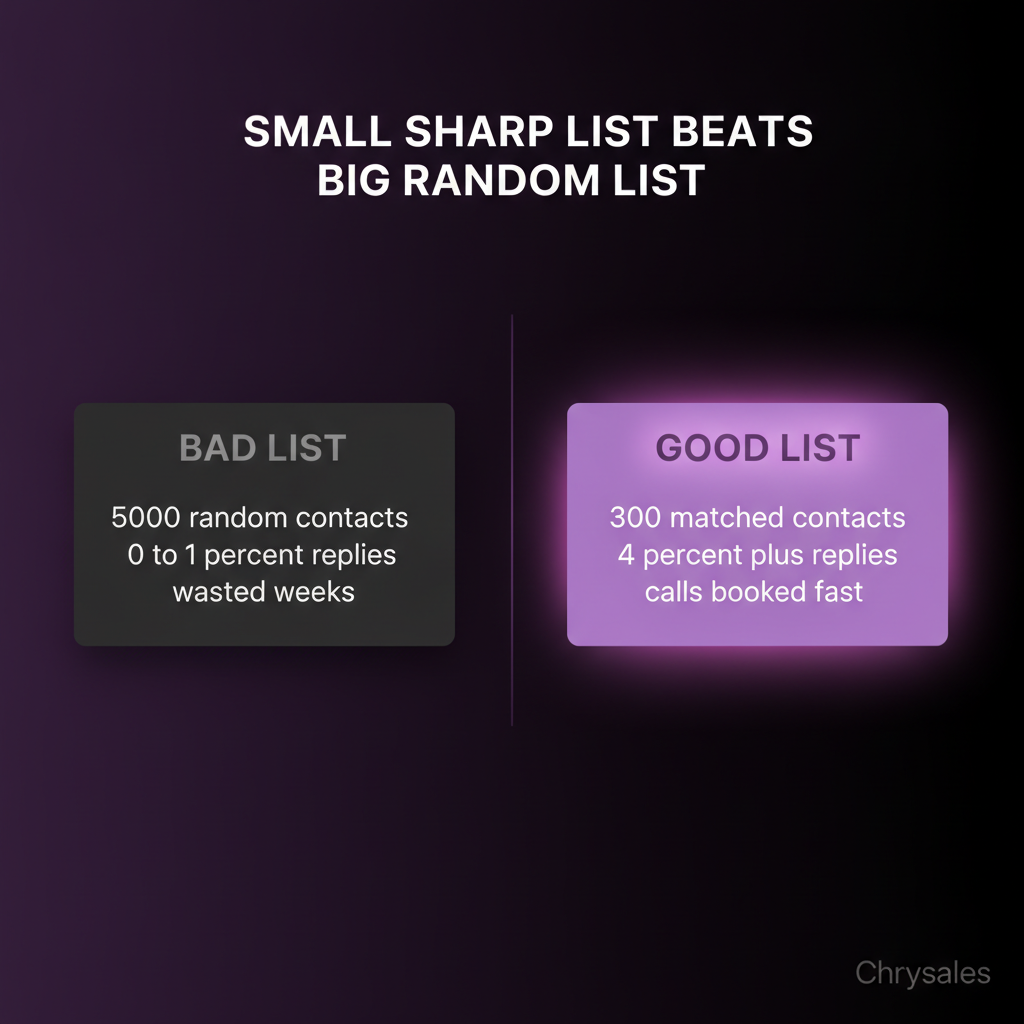
Watch out: The biggest trap is building a massive list fast and assuming volume will make up for bad targeting. It won't. A 200-person list of decision makers who actually need what you sell will outperform a 5,000-person list of random titles every single time.
Quality Beats Quantity Every Time
We worked with a tech company that had a 10,000-contact lead list. Their reply rate was 0.3%. After cutting it down to 800 contacts who matched their ideal customer profile, the reply rate jumped to 4.2%. Same emails. Same team. Different list. When you're doing B2B lead generation, you're not trying to reach everyone. You're trying to reach the right someone.
Start With Your Ideal Customer Profile
Before you touch a spreadsheet or open a prospecting tool, sit down and write out who you're actually looking for. Not in vague terms like "mid-market companies." Get specific.
What Makes Someone a Good Fit?
Ask yourself:
- What industry do they work in?
- How big is their company (headcount, revenue)?
- What tech do they already use?
- What problem are they actively trying to solve?
- Who inside the company makes buying decisions?
Pro Tip: If you've closed deals before, look at your best three clients. What do they have in common? That's your starting point. A 30-person consulting firm isn't the same as a 300-person one. A company using Salesforce has different needs than one using spreadsheets. For a deeper dive into defining your ideal customer profile in B2B sales, the more specific you get about your ICP, the easier everything else becomes.
The Mistake Most Teams Make
Most people define their ICP too broadly because they don't want to "miss opportunities." So they target 15 industries, companies from 10 to 500 people, and anyone with "manager" in their title. That's not an ICP. That's a guessing game. Pick one segment. Nail that segment. Then expand. A marketing agency that targets SaaS companies with 20 to 50 employees will build a better lead list than one targeting "B2B companies of all sizes."
Where to Actually Find Your Leads
Once you know who you're looking for, you need to find them. You've got a few routes here, and the best approach usually mixes two or three. If you want a step-by-step visual guide, watch 4 Ways To Find Clients Who Need Your Services Right Now for practical methods to identify high-intent prospects.
LinkedIn Sales Navigator
This is the go-to for most B2B sales teams. You can filter by job title, company size, industry, location, and even recent company events like funding rounds or job changes. Set up a search with your ICP filters. Save it. Export the results. That's your starting point.
Common mistake: Exporting 1,000 leads at once without verifying the data first. LinkedIn profiles aren't always up to date. Someone might have changed jobs three months ago.
Apollo, ZoomInfo, and Other Data Platforms
Tools like Apollo.io and ZoomInfo let you build lead lists based on firmographic and technographic data. You can search for companies using specific software, in specific revenue ranges, with specific team sizes. These platforms also give you email addresses and phone numbers, which saves time. For a detailed breakdown of how these platforms compare, check out our guide on account list builder tools compared. But the data quality varies. Always plan to verify emails before you send anything.
Your Own Network and Referrals
Don't ignore the low-hanging fruit. Look at:
- Past clients who might need more help
- Referrals from happy customers
- People who engaged with your content but didn't buy
- Warm intros from your team's connections
These leads convert way higher than cold outreach because there's already some trust built in. In fact, research shows that referrals account for a significant portion of B2B sales, often converting at rates 3-5x higher than cold leads.
How to Build Your Lead List Step by Step
Now let's put this into action. Here's the exact process we use with clients at Chrysales when we're setting up targeted lead generation systems.
Step 1: Define Your Filters
Write down the exact criteria for your list:
- Industry: SaaS, consulting, marketing agencies, etc.
- Company size: 20 to 100 employees
- Location: Europe, North America, etc.
- Job titles: Head of Sales, VP Revenue, Sales Director
- Tech stack: Using HubSpot, Salesforce, or similar
These filters become your search parameters in whatever tool you use.
Step 2: Pull the Data
Open your prospecting tool of choice (LinkedIn Sales Navigator, Apollo, Clay, whatever fits your budget). Plug in your filters. Export the results. At this stage, you'll probably get more contacts than you need. That's fine. You'll clean it up next.
Step 3: Enrich and Verify
Raw data from prospecting tools is rarely perfect. You need to:
- Verify email addresses (use a tool like NeverBounce or ZeroBounce)
- Add missing info like direct phone numbers or LinkedIn URLs
- Check that people still work at the companies listed
- Remove obvious bad fits
Pro Tip: Set a simple rule. If an email bounce rate on a sample of 50 contacts is above 10%, your data source isn't good enough. Find a better one or spend more time verifying. Learn more about why email verification before cold email is critical to maintaining sender reputation.
Step 4: Segment Your List
Don't treat every lead the same. Break your list into segments based on:
- Priority: High fit vs. medium fit
- Industry: SaaS vs. consulting vs. agencies
- Size: Small teams vs. larger teams
- Engagement: Warm leads (visited your site, downloaded content) vs. cold
Each segment gets slightly different messaging. A small sales team at a 15-person consulting firm has different problems than a 50-person tech company with a full sales department. Understanding B2B email list segmentation and targeting can improve your reply rates significantly.
Step 5: Add Context and Notes
This is where most teams stop, but it's the step that turns a decent lead list into a great one. For your highest-priority contacts, add a line or two of research:
- Did their company just raise funding?
- Did they post on LinkedIn about a problem you solve?
- Are they hiring for sales roles?
- Did they recently expand into a new market?
You don't need this for every contact. But for your top 50 to 100, it's worth it. Personalized outreach using this context gets 3x to 5x better reply rates than generic cold emails.
Tools That Make Lead List Building Faster
You don't need 10 tools. You need the right two or three that fit your workflow. Here's what actually works for most B2B sales teams.
For Finding Leads
- LinkedIn Sales Navigator: Best for filtering by job title, seniority, company, and activity
- Apollo.io: Good mix of contact data and email verification in one platform
- Clay: Advanced option for teams that want to automate enrichment workflows
For Verifying Emails
- NeverBounce: Fast email verification, catches fake addresses
- Hunter.io: Finds and verifies email addresses for specific domains
- ZeroBounce: Another solid option with good accuracy
For Enrichment
- Clearbit: Adds firmographic data, company size, industry, tech stack
- Lusha: Pulls phone numbers and email addresses
- PhantomBuster: Automates LinkedIn data scraping, use carefully, LinkedIn has limits
Watch out: Don't buy lead lists from sketchy vendors. The data is always old, the contacts didn't opt in, and your emails will get flagged as spam. Build your own list or work with someone who does it properly.
How to Keep Your Lead List Fresh
A lead list isn't a one and done task. People change jobs. Companies shut down. New prospects enter your target market every week. Set a simple rhythm:
- Monthly: Add 50 to 100 new leads who match your ICP
- Quarterly: Scrub your list and remove bounced emails, outdated contacts, and companies that went out of business
- Always: Track which segments and sources convert best, then double down on those
One marketing agency we worked with set up a weekly routine where they added 25 new high-priority leads every Monday. After three months, they had a pipeline of 300 fresh contacts and were booking 4 to 6 calls per week from cold outreach. The secret wasn't a magic email template. It was a constantly updated lead list.
Using Lead Scoring to Prioritize Outreach
Not every lead on your list deserves the same attention. Lead scoring helps you figure out who to contact first. Assign points based on:
- Company size (bigger = more points, if that's your ICP)
- Job title (decision maker = more points)
- Recent activity (funding, hiring, expansion = more points)
- Engagement (visited your site, opened an email = more points)
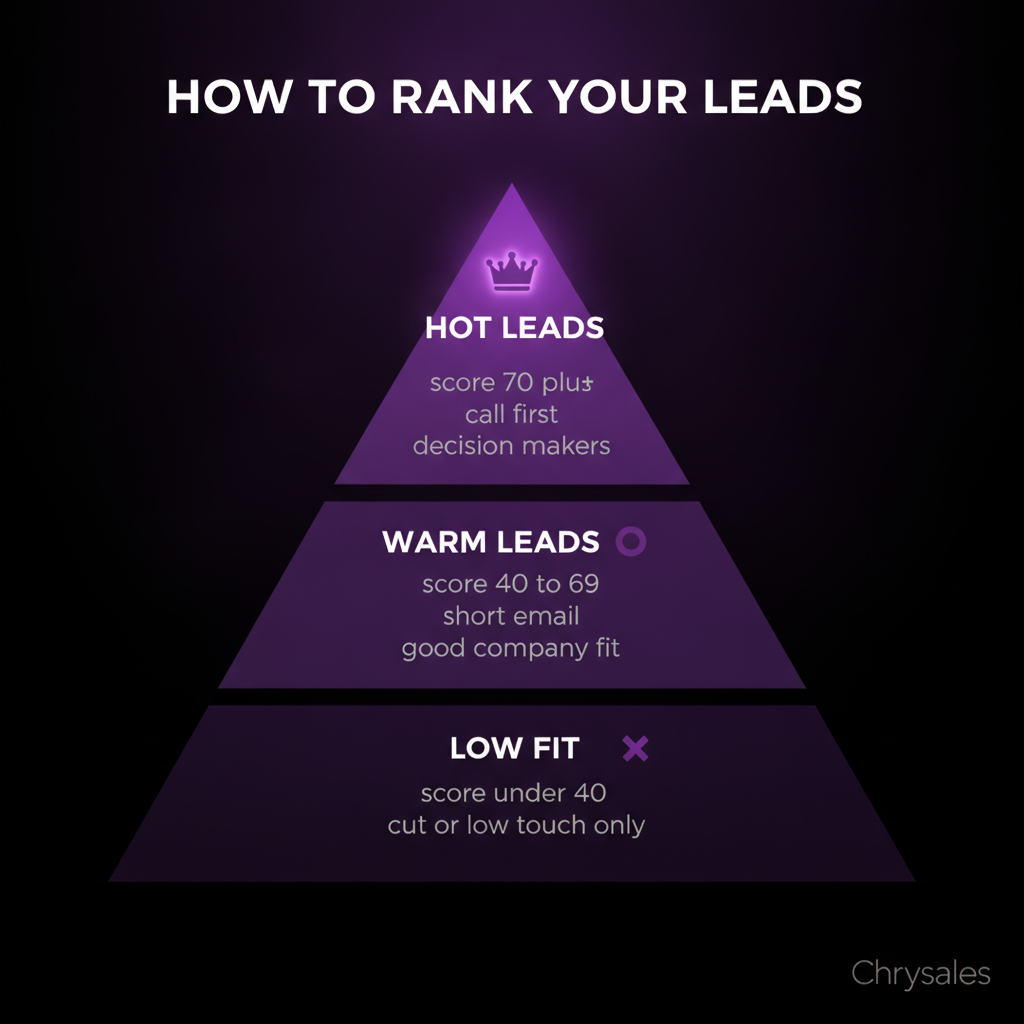
Set a simple rule: anything scoring above 70 goes to the top of your call list. Anything below 40 gets a low-touch email sequence or gets cut entirely. For a deep dive into modern approaches, explore lead qualification scoring models combining behavioral, firmographic, and intent data. This is where AI in sales is starting to make a real difference. At Chrysales, we use Gemini based workflows to automatically score and prioritize leads based on fit and intent signals. To see how AI can automate this entire process, watch AI Sales System Get You Record Revenue (Unlimited Demand) for a real demonstration. It's not magic, but it saves hours of manual work every week.
Common Lead List Mistakes and How to Avoid Them
Most teams make the same handful of mistakes when building their lead list. Here's what to watch for.
Mistake 1: Building Too Big, Too Fast
You don't need 5,000 leads. You need 500 good ones. A giant list feels productive, but if 80% of the contacts are bad fits, you've just created busy work. Start small. Build a tight list of 200 to 300 highly qualified contacts. Test your outreach. Refine your messaging. Then scale up.
Mistake 2: Skipping Email Verification
Sending cold emails to a list with a 15% bounce rate tanks your sender reputation. Email providers notice. Your future emails go to spam, even for good contacts. Always verify emails before your first send. It takes 10 extra minutes and saves weeks of damage control.
Mistake 3: Ignoring Segmentation
Sending the same email to a 10 person startup and a 200 person enterprise company doesn't work. They have different budgets, different buying processes, different problems. Segment your list. Tailor your messaging. Even small tweaks like changing one paragraph based on company size can double your reply rate.
Mistake 4: Treating Your List Like a Static File
Your lead list should be a living sales asset, not a spreadsheet you built once in 2022 and forgot about. Update it. Clean it. Add context. Track what works. The teams that treat their lead list like a CRM pipeline instead of a data dump are the ones booking 10+ calls per month from outbound.
How Chrysales Builds Lead Lists as Part of Full Sales Systems
Here's the truth most sales coaches won't tell you: a good lead list is only useful if you have a system around it. You need:
- A clear offer that solves a real problem
- A cold outreach sequence that gets replies
- A discovery call structure that books meetings
- A follow-up system that doesn't let leads go cold
At Chrysales, we don't just hand clients a spreadsheet and say "good luck." We build the full outbound sales system. That means:
- Defining the ICP based on past wins and market research
- Building a verified, segmented lead list using the process above
- Writing cold outreach sequences that get 3% to 5% reply rates
- Setting up AI powered lead scoring and follow-up automation
- Training sales teams to turn replies into booked calls
We've worked with over 500 sales teams and helped generate €10M+ in client revenue. The pattern is always the same: the teams that win are the ones who treat lead generation as a system, not a task. If you're building this yourself, follow the steps in this guide. If you want help setting up the full system, learn more about how to build a sales system that actually scales, that's what we do.
Frequently Asked Questions
Q: How many leads should I have on my list before I start outreach?
Start with at least 200 high-quality, verified contacts. That's enough to test your messaging and see what works. If you're running a full cold outreach campaign, aim for 500 to 1,000 leads segmented into 3 to 5 buckets. You don't need thousands. Quality and segmentation matter way more than raw numbers. A tight list of 300 decision makers who fit your ICP will outperform a messy list of 3,000 random contacts every time.
Q: What's the best tool for building a B2B lead list?
It depends on your budget and workflow. LinkedIn Sales Navigator is the most popular for filtering by job title and company. Apollo.io is great if you want contact data and email verification in one place. Clay is powerful if you want to automate enrichment workflows. Most small sales teams do fine with Sales Navigator plus a basic email verification tool like NeverBounce. Pick two tools that fit your process and learn them well instead of juggling six mediocre ones.
Q: How often should I update my lead list?
At minimum, clean your list every quarter. Remove bounced emails, outdated contacts, and companies that no longer fit your ICP. Ideally, add 50 to 100 new leads every month so your pipeline stays fresh. If you're running active outbound campaigns, check your list weekly for any contacts who changed jobs or companies. Leads go stale fast, especially in B2B sales where people move around a lot.
Q: Should I buy a lead list or build my own?
Build your own. Bought lists are almost always outdated, full of bad data, and filled with people who didn't opt in to hear from you. Your emails will bounce, your sender reputation will tank, and you'll waste money on contacts who never convert. Building your own list takes more time upfront, but the data is clean, targeted, and way more likely to turn into real conversations and booked calls.
Q: How do I know if my lead list is any good?
Test it. Send a small batch of 50 to 100 emails to a segment of your list. If your bounce rate is under 5%, your open rate is above 30%, and your reply rate is above 2%, your list is solid. To understand what good performance looks like, review typical cold email response rates benchmarks. If bounces are high or nobody replies, your data quality or targeting is off. Go back and tighten your ICP, verify emails better, or add more context and research to each contact before reaching out.
A lead list is a targeted group of prospects chosen to improve lead generation, boost b2b sales, and support client acquisition. It helps you focus on the right people instead of wasting time on random contacts. Most sales teams spend days building a lead list, then wonder why nobody replies. Here's the thing: a huge list full of random contacts won't move the needle. A small, sharp list of the right people will. The difference between wasting two weeks on cold outreach and booking 15 calls in a month usually comes down to how you build your lead list in the first place. This guide shows you exactly how to do it, step by step, without the fluff.
Why Your Lead List Matters More Than Your Pitch
Your sales pitch could be perfect. Your follow-up emails could be chef's kiss. But if your lead list is garbage, none of that matters. Think of your sales pipeline like a phone contact list. If half the numbers don't work, no message gets through. Most teams focus on writing better emails when the real problem is they're sending those emails to the wrong people.
Watch out: The biggest trap is building a massive list fast and assuming volume will make up for bad targeting. It won't. A 200-person list of decision makers who actually need what you sell will outperform a 5,000-person list of random titles every single time.
Quality Beats Quantity Every Time
We worked with a tech company that had a 10,000-contact lead list. Their reply rate was 0.3%. After cutting it down to 800 contacts who matched their ideal customer profile, the reply rate jumped to 4.2%. Same emails. Same team. Different list. When you're doing B2B lead generation, you're not trying to reach everyone. You're trying to reach the right someone.
Start With Your Ideal Customer Profile
Before you touch a spreadsheet or open a prospecting tool, sit down and write out who you're actually looking for. Not in vague terms like "mid-market companies." Get specific.
What Makes Someone a Good Fit?
Ask yourself:
- What industry do they work in?
- How big is their company (headcount, revenue)?
- What tech do they already use?
- What problem are they actively trying to solve?
- Who inside the company makes buying decisions?
Pro Tip: If you've closed deals before, look at your best three clients. What do they have in common? That's your starting point. A 30-person consulting firm isn't the same as a 300-person one. A company using Salesforce has different needs than one using spreadsheets. For a deeper dive into defining your ideal customer profile in B2B sales, the more specific you get about your ICP, the easier everything else becomes.
The Mistake Most Teams Make
Most people define their ICP too broadly because they don't want to "miss opportunities." So they target 15 industries, companies from 10 to 500 people, and anyone with "manager" in their title. That's not an ICP. That's a guessing game. Pick one segment. Nail that segment. Then expand. A marketing agency that targets SaaS companies with 20 to 50 employees will build a better lead list than one targeting "B2B companies of all sizes."
Where to Actually Find Your Leads
Once you know who you're looking for, you need to find them. You've got a few routes here, and the best approach usually mixes two or three. If you want a step-by-step visual guide, watch 4 Ways To Find Clients Who Need Your Services Right Now for practical methods to identify high-intent prospects.
LinkedIn Sales Navigator
This is the go-to for most B2B sales teams. You can filter by job title, company size, industry, location, and even recent company events like funding rounds or job changes. Set up a search with your ICP filters. Save it. Export the results. That's your starting point.
Common mistake: Exporting 1,000 leads at once without verifying the data first. LinkedIn profiles aren't always up to date. Someone might have changed jobs three months ago.
Apollo, ZoomInfo, and Other Data Platforms
Tools like Apollo.io and ZoomInfo let you build lead lists based on firmographic and technographic data. You can search for companies using specific software, in specific revenue ranges, with specific team sizes. These platforms also give you email addresses and phone numbers, which saves time. For a detailed breakdown of how these platforms compare, check out our guide on account list builder tools compared. But the data quality varies. Always plan to verify emails before you send anything.
Your Own Network and Referrals
Don't ignore the low-hanging fruit. Look at:
- Past clients who might need more help
- Referrals from happy customers
- People who engaged with your content but didn't buy
- Warm intros from your team's connections
These leads convert way higher than cold outreach because there's already some trust built in. In fact, research shows that referrals account for a significant portion of B2B sales, often converting at rates 3-5x higher than cold leads.
How to Build Your Lead List Step by Step
Now let's put this into action. Here's the exact process we use with clients at Chrysales when we're setting up targeted lead generation systems.
Step 1: Define Your Filters
Write down the exact criteria for your list:
- Industry: SaaS, consulting, marketing agencies, etc.
- Company size: 20 to 100 employees
- Location: Europe, North America, etc.
- Job titles: Head of Sales, VP Revenue, Sales Director
- Tech stack: Using HubSpot, Salesforce, or similar
These filters become your search parameters in whatever tool you use.
Step 2: Pull the Data
Open your prospecting tool of choice (LinkedIn Sales Navigator, Apollo, Clay, whatever fits your budget). Plug in your filters. Export the results. At this stage, you'll probably get more contacts than you need. That's fine. You'll clean it up next.
Step 3: Enrich and Verify
Raw data from prospecting tools is rarely perfect. You need to:
- Verify email addresses (use a tool like NeverBounce or ZeroBounce)
- Add missing info like direct phone numbers or LinkedIn URLs
- Check that people still work at the companies listed
- Remove obvious bad fits
Pro Tip: Set a simple rule. If an email bounce rate on a sample of 50 contacts is above 10%, your data source isn't good enough. Find a better one or spend more time verifying. Learn more about why email verification before cold email is critical to maintaining sender reputation.
Step 4: Segment Your List
Don't treat every lead the same. Break your list into segments based on:
- Priority: High fit vs. medium fit
- Industry: SaaS vs. consulting vs. agencies
- Size: Small teams vs. larger teams
- Engagement: Warm leads (visited your site, downloaded content) vs. cold
Each segment gets slightly different messaging. A small sales team at a 15-person consulting firm has different problems than a 50-person tech company with a full sales department. Understanding B2B email list segmentation and targeting can improve your reply rates significantly.
Step 5: Add Context and Notes
This is where most teams stop, but it's the step that turns a decent lead list into a great one. For your highest-priority contacts, add a line or two of research:
- Did their company just raise funding?
- Did they post on LinkedIn about a problem you solve?
- Are they hiring for sales roles?
- Did they recently expand into a new market?
You don't need this for every contact. But for your top 50 to 100, it's worth it. Personalized outreach using this context gets 3x to 5x better reply rates than generic cold emails.
Tools That Make Lead List Building Faster
You don't need 10 tools. You need the right two or three that fit your workflow. Here's what actually works for most B2B sales teams.
For Finding Leads
- LinkedIn Sales Navigator: Best for filtering by job title, seniority, company, and activity
- Apollo.io: Good mix of contact data and email verification in one platform
- Clay: Advanced option for teams that want to automate enrichment workflows
For Verifying Emails
- NeverBounce: Fast email verification, catches fake addresses
- Hunter.io: Finds and verifies email addresses for specific domains
- ZeroBounce: Another solid option with good accuracy
For Enrichment
- Clearbit: Adds firmographic data, company size, industry, tech stack
- Lusha: Pulls phone numbers and email addresses
- PhantomBuster: Automates LinkedIn data scraping, use carefully, LinkedIn has limits
Watch out: Don't buy lead lists from sketchy vendors. The data is always old, the contacts didn't opt in, and your emails will get flagged as spam. Build your own list or work with someone who does it properly.
How to Keep Your Lead List Fresh
A lead list isn't a one and done task. People change jobs. Companies shut down. New prospects enter your target market every week. Set a simple rhythm:
- Monthly: Add 50 to 100 new leads who match your ICP
- Quarterly: Scrub your list and remove bounced emails, outdated contacts, and companies that went out of business
- Always: Track which segments and sources convert best, then double down on those
One marketing agency we worked with set up a weekly routine where they added 25 new high-priority leads every Monday. After three months, they had a pipeline of 300 fresh contacts and were booking 4 to 6 calls per week from cold outreach. The secret wasn't a magic email template. It was a constantly updated lead list.
Using Lead Scoring to Prioritize Outreach
Not every lead on your list deserves the same attention. Lead scoring helps you figure out who to contact first. Assign points based on:
- Company size (bigger = more points, if that's your ICP)
- Job title (decision maker = more points)
- Recent activity (funding, hiring, expansion = more points)
- Engagement (visited your site, opened an email = more points)
Set a simple rule: anything scoring above 70 goes to the top of your call list. Anything below 40 gets a low-touch email sequence or gets cut entirely. For a deep dive into modern approaches, explore lead qualification scoring models combining behavioral, firmographic, and intent data. This is where AI in sales is starting to make a real difference. At Chrysales, we use Gemini based workflows to automatically score and prioritize leads based on fit and intent signals. To see how AI can automate this entire process, watch AI Sales System Get You Record Revenue (Unlimited Demand) for a real demonstration. It's not magic, but it saves hours of manual work every week.
Common Lead List Mistakes and How to Avoid Them
Most teams make the same handful of mistakes when building their lead list. Here's what to watch for.
Mistake 1: Building Too Big, Too Fast
You don't need 5,000 leads. You need 500 good ones. A giant list feels productive, but if 80% of the contacts are bad fits, you've just created busy work. Start small. Build a tight list of 200 to 300 highly qualified contacts. Test your outreach. Refine your messaging. Then scale up.
Mistake 2: Skipping Email Verification
Sending cold emails to a list with a 15% bounce rate tanks your sender reputation. Email providers notice. Your future emails go to spam, even for good contacts. Always verify emails before your first send. It takes 10 extra minutes and saves weeks of damage control.
Mistake 3: Ignoring Segmentation
Sending the same email to a 10 person startup and a 200 person enterprise company doesn't work. They have different budgets, different buying processes, different problems. Segment your list. Tailor your messaging. Even small tweaks like changing one paragraph based on company size can double your reply rate.
Mistake 4: Treating Your List Like a Static File
Your lead list should be a living sales asset, not a spreadsheet you built once in 2022 and forgot about. Update it. Clean it. Add context. Track what works. The teams that treat their lead list like a CRM pipeline instead of a data dump are the ones booking 10+ calls per month from outbound.
How Chrysales Builds Lead Lists as Part of Full Sales Systems
Here's the truth most sales coaches won't tell you: a good lead list is only useful if you have a system around it. You need:
- A clear offer that solves a real problem
- A cold outreach sequence that gets replies
- A discovery call structure that books meetings
- A follow-up system that doesn't let leads go cold
At Chrysales, we don't just hand clients a spreadsheet and say "good luck." We build the full outbound sales system. That means:
- Defining the ICP based on past wins and market research
- Building a verified, segmented lead list using the process above
- Writing cold outreach sequences that get 3% to 5% reply rates
- Setting up AI powered lead scoring and follow-up automation
- Training sales teams to turn replies into booked calls
We've worked with over 500 sales teams and helped generate €10M+ in client revenue. The pattern is always the same: the teams that win are the ones who treat lead generation as a system, not a task. If you're building this yourself, follow the steps in this guide. If you want help setting up the full system, learn more about how to build a sales system that actually scales, that's what we do.
Frequently Asked Questions
Q: How many leads should I have on my list before I start outreach?
Start with at least 200 high-quality, verified contacts. That's enough to test your messaging and see what works. If you're running a full cold outreach campaign, aim for 500 to 1,000 leads segmented into 3 to 5 buckets. You don't need thousands. Quality and segmentation matter way more than raw numbers. A tight list of 300 decision makers who fit your ICP will outperform a messy list of 3,000 random contacts every time.
Q: What's the best tool for building a B2B lead list?
It depends on your budget and workflow. LinkedIn Sales Navigator is the most popular for filtering by job title and company. Apollo.io is great if you want contact data and email verification in one place. Clay is powerful if you want to automate enrichment workflows. Most small sales teams do fine with Sales Navigator plus a basic email verification tool like NeverBounce. Pick two tools that fit your process and learn them well instead of juggling six mediocre ones.
Q: How often should I update my lead list?
At minimum, clean your list every quarter. Remove bounced emails, outdated contacts, and companies that no longer fit your ICP. Ideally, add 50 to 100 new leads every month so your pipeline stays fresh. If you're running active outbound campaigns, check your list weekly for any contacts who changed jobs or companies. Leads go stale fast, especially in B2B sales where people move around a lot.
Q: Should I buy a lead list or build my own?
Build your own. Bought lists are almost always outdated, full of bad data, and filled with people who didn't opt in to hear from you. Your emails will bounce, your sender reputation will tank, and you'll waste money on contacts who never convert. Building your own list takes more time upfront, but the data is clean, targeted, and way more likely to turn into real conversations and booked calls.
Q: How do I know if my lead list is any good?
Test it. Send a small batch of 50 to 100 emails to a segment of your list. If your bounce rate is under 5%, your open rate is above 30%, and your reply rate is above 2%, your list is solid. To understand what good performance looks like, review typical cold email response rates benchmarks. If bounces are high or nobody replies, your data quality or targeting is off. Go back and tighten your ICP, verify emails better, or add more context and research to each contact before reaching out.
Scaling Is Not Hard If You Have The Right Systems
If you’re serious about leveling up your scaling game, you need the right system, the right training, and the right team behind you. We're here to give you the exact tools and strategies top entrepreneurs use to dominate.

Discover the latest tips
View All.avif)
Chrysales was formed from the words "chrysalis" the stage where a caterpillar transforms into a butterfly and "sales".
It stands for one thing: sales transformation.Because scaling doesn’t happen by doing more of the same. Scaling only happens when you go through real transformation in your systems, your offer, team and the way you sell.
.avif)


