.avif)
Account List Builder Tools: Types, Use Cases, and Pros
Account list builder tools are software platforms that help B2B sales teams create targeted company lists using filters like firmographics, technographics, and intent data. They improve lead generation by focusing on high-fit accounts for b2b sales and client acquisition.
Most sales teams waste weeks building lists that never convert. The problem is not how many names you collect. It is which names make it onto the list in the first place. A strong account list builder saves time, cuts wasted outreach, and fills your pipeline with prospects that actually fit. This guide breaks down the tool types, when to use each one, and what to watch out for when building your B2B lead list.
Why Account List Building Tools Matter More Than You Think
Sales teams often blame their messaging when outreach fails. But the real issue sits upstream. If your list is wrong, even perfect copy will not save you. An account list builder helps you filter companies by size, industry, tech stack, and dozens of other signals before you write a single email.
Consider a 20-person consulting firm that sells to mid-market SaaS companies. Without filters, they might pull 10,000 contacts from a database. With a proper account list builder, they narrow it to 800 companies that match their ideal customer profile (ICP). The conversion rate jumps because every name on the list already fits.
The Cost of Bad Lists
Bad lists cost more than time. They hurt deliverability, waste sales hours, and train your team to ignore their own pipeline. A study from SalesLoft found that 68% of B2B sales teams struggle with data quality, and poor data is the top reason outbound campaigns underperform. When your account list builder is weak, every step after it breaks down.
What a Good Account List Builder Does
A solid tool filters by firmographics like revenue, employee count, and location. It adds technographic data so you know what software a company uses. It layers in intent signals so you can prioritize accounts that are actively searching for solutions. And it exports clean, structured data that plugs into your CRM without manual cleanup.
Types of Account List Builder Tools and When to Use Each
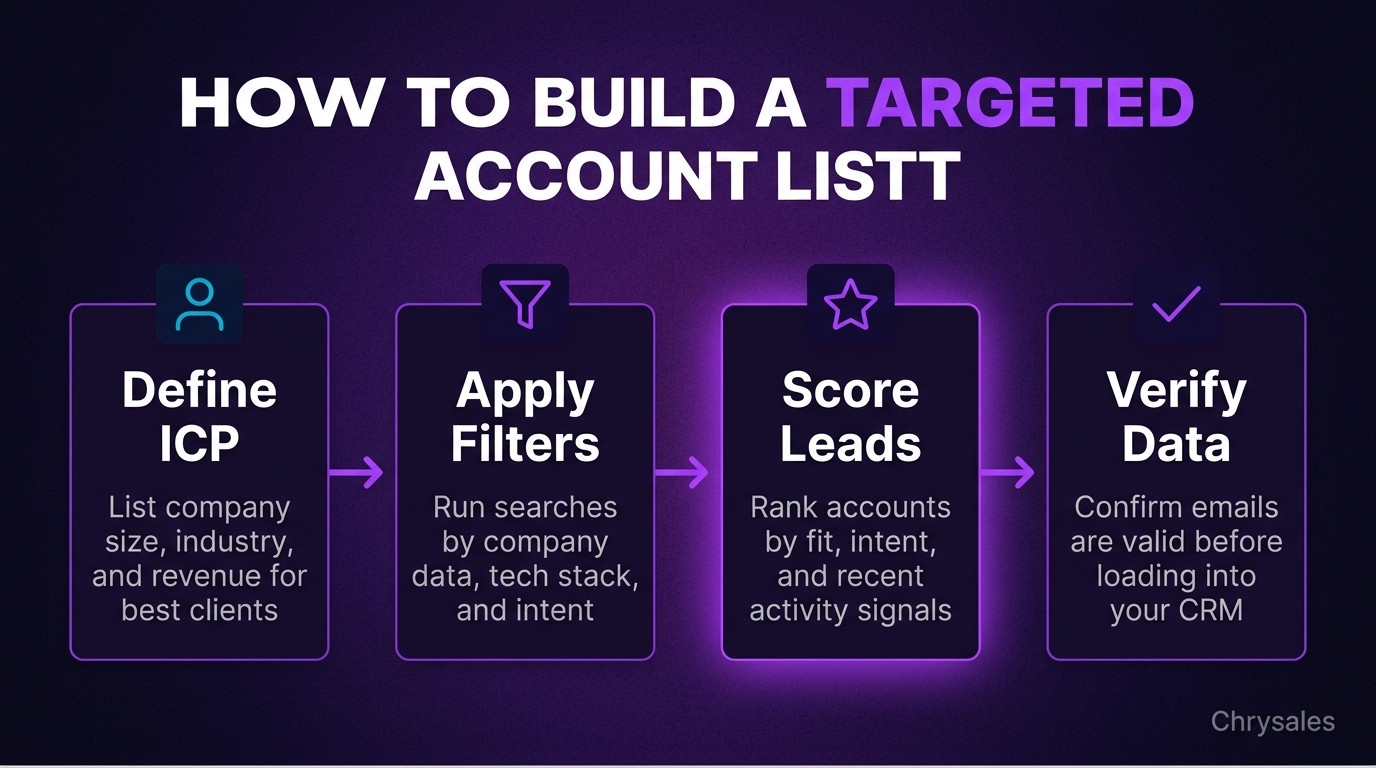
Not all list building tools serve the same goal. Some pull contact emails. Others focus on account-level intelligence. Knowing which type fits your sales motion saves money and speeds up your outbound process.
Contact-Based List Builders
These tools give you individual email addresses and phone numbers. Examples include Apollo, ZoomInfo, and Lusha. They work well for high-volume cold outreach where you need to reach specific people inside target accounts.
Pros:
- Large databases with millions of verified contacts
- Direct dial numbers and mobile phone access
- Built-in email verification to reduce bounce rates
- CRM integrations that sync contact data automatically
Cons:
- Contact details change fast, so accuracy drops over time
- Expensive at scale, especially for small teams
- Data coverage varies by industry and region
- Privacy compliance can be tricky in the EU
Use contact-based list builders when you run cold email or cold calling campaigns and need individual contact info fast. They are less useful if your sales process starts with account research or if you sell to large enterprises where relationships matter more than volume.
Account-Based List Builders
These tools focus on company-level data. Examples include 6sense, Keyplay, and RollWorks. They help you score accounts by fit and intent, then build target lists for account-based marketing (ABM) or sales campaigns.
Pros:
- Deep firmographic and technographic filters
- AI-driven ICP scoring based on your best customers
- Intent data shows which accounts are in-market
- Better for ABM and multi-threaded sales motions
Cons:
- Pricier than contact-only tools
- Requires more setup time to define your ICP
- Some tools need a minimum spend or contract length
- Contact-level data often costs extra
Use account-based list builders when you sell complex B2B solutions, target enterprise accounts, or run coordinated sales and marketing campaigns. They shine when precision matters more than speed.
Technographic and Intent Data Tools
These tools tell you what technology a company uses and whether they are actively researching solutions. Examples include BuiltWith, HG Insights, and Bombora. They layer on top of your existing account list to add buying signals.
Pros:
- Identify companies using competitor tools or adjacent products
- Spot accounts showing intent through content consumption
- Strong signals for timing your outreach
- Integrate with most CRM and marketing automation platforms
Cons:
- Data freshness can lag by weeks or months
- Intent signals are probabilistic, not guaranteed
- Expensive as standalone tools
- Best used in combination with other list builders
Use these when your product replaces or complements existing software, or when timing matters more than volume. A marketing agency targeting companies using outdated CRM systems would benefit from technographic filters. A sales training firm could use intent data to find companies searching for "sales coaching" or "B2B lead generation."
How to Choose the Right Account List Builder for Your Sales Process
The best tool depends on your deal size, sales cycle, and team structure. A 10-person IT services company selling $5,000 contracts needs a different setup than a 40-person consulting firm closing $150,000 deals.
Match the Tool to Your Deal Size
For deals under $10,000, speed and volume matter. Use a contact-based list builder with strong email verification. Build lists of 500 to 1,000 prospects, run cold email sequences, and iterate fast.
For deals between $10,000 and $50,000, add account-level filters. Use a tool that combines firmographics with basic intent data. Build smaller lists of 200 to 400 accounts. Research each account before you reach out.
For deals above $50,000, focus on precision. Use an account-based list builder with ICP scoring and intent signals. Build lists of 50 to 100 high-fit accounts. Customize every touchpoint.
Consider Data Coverage by Region and Industry
Not all databases cover every market equally. ZoomInfo and Apollo have strong coverage in North America but weaker data in Asia and Latin America. If you sell internationally, test a few tools before you commit.
Industry coverage also varies. Tech and SaaS companies are well-represented in most databases. Manufacturing, logistics, and niche B2B verticals often have gaps. Check sample data for your target industries before you buy.
Integration and Workflow Fit
Your account list builder should plug into your CRM without friction. Look for native integrations with HubSpot, Salesforce, or Pipedrive. Check whether the tool supports bulk exports, API access, and automatic data refresh.
Pro Tip: Test the export format before you buy. Some tools export messy CSVs that require manual cleanup. Others push clean, structured data straight into your CRM fields.
Building a Targeted Prospect List: Step-by-Step Process
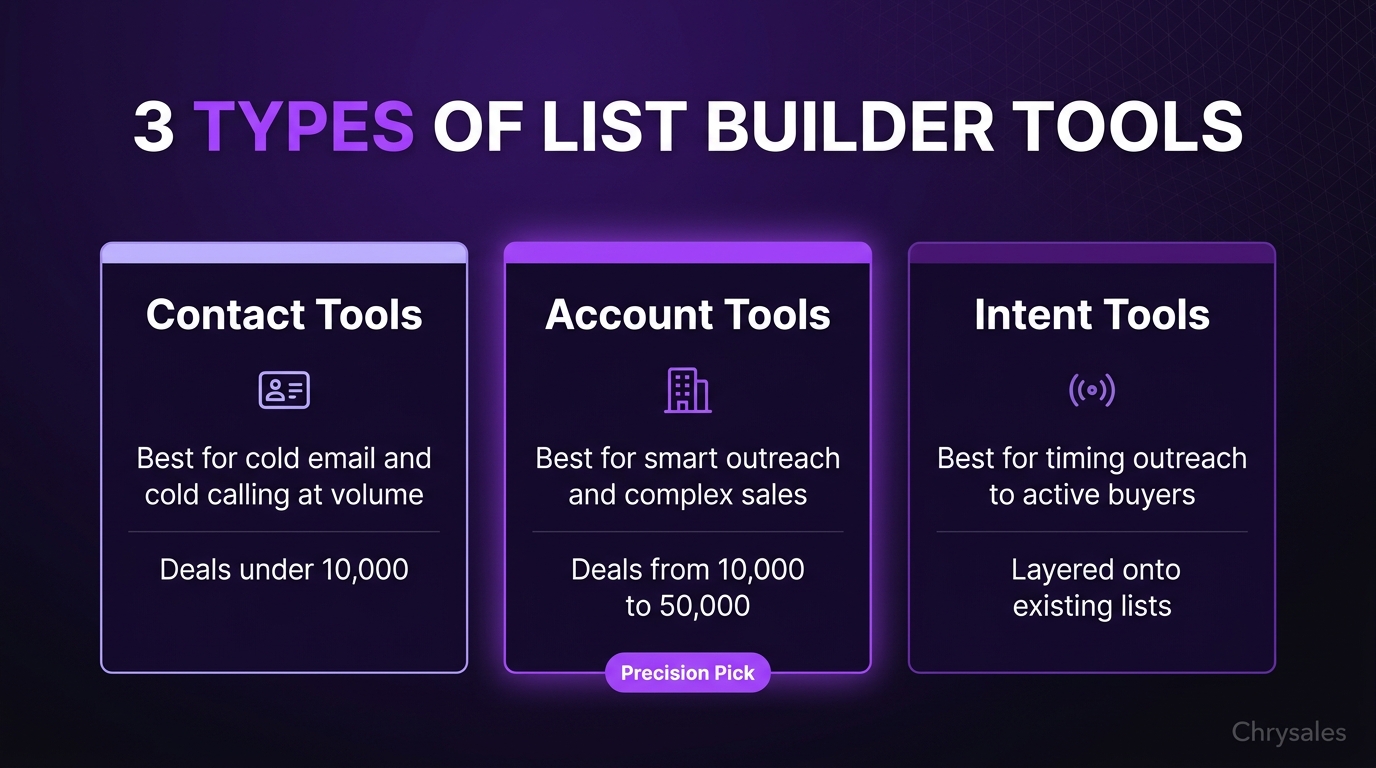
Once you pick a tool, the next step is building your first list. This process works whether you use a contact-based tool or an account-based platform.
Step 1: Define Your Ideal Customer Profile
Start with firmographics. List the company size, industry, location, and revenue range of your best customers. Be specific. "Tech companies" is too broad. "SaaS companies with 20 to 200 employees selling to enterprise buyers" is better.
Add technographic criteria if relevant. What tools do your best customers use? What tech stack signals buying intent? A sales automation vendor might target companies using HubSpot or Salesforce but not using a sales engagement tool yet.
Layer in behavioral signals. Are your best customers growing fast? Did they recently raise funding? Are they hiring for sales roles? These filters turn a good list into a great one.
Step 2: Apply Filters and Run Your First Search
Open your account list builder and apply the filters you defined. Start broad, then tighten. If your first search returns 10,000 accounts, add another filter. If it returns 50, loosen one.
Most tools let you save searches and set alerts. Save your ICP search so you can rerun it monthly. Set alerts for new accounts that match your criteria so you catch them early. You can also learn how to find clients who need your services right now for practical lead generation strategies that work with targeted account lists.
Step 3: Score and Prioritize Accounts
Not every account on your list deserves equal attention. Score each account based on fit and intent. A simple scoring model might assign points for:
- Company size matches ICP (10 points)
- Industry matches ICP (10 points)
- Uses relevant tech stack (15 points)
- Shows intent signals (20 points)
- Recent funding or hiring activity (10 points)
Set a threshold. Anything scoring above 40 goes into your priority queue. Anything below 30 gets saved for later or dropped.
Step 4: Enrich and Verify Data
Even the best account list builder gives you incomplete data. Enrich your list with additional fields like company website, LinkedIn profile, and recent news. Tools like Clearbit and Hunter.io help fill gaps.
Verify email addresses before you send. Use a verification tool like NeverBounce or Zerobounce to reduce bounce rates. A bounce rate above 5% hurts deliverability and flags your domain as spam.
Step 5: Export and Load into Your CRM
Export your final list and load it into your CRM. Map fields carefully so data lands in the right place. Tag accounts by list source, campaign, or ICP segment so you can track performance later.
Watch out: Do not skip tagging. Six months from now, you will want to know which list drove the most pipeline. If every account looks the same in your CRM, you lose that insight.
Common Mistakes When Using List Building Tools
Even with the right tools, most teams make a few predictable mistakes. Avoid these and your lists will convert faster.
Mistake 1: Building Lists Without Testing Outreach
Some teams spend weeks perfecting a list before they send a single message. Build a small test list of 100 accounts, run outreach, and measure response rates. If the list works, scale it. If it does not, adjust your filters before you waste time on 1,000 more names.
Mistake 2: Ignoring Data Decay
Contact data goes stale fast. A study by ZoomInfo found that B2B contact data decays at about 30% per year. People change jobs, companies get acquired, and email addresses expire. Refresh your lists every 90 days or set up automatic updates in your account list builder.
Mistake 3: Over-Filtering and Building Tiny Lists
It is possible to filter too much. A 15-person marketing agency might define their ICP so narrowly that only 20 companies in the world match. Broaden one or two criteria. You can always deprioritize lower-fit accounts instead of excluding them entirely.
Mistake 4: Treating All Lists the Same
A list built for cold email needs different data than a list built for LinkedIn outreach. Cold email needs verified email addresses and job titles. LinkedIn outreach needs accurate LinkedIn URLs and connection status. Choose your fields based on the channel you plan to use.
Integrating Your Account List Builder into a Full Sales System
An account list builder is just one piece. To turn lists into revenue, connect list building to your offer, outreach sequences, and closing process.
From List to Offer
Your ICP and your offer should match. If your list targets fast-growing SaaS companies, your offer should solve a problem fast-growing SaaS companies actually have. A mismatch here kills conversion no matter how good your list is.
Chrysales builds custom sales systems that connect list building to offer positioning. Instead of treating list building as a standalone task, we help B2B companies design their ICP around the problems they solve best, then build lists that reflect that focus. This approach has helped generate over €10M in client revenue across 500+ sales teams.
From List to Outreach Sequence
Once your list is ready, load it into a sequence. A typical cold outreach sequence includes three to five emails over two weeks, plus LinkedIn touches and maybe a call attempt. Personalize the first line based on data from your account list builder. Mention their industry, tech stack, or a recent company milestone, and apply proven sales tactics to improve your closing rate once prospects engage.
From Outreach to Discovery Call
When a prospect responds, move them into your discovery process. Use structured discovery questions to qualify fit and uncover pain. The best sales systems treat discovery as a continuation of list building. You already filtered by firmographics. Now filter by budget, urgency, and decision-making authority.
Chrysales trains teams on discovery frameworks that tie back to ICP criteria. We teach how to ask questions that confirm fit and disqualify bad leads early, saving time and keeping your pipeline clean.
Best Practices for Maintaining and Scaling Your Account Lists
Building one great list is not enough. Top-performing sales teams maintain and scale their lists over time, especially when following B2B sales best practices for engagement that drive consistent results.
Set a Monthly List Review Routine
Block one hour per month to review your lists. Remove dead accounts. Add new filters based on what you learned from recent deals. Update your ICP criteria as your product or market changes.
Track which list segments convert best. If accounts in the 50 to 100 employee range close faster than accounts with 200 to 500 employees, shift your list-building focus.
Use AI to Improve ICP Scoring
Modern account list builders use AI to score accounts based on fit and buying intent. Tools like Keyplay and 6sense analyze your closed deals and suggest new accounts that match the same pattern. This works better than manual filtering once you have 20 or more closed deals to train the model.
Pro Tip: If your account list builder has an AI scoring feature, feed it data on closed-lost deals too. Teaching the model what to avoid is just as useful as teaching it what to target.
Automate Data Refresh and Enrichment
Set up automatic data refresh so your CRM stays current. Many account list builders offer scheduled syncs that update contact details, add new hires, or flag accounts showing intent. Automation reduces manual work and keeps your lists accurate.
Share Lists Across Sales and Marketing
Your marketing team should use the same ICP and account lists as your sales team. When both teams target the same accounts, conversion rates improve. A coordinated approach using tools like RollWorks or 6sense connects account-based selling with account-based marketing, ensuring consistent messaging across channels.
How Chrysales Helps B2B Companies Build and Activate Winning Lists
Most companies treat list building as a data task. Chrysales treats it as the foundation of a full client acquisition system. We work 1-on-1 with B2B businesses to define their ICP, choose the right tools, and connect list building to their offer, outreach, and closing process.
Our 4-step methodology starts with learning your business and ideal customer. Then we build custom systems that include list sourcing, scoring, and segmentation. We automate repetitive tasks using AI workflows, often built on Gemini-based tools. Finally, we help you hire and train elite setters and closers who activate those lists and turn them into revenue, as part of building a sales system that actually scales with predictable revenue generation.
With over 1,000 business owners trained, a 99.4% client satisfaction rate, and €10M+ in revenue generated for clients, we have proven that list building works best when it sits inside a complete, repeatable sales system. Our clients include companies like Amazon, Vodafone, and Cloudification, as well as lean sales teams at consulting firms and marketing agencies across Europe and beyond.
If your lists are not converting, the issue might not be the tool. It might be the system around it, and understanding the full landscape of B2B sales strategies and methodologies can help you diagnose what is missing from your current approach.
Frequently Asked Questions
Q: What is the difference between a contact list builder and an account list builder?
A contact list builder focuses on individual people. It gives you email addresses, phone numbers, and job titles. An account list builder focuses on companies. It gives you firmographic data, technographic signals, and intent scores. Use a contact list builder for high-volume outreach. Use an account list builder for account-based sales or when you need to research companies before reaching out.
Q: How often should I refresh my B2B lead list?
Refresh your list every 90 days at minimum. Contact data decays fast. People change jobs, companies get acquired, and email addresses expire. If your account list builder supports automatic updates, turn them on. If not, schedule a quarterly manual refresh to remove bad data and add new accounts.
Q: Can I build an account list for free?
Yes, but with limits. Free tools like LinkedIn Sales Navigator (trial), Hunter.io (limited searches), and Keyplay (freemium version) let you build small lists. For serious B2B lead generation, you will need a paid tool with better filters, more data, and CRM integration. Free tools work for testing or very early-stage outbound.
Q: What makes a good ICP for list building?
A good ICP is specific but not too narrow. Include firmographics like company size, industry, and location. Add technographics if your product integrates with or replaces other tools. Layer in behavioral signals like growth rate, funding, or hiring activity. Test your ICP with a small list before you scale. If response rates are low, adjust your filters.
Q: How do I know if my account list is working?
Track three metrics: response rate, meeting booking rate, and closed deal rate by list source. If your cold outreach gets a 2 to 5% reply rate and books meetings at 0.5 to 1%, your list is probably good. If replies are under 1%, your list might be too broad or off-target. Tag every list in your CRM so you can compare performance over time.
Q: Should I buy a list or build it myself with an account list builder?
Build it yourself. Bought lists are outdated, unverified, and often violate privacy laws like GDPR. An account list builder gives you fresh data, precise filters, and the ability to update your list as your ICP changes. Bought lists might be cheaper upfront, but they cost more in the long run through wasted outreach and poor deliverability.
Q: What role does sales training play in list building?
Sales training teaches your team how to use lists effectively. A great list means nothing if your team does not know how to research accounts, personalize outreach, or ask the right discovery questions. Training connects list building to your full sales process, ensuring your team knows not just who to target but how to close them once they respond.
Account list builder tools are software platforms that help B2B sales teams create targeted company lists using filters like firmographics, technographics, and intent data. They improve lead generation by focusing on high-fit accounts for b2b sales and client acquisition.
Most sales teams waste weeks building lists that never convert. The problem is not how many names you collect. It is which names make it onto the list in the first place. A strong account list builder saves time, cuts wasted outreach, and fills your pipeline with prospects that actually fit. This guide breaks down the tool types, when to use each one, and what to watch out for when building your B2B lead list.
Why Account List Building Tools Matter More Than You Think
Sales teams often blame their messaging when outreach fails. But the real issue sits upstream. If your list is wrong, even perfect copy will not save you. An account list builder helps you filter companies by size, industry, tech stack, and dozens of other signals before you write a single email.
Consider a 20-person consulting firm that sells to mid-market SaaS companies. Without filters, they might pull 10,000 contacts from a database. With a proper account list builder, they narrow it to 800 companies that match their ideal customer profile (ICP). The conversion rate jumps because every name on the list already fits.
The Cost of Bad Lists
Bad lists cost more than time. They hurt deliverability, waste sales hours, and train your team to ignore their own pipeline. A study from SalesLoft found that 68% of B2B sales teams struggle with data quality, and poor data is the top reason outbound campaigns underperform. When your account list builder is weak, every step after it breaks down.
What a Good Account List Builder Does
A solid tool filters by firmographics like revenue, employee count, and location. It adds technographic data so you know what software a company uses. It layers in intent signals so you can prioritize accounts that are actively searching for solutions. And it exports clean, structured data that plugs into your CRM without manual cleanup.
Types of Account List Builder Tools and When to Use Each
Not all list building tools serve the same goal. Some pull contact emails. Others focus on account-level intelligence. Knowing which type fits your sales motion saves money and speeds up your outbound process.
Contact-Based List Builders
These tools give you individual email addresses and phone numbers. Examples include Apollo, ZoomInfo, and Lusha. They work well for high-volume cold outreach where you need to reach specific people inside target accounts.
Pros:
- Large databases with millions of verified contacts
- Direct dial numbers and mobile phone access
- Built-in email verification to reduce bounce rates
- CRM integrations that sync contact data automatically
Cons:
- Contact details change fast, so accuracy drops over time
- Expensive at scale, especially for small teams
- Data coverage varies by industry and region
- Privacy compliance can be tricky in the EU
Use contact-based list builders when you run cold email or cold calling campaigns and need individual contact info fast. They are less useful if your sales process starts with account research or if you sell to large enterprises where relationships matter more than volume.
Account-Based List Builders
These tools focus on company-level data. Examples include 6sense, Keyplay, and RollWorks. They help you score accounts by fit and intent, then build target lists for account-based marketing (ABM) or sales campaigns.
Pros:
- Deep firmographic and technographic filters
- AI-driven ICP scoring based on your best customers
- Intent data shows which accounts are in-market
- Better for ABM and multi-threaded sales motions
Cons:
- Pricier than contact-only tools
- Requires more setup time to define your ICP
- Some tools need a minimum spend or contract length
- Contact-level data often costs extra
Use account-based list builders when you sell complex B2B solutions, target enterprise accounts, or run coordinated sales and marketing campaigns. They shine when precision matters more than speed.
Technographic and Intent Data Tools
These tools tell you what technology a company uses and whether they are actively researching solutions. Examples include BuiltWith, HG Insights, and Bombora. They layer on top of your existing account list to add buying signals.
Pros:
- Identify companies using competitor tools or adjacent products
- Spot accounts showing intent through content consumption
- Strong signals for timing your outreach
- Integrate with most CRM and marketing automation platforms
Cons:
- Data freshness can lag by weeks or months
- Intent signals are probabilistic, not guaranteed
- Expensive as standalone tools
- Best used in combination with other list builders
Use these when your product replaces or complements existing software, or when timing matters more than volume. A marketing agency targeting companies using outdated CRM systems would benefit from technographic filters. A sales training firm could use intent data to find companies searching for "sales coaching" or "B2B lead generation."
How to Choose the Right Account List Builder for Your Sales Process
The best tool depends on your deal size, sales cycle, and team structure. A 10-person IT services company selling $5,000 contracts needs a different setup than a 40-person consulting firm closing $150,000 deals.
Match the Tool to Your Deal Size
For deals under $10,000, speed and volume matter. Use a contact-based list builder with strong email verification. Build lists of 500 to 1,000 prospects, run cold email sequences, and iterate fast.
For deals between $10,000 and $50,000, add account-level filters. Use a tool that combines firmographics with basic intent data. Build smaller lists of 200 to 400 accounts. Research each account before you reach out.
For deals above $50,000, focus on precision. Use an account-based list builder with ICP scoring and intent signals. Build lists of 50 to 100 high-fit accounts. Customize every touchpoint.
Consider Data Coverage by Region and Industry
Not all databases cover every market equally. ZoomInfo and Apollo have strong coverage in North America but weaker data in Asia and Latin America. If you sell internationally, test a few tools before you commit.
Industry coverage also varies. Tech and SaaS companies are well-represented in most databases. Manufacturing, logistics, and niche B2B verticals often have gaps. Check sample data for your target industries before you buy.
Integration and Workflow Fit
Your account list builder should plug into your CRM without friction. Look for native integrations with HubSpot, Salesforce, or Pipedrive. Check whether the tool supports bulk exports, API access, and automatic data refresh.
Pro Tip: Test the export format before you buy. Some tools export messy CSVs that require manual cleanup. Others push clean, structured data straight into your CRM fields.
Building a Targeted Prospect List: Step-by-Step Process
Once you pick a tool, the next step is building your first list. This process works whether you use a contact-based tool or an account-based platform.
Step 1: Define Your Ideal Customer Profile
Start with firmographics. List the company size, industry, location, and revenue range of your best customers. Be specific. "Tech companies" is too broad. "SaaS companies with 20 to 200 employees selling to enterprise buyers" is better.
Add technographic criteria if relevant. What tools do your best customers use? What tech stack signals buying intent? A sales automation vendor might target companies using HubSpot or Salesforce but not using a sales engagement tool yet.
Layer in behavioral signals. Are your best customers growing fast? Did they recently raise funding? Are they hiring for sales roles? These filters turn a good list into a great one.
Step 2: Apply Filters and Run Your First Search
Open your account list builder and apply the filters you defined. Start broad, then tighten. If your first search returns 10,000 accounts, add another filter. If it returns 50, loosen one.
Most tools let you save searches and set alerts. Save your ICP search so you can rerun it monthly. Set alerts for new accounts that match your criteria so you catch them early. You can also learn how to find clients who need your services right now for practical lead generation strategies that work with targeted account lists.
Step 3: Score and Prioritize Accounts
Not every account on your list deserves equal attention. Score each account based on fit and intent. A simple scoring model might assign points for:
- Company size matches ICP (10 points)
- Industry matches ICP (10 points)
- Uses relevant tech stack (15 points)
- Shows intent signals (20 points)
- Recent funding or hiring activity (10 points)
Set a threshold. Anything scoring above 40 goes into your priority queue. Anything below 30 gets saved for later or dropped.
Step 4: Enrich and Verify Data
Even the best account list builder gives you incomplete data. Enrich your list with additional fields like company website, LinkedIn profile, and recent news. Tools like Clearbit and Hunter.io help fill gaps.
Verify email addresses before you send. Use a verification tool like NeverBounce or Zerobounce to reduce bounce rates. A bounce rate above 5% hurts deliverability and flags your domain as spam.
Step 5: Export and Load into Your CRM
Export your final list and load it into your CRM. Map fields carefully so data lands in the right place. Tag accounts by list source, campaign, or ICP segment so you can track performance later.
Watch out: Do not skip tagging. Six months from now, you will want to know which list drove the most pipeline. If every account looks the same in your CRM, you lose that insight.
Common Mistakes When Using List Building Tools
Even with the right tools, most teams make a few predictable mistakes. Avoid these and your lists will convert faster.
Mistake 1: Building Lists Without Testing Outreach
Some teams spend weeks perfecting a list before they send a single message. Build a small test list of 100 accounts, run outreach, and measure response rates. If the list works, scale it. If it does not, adjust your filters before you waste time on 1,000 more names.
Mistake 2: Ignoring Data Decay
Contact data goes stale fast. A study by ZoomInfo found that B2B contact data decays at about 30% per year. People change jobs, companies get acquired, and email addresses expire. Refresh your lists every 90 days or set up automatic updates in your account list builder.
Mistake 3: Over-Filtering and Building Tiny Lists
It is possible to filter too much. A 15-person marketing agency might define their ICP so narrowly that only 20 companies in the world match. Broaden one or two criteria. You can always deprioritize lower-fit accounts instead of excluding them entirely.
Mistake 4: Treating All Lists the Same
A list built for cold email needs different data than a list built for LinkedIn outreach. Cold email needs verified email addresses and job titles. LinkedIn outreach needs accurate LinkedIn URLs and connection status. Choose your fields based on the channel you plan to use.
Integrating Your Account List Builder into a Full Sales System
An account list builder is just one piece. To turn lists into revenue, connect list building to your offer, outreach sequences, and closing process.
From List to Offer
Your ICP and your offer should match. If your list targets fast-growing SaaS companies, your offer should solve a problem fast-growing SaaS companies actually have. A mismatch here kills conversion no matter how good your list is.
Chrysales builds custom sales systems that connect list building to offer positioning. Instead of treating list building as a standalone task, we help B2B companies design their ICP around the problems they solve best, then build lists that reflect that focus. This approach has helped generate over €10M in client revenue across 500+ sales teams.
From List to Outreach Sequence
Once your list is ready, load it into a sequence. A typical cold outreach sequence includes three to five emails over two weeks, plus LinkedIn touches and maybe a call attempt. Personalize the first line based on data from your account list builder. Mention their industry, tech stack, or a recent company milestone, and apply proven sales tactics to improve your closing rate once prospects engage.
From Outreach to Discovery Call
When a prospect responds, move them into your discovery process. Use structured discovery questions to qualify fit and uncover pain. The best sales systems treat discovery as a continuation of list building. You already filtered by firmographics. Now filter by budget, urgency, and decision-making authority.
Chrysales trains teams on discovery frameworks that tie back to ICP criteria. We teach how to ask questions that confirm fit and disqualify bad leads early, saving time and keeping your pipeline clean.
Best Practices for Maintaining and Scaling Your Account Lists
Building one great list is not enough. Top-performing sales teams maintain and scale their lists over time, especially when following B2B sales best practices for engagement that drive consistent results.
Set a Monthly List Review Routine
Block one hour per month to review your lists. Remove dead accounts. Add new filters based on what you learned from recent deals. Update your ICP criteria as your product or market changes.
Track which list segments convert best. If accounts in the 50 to 100 employee range close faster than accounts with 200 to 500 employees, shift your list-building focus.
Use AI to Improve ICP Scoring
Modern account list builders use AI to score accounts based on fit and buying intent. Tools like Keyplay and 6sense analyze your closed deals and suggest new accounts that match the same pattern. This works better than manual filtering once you have 20 or more closed deals to train the model.
Pro Tip: If your account list builder has an AI scoring feature, feed it data on closed-lost deals too. Teaching the model what to avoid is just as useful as teaching it what to target.
Automate Data Refresh and Enrichment
Set up automatic data refresh so your CRM stays current. Many account list builders offer scheduled syncs that update contact details, add new hires, or flag accounts showing intent. Automation reduces manual work and keeps your lists accurate.
Share Lists Across Sales and Marketing
Your marketing team should use the same ICP and account lists as your sales team. When both teams target the same accounts, conversion rates improve. A coordinated approach using tools like RollWorks or 6sense connects account-based selling with account-based marketing, ensuring consistent messaging across channels.
How Chrysales Helps B2B Companies Build and Activate Winning Lists
Most companies treat list building as a data task. Chrysales treats it as the foundation of a full client acquisition system. We work 1-on-1 with B2B businesses to define their ICP, choose the right tools, and connect list building to their offer, outreach, and closing process.
Our 4-step methodology starts with learning your business and ideal customer. Then we build custom systems that include list sourcing, scoring, and segmentation. We automate repetitive tasks using AI workflows, often built on Gemini-based tools. Finally, we help you hire and train elite setters and closers who activate those lists and turn them into revenue, as part of building a sales system that actually scales with predictable revenue generation.
With over 1,000 business owners trained, a 99.4% client satisfaction rate, and €10M+ in revenue generated for clients, we have proven that list building works best when it sits inside a complete, repeatable sales system. Our clients include companies like Amazon, Vodafone, and Cloudification, as well as lean sales teams at consulting firms and marketing agencies across Europe and beyond.
If your lists are not converting, the issue might not be the tool. It might be the system around it, and understanding the full landscape of B2B sales strategies and methodologies can help you diagnose what is missing from your current approach.
Frequently Asked Questions
Q: What is the difference between a contact list builder and an account list builder?
A contact list builder focuses on individual people. It gives you email addresses, phone numbers, and job titles. An account list builder focuses on companies. It gives you firmographic data, technographic signals, and intent scores. Use a contact list builder for high-volume outreach. Use an account list builder for account-based sales or when you need to research companies before reaching out.
Q: How often should I refresh my B2B lead list?
Refresh your list every 90 days at minimum. Contact data decays fast. People change jobs, companies get acquired, and email addresses expire. If your account list builder supports automatic updates, turn them on. If not, schedule a quarterly manual refresh to remove bad data and add new accounts.
Q: Can I build an account list for free?
Yes, but with limits. Free tools like LinkedIn Sales Navigator (trial), Hunter.io (limited searches), and Keyplay (freemium version) let you build small lists. For serious B2B lead generation, you will need a paid tool with better filters, more data, and CRM integration. Free tools work for testing or very early-stage outbound.
Q: What makes a good ICP for list building?
A good ICP is specific but not too narrow. Include firmographics like company size, industry, and location. Add technographics if your product integrates with or replaces other tools. Layer in behavioral signals like growth rate, funding, or hiring activity. Test your ICP with a small list before you scale. If response rates are low, adjust your filters.
Q: How do I know if my account list is working?
Track three metrics: response rate, meeting booking rate, and closed deal rate by list source. If your cold outreach gets a 2 to 5% reply rate and books meetings at 0.5 to 1%, your list is probably good. If replies are under 1%, your list might be too broad or off-target. Tag every list in your CRM so you can compare performance over time.
Q: Should I buy a list or build it myself with an account list builder?
Build it yourself. Bought lists are outdated, unverified, and often violate privacy laws like GDPR. An account list builder gives you fresh data, precise filters, and the ability to update your list as your ICP changes. Bought lists might be cheaper upfront, but they cost more in the long run through wasted outreach and poor deliverability.
Q: What role does sales training play in list building?
Sales training teaches your team how to use lists effectively. A great list means nothing if your team does not know how to research accounts, personalize outreach, or ask the right discovery questions. Training connects list building to your full sales process, ensuring your team knows not just who to target but how to close them once they respond.
Scaling Is Not Hard If You Have The Right Systems
If you’re serious about leveling up your scaling game, you need the right system, the right training, and the right team behind you. We're here to give you the exact tools and strategies top entrepreneurs use to dominate.

Discover the latest tips
View All.avif)
Chrysales was formed from the words "chrysalis" the stage where a caterpillar transforms into a butterfly and "sales".
It stands for one thing: sales transformation.Because scaling doesn’t happen by doing more of the same. Scaling only happens when you go through real transformation in your systems, your offer, team and the way you sell.
.avif)


