
How many cold emails per day? Limits per inbox and domain
How many cold emails per day you can send depends on the reputation of each inbox and domain, not on the provider cap. Google Workspace allows 2,000 messages a day per user and Microsoft 365 allows 10,000 recipients a day per mailbox (as of November 2026). On one sending platform the median mailbox sends 14 cold emails a day, and in one vendor's data accounts sending 20 to 49 a day had reply rates 27% above average. For more, add inboxes and raise volume only while spam complaints and bounces stay low.
Keep two numbers apart as you read. Per inbox is what one mailbox sends in a day. Per domain is the total of every inbox on that domain, and that total is what Google counts for its bulk sender line.
How much you can send is a technical question. Whether you may email a given prospect at all depends on their country, and Germany requires prior consent (see the section on Germany and the EU).
How many cold emails per day can one inbox send?
No email provider publishes a cold email number per inbox. The numbers you see online are three different things: provider caps on what an account can send, bulk sender thresholds that decide which rules apply, and ranges from people who run cold email every day. The descriptive data that exists puts a typical mailbox at 8 to 24 cold emails a day, and the little outcome data points to 20 to 49 a day per account.
| Number people quote | What it really is | Source |
|---|---|---|
| 2,000 a day | Google Workspace sending cap per user, a technical ceiling | Google Workspace Admin Help |
| 10,000 a day | Microsoft 365 recipient cap per mailbox | Microsoft Learn |
| 5,000 a day | The line where Google treats a domain as a bulk sender to personal Gmail | Google's sender guidelines FAQ |
| 20 to 49 a day | Per-account band with reply rates 27% above average, in one vendor's data | Hunter, State of Email Outreach 2026 |
| 14 a day | What the median mailbox sends on one sending platform | Smartlead benchmark, first half of 2026 |
Hunter's State of Email Outreach 2026 is one of the few public datasets that ties daily volume per account to replies. Across 31 million emails sent by Hunter users in 2025, accounts sending 20 to 49 emails a day had a 5.7% reply rate against an overall average of 4.5%. Reply rates stayed at similar levels for 50 to 99 a day. This is vendor data and a correlation: it shows where replies were higher, and it can't prove that the volume caused them.
Smartlead's per-mailbox benchmark describes what senders actually do. In the first half of 2026, the median mailbox on its platform sent 14 cold emails a day, and half of all mailboxes sent between 8 and 24. It says nothing about results, but it shows that low volume per inbox is ordinary practice among cold senders on that platform.
Woodpecker's CEO Margaret Sikora says: "published email sending limits are ceilings, not targets." For the math below I use 25 and 40 cold emails per warmed inbox a day as example inputs. A warmed inbox is one that has been sending at a low, steady volume for a few weeks. Both numbers sit inside the band where Hunter's data showed the higher reply rates; swap in your own.
What are the sending limits for Gmail, Google Workspace and Microsoft 365?
As of November 2026, a free Gmail account hits its limit above 500 emails a day and a Google Workspace user can send 2,000 messages a day (500 on a trial account). A Microsoft 365 mailbox can send to 10,000 recipients a day, at up to 30 messages a minute. These are account caps. Cross one and the account stops sending for a while.
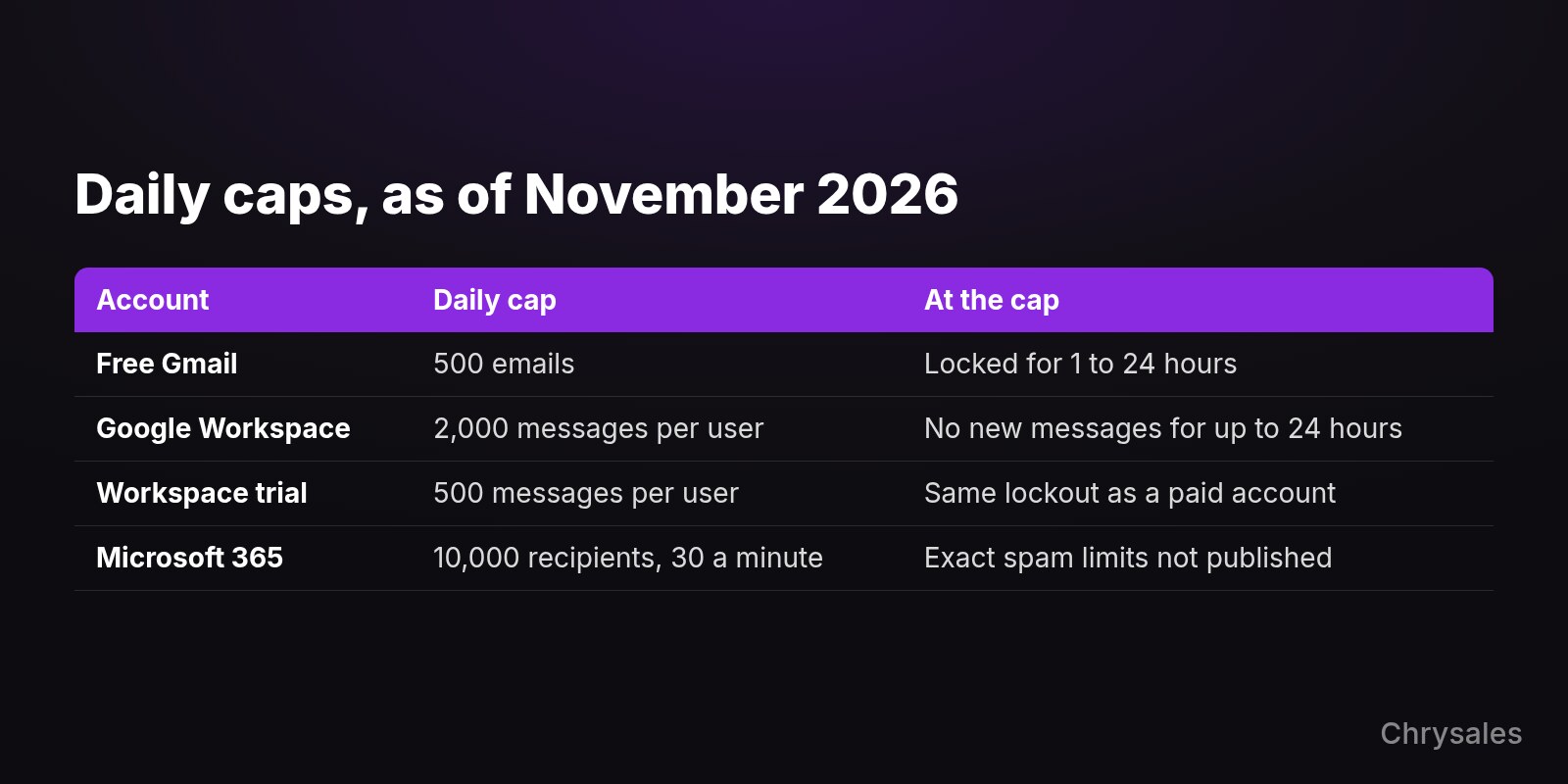
| Account | Daily cap (as of November 2026) | What happens or what to know | Source |
|---|---|---|---|
| Free Gmail | More than 500 emails sent in a day triggers the limit | Sending is locked for 1 to 24 hours | Gmail Help |
| Google Workspace | 2,000 messages per user; 3,000 external recipients, 2,000 of them unique | No new messages for up to 24 hours | Google Workspace Admin Help |
| Google Workspace trial | 500 messages per user | Same lockout as a paid account | Google Workspace Admin Help |
| Microsoft 365 (Exchange Online) | 10,000 recipients per mailbox; 30 messages a minute | Microsoft doesn't publish its exact outbound spam limits | Microsoft Learn |
| Microsoft 365, whole organization | A daily cap on external recipients that grows with the number of licenses | Counts the whole organization's external recipients together | Microsoft Exchange Team blog |
Google applies its limits over a rolling 24-hour period, not from midnight. Its help page also says: "Sending limits can change without notice." Check the Google Workspace sending limits page before you build a plan around any of these figures.
Microsoft is blunter about bulk mail. Its outbound spam page says bulk email from Microsoft 365 isn't a supported use of the service and is allowed only on a 'best-effort' basis. Microsoft also keeps its thresholds private: "We don't advertise the exact limits so spammers can't game the system".
One number that still circulates online is a 2,000-a-day external recipient limit per Microsoft 365 mailbox. Microsoft announced it and later cancelled it. The January 2026 update on the Exchange Team blog reads: "The implementation of this limit has now been CANCELLED and will not go into effect."
Do the 5,000-a-day bulk sender rules apply to B2B cold email?
The 5,000 line mostly won't bind a cold sender, but the authentication and spam-rate rules apply to everyone sending to personal Gmail. Google's bulk sender line is close to 5,000 messages a day to personal Gmail accounts, counted across one primary domain. Google also says its sender guidelines don't apply to mail sent to Google Workspace accounts, and many B2B prospects on Google use Workspace addresses (our assumption, check your own list).
| Provider rule | Applies to mail sent to | Volume line | What it asks for |
|---|---|---|---|
| Google sender guidelines | Personal Gmail accounts | Close to 5,000 a day from one primary domain; once crossed, you are a bulk sender permanently | SPF or DKIM for everyone; spam rate below 0.1%, never 0.3% |
| Outlook.com high-volume rules (since May 2025) | hotmail.com, live.com and outlook.com addresses | More than 5,000 a day from one domain | SPF, DKIM and DMARC |
| Yahoo sender best practices | Yahoo addresses | Yahoo: "We will not specify a volume threshold." | Spam rate below 0.3%; a sudden spike can get flagged |
This is where per domain matters most. Google adds up every inbox on the same primary domain for its 5,000 line, so ten inboxes at 40 a day are 400 a day for that domain. That's far below the bulk line, and all ten inboxes still send under one domain's name.
Even when the rules don't bind you, use them as your floor. Google asks every sender to personal Gmail to set up SPF or DKIM and to keep the spam rate in Postmaster Tools below 0.3%.
Postmaster Tools is Google's free dashboard that shows, among other things, the share of your mail that Gmail users report as spam. Google's sender guidelines FAQ sets the target at below 0.1%. If SPF and DKIM are new terms, read how spam filters judge your sender reputation before you add any volume.
How many inboxes do you need for your meetings target?
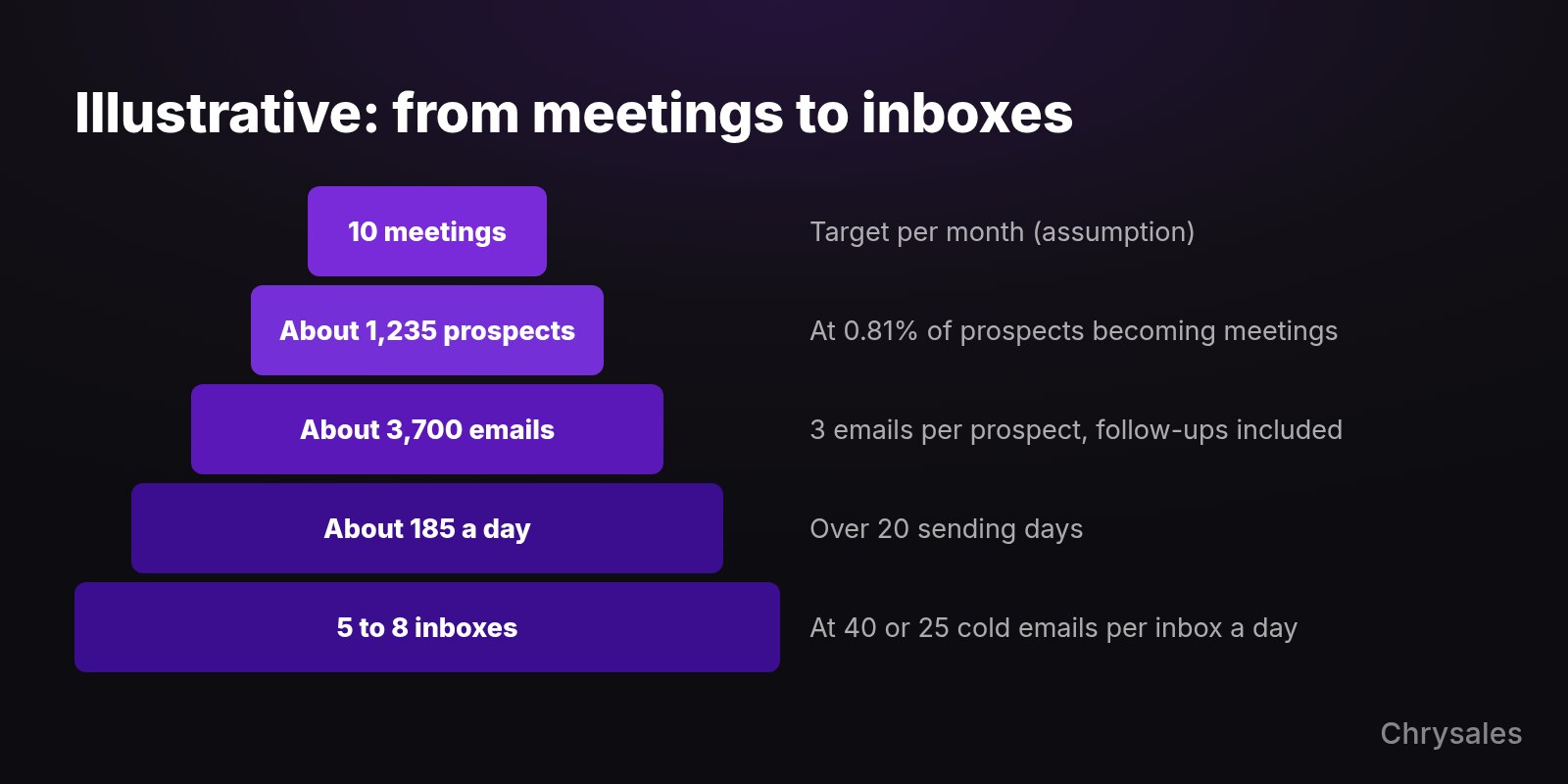
Work backwards. Start from the meetings you want each month and divide by the share of prospects who end up in a meeting. Multiply by the emails each prospect gets, spread that over your sending days and divide by your per-inbox number. With the illustrative inputs below, 10 meetings a month needs about 185 cold emails a day: 5 inboxes at 40 a day, or 8 at 25.
- Write down the meetings you want per month. Use a number your calendar and your closing process can handle.
- Put in your reply rate. If you have no data yet, a published average is a placeholder: Hunter's 2025 average across its users was 4.5%.
- Estimate what share of replies are positive and what share of those book a meeting. Your own numbers beat any benchmark here, so update them after the first few weeks.
- Multiply the three rates. The result is the share of prospects who become meetings; divide your meetings target by it to get new prospects per month.
- Multiply new prospects by the emails each one gets, follow-ups included. Every follow-up is a send, so it uses the same daily capacity as a first email.
- Divide by your sending days per month, then by your per-inbox number, and round up.
- Add spare capacity, so one inbox can rest without your volume dropping.
Illustrative example. Every input is an assumption: replace it with your own.

Meetings wanted per month         10              (assumption)
Reply rate                        4.5%            (Hunter's 2025 average across its users)
Replies that are positive         30%             (assumption)
Positive replies that book        60%             (assumption)

Prospects who become meetings     4.5% x 30% x 60% = 0.81%
New prospects per month           10 / 0.81% = about 1,235
Emails per prospect               3               (first email + 2 follow-ups, assumption)
Emails per month                  1,235 x 3 = about 3,700
Sending days per month            20              (assumption)
Emails per day                    3,700 / 20 = about 185

Inboxes at 40 a day               185 / 40 = 4.6 -> 5 inboxes
Inboxes at 25 a day               185 / 25 = 7.4 -> 8 inboxes

With 50% spare capacity           about 278 a day -> 7 inboxes at 40, 12 at 25
The spare capacity idea comes from practice. Growth Engine X, a B2B lead generation company, states on its website: "If your goal is to send 1,000 emails per day, we set up capacity for 1,500." That is one company's setup. The logic holds for a smaller program too: a buffer lets you pause a struggling inbox and keep your plan.
Going from one email per prospect to three triples the daily volume in this example, so decide how many follow-ups to put in a sequence before you buy inboxes. For the domains, accounts and sending tool around those inboxes, see the full setup for sending cold emails at scale.
Inboxes per domain have no official number either. Each inbox you add on a domain raises that domain's daily total. Keep each domain's total modest so one damaged domain doesn't take all your sending with it; this protects your reputation and is not a way around provider limits.
Check your provider's terms before you scale. Microsoft 365 treats bulk mail as best-effort only, and account restriction is a real outcome on any provider.
How do you ramp up a new inbox?
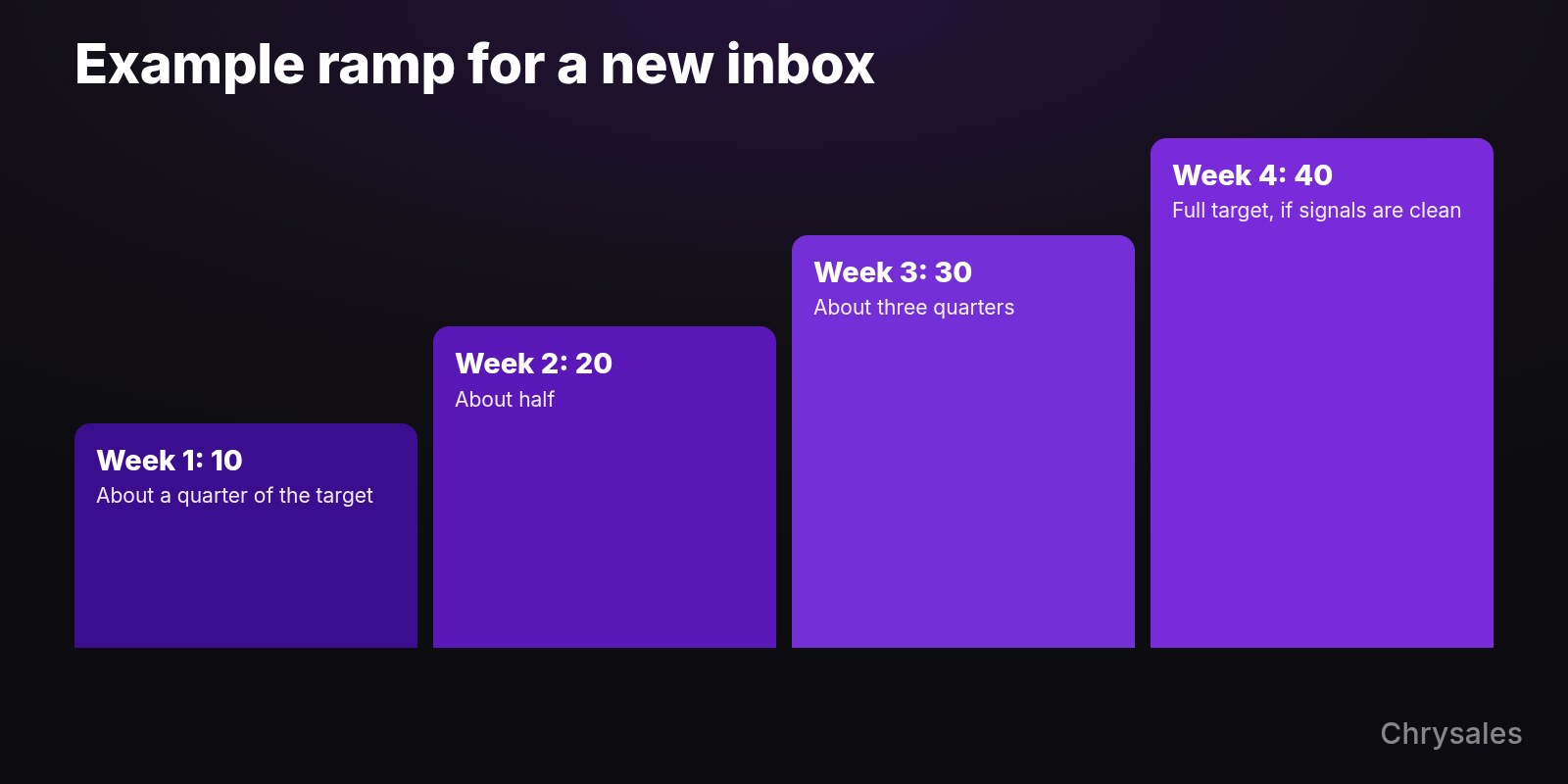
Start low, send to the people most likely to engage, and raise volume in steady steps with no spikes. That is Google's own advice, though Google gives no number and doesn't use the word warm-up. The example plan below reaches the full per-inbox target in four weeks and only moves up a step when spam complaints and bounces stay low.
Google's sender guidelines say to "start with a low sending volume to engaged users, and slowly increase the volume over time," and to avoid sudden spikes and bursts.
| Week | Cold emails a day per inbox | Example with a target of 40 a day |
|---|---|---|
| 1 | About a quarter of your target | 10 |
| 2 | About half | 20 |
| 3 | About three quarters | 30 |
| 4 | Your full target | 40 |
This example plan counts cold sends only, and Google gives no step sizes of its own. Move to the next week only when the stop signals in the next section are clean. If one turns, stay where you are or go back one step. Keep the daily number even across the working week, and send the first weeks to the prospects who fit your offer best.
Be careful with automated warm-up networks that swap messages between inboxes to build a reputation. In September 2026 Validity launched the Heatwave blocklist, aimed at cold email practices including artificial domain warming, and says it lists more than 1 million domains. Al Iverson of Spam Resource wrote about it: "Domain reputation can be repaired, but it's not an easy, fun or fast practice."
Where you send from matters as much as how fast. Microsoft advises against using your primary domain as the sender for bulk email and suggests a subdomain. Spamhaus names "large sets of throwaway domains that closely resemble the main business domain name" as a problem practice. Keep your sending domains few and look after each one.
When should you slow down?
Slow down the moment one signal turns. Watch spam complaints climbing toward Google's 0.1% target, Gmail's 421 4.7.28 rate-limit error, an account hitting its sending limit, hard bounces (addresses that don't exist) and falling replies. Cut volume back by a step, find the cause in the list or the message, and wait for a run of clean days before you raise it again.
| Signal | What you see | What to do |
|---|---|---|
| Spam rate in Postmaster Tools | Google: keep it below 0.1% and never let it reach 0.3% | Stop raising volume above 0.1%; pause the inbox as it nears 0.3% and fix the list and message |
| Gmail error 421 4.7.28 | "Gmail has detected an unusual rate of email" and temporary rate limiting | Go back one ramp step and spread sends evenly through the day |
| Workspace limit reached | The user can't send new messages for up to 24 hours | Lower the daily setting in your sending tool; check that follow-ups were counted |
| Microsoft 365 account restricted | The mailbox is blocked from sending | Stop all sends from that mailbox and ask your Microsoft 365 admin to review it |
| Hard bounces | No provider publishes a threshold | Verify addresses before sending; never buy lists |
| Replies fall or complaints arrive | Your own baseline from earlier weeks | Fix the list and the message before adding volume |
Two warnings about the dashboard. Postmaster Tools covers only mail to personal Gmail addresses, and Google says "Data might be missing if the total number of messages for a given day is too low." If you send little, you may see an empty dashboard and read it as clean when there is simply no data.
Microsoft keeps its limits private, and a Microsoft Q&A thread from March 2026 shows a limit being hit. A user sent a mass email to roughly 300 to 400 people through a third-party tool from a Microsoft 365 account, and the account was restricted. A moderator's reply in the thread: "there's no built-in permanent exemption."
On lists, Google is direct: "Don't purchase email addresses from other companies." If someone else runs your sending, ask for this short report every week, one per inbox:
Weekly sending check - one per inbox

Inbox:
Cold emails sent per day this week:
Spam rate in Postmaster Tools (or "no data"):
421 or other rate-limit errors: yes / no
Account locked or restricted: yes / no
Hard bounces this week:
Replies this week / positive replies:
Next week: raise one step / hold / go back one step
When is volume not the problem?
When a warmed inbox sends 20 to 40 cold emails a day and almost nobody replies, more inboxes multiply the same result. Low replies at moderate volume point to the list or the message first, and then to the offer. Fix those on a small segment first, and add volume once that segment answers.
Our founder Sabir Naghiyev makes this point in his short video "We just need to send more messages.": more volume only multiplies the mistakes most messages already have. The fix sits in the message, and how to write a cold email that gets a reply covers it step by step.
Deliverability people see the same line from the other side. The Spamhaus Team writes that the problem begins when 'cold emailing' becomes automated, scaled and sent in bulk. In September 2026 Laura Atkins of Word to the Wise went further: "This really feels like the anti-spam filters have decided they're done with cold outreach."
In this video, Sabir argues that more reps and more volume are the wrong strategy, and he walks through five levels of sales.
Can you send cold emails to Germany or the EU?
Daily volume is one question; whether you may send at all is another, and the answer depends on the recipient's country. In Germany, UWG §7 treats email advertising without the recipient's prior express consent as unreasonable harassment, and IHK Ulm states that this applies to B2B as well as B2C. Rules differ by country and this is not legal advice, so check with a lawyer before you email prospects in the EU.
The German rule is in §7 of the UWG, and the IHK Ulm explanation (as of February 2026) spells out the B2B point. A low daily number doesn't change it. Phone outreach has its own consent rules in Germany, so compare channels, including when cold email beats cold calling, before you choose one.
Common mistakes with cold email volume
Most volume problems come from the habits below, and each has a fix you can apply this week.
- Reading the provider cap as a target. The 2,000 a day in Google Workspace is what the account can technically send; plan with something like 25 to 40 per warmed inbox.
- Sending cold email from your main company domain. Microsoft advises against the primary domain for bulk email, and a damaged domain can also hurt the normal mail your team sends.
- Buying lists. Google says not to purchase addresses from other companies; build your own list and verify every address.
- Spiking after a quiet week. Google asks for a consistent rate, so catch up over several days instead of sending a backlog at once.
- Counting only first emails. Follow-ups use the same daily capacity, so a three-step sequence triples the sends per prospect.
- Trusting an empty Postmaster Tools dashboard. At low volume it may show no data, which tells you nothing about complaints.
- Copying "2,000 external recipients per mailbox" for Microsoft 365. Microsoft cancelled that limit, so take numbers from the provider's page and note the date.
- Scaling a message that doesn't get replies. Test on a small segment until people answer, then add inboxes.
FAQ
How many cold emails per day can I send from Gmail?
A free Gmail account hits its limit above 500 emails a day, and a Google Workspace user can send up to 2,000 messages a day (as of November 2026). Those are technical caps. For cold email, plan per warmed inbox; Hunter's 2025 data, from one vendor, showed reply rates 27% above average at 20 to 49 a day per account.
How many cold emails per domain per day?
Providers don't set a cold email number per domain. Google counts all mail from one primary domain together toward its bulk sender line of close to 5,000 a day to personal Gmail accounts. Add up the inboxes on each domain and keep that total well below the line, since every inbox sends under that domain's name.
How long should you warm up a new inbox?
Google gives no timeframe. It asks senders to start with low volume to engaged recipients and increase slowly, without spikes. The example plan here takes four weeks, from about a quarter of your target to the full number, and only moves up when spam rate and bounces look clean.
Is 100 cold emails a day too many?
Across several inboxes, 100 a day is a modest total. From a single inbox, it sits above the 20 to 49 band where Hunter's data showed the higher reply rates and well above the 14 a day the median mailbox sends in Smartlead's benchmark. No provider forbids it, but the risk to that one inbox and its domain goes up.
Do follow-ups count toward the daily limit?
Yes. Every follow-up is a message sent from the inbox, so it counts toward the provider's cap and toward the volume your reputation has to carry. Plan your daily number on total sends, first emails and follow-ups together.
Sources
- Google Workspace Admin Help - Gmail sending limits in Google Workspace
- Gmail Help - Limits for sending and getting mail
- Google - Email sender guidelines
- Google - Email sender guidelines FAQ
- Google - Set up Postmaster Tools
- Google Workspace Admin Help - Gmail SMTP errors and codes
- Yahoo Sender Hub - Best practices
- Yahoo Sender Hub - FAQs
- Microsoft Learn - Exchange Online limits
- Microsoft Learn - Outbound spam protection
- Microsoft Exchange Team - External recipient rate limit (cancelled)
- Microsoft Exchange Team - Tenant outbound email limits
- Microsoft Defender for Office 365 blog - Outlook's requirements for high-volume senders
- Microsoft Q&A - Restricted entities
- Hunter - State of Email Outreach 2026
- Smartlead - How many cold emails per day per mailbox (benchmark)
- Woodpecker - Email sending limits
- The Spamhaus Team - Spamhaus' take on cold emailing
- Validity - Heatwave blocklist press release
- Word to the Wise - Gambling with cold email
- Spam Resource - New from Validity: The Heatwave Domain Blocklist
- Growth Engine X
- Gesetz gegen den unlauteren Wettbewerb (UWG), §7
- IHK Ulm - Rules for advertising by phone, email and fax (German)
Not sure how many inboxes your own meetings target needs? Bring your target and your current sending setup to a free strategy call with Chrysales and map out the outreach around it. Size your sending setup on a free call
How many cold emails per day you can send depends on the reputation of each inbox and domain, not on the provider cap. Google Workspace allows 2,000 messages a day per user and Microsoft 365 allows 10,000 recipients a day per mailbox (as of November 2026). On one sending platform the median mailbox sends 14 cold emails a day, and in one vendor's data accounts sending 20 to 49 a day had reply rates 27% above average. For more, add inboxes and raise volume only while spam complaints and bounces stay low.
Keep two numbers apart as you read. Per inbox is what one mailbox sends in a day. Per domain is the total of every inbox on that domain, and that total is what Google counts for its bulk sender line.
How much you can send is a technical question. Whether you may email a given prospect at all depends on their country, and Germany requires prior consent (see the section on Germany and the EU).
How many cold emails per day can one inbox send?
No email provider publishes a cold email number per inbox. The numbers you see online are three different things: provider caps on what an account can send, bulk sender thresholds that decide which rules apply, and ranges from people who run cold email every day. The descriptive data that exists puts a typical mailbox at 8 to 24 cold emails a day, and the little outcome data points to 20 to 49 a day per account.
| Number people quote | What it really is | Source |
|---|---|---|
| 2,000 a day | Google Workspace sending cap per user, a technical ceiling | Google Workspace Admin Help |
| 10,000 a day | Microsoft 365 recipient cap per mailbox | Microsoft Learn |
| 5,000 a day | The line where Google treats a domain as a bulk sender to personal Gmail | Google's sender guidelines FAQ |
| 20 to 49 a day | Per-account band with reply rates 27% above average, in one vendor's data | Hunter, State of Email Outreach 2026 |
| 14 a day | What the median mailbox sends on one sending platform | Smartlead benchmark, first half of 2026 |
Hunter's State of Email Outreach 2026 is one of the few public datasets that ties daily volume per account to replies. Across 31 million emails sent by Hunter users in 2025, accounts sending 20 to 49 emails a day had a 5.7% reply rate against an overall average of 4.5%. Reply rates stayed at similar levels for 50 to 99 a day. This is vendor data and a correlation: it shows where replies were higher, and it can't prove that the volume caused them.
Smartlead's per-mailbox benchmark describes what senders actually do. In the first half of 2026, the median mailbox on its platform sent 14 cold emails a day, and half of all mailboxes sent between 8 and 24. It says nothing about results, but it shows that low volume per inbox is ordinary practice among cold senders on that platform.
Woodpecker's CEO Margaret Sikora says: "published email sending limits are ceilings, not targets." For the math below I use 25 and 40 cold emails per warmed inbox a day as example inputs. A warmed inbox is one that has been sending at a low, steady volume for a few weeks. Both numbers sit inside the band where Hunter's data showed the higher reply rates; swap in your own.
What are the sending limits for Gmail, Google Workspace and Microsoft 365?
As of November 2026, a free Gmail account hits its limit above 500 emails a day and a Google Workspace user can send 2,000 messages a day (500 on a trial account). A Microsoft 365 mailbox can send to 10,000 recipients a day, at up to 30 messages a minute. These are account caps. Cross one and the account stops sending for a while.
| Account | Daily cap (as of November 2026) | What happens or what to know | Source |
|---|---|---|---|
| Free Gmail | More than 500 emails sent in a day triggers the limit | Sending is locked for 1 to 24 hours | Gmail Help |
| Google Workspace | 2,000 messages per user; 3,000 external recipients, 2,000 of them unique | No new messages for up to 24 hours | Google Workspace Admin Help |
| Google Workspace trial | 500 messages per user | Same lockout as a paid account | Google Workspace Admin Help |
| Microsoft 365 (Exchange Online) | 10,000 recipients per mailbox; 30 messages a minute | Microsoft doesn't publish its exact outbound spam limits | Microsoft Learn |
| Microsoft 365, whole organization | A daily cap on external recipients that grows with the number of licenses | Counts the whole organization's external recipients together | Microsoft Exchange Team blog |
Google applies its limits over a rolling 24-hour period, not from midnight. Its help page also says: "Sending limits can change without notice." Check the Google Workspace sending limits page before you build a plan around any of these figures.
Microsoft is blunter about bulk mail. Its outbound spam page says bulk email from Microsoft 365 isn't a supported use of the service and is allowed only on a 'best-effort' basis. Microsoft also keeps its thresholds private: "We don't advertise the exact limits so spammers can't game the system".
One number that still circulates online is a 2,000-a-day external recipient limit per Microsoft 365 mailbox. Microsoft announced it and later cancelled it. The January 2026 update on the Exchange Team blog reads: "The implementation of this limit has now been CANCELLED and will not go into effect."
Do the 5,000-a-day bulk sender rules apply to B2B cold email?
The 5,000 line mostly won't bind a cold sender, but the authentication and spam-rate rules apply to everyone sending to personal Gmail. Google's bulk sender line is close to 5,000 messages a day to personal Gmail accounts, counted across one primary domain. Google also says its sender guidelines don't apply to mail sent to Google Workspace accounts, and many B2B prospects on Google use Workspace addresses (our assumption, check your own list).
| Provider rule | Applies to mail sent to | Volume line | What it asks for |
|---|---|---|---|
| Google sender guidelines | Personal Gmail accounts | Close to 5,000 a day from one primary domain; once crossed, you are a bulk sender permanently | SPF or DKIM for everyone; spam rate below 0.1%, never 0.3% |
| Outlook.com high-volume rules (since May 2025) | hotmail.com, live.com and outlook.com addresses | More than 5,000 a day from one domain | SPF, DKIM and DMARC |
| Yahoo sender best practices | Yahoo addresses | Yahoo: "We will not specify a volume threshold." | Spam rate below 0.3%; a sudden spike can get flagged |
This is where per domain matters most. Google adds up every inbox on the same primary domain for its 5,000 line, so ten inboxes at 40 a day are 400 a day for that domain. That's far below the bulk line, and all ten inboxes still send under one domain's name.
Even when the rules don't bind you, use them as your floor. Google asks every sender to personal Gmail to set up SPF or DKIM and to keep the spam rate in Postmaster Tools below 0.3%.
Postmaster Tools is Google's free dashboard that shows, among other things, the share of your mail that Gmail users report as spam. Google's sender guidelines FAQ sets the target at below 0.1%. If SPF and DKIM are new terms, read how spam filters judge your sender reputation before you add any volume.
How many inboxes do you need for your meetings target?
Work backwards. Start from the meetings you want each month and divide by the share of prospects who end up in a meeting. Multiply by the emails each prospect gets, spread that over your sending days and divide by your per-inbox number. With the illustrative inputs below, 10 meetings a month needs about 185 cold emails a day: 5 inboxes at 40 a day, or 8 at 25.
- Write down the meetings you want per month. Use a number your calendar and your closing process can handle.
- Put in your reply rate. If you have no data yet, a published average is a placeholder: Hunter's 2025 average across its users was 4.5%.
- Estimate what share of replies are positive and what share of those book a meeting. Your own numbers beat any benchmark here, so update them after the first few weeks.
- Multiply the three rates. The result is the share of prospects who become meetings; divide your meetings target by it to get new prospects per month.
- Multiply new prospects by the emails each one gets, follow-ups included. Every follow-up is a send, so it uses the same daily capacity as a first email.
- Divide by your sending days per month, then by your per-inbox number, and round up.
- Add spare capacity, so one inbox can rest without your volume dropping.
Illustrative example. Every input is an assumption: replace it with your own.

Meetings wanted per month         10              (assumption)
Reply rate                        4.5%            (Hunter's 2025 average across its users)
Replies that are positive         30%             (assumption)
Positive replies that book        60%             (assumption)

Prospects who become meetings     4.5% x 30% x 60% = 0.81%
New prospects per month           10 / 0.81% = about 1,235
Emails per prospect               3               (first email + 2 follow-ups, assumption)
Emails per month                  1,235 x 3 = about 3,700
Sending days per month            20              (assumption)
Emails per day                    3,700 / 20 = about 185

Inboxes at 40 a day               185 / 40 = 4.6 -> 5 inboxes
Inboxes at 25 a day               185 / 25 = 7.4 -> 8 inboxes

With 50% spare capacity           about 278 a day -> 7 inboxes at 40, 12 at 25
The spare capacity idea comes from practice. Growth Engine X, a B2B lead generation company, states on its website: "If your goal is to send 1,000 emails per day, we set up capacity for 1,500." That is one company's setup. The logic holds for a smaller program too: a buffer lets you pause a struggling inbox and keep your plan.
Going from one email per prospect to three triples the daily volume in this example, so decide how many follow-ups to put in a sequence before you buy inboxes. For the domains, accounts and sending tool around those inboxes, see the full setup for sending cold emails at scale.
Inboxes per domain have no official number either. Each inbox you add on a domain raises that domain's daily total. Keep each domain's total modest so one damaged domain doesn't take all your sending with it; this protects your reputation and is not a way around provider limits.
Check your provider's terms before you scale. Microsoft 365 treats bulk mail as best-effort only, and account restriction is a real outcome on any provider.
How do you ramp up a new inbox?
Start low, send to the people most likely to engage, and raise volume in steady steps with no spikes. That is Google's own advice, though Google gives no number and doesn't use the word warm-up. The example plan below reaches the full per-inbox target in four weeks and only moves up a step when spam complaints and bounces stay low.
Google's sender guidelines say to "start with a low sending volume to engaged users, and slowly increase the volume over time," and to avoid sudden spikes and bursts.
| Week | Cold emails a day per inbox | Example with a target of 40 a day |
|---|---|---|
| 1 | About a quarter of your target | 10 |
| 2 | About half | 20 |
| 3 | About three quarters | 30 |
| 4 | Your full target | 40 |
This example plan counts cold sends only, and Google gives no step sizes of its own. Move to the next week only when the stop signals in the next section are clean. If one turns, stay where you are or go back one step. Keep the daily number even across the working week, and send the first weeks to the prospects who fit your offer best.
Be careful with automated warm-up networks that swap messages between inboxes to build a reputation. In September 2026 Validity launched the Heatwave blocklist, aimed at cold email practices including artificial domain warming, and says it lists more than 1 million domains. Al Iverson of Spam Resource wrote about it: "Domain reputation can be repaired, but it's not an easy, fun or fast practice."
Where you send from matters as much as how fast. Microsoft advises against using your primary domain as the sender for bulk email and suggests a subdomain. Spamhaus names "large sets of throwaway domains that closely resemble the main business domain name" as a problem practice. Keep your sending domains few and look after each one.
When should you slow down?
Slow down the moment one signal turns. Watch spam complaints climbing toward Google's 0.1% target, Gmail's 421 4.7.28 rate-limit error, an account hitting its sending limit, hard bounces (addresses that don't exist) and falling replies. Cut volume back by a step, find the cause in the list or the message, and wait for a run of clean days before you raise it again.
| Signal | What you see | What to do |
|---|---|---|
| Spam rate in Postmaster Tools | Google: keep it below 0.1% and never let it reach 0.3% | Stop raising volume above 0.1%; pause the inbox as it nears 0.3% and fix the list and message |
| Gmail error 421 4.7.28 | "Gmail has detected an unusual rate of email" and temporary rate limiting | Go back one ramp step and spread sends evenly through the day |
| Workspace limit reached | The user can't send new messages for up to 24 hours | Lower the daily setting in your sending tool; check that follow-ups were counted |
| Microsoft 365 account restricted | The mailbox is blocked from sending | Stop all sends from that mailbox and ask your Microsoft 365 admin to review it |
| Hard bounces | No provider publishes a threshold | Verify addresses before sending; never buy lists |
| Replies fall or complaints arrive | Your own baseline from earlier weeks | Fix the list and the message before adding volume |
Two warnings about the dashboard. Postmaster Tools covers only mail to personal Gmail addresses, and Google says "Data might be missing if the total number of messages for a given day is too low." If you send little, you may see an empty dashboard and read it as clean when there is simply no data.
Microsoft keeps its limits private, and a Microsoft Q&A thread from March 2026 shows a limit being hit. A user sent a mass email to roughly 300 to 400 people through a third-party tool from a Microsoft 365 account, and the account was restricted. A moderator's reply in the thread: "there's no built-in permanent exemption."
On lists, Google is direct: "Don't purchase email addresses from other companies." If someone else runs your sending, ask for this short report every week, one per inbox:
Weekly sending check - one per inbox

Inbox:
Cold emails sent per day this week:
Spam rate in Postmaster Tools (or "no data"):
421 or other rate-limit errors: yes / no
Account locked or restricted: yes / no
Hard bounces this week:
Replies this week / positive replies:
Next week: raise one step / hold / go back one step
When is volume not the problem?
When a warmed inbox sends 20 to 40 cold emails a day and almost nobody replies, more inboxes multiply the same result. Low replies at moderate volume point to the list or the message first, and then to the offer. Fix those on a small segment first, and add volume once that segment answers.
Our founder Sabir Naghiyev makes this point in his short video "We just need to send more messages.": more volume only multiplies the mistakes most messages already have. The fix sits in the message, and how to write a cold email that gets a reply covers it step by step.
Deliverability people see the same line from the other side. The Spamhaus Team writes that the problem begins when 'cold emailing' becomes automated, scaled and sent in bulk. In September 2026 Laura Atkins of Word to the Wise went further: "This really feels like the anti-spam filters have decided they're done with cold outreach."
In this video, Sabir argues that more reps and more volume are the wrong strategy, and he walks through five levels of sales.
Can you send cold emails to Germany or the EU?
Daily volume is one question; whether you may send at all is another, and the answer depends on the recipient's country. In Germany, UWG §7 treats email advertising without the recipient's prior express consent as unreasonable harassment, and IHK Ulm states that this applies to B2B as well as B2C. Rules differ by country and this is not legal advice, so check with a lawyer before you email prospects in the EU.
The German rule is in §7 of the UWG, and the IHK Ulm explanation (as of February 2026) spells out the B2B point. A low daily number doesn't change it. Phone outreach has its own consent rules in Germany, so compare channels, including when cold email beats cold calling, before you choose one.
Common mistakes with cold email volume
Most volume problems come from the habits below, and each has a fix you can apply this week.
- Reading the provider cap as a target. The 2,000 a day in Google Workspace is what the account can technically send; plan with something like 25 to 40 per warmed inbox.
- Sending cold email from your main company domain. Microsoft advises against the primary domain for bulk email, and a damaged domain can also hurt the normal mail your team sends.
- Buying lists. Google says not to purchase addresses from other companies; build your own list and verify every address.
- Spiking after a quiet week. Google asks for a consistent rate, so catch up over several days instead of sending a backlog at once.
- Counting only first emails. Follow-ups use the same daily capacity, so a three-step sequence triples the sends per prospect.
- Trusting an empty Postmaster Tools dashboard. At low volume it may show no data, which tells you nothing about complaints.
- Copying "2,000 external recipients per mailbox" for Microsoft 365. Microsoft cancelled that limit, so take numbers from the provider's page and note the date.
- Scaling a message that doesn't get replies. Test on a small segment until people answer, then add inboxes.
FAQ
How many cold emails per day can I send from Gmail?
A free Gmail account hits its limit above 500 emails a day, and a Google Workspace user can send up to 2,000 messages a day (as of November 2026). Those are technical caps. For cold email, plan per warmed inbox; Hunter's 2025 data, from one vendor, showed reply rates 27% above average at 20 to 49 a day per account.
How many cold emails per domain per day?
Providers don't set a cold email number per domain. Google counts all mail from one primary domain together toward its bulk sender line of close to 5,000 a day to personal Gmail accounts. Add up the inboxes on each domain and keep that total well below the line, since every inbox sends under that domain's name.
How long should you warm up a new inbox?
Google gives no timeframe. It asks senders to start with low volume to engaged recipients and increase slowly, without spikes. The example plan here takes four weeks, from about a quarter of your target to the full number, and only moves up when spam rate and bounces look clean.
Is 100 cold emails a day too many?
Across several inboxes, 100 a day is a modest total. From a single inbox, it sits above the 20 to 49 band where Hunter's data showed the higher reply rates and well above the 14 a day the median mailbox sends in Smartlead's benchmark. No provider forbids it, but the risk to that one inbox and its domain goes up.
Do follow-ups count toward the daily limit?
Yes. Every follow-up is a message sent from the inbox, so it counts toward the provider's cap and toward the volume your reputation has to carry. Plan your daily number on total sends, first emails and follow-ups together.
Sources
- Google Workspace Admin Help - Gmail sending limits in Google Workspace
- Gmail Help - Limits for sending and getting mail
- Google - Email sender guidelines
- Google - Email sender guidelines FAQ
- Google - Set up Postmaster Tools
- Google Workspace Admin Help - Gmail SMTP errors and codes
- Yahoo Sender Hub - Best practices
- Yahoo Sender Hub - FAQs
- Microsoft Learn - Exchange Online limits
- Microsoft Learn - Outbound spam protection
- Microsoft Exchange Team - External recipient rate limit (cancelled)
- Microsoft Exchange Team - Tenant outbound email limits
- Microsoft Defender for Office 365 blog - Outlook's requirements for high-volume senders
- Microsoft Q&A - Restricted entities
- Hunter - State of Email Outreach 2026
- Smartlead - How many cold emails per day per mailbox (benchmark)
- Woodpecker - Email sending limits
- The Spamhaus Team - Spamhaus' take on cold emailing
- Validity - Heatwave blocklist press release
- Word to the Wise - Gambling with cold email
- Spam Resource - New from Validity: The Heatwave Domain Blocklist
- Growth Engine X
- Gesetz gegen den unlauteren Wettbewerb (UWG), §7
- IHK Ulm - Rules for advertising by phone, email and fax (German)
Not sure how many inboxes your own meetings target needs? Bring your target and your current sending setup to a free strategy call with Chrysales and map out the outreach around it. Size your sending setup on a free call
Scaling Is Not Hard If You Have The Right Systems
If you’re serious about leveling up your scaling game, you need the right system, the right training, and the right team behind you. We're here to give you the exact tools and strategies top entrepreneurs use to dominate.

Discover the latest tips
View All
Chrysales was formed from the words "chrysalis" the stage where a caterpillar transforms into a butterfly and "sales".
It stands for one thing: sales transformation.Because scaling doesn’t happen by doing more of the same. Scaling only happens when you go through real transformation in your systems, your offer, team and the way you sell.


