.avif)
What Is Site Retargeting and Why Does It Matter?
Site retargeting is a paid advertising method that shows ads to people who already visited your website, so you can bring them back and turn interest into leads. Picture this: 100 people visit your website today. Maybe they look at your services page, skim a case study, check your pricing. Then they leave. No call booked. No email sent. Just gone. Most businesses shrug and move on. But here's the thing: those visitors already know who you are. They've seen your offer. They're warm. Site retargeting is how you stay in front of them until they're ready to buy. It's not magic, it's just smart follow-up using ads instead of emails.
What Site Retargeting Actually Is
Site retargeting is a paid advertising strategy that shows ads to people who already visited your website. You install a small piece of tracking code (called a pixel) on your site. When someone lands on a page, the pixel drops a cookie in their browser. Later, when that person scrolls Facebook, reads an article, or watches YouTube, your ad shows up in their feed or sidebar. They've already seen your site once. Now you're reminding them you exist. This isn't cold advertising. You're not paying to show ads to strangers. You're paying to re-engage people who already raised their hand by visiting your site. That's the whole game.
How the Pixel Works
The pixel is a tiny snippet of code. You add it to your website header. Most ad platforms (Google, Meta, LinkedIn) give you one for free when you set up an ad account. Once it's live, it tracks every visitor. Not in a creepy way. It just knows someone visited, which pages they saw, and roughly how long they stayed. When that person leaves your site and browses the web, ad exchanges recognize the cookie. Your retargeting campaign bids to show them an ad. If you win the bid, your ad appears. Simple.
Pro Tip: Install the pixel even if you're not running ads yet. It starts collecting data immediately, so when you do launch a retargeting campaign, you'll already have an audience to target.
Site Retargeting vs. Search Retargeting
Site retargeting shows ads to people who visited your site. Search retargeting shows ads to people who searched specific keywords on Google but didn't visit you yet. Totally different. Site retargeting = behavior-based. They already interacted with you. Search retargeting = intent-based. They're researching the problem you solve, but they don't know you exist yet. Both work. Combine them if you have the budget. But site retargeting is where most B2B companies start because the audience is already warm.
Why Site Retargeting Matters for B2B Lead Generation
Most B2B sales cycles aren't one-and-done. A consulting firm doesn't book a call the first time someone lands on their site. A SaaS company doesn't close a deal from a single visit. People need time. They compare options. They talk to their team. They forget about you. Site retargeting keeps you top of mind during that gap. It's the difference between "I saw a sales coaching company last week, can't remember the name" and "Oh yeah, Chrysales. I keep seeing them."
The Timing Problem
Stanford GSB ran a study on retargeting timing. The finding: retargeting someone within 24 hours of their site visit converts way better than waiting a week. Makes sense. The visit is fresh. The problem they were researching is still active. Wait too long and they've moved on or picked a competitor. Most retargeting campaigns run on autopilot with no timing rules. That's a miss. Set your campaign to hit visitors fast. First 24 hours, show them your strongest offer. Days 2 to 7, reinforce your positioning. After that, either they convert or they're not ready yet.
Common mistake: Running the same ad to someone who visited once three months ago and someone who visited yesterday. Segment your audiences by recency. Fresh visitors need a different message than cold ones.
How to Set Up a Site Retargeting Campaign That Actually Works
You don't need a massive ad budget or a full marketing team. You need a pixel, a warm audience, and a simple campaign structure. Here's the breakdown.
Step 1: Install the Tracking Pixel
Pick your platform. For B2B, LinkedIn and Google Display work best. Meta (Facebook/Instagram) can work if your audience scrolls socially, but most B2B decision makers don't click ads there. Grab the pixel code from your ad platform. Drop it in your website header using Google Tag Manager or paste it directly into your site's code. Test it. Most platforms have a browser extension that shows if the pixel is firing.
Step 2: Build Your Retargeting Audience
You need at least 100 to 300 recent visitors to make retargeting work. Less than that and the ad platforms won't run your campaign. More is better. Segment your audience by behavior:
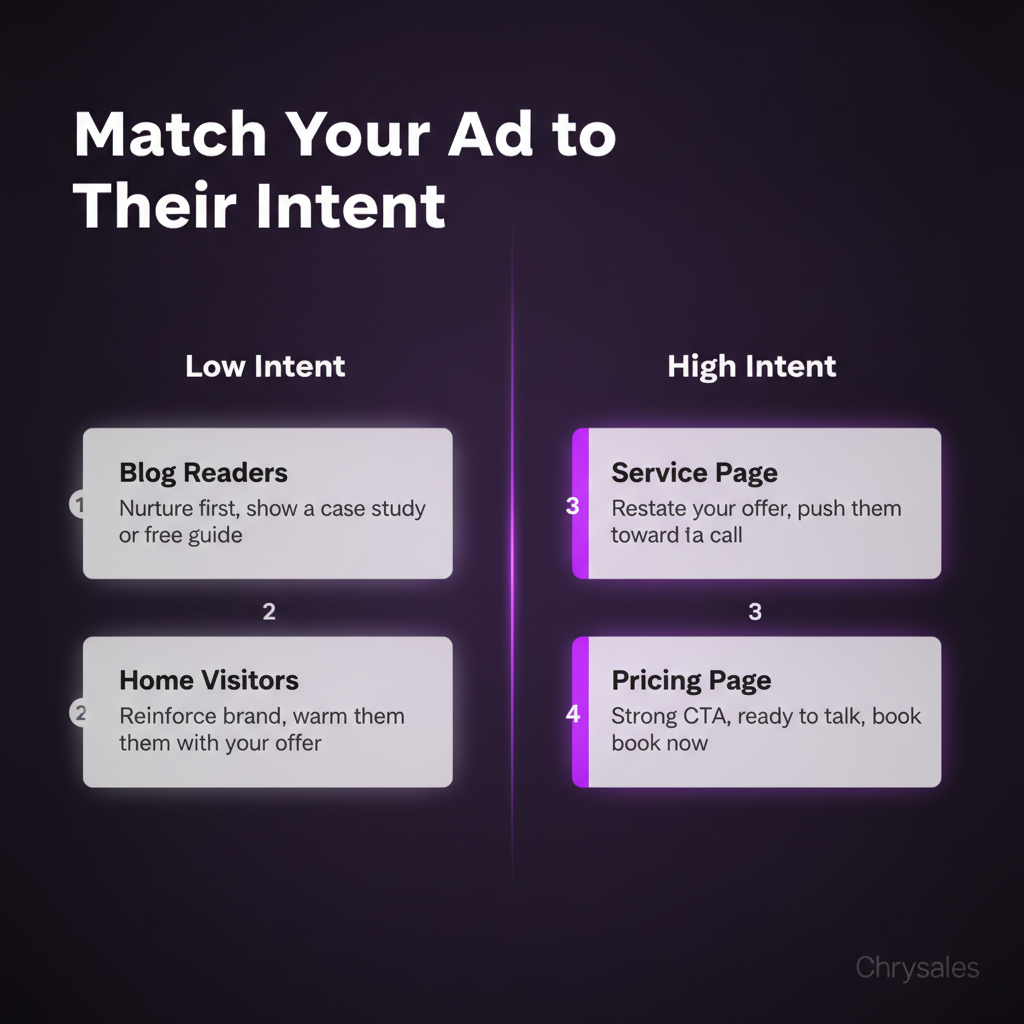
- Homepage visitors: Saw your brand, but didn't dig deeper. Mild interest.
- Service page visitors: Checked your offer. Higher intent.
- Pricing page visitors: Serious. Almost ready to buy.
- Blog readers: Researching the topic. Early stage, but engaged.
Run different ads to each group. A pricing page visitor should see a "Book a call" ad. A blog reader should see a case study or free resource.
Watch out: Don't retarget people who already converted. If someone booked a call or filled out a form, exclude them from your audience. Otherwise you waste budget and annoy them.
Step 3: Create Ads That Don't Suck
Your retargeting ad isn't a cold pitch. They already know you exist. The ad's job is to remind them why they should care and give them one clear next step. Good retargeting ad structure:
- Headline: One sentence that hits a pain point or restates your offer. "Still struggling to close deals? We build custom sales systems that actually work."
- Visual: Clean, simple. Your logo, a client result, or a face (founder or client). Avoid stock photos.
- Body copy: Two sentences max. "We've trained 500+ sales teams to book calls and close deals predictably. See how it works."
- CTA: One button. "Book a free call," "Download the guide," "See case studies." One action only.
Run 2 to 3 versions of each ad. Test different headlines and visuals. Kill the losers after a week.
Step 4: Set Your Budget and Frequency Cap
Retargeting is cheap compared to cold ads. You're targeting a small, warm audience, so CPMs (cost per 1,000 impressions) are low. For B2B, expect to spend $200 to $800 a month to start. Set a frequency cap. This limits how many times one person sees your ad per day or week. Without a cap, you'll blast the same person 30 times in a week. Annoying and wasteful. Good rule: 3 to 5 impressions per person per week max. Enough to stay visible, not enough to make them hate you.
When Site Retargeting Fits Into Your Sales System
Site retargeting isn't a standalone tactic. It's one piece of a bigger client acquisition system. Think of it like this: cold outreach gets people to your site. Your website explains the offer. Retargeting keeps you in their face until they book a call. Your sales process closes the deal. We see this all the time with Chrysales clients. A 20 person consulting firm runs LinkedIn outreach. Prospects click the link and visit the site. Half of them bounce. No retargeting = those leads are gone. With retargeting = they see 3 to 5 ads over the next two weeks, click through again, and book a call.
Retargeting + Cold Outreach = Warm Follow-Up
Cold email and cold LinkedIn messages work, but response rates are low. According to B2B cold email statistics, 2% to 5% if your list is good. That means 95% of people ignore you. But some of those people still visit your site from your email signature or profile link. Now you can retarget them. You sent a cold message. They didn't reply. But they checked you out. Your retargeting ad shows up two days later while they're reading an article. Suddenly you're not a random email anymore. You're a name they've seen twice. That's when they click.
Pro Tip: Use UTM parameters on your outreach links so you can track which cold campaigns drive site visits. Then build retargeting audiences around those visits. You can also learn outbound email marketing best practices to improve the cold email campaigns that drive initial site traffic.
Retargeting High-Intent Pages
Not all site visitors are equal. Someone who reads your "About" page and leaves isn't the same as someone who views your pricing page three times. Segment your retargeting by page visits. Create separate campaigns for:
- Pricing page visitors: Hit them with a strong CTA. "Ready to talk? Book a free strategy call."
- Case study readers: Show proof. "See how we helped 15 companies like yours close more deals."
- Service page visitors: Reinforce the offer. "Custom sales systems built for your team. No courses, no tools, just results."
A marketing agency we worked with last year did this. They had 1,200 site visitors a month. 80 visited the pricing page. They ran a retargeting campaign just to those 80. Booked 9 calls in three weeks. Cost: $340.
Common Site Retargeting Mistakes (And How to Avoid Them)
Most retargeting campaigns fail because of three fixable mistakes. You don't need more budget. You need to stop doing these.
Mistake 1: Retargeting Everyone the Same Way
Showing the same ad to every site visitor is lazy. A first-time homepage visitor needs a different message than someone who visited your services page five times. Fix: Build 3 to 5 audience segments based on behavior. Match the ad message to the intent level.
Mistake 2: No Exclusions
If someone already booked a call, downloaded your lead magnet, or signed up, stop showing them ads. It wastes money and annoys them. Fix: Set up conversion tracking. Automatically exclude anyone who completes a goal (form fill, call booking, purchase).
Mistake 3: Running Retargeting with No New Traffic
Retargeting only works if people are visiting your site in the first place. If you get 50 visitors a month, your retargeting audience is too small. The ads won't run. Fix: Drive traffic first. Run cold outreach, post content, do SEO, whatever gets people to your site. Once you hit 300+ visitors a month, turn on retargeting. Watch 4 ways to find clients who need your services right now to learn immediate client acquisition strategies that can drive more site traffic.
Watch out: Retargeting a tiny audience for months burns out fast. People see the same ad 50 times and tune out. Refresh your creative every 4 to 6 weeks.
How Retargeting Supports Predictable Client Acquisition
Retargeting isn't a magic bullet. It's one tool in a full B2B sales system. But when you pair it with strong positioning, a clear offer, and a repeatable outreach process, it fills gaps in your pipeline. Here's what that looks like in practice. You run cold outreach to 500 people. 50 click your site link. 10 reply. 5 book calls. Without retargeting, the 40 who clicked but didn't reply are lost. With retargeting, you stay in front of them. Maybe 5 more book calls over the next two weeks. Now you went from 5 calls to 10. Same outreach effort, double the output.
Chrysales has trained over 500 sales teams, and the ones who combine outreach with retargeting consistently book 30% to 50% more calls than teams doing outreach alone. It's not because the ads are amazing. It's because repetition builds trust. People need to see you multiple times before they act.
Retargeting as Part of a Four-Step System
The way we build sales systems at Chrysales follows four steps: Learn, Build Systems, Automate, Hire. Retargeting fits into the Automate phase. First, you learn what works (positioning, offer, messaging). Then you build the system (outreach process, call structure, follow-up). Next, you automate the repeatable parts (CRM workflows, email sequences, retargeting ads). Finally, you hire people to run it (setters, closers, a Chief of Staff to manage the team).
Retargeting automates one part of follow-up. Instead of manually emailing every site visitor, the ads do it for you. Set it up once, let it run, and focus your time on closing calls. If you want to understand how to build a sales system that actually scales, you can see how retargeting fits into the broader infrastructure of predictable client acquisition.
Pro Tip: Once your retargeting campaigns are running smoothly, hand them off to a junior team member or virtual assistant. Check performance weekly, but don't micromanage daily. Free up your time for higher-value work.
Retargeting Ads for B2B: Platform Breakdown
Not all ad platforms work the same for B2B service businesses. Here's where to spend your budget.
LinkedIn Retargeting
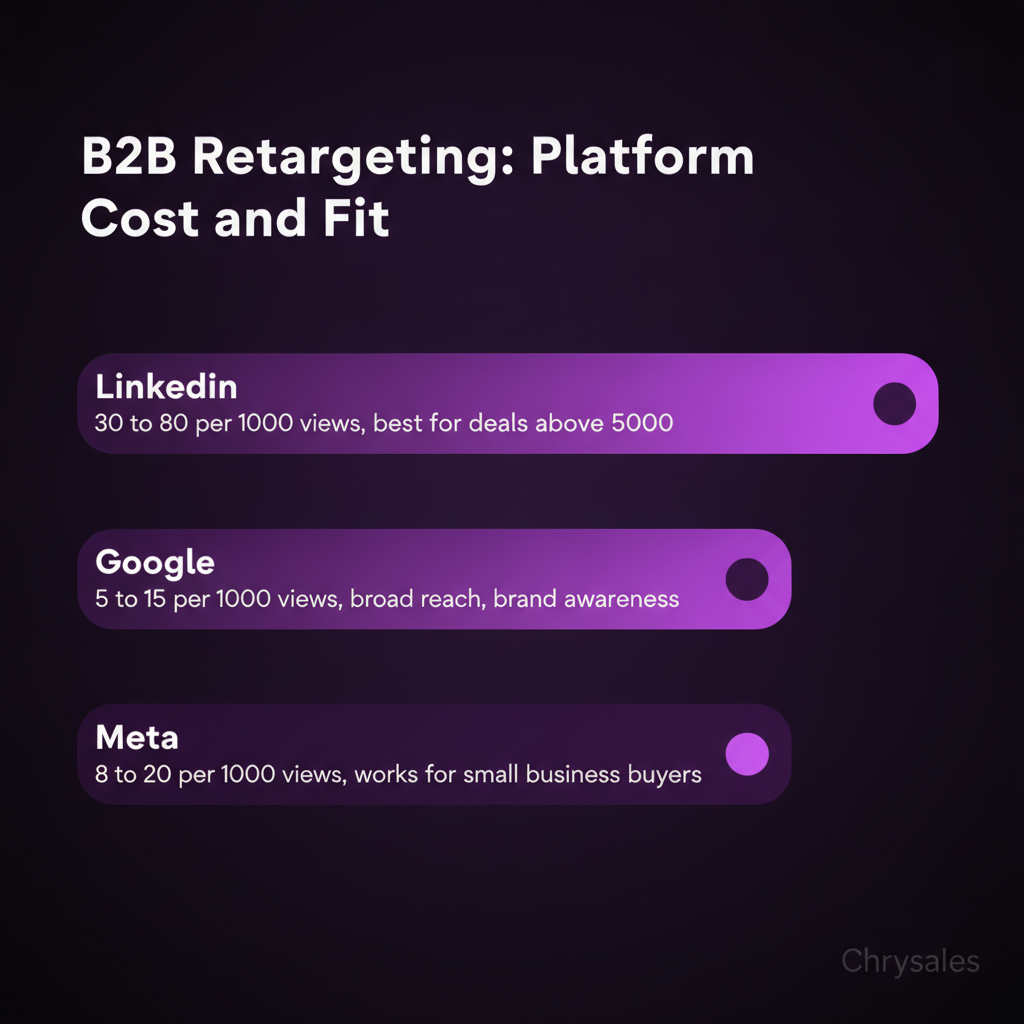
Best for: consulting firms, tech companies, agencies targeting other businesses. LinkedIn lets you retarget site visitors and layer on filters like job title, company size, or industry. The targeting is sharp. CPMs are high (expect $30 to $80 per 1,000 impressions), but the leads are high-quality. Run LinkedIn retargeting if your average deal size is over $5,000. Lower than that and the cost per click usually doesn't pencil out. You can improve your LinkedIn outreach strategy to use LinkedIn outreach to book meetings that feed your retargeting audience.
Google Display Network
Best for: broad reach, lower cost, top of funnel awareness. Google Display shows your ads across millions of websites, news sites, blogs, and YouTube. CPMs are cheap ($5 to $15). The downside: lower intent. People aren't on those sites to buy, they're reading an article or watching a video. Use Google Display for brand awareness and early stage nurturing. Not great for "book a call now" campaigns unless your offer is super clear.
Meta (Facebook and Instagram)
Best for: B2B companies whose audience scrolls social media regularly. Meta works if you're targeting small business owners, marketers, or solo consultants who are active on Facebook or Instagram. It's hit or miss for corporate buyers or enterprise clients. CPMs are low ($8 to $20). Retargeting is easy to set up. Test it, but don't go all in unless you see conversions.
Common mistake: Spreading your budget across all three platforms at once. Pick one, run it for 30 days, measure results, then expand. Most small B2B companies should start with LinkedIn or Google.
Measuring Site Retargeting ROI
Track these numbers weekly:
- Impressions: How many times your ad was shown. Should grow as site traffic grows.
- Click-through rate (CTR): Percentage of people who saw the ad and clicked. For retargeting, 0.5% to 2% is normal. Higher is great.
- Cost per click (CPC): How much you pay each time someone clicks. Varies by platform. LinkedIn: $5 to $15. Google: $1 to $5. Meta: $0.50 to $3.
- Conversions: Calls booked, forms filled, downloads. This is what matters. If CTR is high but conversions are zero, your landing page or offer is the problem, not the ad.
Set a simple rule: if a campaign runs for two weeks with no conversions and CPC is above your target, pause it. Test a new ad or audience. One tech company we worked with spent $600 on LinkedIn retargeting over six weeks. They got 11 calls booked. Average deal size: $12,000. Three deals closed. ROI: massive. But the first two weeks got zero results. They almost killed the campaign. Patience pays if the fundamentals are solid.
Watch out: Don't obsess over impressions. High impressions with low CTR means your ad is boring or your audience is burned out. Refresh the creative.
Frequently Asked Questions
Q: How much website traffic do I need before site retargeting makes sense?
You need at least 100 to 300 unique visitors per month to build a retargeting audience that ad platforms will actually serve ads to. Less than that and most platforms won't run your campaign because the audience is too small. If you're below that threshold, focus on driving more traffic first through cold outreach, content, or SEO. Once you hit consistent monthly traffic above 300, turn on retargeting.
Q: What's the difference between site retargeting and remarketing?
Nothing. They're the same thing. "Retargeting" is the term ad platforms like Google and Meta use. "Remarketing" is what email platforms and some marketers call it. Both mean showing ads or messages to people who already interacted with your brand. In practice, when people say "retargeting," they usually mean paid ads. When they say "remarketing," they sometimes mean email follow-up. But technically, same concept.
Q: How long should I retarget someone after they visit my site?
The sweet spot for B2B is 7 to 30 days. Research from Stanford shows retargeting within the first 24 hours gets the best results, so hit visitors early and often in the first week. After 30 days, most site visitors have either moved on or forgotten about you, so continuing to retarget them wastes budget. Set your audience window to 30 days max, and exclude anyone who converts before that.
Q: Can I use site retargeting if I don't have a big ad budget?
Yes. Retargeting is one of the cheapest ad strategies because you're targeting a small, warm audience instead of millions of cold people. You can run a solid B2B retargeting campaign on $200 to $500 a month. Start with one platform (LinkedIn or Google), one audience segment (like pricing page visitors), and one simple ad. Test for 30 days. If it works, scale up. If it doesn't, tweak the offer or audience before spending more.
Q: Should I retarget people who only visited my blog?
It depends on your goal. Blog readers are early stage. They're researching a problem, not ready to buy yet. Retargeting them with a hard "book a call" ad usually flops. Instead, show them a softer offer like a case study, free guide, or another blog post. Nurture them first. Once they visit a service or pricing page, then hit them with a conversion focused ad. Segment blog visitors separately from high intent page visitors and match your message to their stage.
Site retargeting is a paid advertising method that shows ads to people who already visited your website, so you can bring them back and turn interest into leads. Picture this: 100 people visit your website today. Maybe they look at your services page, skim a case study, check your pricing. Then they leave. No call booked. No email sent. Just gone. Most businesses shrug and move on. But here's the thing: those visitors already know who you are. They've seen your offer. They're warm. Site retargeting is how you stay in front of them until they're ready to buy. It's not magic, it's just smart follow-up using ads instead of emails.
What Site Retargeting Actually Is
Site retargeting is a paid advertising strategy that shows ads to people who already visited your website. You install a small piece of tracking code (called a pixel) on your site. When someone lands on a page, the pixel drops a cookie in their browser. Later, when that person scrolls Facebook, reads an article, or watches YouTube, your ad shows up in their feed or sidebar. They've already seen your site once. Now you're reminding them you exist. This isn't cold advertising. You're not paying to show ads to strangers. You're paying to re-engage people who already raised their hand by visiting your site. That's the whole game.
How the Pixel Works
The pixel is a tiny snippet of code. You add it to your website header. Most ad platforms (Google, Meta, LinkedIn) give you one for free when you set up an ad account. Once it's live, it tracks every visitor. Not in a creepy way. It just knows someone visited, which pages they saw, and roughly how long they stayed. When that person leaves your site and browses the web, ad exchanges recognize the cookie. Your retargeting campaign bids to show them an ad. If you win the bid, your ad appears. Simple.
Pro Tip: Install the pixel even if you're not running ads yet. It starts collecting data immediately, so when you do launch a retargeting campaign, you'll already have an audience to target.
Site Retargeting vs. Search Retargeting
Site retargeting shows ads to people who visited your site. Search retargeting shows ads to people who searched specific keywords on Google but didn't visit you yet. Totally different. Site retargeting = behavior-based. They already interacted with you. Search retargeting = intent-based. They're researching the problem you solve, but they don't know you exist yet. Both work. Combine them if you have the budget. But site retargeting is where most B2B companies start because the audience is already warm.
Why Site Retargeting Matters for B2B Lead Generation
Most B2B sales cycles aren't one-and-done. A consulting firm doesn't book a call the first time someone lands on their site. A SaaS company doesn't close a deal from a single visit. People need time. They compare options. They talk to their team. They forget about you. Site retargeting keeps you top of mind during that gap. It's the difference between "I saw a sales coaching company last week, can't remember the name" and "Oh yeah, Chrysales. I keep seeing them."
The Timing Problem
Stanford GSB ran a study on retargeting timing. The finding: retargeting someone within 24 hours of their site visit converts way better than waiting a week. Makes sense. The visit is fresh. The problem they were researching is still active. Wait too long and they've moved on or picked a competitor. Most retargeting campaigns run on autopilot with no timing rules. That's a miss. Set your campaign to hit visitors fast. First 24 hours, show them your strongest offer. Days 2 to 7, reinforce your positioning. After that, either they convert or they're not ready yet.
Common mistake: Running the same ad to someone who visited once three months ago and someone who visited yesterday. Segment your audiences by recency. Fresh visitors need a different message than cold ones.
How to Set Up a Site Retargeting Campaign That Actually Works
You don't need a massive ad budget or a full marketing team. You need a pixel, a warm audience, and a simple campaign structure. Here's the breakdown.
Step 1: Install the Tracking Pixel
Pick your platform. For B2B, LinkedIn and Google Display work best. Meta (Facebook/Instagram) can work if your audience scrolls socially, but most B2B decision makers don't click ads there. Grab the pixel code from your ad platform. Drop it in your website header using Google Tag Manager or paste it directly into your site's code. Test it. Most platforms have a browser extension that shows if the pixel is firing.
Step 2: Build Your Retargeting Audience
You need at least 100 to 300 recent visitors to make retargeting work. Less than that and the ad platforms won't run your campaign. More is better. Segment your audience by behavior:
- Homepage visitors: Saw your brand, but didn't dig deeper. Mild interest.
- Service page visitors: Checked your offer. Higher intent.
- Pricing page visitors: Serious. Almost ready to buy.
- Blog readers: Researching the topic. Early stage, but engaged.
Run different ads to each group. A pricing page visitor should see a "Book a call" ad. A blog reader should see a case study or free resource.
Watch out: Don't retarget people who already converted. If someone booked a call or filled out a form, exclude them from your audience. Otherwise you waste budget and annoy them.
Step 3: Create Ads That Don't Suck
Your retargeting ad isn't a cold pitch. They already know you exist. The ad's job is to remind them why they should care and give them one clear next step. Good retargeting ad structure:
- Headline: One sentence that hits a pain point or restates your offer. "Still struggling to close deals? We build custom sales systems that actually work."
- Visual: Clean, simple. Your logo, a client result, or a face (founder or client). Avoid stock photos.
- Body copy: Two sentences max. "We've trained 500+ sales teams to book calls and close deals predictably. See how it works."
- CTA: One button. "Book a free call," "Download the guide," "See case studies." One action only.
Run 2 to 3 versions of each ad. Test different headlines and visuals. Kill the losers after a week.
Step 4: Set Your Budget and Frequency Cap
Retargeting is cheap compared to cold ads. You're targeting a small, warm audience, so CPMs (cost per 1,000 impressions) are low. For B2B, expect to spend $200 to $800 a month to start. Set a frequency cap. This limits how many times one person sees your ad per day or week. Without a cap, you'll blast the same person 30 times in a week. Annoying and wasteful. Good rule: 3 to 5 impressions per person per week max. Enough to stay visible, not enough to make them hate you.
When Site Retargeting Fits Into Your Sales System
Site retargeting isn't a standalone tactic. It's one piece of a bigger client acquisition system. Think of it like this: cold outreach gets people to your site. Your website explains the offer. Retargeting keeps you in their face until they book a call. Your sales process closes the deal. We see this all the time with Chrysales clients. A 20 person consulting firm runs LinkedIn outreach. Prospects click the link and visit the site. Half of them bounce. No retargeting = those leads are gone. With retargeting = they see 3 to 5 ads over the next two weeks, click through again, and book a call.
Retargeting + Cold Outreach = Warm Follow-Up
Cold email and cold LinkedIn messages work, but response rates are low. According to B2B cold email statistics, 2% to 5% if your list is good. That means 95% of people ignore you. But some of those people still visit your site from your email signature or profile link. Now you can retarget them. You sent a cold message. They didn't reply. But they checked you out. Your retargeting ad shows up two days later while they're reading an article. Suddenly you're not a random email anymore. You're a name they've seen twice. That's when they click.
Pro Tip: Use UTM parameters on your outreach links so you can track which cold campaigns drive site visits. Then build retargeting audiences around those visits. You can also learn outbound email marketing best practices to improve the cold email campaigns that drive initial site traffic.
Retargeting High-Intent Pages
Not all site visitors are equal. Someone who reads your "About" page and leaves isn't the same as someone who views your pricing page three times. Segment your retargeting by page visits. Create separate campaigns for:
- Pricing page visitors: Hit them with a strong CTA. "Ready to talk? Book a free strategy call."
- Case study readers: Show proof. "See how we helped 15 companies like yours close more deals."
- Service page visitors: Reinforce the offer. "Custom sales systems built for your team. No courses, no tools, just results."
A marketing agency we worked with last year did this. They had 1,200 site visitors a month. 80 visited the pricing page. They ran a retargeting campaign just to those 80. Booked 9 calls in three weeks. Cost: $340.
Common Site Retargeting Mistakes (And How to Avoid Them)
Most retargeting campaigns fail because of three fixable mistakes. You don't need more budget. You need to stop doing these.
Mistake 1: Retargeting Everyone the Same Way
Showing the same ad to every site visitor is lazy. A first-time homepage visitor needs a different message than someone who visited your services page five times. Fix: Build 3 to 5 audience segments based on behavior. Match the ad message to the intent level.
Mistake 2: No Exclusions
If someone already booked a call, downloaded your lead magnet, or signed up, stop showing them ads. It wastes money and annoys them. Fix: Set up conversion tracking. Automatically exclude anyone who completes a goal (form fill, call booking, purchase).
Mistake 3: Running Retargeting with No New Traffic
Retargeting only works if people are visiting your site in the first place. If you get 50 visitors a month, your retargeting audience is too small. The ads won't run. Fix: Drive traffic first. Run cold outreach, post content, do SEO, whatever gets people to your site. Once you hit 300+ visitors a month, turn on retargeting. Watch 4 ways to find clients who need your services right now to learn immediate client acquisition strategies that can drive more site traffic.
Watch out: Retargeting a tiny audience for months burns out fast. People see the same ad 50 times and tune out. Refresh your creative every 4 to 6 weeks.
How Retargeting Supports Predictable Client Acquisition
Retargeting isn't a magic bullet. It's one tool in a full B2B sales system. But when you pair it with strong positioning, a clear offer, and a repeatable outreach process, it fills gaps in your pipeline. Here's what that looks like in practice. You run cold outreach to 500 people. 50 click your site link. 10 reply. 5 book calls. Without retargeting, the 40 who clicked but didn't reply are lost. With retargeting, you stay in front of them. Maybe 5 more book calls over the next two weeks. Now you went from 5 calls to 10. Same outreach effort, double the output.
Chrysales has trained over 500 sales teams, and the ones who combine outreach with retargeting consistently book 30% to 50% more calls than teams doing outreach alone. It's not because the ads are amazing. It's because repetition builds trust. People need to see you multiple times before they act.
Retargeting as Part of a Four-Step System
The way we build sales systems at Chrysales follows four steps: Learn, Build Systems, Automate, Hire. Retargeting fits into the Automate phase. First, you learn what works (positioning, offer, messaging). Then you build the system (outreach process, call structure, follow-up). Next, you automate the repeatable parts (CRM workflows, email sequences, retargeting ads). Finally, you hire people to run it (setters, closers, a Chief of Staff to manage the team).
Retargeting automates one part of follow-up. Instead of manually emailing every site visitor, the ads do it for you. Set it up once, let it run, and focus your time on closing calls. If you want to understand how to build a sales system that actually scales, you can see how retargeting fits into the broader infrastructure of predictable client acquisition.
Pro Tip: Once your retargeting campaigns are running smoothly, hand them off to a junior team member or virtual assistant. Check performance weekly, but don't micromanage daily. Free up your time for higher-value work.
Retargeting Ads for B2B: Platform Breakdown
Not all ad platforms work the same for B2B service businesses. Here's where to spend your budget.
LinkedIn Retargeting
Best for: consulting firms, tech companies, agencies targeting other businesses. LinkedIn lets you retarget site visitors and layer on filters like job title, company size, or industry. The targeting is sharp. CPMs are high (expect $30 to $80 per 1,000 impressions), but the leads are high-quality. Run LinkedIn retargeting if your average deal size is over $5,000. Lower than that and the cost per click usually doesn't pencil out. You can improve your LinkedIn outreach strategy to use LinkedIn outreach to book meetings that feed your retargeting audience.
Google Display Network
Best for: broad reach, lower cost, top of funnel awareness. Google Display shows your ads across millions of websites, news sites, blogs, and YouTube. CPMs are cheap ($5 to $15). The downside: lower intent. People aren't on those sites to buy, they're reading an article or watching a video. Use Google Display for brand awareness and early stage nurturing. Not great for "book a call now" campaigns unless your offer is super clear.
Meta (Facebook and Instagram)
Best for: B2B companies whose audience scrolls social media regularly. Meta works if you're targeting small business owners, marketers, or solo consultants who are active on Facebook or Instagram. It's hit or miss for corporate buyers or enterprise clients. CPMs are low ($8 to $20). Retargeting is easy to set up. Test it, but don't go all in unless you see conversions.
Common mistake: Spreading your budget across all three platforms at once. Pick one, run it for 30 days, measure results, then expand. Most small B2B companies should start with LinkedIn or Google.
Measuring Site Retargeting ROI
Track these numbers weekly:
- Impressions: How many times your ad was shown. Should grow as site traffic grows.
- Click-through rate (CTR): Percentage of people who saw the ad and clicked. For retargeting, 0.5% to 2% is normal. Higher is great.
- Cost per click (CPC): How much you pay each time someone clicks. Varies by platform. LinkedIn: $5 to $15. Google: $1 to $5. Meta: $0.50 to $3.
- Conversions: Calls booked, forms filled, downloads. This is what matters. If CTR is high but conversions are zero, your landing page or offer is the problem, not the ad.
Set a simple rule: if a campaign runs for two weeks with no conversions and CPC is above your target, pause it. Test a new ad or audience. One tech company we worked with spent $600 on LinkedIn retargeting over six weeks. They got 11 calls booked. Average deal size: $12,000. Three deals closed. ROI: massive. But the first two weeks got zero results. They almost killed the campaign. Patience pays if the fundamentals are solid.
Watch out: Don't obsess over impressions. High impressions with low CTR means your ad is boring or your audience is burned out. Refresh the creative.
Frequently Asked Questions
Q: How much website traffic do I need before site retargeting makes sense?
You need at least 100 to 300 unique visitors per month to build a retargeting audience that ad platforms will actually serve ads to. Less than that and most platforms won't run your campaign because the audience is too small. If you're below that threshold, focus on driving more traffic first through cold outreach, content, or SEO. Once you hit consistent monthly traffic above 300, turn on retargeting.
Q: What's the difference between site retargeting and remarketing?
Nothing. They're the same thing. "Retargeting" is the term ad platforms like Google and Meta use. "Remarketing" is what email platforms and some marketers call it. Both mean showing ads or messages to people who already interacted with your brand. In practice, when people say "retargeting," they usually mean paid ads. When they say "remarketing," they sometimes mean email follow-up. But technically, same concept.
Q: How long should I retarget someone after they visit my site?
The sweet spot for B2B is 7 to 30 days. Research from Stanford shows retargeting within the first 24 hours gets the best results, so hit visitors early and often in the first week. After 30 days, most site visitors have either moved on or forgotten about you, so continuing to retarget them wastes budget. Set your audience window to 30 days max, and exclude anyone who converts before that.
Q: Can I use site retargeting if I don't have a big ad budget?
Yes. Retargeting is one of the cheapest ad strategies because you're targeting a small, warm audience instead of millions of cold people. You can run a solid B2B retargeting campaign on $200 to $500 a month. Start with one platform (LinkedIn or Google), one audience segment (like pricing page visitors), and one simple ad. Test for 30 days. If it works, scale up. If it doesn't, tweak the offer or audience before spending more.
Q: Should I retarget people who only visited my blog?
It depends on your goal. Blog readers are early stage. They're researching a problem, not ready to buy yet. Retargeting them with a hard "book a call" ad usually flops. Instead, show them a softer offer like a case study, free guide, or another blog post. Nurture them first. Once they visit a service or pricing page, then hit them with a conversion focused ad. Segment blog visitors separately from high intent page visitors and match your message to their stage.
Scaling Is Not Hard If You Have The Right Systems
If you’re serious about leveling up your scaling game, you need the right system, the right training, and the right team behind you. We're here to give you the exact tools and strategies top entrepreneurs use to dominate.

Discover the latest tips
View All.avif)
Chrysales was formed from the words "chrysalis" the stage where a caterpillar transforms into a butterfly and "sales".
It stands for one thing: sales transformation.Because scaling doesn’t happen by doing more of the same. Scaling only happens when you go through real transformation in your systems, your offer, team and the way you sell.
.avif)


