.avif)
How to Write a Saas Email Confirmation Page That Converts
A saas email confirmation page is the screen users see right after signing up, telling them to check their email to confirm their account and setting expectations for what happens next. This page is often treated as an afterthought, but it is actually the first real step in your customer journey.
Picture this: you spend two weeks setting up a SaaS product. The signup flow is beautiful. The dashboard is clean. Then someone signs up, and they get a boring confirmation email that says "Click here to verify." Half of them never click. The other half forget about you five minutes later.
That's the trap most B2B SaaS companies fall into. Email templates aren't just about looking professional or staying out of spam folders. They're the first real conversation you have with someone who just raised their hand and said "I'm interested." Get this part right, and you turn cold signups into warm leads. Get it wrong, and you're burning money on traffic that goes nowhere.
This guide breaks down the SaaS email templates that actually move people from signup to active user, from trial to paying customer, and from one-time buyer to long-term client.
Why Most SaaS Email Templates Fail (And How to Fix Them)
Most SaaS email templates sound like they were written by a lawyer, for a robot, about a process nobody cares about. The tone is stiff. The next steps are unclear. The value gets buried under a pile of "Thank you for registering" fluff.
Here's the thing: your email confirmation isn't just a technical step. It's a sales moment. Someone just gave you their email address. They're paying attention right now. You have maybe 30 seconds before they close the tab and forget you exist.
The Three Mistakes That Kill Conversion Rates
Most teams focus on what the company needs (verify your email, complete your profile, read our terms) instead of what the reader gets (access your dashboard, start building, see your first result). Following SaaS onboarding email best practices, companies that reframe confirmation messages around user value see significantly higher engagement rates.
Most teams also send way too many emails in the first 24 hours. A signup confirmation, a welcome email, a "here's how to get started" guide, a "meet the founder" story, and a "don't forget about us" reminder. That's five emails before someone even logs in once. It feels like spam, even if the content is good.
The third mistake is treating every user the same. A solo consultant signing up for project management software has different questions than a 50-person agency. Yet most SaaS companies send identical emails to both. One size fits nobody.
Pro Tip: Cut your welcome email sequence down to two emails in the first day: one confirmation, one action-focused "here's what to do first" message. Wait 48 hours before sending anything else.
The SaaS Email Confirmation Page: First Impressions That Stick

The saas email confirmation page is the moment right after someone signs up. They land on a page that says "Check your email to confirm your account." This page gets treated like an afterthought. It's usually plain text on a white background with zero personality.
But this is where a lot of b2b lead generation starts to leak. About 20-30% of people who hit this page never open the email. Why? Because the page doesn't give them a reason to care. It doesn't remind them why they signed up. It doesn't set expectations for what happens next.
What Great Confirmation Pages Do Differently
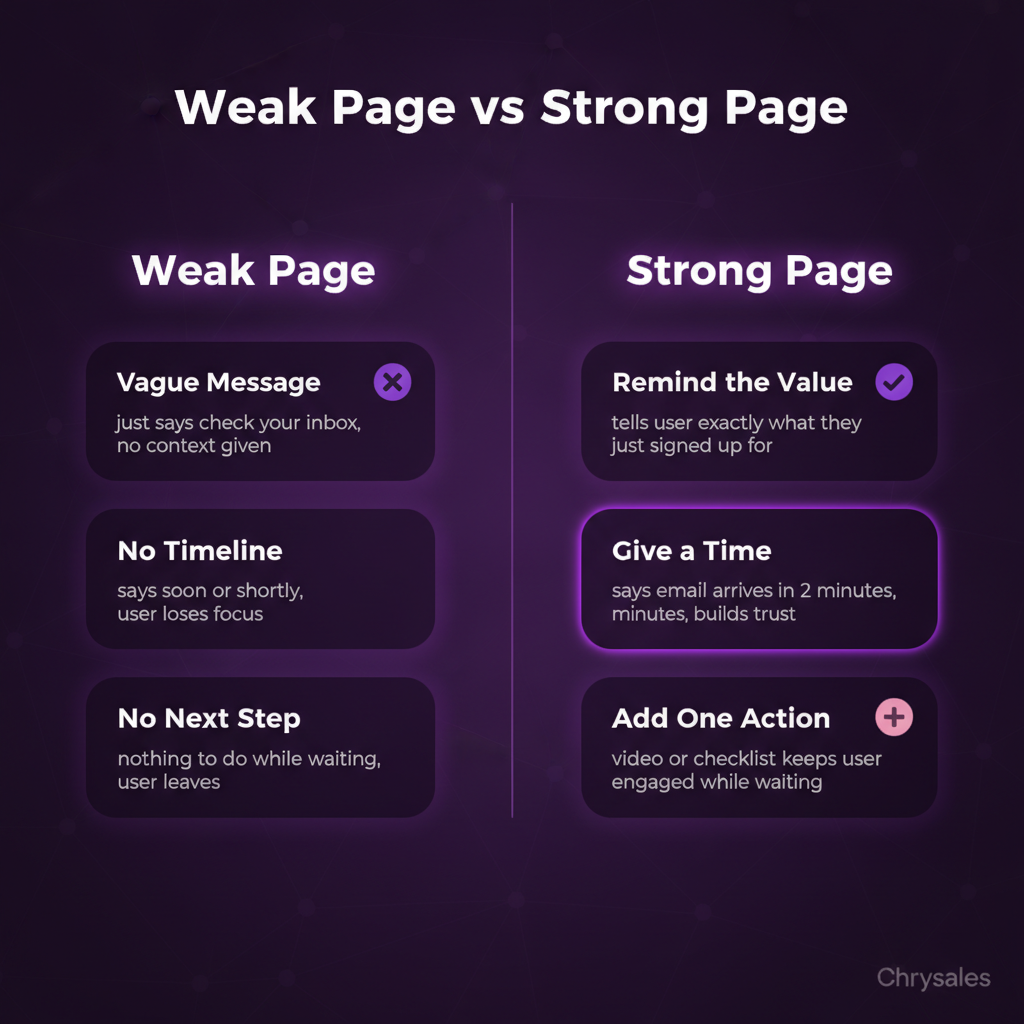
A strong saas email confirmation page does three things:
- Reminds the user what they just signed up for. If someone filled out a form for a free trial, the confirmation page should say "Your trial starts as soon as you confirm your email" instead of just "Confirmation email sent."
- Sets a timeline. Tell people the email arrives in 2 minutes, not "soon" or "shortly." That specificity makes them wait instead of wandering off.
- Gives them something to do while they wait. A 90-second video showing the dashboard. A quick checklist of what to prep before their first login. A live chat button if they have questions. Anything that keeps them engaged.
A 30-person consulting firm we worked with changed their confirmation page from a plain "Check your inbox" message to a page with a 60-second demo video and a clear "Email arrives in under 2 minutes" line. Their email open rate jumped from 58% to 81% in three weeks. The video did the heavy lifting. It reminded people why they cared.
Watch out: Don't add too much. If your confirmation page has 10 links and 3 CTAs, people get distracted. Keep it focused: confirm email, watch/read one thing, done.
Email Verification Best Practices: Getting People to Actually Click
Email verification is where the SaaS onboarding flow either works or dies. If someone doesn't verify their email, they can't log in. They can't see your product. They can't become a customer. You spent money getting them to sign up, and now they're stuck at step one.
The biggest problem? Most verification emails are boring. Subject line: "Confirm your email address." Body: "Click the button below to verify your account." No context, no urgency, no reason to care. People ignore it or it lands in a promo tab and gets buried.
How to Write Verification Emails That Get Clicked
Start with a subject line that reminds the person what they're getting. "Confirm your email and access your dashboard" beats "Email verification required" every time. It's the same action, but one tells you why it matters.
Inside the email, use the first sentence to reconnect with the signup moment. "You just signed up for [product name]. Here's how to get in." Then make the CTA button copy specific. Instead of "Verify Email," try "Access My Account" or "Start My Trial." Same click, better framing.
One marketing agency switched from "Verify Your Email" to "Unlock Your Account in One Click" and saw their verification rate go from 62% to 74%. Small copy change, big result.
Pro Tip: Add a line below the CTA button with the raw verification link. Some email clients block buttons. If someone can't click, they can copy-paste the URL. Sounds basic, but it saves 5-10% of signups.
Timing and Delivery Details That Matter
Send the verification email instantly. Not in 5 minutes. Not "within the hour." The second someone submits the signup form, the email should hit their inbox. Every minute of delay is a drop in verification rate.
Also, make sure your "from" name is recognizable. If your product is called "FlowApp" and the email comes from "noreply@flowapp-mail.io," people won't recognize it. Use "FlowApp Team" or "Sarah at FlowApp." Real names get opened more, which aligns with best practices for verification emails that remain effective over time.
SaaS Onboarding Email Templates: Turning Signups Into Active Users
Once someone verifies their email, they're in. Now what? This is where b2b sales and SaaS onboarding overlap. A verified email is not an active user. You need to get them to log in, poke around, and see value fast.
Most SaaS products lose 40-60% of signups in the first week because onboarding emails don't guide people clearly enough.
The Welcome Email: Your First Real Sales Moment
The welcome email is the first thing someone sees after they confirm. This email should do one thing: get them to take the next step. Not three steps. One. Log in, watch a demo, book a call, complete setup, whatever makes sense for your product. Pick one and make it obvious.
Here's a simple structure that works:
- Subject: Welcome to [Product]. Here's what to do first.
- Body opening: You're in. Now let's get you set up so you can [specific outcome: close more deals, automate outreach, track leads, etc.].
- The ask: Click below to [specific action]. This takes about 2 minutes.
- CTA button: Big, clear, one action.
- Optional: A short "What happens next" section below the button. Three bullet points max.
A tech company we worked with used to send a welcome email with links to the knowledge base, a feature tour, a case study, and a community forum. Nobody clicked anything. They cut it down to one button: "Build Your First Workflow in 2 Minutes." Click-through rate went from 14% to 47%.
Watch out: Don't bury the CTA below a wall of text. Most people scan emails in under 10 seconds. If they can't see the button without scrolling, they won't click.
Onboarding Sequences: The 3-Email Framework
After the welcome email, you need a short sequence that walks people through the first steps. Most teams send 7-10 onboarding emails. That's too many. People tune out. Stick to three emails over the first week.
Email 1 (Day 1): Welcome and one clear action (already covered above).
Email 2 (Day 3): Check-in and quick win. Subject: "Need help getting started?" Body: Show them the fastest way to get value. If your product is a CRM, show them how to add their first 10 leads in 60 seconds. If it's a scheduling tool, show them how to send their first booking link. Make it tiny and achievable. End with "Reply to this email if you're stuck." Personal replies convert way better than "contact support" links.
Email 3 (Day 7): Results and next level. Subject: "Here's what to do next with [Product]." Body: Assume they did the first quick win. Now show them the next step that gets them closer to the main value. If they added leads, show them how to set up a follow-up sequence. If they sent a booking link, show them how to connect their calendar. This email should feel like leveling up, not starting over.
One 15-person consulting firm used this exact three-email sequence and cut their trial-to-paid conversion time from 18 days to 11 days. Fewer emails, better results.
Cold Outreach and Post-Signup Follow-Up: Bridging the Gap
Here's something most SaaS companies miss: the confirmation and onboarding flow is cold outreach. It's not technically "cold" because the person signed up. But they don't know you yet. They don't trust you. They're not warm.
That's why the same rules that work for cold email also work for SaaS email templates. Be specific. Be short. Make the value obvious. Don't ask for too much too soon. Understanding outbound email marketing best practices can dramatically improve how you write confirmation and onboarding sequences.
Using Post-Signup Emails to Move People Toward Sales Calls
If you're selling B2B SaaS with a sales team, your onboarding emails should guide people toward a discovery call, not just product usage. A lot of companies separate these completely. Marketing sends onboarding emails. Sales sends booking requests. The two don't talk. That's a waste.
Better approach: Build the call invite into your onboarding sequence. Email 2 or 3 can include a soft CTA: "Want help setting this up? Book a 15-minute call and we'll walk you through it." Not pushy. Just helpful. Some people want to figure it out alone. Others want a hand. Give them the option.
We worked with a SaaS company selling to marketing agencies. They added a "Book a setup call" link to their Day 3 onboarding email. 22% of new signups booked. Half of those became paying customers within 30 days. The email didn't change much. The offer did.
Pro Tip: If someone books a call from an onboarding email, send a separate confirmation email with what to expect on the call. Most people show up if they know exactly what's going to happen and how long it takes.
Transactional Emails and sales training: Teaching Teams to Follow Up
Transactional email optimization isn't just about deliverability and open rates. It's about training your sales team to treat every automated email as part of the client acquisition system.
If someone opens a confirmation email three times but doesn't log in, that's a signal. If someone clicks "reset password" twice, that's a signal. Most teams ignore these signals because they think transactional emails are just technical plumbing.
How to Turn Transactional Signals Into Sales Actions
Your CRM or sales system should track email activity from your SaaS onboarding flow. If someone confirms their email but doesn't log in after 48 hours, that should trigger a personal follow-up. Not another automated email. A real message from a real person.
Simple follow-up template for this scenario: "Hey [Name], saw you signed up for [Product] a couple days ago but haven't had a chance to log in yet. Anything I can help with to get you started? Happy to hop on a quick call or send over a walkthrough. Just reply to this and let me know."
That's it. No pitch. No pressure. Just a real human checking in. This kind of follow-up closes the gap between marketing automation and sales training. Your team learns to watch the signals and act on them.
A 50-person tech company added this step and recovered 18% of signups that would have gone cold. The follow-up took 90 seconds per person. The ROI was massive.
Watch out: Don't follow up too soon. If someone signs up at 11 PM, don't email them at 9 AM the next morning asking why they haven't logged in. Give people 48-72 hours to explore on their own first.
Building a Custom Sales System Around Your Email Flow
This is where everything connects. Your SaaS email templates aren't separate from your sales system. They are your sales system. Or at least the first part of it.
Every email is a chance to qualify, educate, and move someone closer to a buying decision. Most B2B businesses treat email automation and sales as separate tracks. Automation handles signups and onboarding. Sales handles calls and closing. But the best systems blur the line. Emails don't just onboard. They qualify. They ask questions. They book calls. They handle objections before a salesperson even gets involved. You can watch how to build a sales system so powerful clients come to you to see how every touchpoint, including transactional emails, drives inbound interest and revenue.
The Four-Part System That Connects Email to Revenue
Part 1: Confirmation and verification. Get people in the door fast. Clear copy, obvious CTA, no friction. This is the top of your sales pipeline, even if it doesn't feel like "sales" yet.
Part 2: Onboarding and activation. Guide people to their first win as fast as possible. This is lead generation inside your product. An active user is a qualified lead.
Part 3: Engagement and qualification. Watch who's engaging. Opens, clicks, logins, feature usage. Feed that data to your sales team or your automation system. If someone uses a key feature, send a case study or a call invite. If they don't, send a helpful nudge or a "what's blocking you?" message.
Part 4: Conversion and handoff. Move people from free to paid, or from self-serve to sales-assisted. This is where your email templates set up the close. A well-timed "Ready to upgrade?" email with clear pricing and a booking link can convert 10-20% of engaged trial users.
A marketing agency we worked with built this exact flow. They went from 3% trial-to-paid conversion to 11% in four months. The product didn't change. The email system did. This approach is part of how to build a sales system that actually scales, where every email, call, and touchpoint is engineered to drive predictable revenue growth.
Pro Tip: Map out every email your users get in the first 30 days. Count them. If it's more than 6-8 emails, cut the weakest ones. More emails doesn't mean more conversions. It usually means more unsubscribes.
GTM Strategy and Email Confirmation: Why It Matters from Day One
Your go-to-market strategy starts the second someone lands on your signup page. It doesn't start when they talk to sales or when they pull out a credit card. It starts at the very first touch.
That's why the saas email confirmation page and the emails that follow are part of your gtm, not just a UX detail. If your confirmation flow is slow, unclear, or boring, you're leaking potential customers before they even see your product. If your onboarding emails don't connect to your sales motion, you're wasting warm interest. The email templates you write today shape your client acquisition pipeline for the next six months. Learning how to integrate your confirmation flow into a broader b2b go-to-market strategy ensures every signup becomes part of your revenue engine from day one.
Most companies don't think about it that way. They treat email templates as a one-time setup. Write them, ship them, forget them. But the best B2B SaaS businesses revisit their email flows every quarter. They test subject lines. They tweak copy. They watch the numbers and adjust.
A 20-person consulting firm changed one line in their confirmation email. Old version: "Click to verify your account." New version: "Click to access your dashboard and see your first results." Confirmation click rate went from 68% to 79%. One sentence, 11-point swing. That's the kind of small change that adds up to real revenue over time.
Watch out: Don't change too many things at once. If you rewrite five emails in one week, you won't know which change made the difference. Test one thing at a time. Wait a week. Look at the numbers. Then test the next thing.
Frequently Asked Questions
Q: How many emails should I send in the first week after someone signs up?
Send 3-4 max. One confirmation, one welcome with a clear first action, one check-in around Day 3, and optionally one more around Day 7 if they haven't logged in or taken the key action. More than that and people tune out or unsubscribe. Quality over quantity always wins. Each email should have one job: get the person to take the next step. If an email doesn't move someone forward, don't send it.
Q: What's the difference between a SaaS email confirmation page and a verification email?
The saas email confirmation page is the screen someone sees right after they submit the signup form. It tells them to check their email and sets expectations. The verification email is the actual message they receive in their inbox with the link to confirm their account. The page prepares them, the email delivers the action. Both need to work together. If the page is vague, people forget to check their email. If the email is boring, they don't click.
Q: Should I require email verification for all signups or let people access the product first?
It depends on your product and your risk tolerance. Email verification cuts down on fake signups and protects your sender reputation, which matters for long-term deliverability. But it also adds friction and can drop your signup-to-active-user conversion rate by 10-20%. If you're selling high-ticket B2B software where every lead matters, verify first. If you're growth-focused and want fast activation, let people in immediately and verify later with a soft nudge. Industry experts recommend understanding user onboarding email best practices for product-led growth to decide which approach suits your business model.
Q: How do I reduce the number of people who confirm their email but never log in?
Send a short, action-focused welcome email immediately after confirmation. Don't make them hunt for the login link or figure out what to do next. Give them one clear step and make it fast. Also, make sure your product dashboard shows value within the first 60 seconds. If someone logs in and sees a blank screen or a complicated setup wizard, they bounce. Show them a quick win, a pre-filled demo, or a guided first task.
Q: Can I use cold outreach tactics in my SaaS onboarding emails without feeling salesy?
Yes. The best SaaS onboarding emails already use cold outreach principles: short, specific, one clear CTA, personalized where possible, and focused on the reader's outcome, not the company's features. The difference is context. Someone who just signed up isn't cold, but they're not warm yet either. Treat them like an interested stranger, not a best friend. Be helpful, not pushy. Offer value first, ask for the sale later.
A saas email confirmation page is the screen users see right after signing up, telling them to check their email to confirm their account and setting expectations for what happens next. This page is often treated as an afterthought, but it is actually the first real step in your customer journey.
Picture this: you spend two weeks setting up a SaaS product. The signup flow is beautiful. The dashboard is clean. Then someone signs up, and they get a boring confirmation email that says "Click here to verify." Half of them never click. The other half forget about you five minutes later.
That's the trap most B2B SaaS companies fall into. Email templates aren't just about looking professional or staying out of spam folders. They're the first real conversation you have with someone who just raised their hand and said "I'm interested." Get this part right, and you turn cold signups into warm leads. Get it wrong, and you're burning money on traffic that goes nowhere.
This guide breaks down the SaaS email templates that actually move people from signup to active user, from trial to paying customer, and from one-time buyer to long-term client.
Why Most SaaS Email Templates Fail (And How to Fix Them)
Most SaaS email templates sound like they were written by a lawyer, for a robot, about a process nobody cares about. The tone is stiff. The next steps are unclear. The value gets buried under a pile of "Thank you for registering" fluff.
Here's the thing: your email confirmation isn't just a technical step. It's a sales moment. Someone just gave you their email address. They're paying attention right now. You have maybe 30 seconds before they close the tab and forget you exist.
The Three Mistakes That Kill Conversion Rates
Most teams focus on what the company needs (verify your email, complete your profile, read our terms) instead of what the reader gets (access your dashboard, start building, see your first result). Following SaaS onboarding email best practices, companies that reframe confirmation messages around user value see significantly higher engagement rates.
Most teams also send way too many emails in the first 24 hours. A signup confirmation, a welcome email, a "here's how to get started" guide, a "meet the founder" story, and a "don't forget about us" reminder. That's five emails before someone even logs in once. It feels like spam, even if the content is good.
The third mistake is treating every user the same. A solo consultant signing up for project management software has different questions than a 50-person agency. Yet most SaaS companies send identical emails to both. One size fits nobody.
Pro Tip: Cut your welcome email sequence down to two emails in the first day: one confirmation, one action-focused "here's what to do first" message. Wait 48 hours before sending anything else.
The SaaS Email Confirmation Page: First Impressions That Stick
The saas email confirmation page is the moment right after someone signs up. They land on a page that says "Check your email to confirm your account." This page gets treated like an afterthought. It's usually plain text on a white background with zero personality.
But this is where a lot of b2b lead generation starts to leak. About 20-30% of people who hit this page never open the email. Why? Because the page doesn't give them a reason to care. It doesn't remind them why they signed up. It doesn't set expectations for what happens next.
What Great Confirmation Pages Do Differently
A strong saas email confirmation page does three things:
- Reminds the user what they just signed up for. If someone filled out a form for a free trial, the confirmation page should say "Your trial starts as soon as you confirm your email" instead of just "Confirmation email sent."
- Sets a timeline. Tell people the email arrives in 2 minutes, not "soon" or "shortly." That specificity makes them wait instead of wandering off.
- Gives them something to do while they wait. A 90-second video showing the dashboard. A quick checklist of what to prep before their first login. A live chat button if they have questions. Anything that keeps them engaged.
A 30-person consulting firm we worked with changed their confirmation page from a plain "Check your inbox" message to a page with a 60-second demo video and a clear "Email arrives in under 2 minutes" line. Their email open rate jumped from 58% to 81% in three weeks. The video did the heavy lifting. It reminded people why they cared.
Watch out: Don't add too much. If your confirmation page has 10 links and 3 CTAs, people get distracted. Keep it focused: confirm email, watch/read one thing, done.
Email Verification Best Practices: Getting People to Actually Click
Email verification is where the SaaS onboarding flow either works or dies. If someone doesn't verify their email, they can't log in. They can't see your product. They can't become a customer. You spent money getting them to sign up, and now they're stuck at step one.
The biggest problem? Most verification emails are boring. Subject line: "Confirm your email address." Body: "Click the button below to verify your account." No context, no urgency, no reason to care. People ignore it or it lands in a promo tab and gets buried.
How to Write Verification Emails That Get Clicked
Start with a subject line that reminds the person what they're getting. "Confirm your email and access your dashboard" beats "Email verification required" every time. It's the same action, but one tells you why it matters.
Inside the email, use the first sentence to reconnect with the signup moment. "You just signed up for [product name]. Here's how to get in." Then make the CTA button copy specific. Instead of "Verify Email," try "Access My Account" or "Start My Trial." Same click, better framing.
One marketing agency switched from "Verify Your Email" to "Unlock Your Account in One Click" and saw their verification rate go from 62% to 74%. Small copy change, big result.
Pro Tip: Add a line below the CTA button with the raw verification link. Some email clients block buttons. If someone can't click, they can copy-paste the URL. Sounds basic, but it saves 5-10% of signups.
Timing and Delivery Details That Matter
Send the verification email instantly. Not in 5 minutes. Not "within the hour." The second someone submits the signup form, the email should hit their inbox. Every minute of delay is a drop in verification rate.
Also, make sure your "from" name is recognizable. If your product is called "FlowApp" and the email comes from "noreply@flowapp-mail.io," people won't recognize it. Use "FlowApp Team" or "Sarah at FlowApp." Real names get opened more, which aligns with best practices for verification emails that remain effective over time.
SaaS Onboarding Email Templates: Turning Signups Into Active Users
Once someone verifies their email, they're in. Now what? This is where b2b sales and SaaS onboarding overlap. A verified email is not an active user. You need to get them to log in, poke around, and see value fast.
Most SaaS products lose 40-60% of signups in the first week because onboarding emails don't guide people clearly enough.
The Welcome Email: Your First Real Sales Moment
The welcome email is the first thing someone sees after they confirm. This email should do one thing: get them to take the next step. Not three steps. One. Log in, watch a demo, book a call, complete setup, whatever makes sense for your product. Pick one and make it obvious.
Here's a simple structure that works:
- Subject: Welcome to [Product]. Here's what to do first.
- Body opening: You're in. Now let's get you set up so you can [specific outcome: close more deals, automate outreach, track leads, etc.].
- The ask: Click below to [specific action]. This takes about 2 minutes.
- CTA button: Big, clear, one action.
- Optional: A short "What happens next" section below the button. Three bullet points max.
A tech company we worked with used to send a welcome email with links to the knowledge base, a feature tour, a case study, and a community forum. Nobody clicked anything. They cut it down to one button: "Build Your First Workflow in 2 Minutes." Click-through rate went from 14% to 47%.
Watch out: Don't bury the CTA below a wall of text. Most people scan emails in under 10 seconds. If they can't see the button without scrolling, they won't click.
Onboarding Sequences: The 3-Email Framework
After the welcome email, you need a short sequence that walks people through the first steps. Most teams send 7-10 onboarding emails. That's too many. People tune out. Stick to three emails over the first week.
Email 1 (Day 1): Welcome and one clear action (already covered above).
Email 2 (Day 3): Check-in and quick win. Subject: "Need help getting started?" Body: Show them the fastest way to get value. If your product is a CRM, show them how to add their first 10 leads in 60 seconds. If it's a scheduling tool, show them how to send their first booking link. Make it tiny and achievable. End with "Reply to this email if you're stuck." Personal replies convert way better than "contact support" links.
Email 3 (Day 7): Results and next level. Subject: "Here's what to do next with [Product]." Body: Assume they did the first quick win. Now show them the next step that gets them closer to the main value. If they added leads, show them how to set up a follow-up sequence. If they sent a booking link, show them how to connect their calendar. This email should feel like leveling up, not starting over.
One 15-person consulting firm used this exact three-email sequence and cut their trial-to-paid conversion time from 18 days to 11 days. Fewer emails, better results.
Cold Outreach and Post-Signup Follow-Up: Bridging the Gap
Here's something most SaaS companies miss: the confirmation and onboarding flow is cold outreach. It's not technically "cold" because the person signed up. But they don't know you yet. They don't trust you. They're not warm.
That's why the same rules that work for cold email also work for SaaS email templates. Be specific. Be short. Make the value obvious. Don't ask for too much too soon. Understanding outbound email marketing best practices can dramatically improve how you write confirmation and onboarding sequences.
Using Post-Signup Emails to Move People Toward Sales Calls
If you're selling B2B SaaS with a sales team, your onboarding emails should guide people toward a discovery call, not just product usage. A lot of companies separate these completely. Marketing sends onboarding emails. Sales sends booking requests. The two don't talk. That's a waste.
Better approach: Build the call invite into your onboarding sequence. Email 2 or 3 can include a soft CTA: "Want help setting this up? Book a 15-minute call and we'll walk you through it." Not pushy. Just helpful. Some people want to figure it out alone. Others want a hand. Give them the option.
We worked with a SaaS company selling to marketing agencies. They added a "Book a setup call" link to their Day 3 onboarding email. 22% of new signups booked. Half of those became paying customers within 30 days. The email didn't change much. The offer did.
Pro Tip: If someone books a call from an onboarding email, send a separate confirmation email with what to expect on the call. Most people show up if they know exactly what's going to happen and how long it takes.
Transactional Emails and sales training: Teaching Teams to Follow Up
Transactional email optimization isn't just about deliverability and open rates. It's about training your sales team to treat every automated email as part of the client acquisition system.
If someone opens a confirmation email three times but doesn't log in, that's a signal. If someone clicks "reset password" twice, that's a signal. Most teams ignore these signals because they think transactional emails are just technical plumbing.
How to Turn Transactional Signals Into Sales Actions
Your CRM or sales system should track email activity from your SaaS onboarding flow. If someone confirms their email but doesn't log in after 48 hours, that should trigger a personal follow-up. Not another automated email. A real message from a real person.
Simple follow-up template for this scenario: "Hey [Name], saw you signed up for [Product] a couple days ago but haven't had a chance to log in yet. Anything I can help with to get you started? Happy to hop on a quick call or send over a walkthrough. Just reply to this and let me know."
That's it. No pitch. No pressure. Just a real human checking in. This kind of follow-up closes the gap between marketing automation and sales training. Your team learns to watch the signals and act on them.
A 50-person tech company added this step and recovered 18% of signups that would have gone cold. The follow-up took 90 seconds per person. The ROI was massive.
Watch out: Don't follow up too soon. If someone signs up at 11 PM, don't email them at 9 AM the next morning asking why they haven't logged in. Give people 48-72 hours to explore on their own first.
Building a Custom Sales System Around Your Email Flow
This is where everything connects. Your SaaS email templates aren't separate from your sales system. They are your sales system. Or at least the first part of it.
Every email is a chance to qualify, educate, and move someone closer to a buying decision. Most B2B businesses treat email automation and sales as separate tracks. Automation handles signups and onboarding. Sales handles calls and closing. But the best systems blur the line. Emails don't just onboard. They qualify. They ask questions. They book calls. They handle objections before a salesperson even gets involved. You can watch how to build a sales system so powerful clients come to you to see how every touchpoint, including transactional emails, drives inbound interest and revenue.
The Four-Part System That Connects Email to Revenue
Part 1: Confirmation and verification. Get people in the door fast. Clear copy, obvious CTA, no friction. This is the top of your sales pipeline, even if it doesn't feel like "sales" yet.
Part 2: Onboarding and activation. Guide people to their first win as fast as possible. This is lead generation inside your product. An active user is a qualified lead.
Part 3: Engagement and qualification. Watch who's engaging. Opens, clicks, logins, feature usage. Feed that data to your sales team or your automation system. If someone uses a key feature, send a case study or a call invite. If they don't, send a helpful nudge or a "what's blocking you?" message.
Part 4: Conversion and handoff. Move people from free to paid, or from self-serve to sales-assisted. This is where your email templates set up the close. A well-timed "Ready to upgrade?" email with clear pricing and a booking link can convert 10-20% of engaged trial users.
A marketing agency we worked with built this exact flow. They went from 3% trial-to-paid conversion to 11% in four months. The product didn't change. The email system did. This approach is part of how to build a sales system that actually scales, where every email, call, and touchpoint is engineered to drive predictable revenue growth.
Pro Tip: Map out every email your users get in the first 30 days. Count them. If it's more than 6-8 emails, cut the weakest ones. More emails doesn't mean more conversions. It usually means more unsubscribes.
GTM Strategy and Email Confirmation: Why It Matters from Day One
Your go-to-market strategy starts the second someone lands on your signup page. It doesn't start when they talk to sales or when they pull out a credit card. It starts at the very first touch.
That's why the saas email confirmation page and the emails that follow are part of your gtm, not just a UX detail. If your confirmation flow is slow, unclear, or boring, you're leaking potential customers before they even see your product. If your onboarding emails don't connect to your sales motion, you're wasting warm interest. The email templates you write today shape your client acquisition pipeline for the next six months. Learning how to integrate your confirmation flow into a broader b2b go-to-market strategy ensures every signup becomes part of your revenue engine from day one.
Most companies don't think about it that way. They treat email templates as a one-time setup. Write them, ship them, forget them. But the best B2B SaaS businesses revisit their email flows every quarter. They test subject lines. They tweak copy. They watch the numbers and adjust.
A 20-person consulting firm changed one line in their confirmation email. Old version: "Click to verify your account." New version: "Click to access your dashboard and see your first results." Confirmation click rate went from 68% to 79%. One sentence, 11-point swing. That's the kind of small change that adds up to real revenue over time.
Watch out: Don't change too many things at once. If you rewrite five emails in one week, you won't know which change made the difference. Test one thing at a time. Wait a week. Look at the numbers. Then test the next thing.
Frequently Asked Questions
Q: How many emails should I send in the first week after someone signs up?
Send 3-4 max. One confirmation, one welcome with a clear first action, one check-in around Day 3, and optionally one more around Day 7 if they haven't logged in or taken the key action. More than that and people tune out or unsubscribe. Quality over quantity always wins. Each email should have one job: get the person to take the next step. If an email doesn't move someone forward, don't send it.
Q: What's the difference between a SaaS email confirmation page and a verification email?
The saas email confirmation page is the screen someone sees right after they submit the signup form. It tells them to check their email and sets expectations. The verification email is the actual message they receive in their inbox with the link to confirm their account. The page prepares them, the email delivers the action. Both need to work together. If the page is vague, people forget to check their email. If the email is boring, they don't click.
Q: Should I require email verification for all signups or let people access the product first?
It depends on your product and your risk tolerance. Email verification cuts down on fake signups and protects your sender reputation, which matters for long-term deliverability. But it also adds friction and can drop your signup-to-active-user conversion rate by 10-20%. If you're selling high-ticket B2B software where every lead matters, verify first. If you're growth-focused and want fast activation, let people in immediately and verify later with a soft nudge. Industry experts recommend understanding user onboarding email best practices for product-led growth to decide which approach suits your business model.
Q: How do I reduce the number of people who confirm their email but never log in?
Send a short, action-focused welcome email immediately after confirmation. Don't make them hunt for the login link or figure out what to do next. Give them one clear step and make it fast. Also, make sure your product dashboard shows value within the first 60 seconds. If someone logs in and sees a blank screen or a complicated setup wizard, they bounce. Show them a quick win, a pre-filled demo, or a guided first task.
Q: Can I use cold outreach tactics in my SaaS onboarding emails without feeling salesy?
Yes. The best SaaS onboarding emails already use cold outreach principles: short, specific, one clear CTA, personalized where possible, and focused on the reader's outcome, not the company's features. The difference is context. Someone who just signed up isn't cold, but they're not warm yet either. Treat them like an interested stranger, not a best friend. Be helpful, not pushy. Offer value first, ask for the sale later.
Scaling Is Not Hard If You Have The Right Systems
If you’re serious about leveling up your scaling game, you need the right system, the right training, and the right team behind you. We're here to give you the exact tools and strategies top entrepreneurs use to dominate.

Discover the latest tips
View All.avif)
Chrysales was formed from the words "chrysalis" the stage where a caterpillar transforms into a butterfly and "sales".
It stands for one thing: sales transformation.Because scaling doesn’t happen by doing more of the same. Scaling only happens when you go through real transformation in your systems, your offer, team and the way you sell.
.avif)


