.avif)
10 Best Linkedin Lead Generation Tools That Work

A linkedin lead generation tool helps you find prospects, send outreach, and track replies on LinkedIn so you can improve lead generation and client acquisition.
Picture this: you spend 40 hours building the perfect LinkedIn outreach campaign. You write great messages. You find hundreds of prospects. Then you hit send. Three people reply. One is an auto-responder. The other two say "not interested."
Sound familiar?
Here's the thing: most LinkedIn lead generation fails not because the message is bad, but because the tools and system behind it don't fit together.
This guide breaks down the 10 best LinkedIn lead generation tools you can actually use to book more calls, with zero fluff about what each button does.
Why Most LinkedIn Lead Generation Tools Don't Deliver Results
Most people pick a linkedin lead generation tool the same way they pick a Netflix show. They read the description, look at the screenshots, maybe check a review. Then they sign up, click around for a week, and wonder why nothing's happening.
The problem isn't the tool. It's that a tool is just one piece of a sales system.
Think of it like buying a nice camera and expecting to become a great photographer overnight. The camera helps, but you still need to know how to frame a shot, adjust the lighting, and edit the photos.
Watch out: Automation tools that promise "500 connections per week" often get your account flagged or restricted. LinkedIn caps connection requests at around 100-200 per week for most accounts, and going harder just trips their spam filters.
A linkedin lead generation tool works when it plugs into a real system. That means you need a clear ICP (ideal customer profile), a list of people who actually match it, a message that speaks to their problem, and a follow-up plan. The tool just makes the outreach faster. It doesn't fix a broken strategy.
We see this all the time with new clients. They come in with three different tools running at once, sending messages to anyone with "CEO" in their title. The reply rate sits at 0.5%. After we help them rebuild the system around one good tool, replies jump to 3-5%. Same tool. Different system.
The Real Job of a LinkedIn Lead Generation Tool
A good LinkedIn outreach automation tool does three things:
- Finds people who match your ICP using filters like job title, company size, industry, location
- Sends messages at scale without you copy-pasting into 50 LinkedIn windows
- Tracks responses so you know who opened, who replied, and who needs a follow-up
That's it. If a tool tries to do 40 other things, it's probably mediocre at all of them. The best tools do these three jobs really well and integrate with your CRM so the data flows where it needs to go.
LinkedIn Sales Navigator: The Backbone of B2B Sales Prospecting

If you're serious about LinkedIn lead generation, you start here. LinkedIn Sales Navigator is LinkedIn's native tool for finding and tracking prospects. It's not flashy. It's not cheap. But it's the foundation most other LinkedIn lead generation software builds on top of.
What Makes Sales Navigator Worth It
Sales Navigator gives you advanced search filters that regular LinkedIn doesn't. You can search by things like company headcount growth, years in current role, seniority level, and even technology the company uses. You can save those searches and get alerts when new people match your criteria.
Pro Tip: Set up 3-5 saved lead lists in Sales Navigator based on slightly different ICP criteria. Check them once a week. This keeps your pipeline fresh without needing to run the same search over and over.
The tool also shows you who's viewed your profile and who's engaged with your content. If someone from your target list checks out your profile, that's a warm signal. Reach out within 24 hours.
A 40-person consulting firm we worked with used Sales Navigator to build a list of 800 qualified prospects in two weeks. They filtered by company size (50-500 employees), industry (SaaS), and job title (VP of Sales). Before that, they were just searching "sales leader" and getting thousands of random results.
Where Sales Navigator Falls Short
Sales Navigator finds people. It doesn't send messages for you. You still have to do that manually, or connect it to an automation tool. It's also $99/month for the basic plan, which feels steep if you're just testing LinkedIn outreach for the first time.
But here's the deal: if you skip Sales Navigator and use a cheaper tool, you'll spend twice as long building lists that aren't as good. Most B2B lead generation software that's worth using integrates with Sales Navigator anyway.
Dux-Soup: Simple Automation for Small Sales Teams
Dux-Soup is one of the oldest LinkedIn automation tools still standing. It's a Chrome extension that automates profile visits, connection requests, and message sequences. If you're a solo founder or running a small sales team, it's a solid place to start.
How Dux-Soup Keeps It Simple
You install the extension, set up a campaign, and let it run while you work. Dux-Soup visits profiles, sends connection requests with a note, and follows up with a message once they accept. You can drip up to three messages over a few weeks.
Common mistake: Sending the same generic message to everyone. Even with automation, you need 2-3 different message templates based on role or industry. A message that works for a marketing director won't land with a CFO.
Dux-Soup pricing starts around $15/month for basic features. The higher tiers let you integrate with your CRM and pull data from LinkedIn profiles directly into your sales pipeline. It's not fancy, but it works if you follow LinkedIn's daily limits.
The Catch with Dux-Soup
It's a Chrome extension, which means it only runs when your browser is open. If you close your laptop, the automation stops. Some teams leave an old laptop running 24/7 just for Dux-Soup campaigns. That works, but it feels clunky.
Also, LinkedIn doesn't love third-party automation. If you send 200 connection requests in a day, your account could get restricted. Dux-Soup has safety limits built in, but you still need to stay conservative. We recommend maxing out at 50-75 actions per day when you're starting.
Waalaxy: Multi-Channel Outreach Beyond LinkedIn
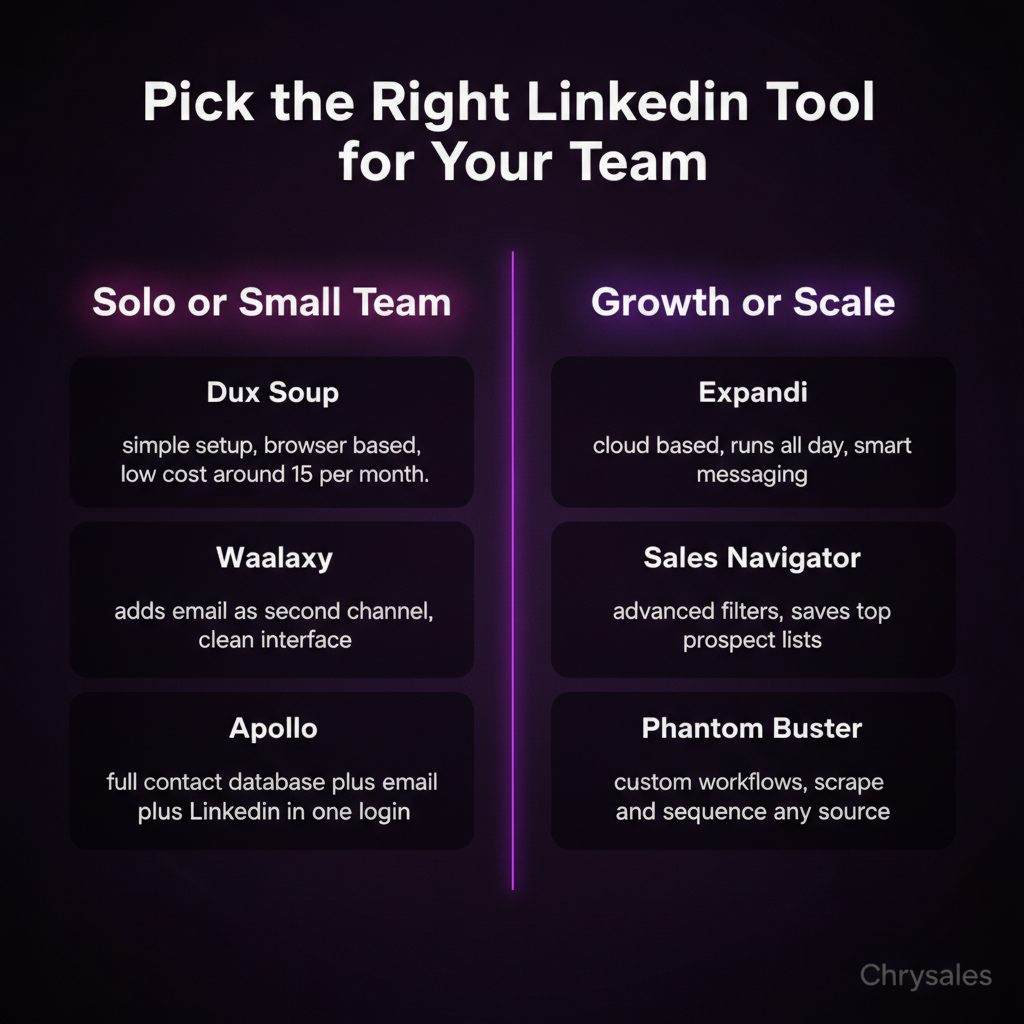
Waalaxy takes LinkedIn automation and adds email into the mix. You can build a sequence that starts with a LinkedIn connection request, follows up with a message, and then sends an email if they don't reply. It's one of the few LinkedIn lead generation tools that actually does multi-channel well.
Why Multi-Channel Matters for Client Acquisition
Most people check LinkedIn once a day, if that. Email? They're in there 10 times a day. If your message only lives on LinkedIn, you're missing half your chances to connect.
A marketing agency we worked with tried LinkedIn-only outreach for three months. Reply rate: 2%. They switched to Waalaxy and added email as a third touchpoint. Reply rate jumped to 6%. Same prospects. Same offer. Just more ways to reach them.
Pro Tip: Don't send the email on the same day as the LinkedIn message. Space it out by 3-4 days so it feels like a natural follow-up, not spam.
Waalaxy's pricing starts around $50/month. The interface is clean and easier to use than most tools in this space. You can import leads from LinkedIn Sales Navigator, CSV files, or even scrape them from LinkedIn search results.
Where Waalaxy Can Improve
The email finder isn't perfect. It pulls emails from public databases, which means 20-30% of the emails you get might be outdated or wrong. If email is a big part of your outreach strategy, pair Waalaxy with a dedicated email finder like Apollo or Hunter.io.
Also, Waalaxy runs in the cloud, which is great for automation but can feel a little risky if LinkedIn decides to crack down. So far, they've been safe, but keep your daily limits low just in case.
Expandi: Cloud-Based LinkedIn Outreach Automation
Expandi is a cloud-based LinkedIn automation tool, which means it runs 24/7 without needing your computer on. You set up a campaign, walk away, and it handles the outreach while you focus on closing deals.
What Expandi Does Better Than Most
Expandi lets you personalize at scale. You can pull data like first name, company name, job title, and even recent LinkedIn posts into your messages. A message that says "Hey [First Name], saw your post about hiring challenges" feels way more human than "Hi, I help companies with sales."
The tool also has image and GIF personalization. You can send a screenshot of someone's LinkedIn profile or a custom GIF with their name on it. Gimmicky? A little. Effective? Sometimes. One tech company we know used this feature and got a 12% reply rate on cold outreach.
Expandi's smart inbox pulls all your LinkedIn conversations into one place so you're not jumping between tabs. If someone replies, you get a notification and can respond right from the dashboard.
The Downside of Expandi
It's $99/month, which is on the higher end for LinkedIn lead generation software. If you're just testing LinkedIn outreach, that's a big commitment. Also, because it's cloud-based, you're trusting Expandi to keep your account safe. They use IP rotation and mimic human behavior to avoid detection, but there's always a small risk with automation.
Phantombuster: For Teams That Want Full Control
Phantombuster isn't just a linkedin lead generation tool. It's a data scraping and automation platform that happens to work really well with LinkedIn. If you like tinkering with workflows and building custom sequences, this is your tool.
How Phantombuster Gives You More Flexibility
Phantombuster uses "Phantoms," which are basically pre-built automation scripts. There's a Phantom for scraping LinkedIn search results, one for sending connection requests, one for extracting emails, and dozens more. You stack them together to build your own outreach system.
Want to scrape everyone who commented on a competitor's post, then send them a connection request, then follow up with a message? You can do that. Want to pull all employees from a target company and add them to your CRM? Also doable.
Watch out: Phantombuster has a learning curve. If you've never built an automation workflow before, it can feel overwhelming. Most teams need a few hours to get comfortable with how the Phantoms connect.
The pricing is based on execution time, not features. Light users pay around $30/month. Heavy users hit $100+/month depending on how many Phantoms they run. It's flexible, but you need to track your usage.
When Phantombuster Makes Sense
If you have a VA or someone on your team who can manage automation, Phantombuster is powerful. For solo B2B sales reps who just want a tool that works out of the box, it's probably overkill. Use it if you want deep customization. Skip it if you just want simple LinkedIn outreach automation.
Apollo.io: Full Sales Stack with LinkedIn Integration
Apollo isn't just a linkedin lead generation tool. It's a full B2B lead generation software platform with a built-in database of 250 million contacts, email finder, sequencing, and CRM. LinkedIn is just one piece of what Apollo does.
Why Apollo Wins for Teams Doing Multi-Channel Sales
Apollo lets you build a list of prospects, find their emails, add them to a sequence, and track everything in one place. You can pull leads from LinkedIn Sales Navigator, enrich them with Apollo's database, and start a sequence that hits LinkedIn, email, and even phone.
We've seen small sales teams replace three or four tools with just Apollo. That's fewer logins, fewer integrations to manage, and one source of truth for all your lead data.
Apollo's LinkedIn integration works through a Chrome extension. You can click a button on someone's LinkedIn profile and add them to a sequence without leaving LinkedIn. Their email, phone number, and company info auto-populate from Apollo's database.
Apollo's Weak Spots
The LinkedIn automation isn't as advanced as tools like Expandi or Waalaxy. Apollo is better at email than LinkedIn. If your whole strategy is LinkedIn-first, Apollo might not give you enough control over sequences and personalization.
Also, the free plan is limited. You get 50 email credits per month, which disappears fast. Paid plans start at $49/month per user, and you'll need the higher tiers to unlock phone numbers and advanced filters. For small teams just testing outreach, that's a real budget consideration.
LinkedIn Lead Gen Forms: Native Ads That Capture Leads
If you want to run LinkedIn ads instead of cold outreach, Lead Gen Forms are the play. They're pre-filled forms that pop up inside LinkedIn ads, so people can submit their info without leaving the platform. No landing page needed.
How Lead Gen Forms Fit Into B2B Sales
Lead Gen Forms work best for content offers, webinars, demos, and free trials. You run a Sponsored Content ad, someone clicks, the form appears with their name and email already filled in, they hit submit. That's it.
A 15-person consulting firm ran a Lead Gen ad offering a free sales audit. They spent $800 and got 43 leads. Ten of those turned into booked calls. Three became clients. That's a 7% close rate from cold LinkedIn traffic.
Pro Tip: Add one custom question to your Lead Gen Form. Something like "What's your biggest challenge with sales right now?" It filters out low-quality leads and gives you a talking point for the first call.
When Lead Gen Forms Don't Work
If your offer isn't clear or valuable, people won't fill out the form. A vague ad like "Book a call to learn more" gets ignored. You need a specific hook: free audit, template download, case study, live training, something concrete.
Lead Gen Forms also cost money upfront. You're paying per click or per impression, so if your targeting is off, you burn budget fast. Start with a small test campaign ($200-$500) before scaling.
Lemlist: Personalization at Scale for Outbound Sales
Lemlist is known for email, but they added LinkedIn automation recently and it's surprisingly good. The big selling point? Personalization that actually looks personal.
What Lemlist Does Differently
Lemlist lets you create dynamic images, videos, and landing pages for each lead. You can auto-generate an image that includes the prospect's company logo, name, or even a screenshot of their website. The LinkedIn integration pulls this data automatically and injects it into your messages.
One tech company used Lemlist to send LinkedIn messages with a custom GIF showing the prospect's company name and a quick intro. Their reply rate went from 1.5% to 8%. Same list. Same offer. Just better personalization.
Lemlist also tracks deliverability and engagement across email and LinkedIn in one dashboard. You can see which sequences are working, which messages get ignored, and where people drop off.
Lemlist's Limitations for LinkedIn-Only Users
If you're only doing LinkedIn and not email, Lemlist might be too much tool. It's built for multi-channel, and the pricing reflects that. Plans start around $50/month but jump quickly if you add team members or want advanced features.
The LinkedIn automation also requires setup. It's not plug-and-play like Dux-Soup. You need to connect your LinkedIn, build your sequences, and set up the personalization rules. Plan on spending 2-3 hours getting everything running.
LinkedIn Sponsored Content and InMail for Paid Outreach
If automation feels risky or your account got flagged in the past, paid options like Sponsored Content and Sponsored InMail let you reach prospects without worrying about LinkedIn's limits.
How Sponsored InMail Gets Your Message Into Inboxes
Sponsored InMail (now called Message Ads) sends direct messages to people's LinkedIn inboxes even if they're not connected to you. LinkedIn guarantees delivery only when the person is active, so your message doesn't get buried.
You pay per send (around $0.30-$0.80 per message depending on targeting), but the open rates are high. LinkedIn reports 50%+ open rates on Message Ads. Compare that to cold email at 20-30%, and it's a solid channel for high-value prospects.
A 25-person software company used Sponsored InMail to reach VPs of Sales at mid-market companies. They sent 500 messages over two weeks, got 280 opens, and booked 18 calls. Cost per booked call: about $22. Not cheap, but better than hiring a full-time SDR for one campaign.
When Paid LinkedIn Outreach Makes Sense
If you're targeting a small, high-value list (under 1,000 people), paid InMail can work. You're not wasting time on automation limits or risking your account. You're just paying LinkedIn to deliver your message.
But if your list is 10,000 people, the cost adds up fast. You'd spend $3,000-$8,000 just to send the messages, and that's before anyone replies. At that scale, automation or a sales team makes more sense.
Building a System Around Your LinkedIn Lead Generation Tool
Here's what nobody tells you when you're comparing LinkedIn lead generation tools: the tool is maybe 20% of the result. The other 80% is the system around it.
A tool finds people and sends messages. Cool. But who are you targeting? What does your message say? What happens when someone replies? Do you have a follow-up sequence? Is your calendar link broken? Does your offer make sense?
Common mistake: Picking a tool, running one campaign for two weeks, seeing bad results, then switching to a different tool. The tool wasn't the problem. The targeting, messaging, or offer was.
The Four Pieces Every LinkedIn Outreach System Needs
1. A tight ICP. Not "B2B companies." Not "sales leaders." A specific profile like "VP of Sales at 50-200 person SaaS companies in the US who hired in the last 6 months." The tighter your ICP, the better your tool performs. You can watch how to find clients who need your services right now to see how a precise ICP transforms your prospecting results.
2. A message that speaks to one problem. If your LinkedIn message tries to solve five problems at once, it gets ignored. Pick one pain point your ICP actually feels, call it out in the first sentence, and offer a clear next step. Our guide on how to get replies on LinkedIn walks through the exact message structure that earns responses.
3. A follow-up plan. Most people reply to the second or third message, not the first. Your linkedin lead generation tool should send at least two follow-ups spaced 3-5 days apart. If they don't reply after three touches, move on.
4. A way to track what's working. Which message got the most replies? Which ICP converted best? If you're not tracking this, you're flying blind. Most tools have basic analytics. Use them.
A 12-person marketing agency came to us with a 1% reply rate. We didn't switch their tool. We rebuilt their ICP (cut their list from 5,000 to 800), rewrote their message (from a generic pitch to a specific problem callout), and added a two-message follow-up sequence. Reply rate hit 5.5% in three weeks. Same tool. Better system. If you want to understand the full framework, learn how to build a sales system so powerful clients come to you for a complete walkthrough.
Building a LinkedIn outreach strategy that actually books meetings means focusing on the system first, then choosing the tool that fits your workflow. Most teams get this backward and wonder why expensive software doesn't deliver results.
For a deeper dive into automation safety and choosing the right tool for your team size and risk tolerance, check out our breakdown of LinkedIn automation tools for B2B outreach with real-world examples from teams doing 500+ monthly connection requests.
The difference between a 1% and a 5% reply rate isn't the tool. It's how you use it. And in B2B sales trends for 2025, personalization and system-driven outreach are outperforming spray-and-pray tactics by 3-5x in every industry we track.
Frequently Asked Questions
Q: What's the best free LinkedIn lead generation tool for small teams?
The best free option is LinkedIn's basic search combined with manual outreach. You won't get automation, but you can find prospects and message them one by one. If you want free automation, Dux-Soup has a limited free plan that lets you visit profiles and send connection requests. For anything more advanced, you'll need to pay. Most solid LinkedIn lead generation tools start around $30-$50/month, which is cheaper than hiring someone to do manual outreach for you.
Q: Can LinkedIn ban my account for using automation tools?
Yes, LinkedIn can restrict or ban accounts that use aggressive automation. They watch for things like sending 200+ connection requests per day, copy-pasting the same message to hundreds of people, or running bots that don't mimic human behavior. To stay safe, keep your daily actions under 75-100, personalize your messages, and use tools that rotate IPs and add random delays. Cloud-based tools like Expandi and Waalaxy are generally safer than sketchy Chrome extensions, but no tool is 100% risk-free.
Q: How many connection requests should I send per day on LinkedIn?
Stick to 50-75 connection requests per day if you're using automation, and 30-50 if your account is new or you've never used LinkedIn for outreach before. LinkedIn doesn't publish hard limits, but going over 100 per day almost always gets flagged. If you're doing this manually without a tool, you can probably go a bit higher since LinkedIn sees the activity as more human. Quality matters more than volume anyway. Fifty well-targeted requests beat 200 random ones every time.
Q: Should I use LinkedIn automation or hire an SDR for cold outreach?
If you're just starting or your monthly outreach volume is under 500 people, use automation. It's cheaper and faster to test messaging and targeting. If you're booking 10+ calls a month from LinkedIn and need to scale past 1,000 outreach touches per month, hire an SDR. A good SDR can personalize at scale, handle replies in real time, and adjust the approach on the fly. Automation is great for getting the system working. Humans are better for scaling it once you know what works. Some teams run both, SDRs handling high-value lists and automation covering the long tail. For scaling beyond LinkedIn, consider how to build a sales system that actually scales so you're not dependent on a single channel.
Q: How long does it take to see results from LinkedIn lead generation tools?
Most teams see their first replies within 3-7 days if their targeting and messaging are solid. You'll book your first call within 2-3 weeks if you're sending 50+ connection requests per day. If you hit week three and you've had zero replies, your targeting or message needs work. The tool isn't the issue. Don't expect 50 booked calls in month one unless you're running paid ads or have a massive list. A realistic goal for a new LinkedIn outreach campaign is 5-10 booked calls in the first 30 days, assuming you're sending 500-700 connection requests total. According to recent B2B sales research, teams that track and iterate on their messaging weekly see 40% faster time-to-first-meeting than teams that set-and-forget their campaigns.
A linkedin lead generation tool helps you find prospects, send outreach, and track replies on LinkedIn so you can improve lead generation and client acquisition.
Picture this: you spend 40 hours building the perfect LinkedIn outreach campaign. You write great messages. You find hundreds of prospects. Then you hit send. Three people reply. One is an auto-responder. The other two say "not interested."
Sound familiar?
Here's the thing: most LinkedIn lead generation fails not because the message is bad, but because the tools and system behind it don't fit together.
This guide breaks down the 10 best LinkedIn lead generation tools you can actually use to book more calls, with zero fluff about what each button does.
Why Most LinkedIn Lead Generation Tools Don't Deliver Results
Most people pick a linkedin lead generation tool the same way they pick a Netflix show. They read the description, look at the screenshots, maybe check a review. Then they sign up, click around for a week, and wonder why nothing's happening.
The problem isn't the tool. It's that a tool is just one piece of a sales system.
Think of it like buying a nice camera and expecting to become a great photographer overnight. The camera helps, but you still need to know how to frame a shot, adjust the lighting, and edit the photos.
Watch out: Automation tools that promise "500 connections per week" often get your account flagged or restricted. LinkedIn caps connection requests at around 100-200 per week for most accounts, and going harder just trips their spam filters.
A linkedin lead generation tool works when it plugs into a real system. That means you need a clear ICP (ideal customer profile), a list of people who actually match it, a message that speaks to their problem, and a follow-up plan. The tool just makes the outreach faster. It doesn't fix a broken strategy.
We see this all the time with new clients. They come in with three different tools running at once, sending messages to anyone with "CEO" in their title. The reply rate sits at 0.5%. After we help them rebuild the system around one good tool, replies jump to 3-5%. Same tool. Different system.
The Real Job of a LinkedIn Lead Generation Tool
A good LinkedIn outreach automation tool does three things:
- Finds people who match your ICP using filters like job title, company size, industry, location
- Sends messages at scale without you copy-pasting into 50 LinkedIn windows
- Tracks responses so you know who opened, who replied, and who needs a follow-up
That's it. If a tool tries to do 40 other things, it's probably mediocre at all of them. The best tools do these three jobs really well and integrate with your CRM so the data flows where it needs to go.
LinkedIn Sales Navigator: The Backbone of B2B Sales Prospecting
If you're serious about LinkedIn lead generation, you start here. LinkedIn Sales Navigator is LinkedIn's native tool for finding and tracking prospects. It's not flashy. It's not cheap. But it's the foundation most other LinkedIn lead generation software builds on top of.
What Makes Sales Navigator Worth It
Sales Navigator gives you advanced search filters that regular LinkedIn doesn't. You can search by things like company headcount growth, years in current role, seniority level, and even technology the company uses. You can save those searches and get alerts when new people match your criteria.
Pro Tip: Set up 3-5 saved lead lists in Sales Navigator based on slightly different ICP criteria. Check them once a week. This keeps your pipeline fresh without needing to run the same search over and over.
The tool also shows you who's viewed your profile and who's engaged with your content. If someone from your target list checks out your profile, that's a warm signal. Reach out within 24 hours.
A 40-person consulting firm we worked with used Sales Navigator to build a list of 800 qualified prospects in two weeks. They filtered by company size (50-500 employees), industry (SaaS), and job title (VP of Sales). Before that, they were just searching "sales leader" and getting thousands of random results.
Where Sales Navigator Falls Short
Sales Navigator finds people. It doesn't send messages for you. You still have to do that manually, or connect it to an automation tool. It's also $99/month for the basic plan, which feels steep if you're just testing LinkedIn outreach for the first time.
But here's the deal: if you skip Sales Navigator and use a cheaper tool, you'll spend twice as long building lists that aren't as good. Most B2B lead generation software that's worth using integrates with Sales Navigator anyway.
Dux-Soup: Simple Automation for Small Sales Teams
Dux-Soup is one of the oldest LinkedIn automation tools still standing. It's a Chrome extension that automates profile visits, connection requests, and message sequences. If you're a solo founder or running a small sales team, it's a solid place to start.
How Dux-Soup Keeps It Simple
You install the extension, set up a campaign, and let it run while you work. Dux-Soup visits profiles, sends connection requests with a note, and follows up with a message once they accept. You can drip up to three messages over a few weeks.
Common mistake: Sending the same generic message to everyone. Even with automation, you need 2-3 different message templates based on role or industry. A message that works for a marketing director won't land with a CFO.
Dux-Soup pricing starts around $15/month for basic features. The higher tiers let you integrate with your CRM and pull data from LinkedIn profiles directly into your sales pipeline. It's not fancy, but it works if you follow LinkedIn's daily limits.
The Catch with Dux-Soup
It's a Chrome extension, which means it only runs when your browser is open. If you close your laptop, the automation stops. Some teams leave an old laptop running 24/7 just for Dux-Soup campaigns. That works, but it feels clunky.
Also, LinkedIn doesn't love third-party automation. If you send 200 connection requests in a day, your account could get restricted. Dux-Soup has safety limits built in, but you still need to stay conservative. We recommend maxing out at 50-75 actions per day when you're starting.
Waalaxy: Multi-Channel Outreach Beyond LinkedIn
Waalaxy takes LinkedIn automation and adds email into the mix. You can build a sequence that starts with a LinkedIn connection request, follows up with a message, and then sends an email if they don't reply. It's one of the few LinkedIn lead generation tools that actually does multi-channel well.
Why Multi-Channel Matters for Client Acquisition
Most people check LinkedIn once a day, if that. Email? They're in there 10 times a day. If your message only lives on LinkedIn, you're missing half your chances to connect.
A marketing agency we worked with tried LinkedIn-only outreach for three months. Reply rate: 2%. They switched to Waalaxy and added email as a third touchpoint. Reply rate jumped to 6%. Same prospects. Same offer. Just more ways to reach them.
Pro Tip: Don't send the email on the same day as the LinkedIn message. Space it out by 3-4 days so it feels like a natural follow-up, not spam.
Waalaxy's pricing starts around $50/month. The interface is clean and easier to use than most tools in this space. You can import leads from LinkedIn Sales Navigator, CSV files, or even scrape them from LinkedIn search results.
Where Waalaxy Can Improve
The email finder isn't perfect. It pulls emails from public databases, which means 20-30% of the emails you get might be outdated or wrong. If email is a big part of your outreach strategy, pair Waalaxy with a dedicated email finder like Apollo or Hunter.io.
Also, Waalaxy runs in the cloud, which is great for automation but can feel a little risky if LinkedIn decides to crack down. So far, they've been safe, but keep your daily limits low just in case.
Expandi: Cloud-Based LinkedIn Outreach Automation
Expandi is a cloud-based LinkedIn automation tool, which means it runs 24/7 without needing your computer on. You set up a campaign, walk away, and it handles the outreach while you focus on closing deals.
What Expandi Does Better Than Most
Expandi lets you personalize at scale. You can pull data like first name, company name, job title, and even recent LinkedIn posts into your messages. A message that says "Hey [First Name], saw your post about hiring challenges" feels way more human than "Hi, I help companies with sales."
The tool also has image and GIF personalization. You can send a screenshot of someone's LinkedIn profile or a custom GIF with their name on it. Gimmicky? A little. Effective? Sometimes. One tech company we know used this feature and got a 12% reply rate on cold outreach.
Expandi's smart inbox pulls all your LinkedIn conversations into one place so you're not jumping between tabs. If someone replies, you get a notification and can respond right from the dashboard.
The Downside of Expandi
It's $99/month, which is on the higher end for LinkedIn lead generation software. If you're just testing LinkedIn outreach, that's a big commitment. Also, because it's cloud-based, you're trusting Expandi to keep your account safe. They use IP rotation and mimic human behavior to avoid detection, but there's always a small risk with automation.
Phantombuster: For Teams That Want Full Control
Phantombuster isn't just a linkedin lead generation tool. It's a data scraping and automation platform that happens to work really well with LinkedIn. If you like tinkering with workflows and building custom sequences, this is your tool.
How Phantombuster Gives You More Flexibility
Phantombuster uses "Phantoms," which are basically pre-built automation scripts. There's a Phantom for scraping LinkedIn search results, one for sending connection requests, one for extracting emails, and dozens more. You stack them together to build your own outreach system.
Want to scrape everyone who commented on a competitor's post, then send them a connection request, then follow up with a message? You can do that. Want to pull all employees from a target company and add them to your CRM? Also doable.
Watch out: Phantombuster has a learning curve. If you've never built an automation workflow before, it can feel overwhelming. Most teams need a few hours to get comfortable with how the Phantoms connect.
The pricing is based on execution time, not features. Light users pay around $30/month. Heavy users hit $100+/month depending on how many Phantoms they run. It's flexible, but you need to track your usage.
When Phantombuster Makes Sense
If you have a VA or someone on your team who can manage automation, Phantombuster is powerful. For solo B2B sales reps who just want a tool that works out of the box, it's probably overkill. Use it if you want deep customization. Skip it if you just want simple LinkedIn outreach automation.
Apollo.io: Full Sales Stack with LinkedIn Integration
Apollo isn't just a linkedin lead generation tool. It's a full B2B lead generation software platform with a built-in database of 250 million contacts, email finder, sequencing, and CRM. LinkedIn is just one piece of what Apollo does.
Why Apollo Wins for Teams Doing Multi-Channel Sales
Apollo lets you build a list of prospects, find their emails, add them to a sequence, and track everything in one place. You can pull leads from LinkedIn Sales Navigator, enrich them with Apollo's database, and start a sequence that hits LinkedIn, email, and even phone.
We've seen small sales teams replace three or four tools with just Apollo. That's fewer logins, fewer integrations to manage, and one source of truth for all your lead data.
Apollo's LinkedIn integration works through a Chrome extension. You can click a button on someone's LinkedIn profile and add them to a sequence without leaving LinkedIn. Their email, phone number, and company info auto-populate from Apollo's database.
Apollo's Weak Spots
The LinkedIn automation isn't as advanced as tools like Expandi or Waalaxy. Apollo is better at email than LinkedIn. If your whole strategy is LinkedIn-first, Apollo might not give you enough control over sequences and personalization.
Also, the free plan is limited. You get 50 email credits per month, which disappears fast. Paid plans start at $49/month per user, and you'll need the higher tiers to unlock phone numbers and advanced filters. For small teams just testing outreach, that's a real budget consideration.
LinkedIn Lead Gen Forms: Native Ads That Capture Leads
If you want to run LinkedIn ads instead of cold outreach, Lead Gen Forms are the play. They're pre-filled forms that pop up inside LinkedIn ads, so people can submit their info without leaving the platform. No landing page needed.
How Lead Gen Forms Fit Into B2B Sales
Lead Gen Forms work best for content offers, webinars, demos, and free trials. You run a Sponsored Content ad, someone clicks, the form appears with their name and email already filled in, they hit submit. That's it.
A 15-person consulting firm ran a Lead Gen ad offering a free sales audit. They spent $800 and got 43 leads. Ten of those turned into booked calls. Three became clients. That's a 7% close rate from cold LinkedIn traffic.
Pro Tip: Add one custom question to your Lead Gen Form. Something like "What's your biggest challenge with sales right now?" It filters out low-quality leads and gives you a talking point for the first call.
When Lead Gen Forms Don't Work
If your offer isn't clear or valuable, people won't fill out the form. A vague ad like "Book a call to learn more" gets ignored. You need a specific hook: free audit, template download, case study, live training, something concrete.
Lead Gen Forms also cost money upfront. You're paying per click or per impression, so if your targeting is off, you burn budget fast. Start with a small test campaign ($200-$500) before scaling.
Lemlist: Personalization at Scale for Outbound Sales
Lemlist is known for email, but they added LinkedIn automation recently and it's surprisingly good. The big selling point? Personalization that actually looks personal.
What Lemlist Does Differently
Lemlist lets you create dynamic images, videos, and landing pages for each lead. You can auto-generate an image that includes the prospect's company logo, name, or even a screenshot of their website. The LinkedIn integration pulls this data automatically and injects it into your messages.
One tech company used Lemlist to send LinkedIn messages with a custom GIF showing the prospect's company name and a quick intro. Their reply rate went from 1.5% to 8%. Same list. Same offer. Just better personalization.
Lemlist also tracks deliverability and engagement across email and LinkedIn in one dashboard. You can see which sequences are working, which messages get ignored, and where people drop off.
Lemlist's Limitations for LinkedIn-Only Users
If you're only doing LinkedIn and not email, Lemlist might be too much tool. It's built for multi-channel, and the pricing reflects that. Plans start around $50/month but jump quickly if you add team members or want advanced features.
The LinkedIn automation also requires setup. It's not plug-and-play like Dux-Soup. You need to connect your LinkedIn, build your sequences, and set up the personalization rules. Plan on spending 2-3 hours getting everything running.
LinkedIn Sponsored Content and InMail for Paid Outreach
If automation feels risky or your account got flagged in the past, paid options like Sponsored Content and Sponsored InMail let you reach prospects without worrying about LinkedIn's limits.
How Sponsored InMail Gets Your Message Into Inboxes
Sponsored InMail (now called Message Ads) sends direct messages to people's LinkedIn inboxes even if they're not connected to you. LinkedIn guarantees delivery only when the person is active, so your message doesn't get buried.
You pay per send (around $0.30-$0.80 per message depending on targeting), but the open rates are high. LinkedIn reports 50%+ open rates on Message Ads. Compare that to cold email at 20-30%, and it's a solid channel for high-value prospects.
A 25-person software company used Sponsored InMail to reach VPs of Sales at mid-market companies. They sent 500 messages over two weeks, got 280 opens, and booked 18 calls. Cost per booked call: about $22. Not cheap, but better than hiring a full-time SDR for one campaign.
When Paid LinkedIn Outreach Makes Sense
If you're targeting a small, high-value list (under 1,000 people), paid InMail can work. You're not wasting time on automation limits or risking your account. You're just paying LinkedIn to deliver your message.
But if your list is 10,000 people, the cost adds up fast. You'd spend $3,000-$8,000 just to send the messages, and that's before anyone replies. At that scale, automation or a sales team makes more sense.
Building a System Around Your LinkedIn Lead Generation Tool
Here's what nobody tells you when you're comparing LinkedIn lead generation tools: the tool is maybe 20% of the result. The other 80% is the system around it.
A tool finds people and sends messages. Cool. But who are you targeting? What does your message say? What happens when someone replies? Do you have a follow-up sequence? Is your calendar link broken? Does your offer make sense?
Common mistake: Picking a tool, running one campaign for two weeks, seeing bad results, then switching to a different tool. The tool wasn't the problem. The targeting, messaging, or offer was.
The Four Pieces Every LinkedIn Outreach System Needs
1. A tight ICP. Not "B2B companies." Not "sales leaders." A specific profile like "VP of Sales at 50-200 person SaaS companies in the US who hired in the last 6 months." The tighter your ICP, the better your tool performs. You can watch how to find clients who need your services right now to see how a precise ICP transforms your prospecting results.
2. A message that speaks to one problem. If your LinkedIn message tries to solve five problems at once, it gets ignored. Pick one pain point your ICP actually feels, call it out in the first sentence, and offer a clear next step. Our guide on how to get replies on LinkedIn walks through the exact message structure that earns responses.
3. A follow-up plan. Most people reply to the second or third message, not the first. Your linkedin lead generation tool should send at least two follow-ups spaced 3-5 days apart. If they don't reply after three touches, move on.
4. A way to track what's working. Which message got the most replies? Which ICP converted best? If you're not tracking this, you're flying blind. Most tools have basic analytics. Use them.
A 12-person marketing agency came to us with a 1% reply rate. We didn't switch their tool. We rebuilt their ICP (cut their list from 5,000 to 800), rewrote their message (from a generic pitch to a specific problem callout), and added a two-message follow-up sequence. Reply rate hit 5.5% in three weeks. Same tool. Better system. If you want to understand the full framework, learn how to build a sales system so powerful clients come to you for a complete walkthrough.
Building a LinkedIn outreach strategy that actually books meetings means focusing on the system first, then choosing the tool that fits your workflow. Most teams get this backward and wonder why expensive software doesn't deliver results.
For a deeper dive into automation safety and choosing the right tool for your team size and risk tolerance, check out our breakdown of LinkedIn automation tools for B2B outreach with real-world examples from teams doing 500+ monthly connection requests.
The difference between a 1% and a 5% reply rate isn't the tool. It's how you use it. And in B2B sales trends for 2025, personalization and system-driven outreach are outperforming spray-and-pray tactics by 3-5x in every industry we track.
Frequently Asked Questions
Q: What's the best free LinkedIn lead generation tool for small teams?
The best free option is LinkedIn's basic search combined with manual outreach. You won't get automation, but you can find prospects and message them one by one. If you want free automation, Dux-Soup has a limited free plan that lets you visit profiles and send connection requests. For anything more advanced, you'll need to pay. Most solid LinkedIn lead generation tools start around $30-$50/month, which is cheaper than hiring someone to do manual outreach for you.
Q: Can LinkedIn ban my account for using automation tools?
Yes, LinkedIn can restrict or ban accounts that use aggressive automation. They watch for things like sending 200+ connection requests per day, copy-pasting the same message to hundreds of people, or running bots that don't mimic human behavior. To stay safe, keep your daily actions under 75-100, personalize your messages, and use tools that rotate IPs and add random delays. Cloud-based tools like Expandi and Waalaxy are generally safer than sketchy Chrome extensions, but no tool is 100% risk-free.
Q: How many connection requests should I send per day on LinkedIn?
Stick to 50-75 connection requests per day if you're using automation, and 30-50 if your account is new or you've never used LinkedIn for outreach before. LinkedIn doesn't publish hard limits, but going over 100 per day almost always gets flagged. If you're doing this manually without a tool, you can probably go a bit higher since LinkedIn sees the activity as more human. Quality matters more than volume anyway. Fifty well-targeted requests beat 200 random ones every time.
Q: Should I use LinkedIn automation or hire an SDR for cold outreach?
If you're just starting or your monthly outreach volume is under 500 people, use automation. It's cheaper and faster to test messaging and targeting. If you're booking 10+ calls a month from LinkedIn and need to scale past 1,000 outreach touches per month, hire an SDR. A good SDR can personalize at scale, handle replies in real time, and adjust the approach on the fly. Automation is great for getting the system working. Humans are better for scaling it once you know what works. Some teams run both, SDRs handling high-value lists and automation covering the long tail. For scaling beyond LinkedIn, consider how to build a sales system that actually scales so you're not dependent on a single channel.
Q: How long does it take to see results from LinkedIn lead generation tools?
Most teams see their first replies within 3-7 days if their targeting and messaging are solid. You'll book your first call within 2-3 weeks if you're sending 50+ connection requests per day. If you hit week three and you've had zero replies, your targeting or message needs work. The tool isn't the issue. Don't expect 50 booked calls in month one unless you're running paid ads or have a massive list. A realistic goal for a new LinkedIn outreach campaign is 5-10 booked calls in the first 30 days, assuming you're sending 500-700 connection requests total. According to recent B2B sales research, teams that track and iterate on their messaging weekly see 40% faster time-to-first-meeting than teams that set-and-forget their campaigns.
Scaling Is Not Hard If You Have The Right Systems
If you’re serious about leveling up your scaling game, you need the right system, the right training, and the right team behind you. We're here to give you the exact tools and strategies top entrepreneurs use to dominate.

Discover the latest tips
View All.avif)
Chrysales was formed from the words "chrysalis" the stage where a caterpillar transforms into a butterfly and "sales".
It stands for one thing: sales transformation.Because scaling doesn’t happen by doing more of the same. Scaling only happens when you go through real transformation in your systems, your offer, team and the way you sell.
.avif)


