.avif)
20+ Best Linkedin Automation Tools for B2B Outreach
LinkedIn automation tools help you send connection requests and messages at scale while saving time, supporting lead generation, b2b sales, and client acquisition. LinkedIn automation tools can help you send hundreds of connection requests and messages every week without spending all day on the platform. But here's the thing nobody tells you: most teams pick a tool, blast out generic messages, and wonder why their reply rates stay below 2%. The tool isn't the problem. The list, the message, and the system around it are.
This guide covers 20+ top LinkedIn automation tools, what they actually do, and how to use them safely so your account doesn't get restricted halfway through a campaign.
What LinkedIn Automation Tools Actually Do (And What They Don't)
LinkedIn automation tools handle the repetitive parts of outreach. They send connection requests, follow up with messages, visit profiles, and track who responds. Some tools run in the cloud, meaning they work 24/7 without your browser open. Others run as browser extensions, which means you need your computer on and LinkedIn logged in.
Most tools let you build sequences. A sequence is a series of actions that happen automatically over days or weeks. For example: visit a profile on day one, send a connection request on day two, send a message three days after they accept. You set it up once, and the tool runs it for hundreds of people.
But here's what they don't do: they don't write good messages for you. They don't build a high-quality prospect list. They don't make your offer better. If your targeting is off or your message sounds like spam, automation just scales the problem faster.
Watch out: LinkedIn's official policy bans automation. The platform uses activity patterns to detect bots. Tools that send too many requests too fast, or that send the same message to everyone, get accounts flagged. The best tools mimic human behavior with random delays, daily limits, and personalization features.
Cloud-Based vs. Browser-Based Tools
Cloud-based tools run on remote servers. You connect your LinkedIn account once, and the tool operates in the background. You can close your laptop, and the sequences keep running. These tools are usually safer because they control sending limits and timing automatically.
Browser-based tools work as Chrome extensions. They only run when your browser is open and LinkedIn is logged in. They're often cheaper, but they can be riskier because they depend on your computer's activity patterns. If you run ten tabs and jump around profiles manually while the tool is running, LinkedIn might notice unusual behavior.
Personalization Features That Actually Matter
Dynamic variables are the simplest form of personalization. The tool pulls the person's first name, company name, or job title from their profile and drops it into your message. It's basic, but it works better than a completely generic message.
Advanced tools add conditional logic. You can write different messages based on job title, company size, or industry. For example, one message for marketing managers at agencies, another for sales directors at software companies. This takes more setup time, but reply rates go up.
AI-generated icebreakers are the newest feature. The tool scans a profile and writes a custom first line based on recent posts, shared connections, or job changes. Some tools do this well. Others generate lines that sound forced or robotic. Test before you send to 500 people.
The 20+ Best LinkedIn Automation Tools in 2026

Here's a breakdown of the top tools. Each has different strengths, pricing, and safety records. Pick based on what you need, not just what sounds cool.
Expandi
Expandi is a cloud-based tool built for agencies and B2B sales teams running multiple campaigns. It's known for smart sequences, strong safety features, and detailed analytics. You can build multi-step campaigns with personalized images, LinkedIn voice notes, and conditional messages based on engagement.
Pricing starts around $99 per month. The tool limits daily actions automatically to stay under LinkedIn's radar. Users report low ban rates compared to browser-based tools.
Pro Tip: Use Expandi's image personalization feature. It auto-generates images with the prospect's name or company logo. Weird, but reply rates go up 15-20% in testing.
HeyReach
HeyReach focuses on multi-account campaigns. If you run an agency or a sales team with multiple LinkedIn accounts, this tool lets you manage all of them from one dashboard. It rotates outreach across accounts, so no single profile sends too many requests in one day.
Pricing is around $79 per seat per month. The tool works best when you have three or more LinkedIn accounts to spread the load. This is ideal for lead generation agencies managing outreach for multiple clients. A 15-person consulting firm probably doesn't need this. A marketing agency running campaigns for ten clients does.
Meet Alfred
Meet Alfred combines LinkedIn, email, and Twitter outreach in one platform. You can set up sequences that connect on LinkedIn, follow up via email, and engage on Twitter, all in the same campaign. It's useful if your prospects are active across multiple channels.
Pricing is around $49 per month for basic plans. The tool runs as a desktop app, so it needs to stay open for sequences to run. This makes it slightly riskier than cloud-based tools, but the multi-channel feature is unique.
Watch out: Meet Alfred's LinkedIn limits are lower than cloud-based tools. Don't push past 100 actions per day, or you risk account restrictions.
Dux-Soup
Dux-Soup is a browser extension focused on simplicity and affordability. It's one of the oldest LinkedIn automation tools and has a large user base. The free version lets you auto-visit profiles and endorse skills. Paid plans add messaging, campaign tracking, and CRM integration.
Pricing starts at $14.99 per month. It's a good entry-level tool for small sales teams or solo consultants testing LinkedIn outreach for the first time. The downside: it only works when your browser is open. If you close Chrome, campaigns stop. Safety is decent if you stick to conservative daily limits.
Snov.io
Snov.io started as an email finder tool and added LinkedIn automation later. The platform combines email prospecting, LinkedIn outreach, and CRM features in one dashboard. You can find emails, verify them, and run LinkedIn campaigns from the same place.
Pricing starts at $39 per month. The tool is cloud-based for LinkedIn campaigns, so sequences run 24/7. It's a solid choice if you want LinkedIn and cold email automation in one platform.
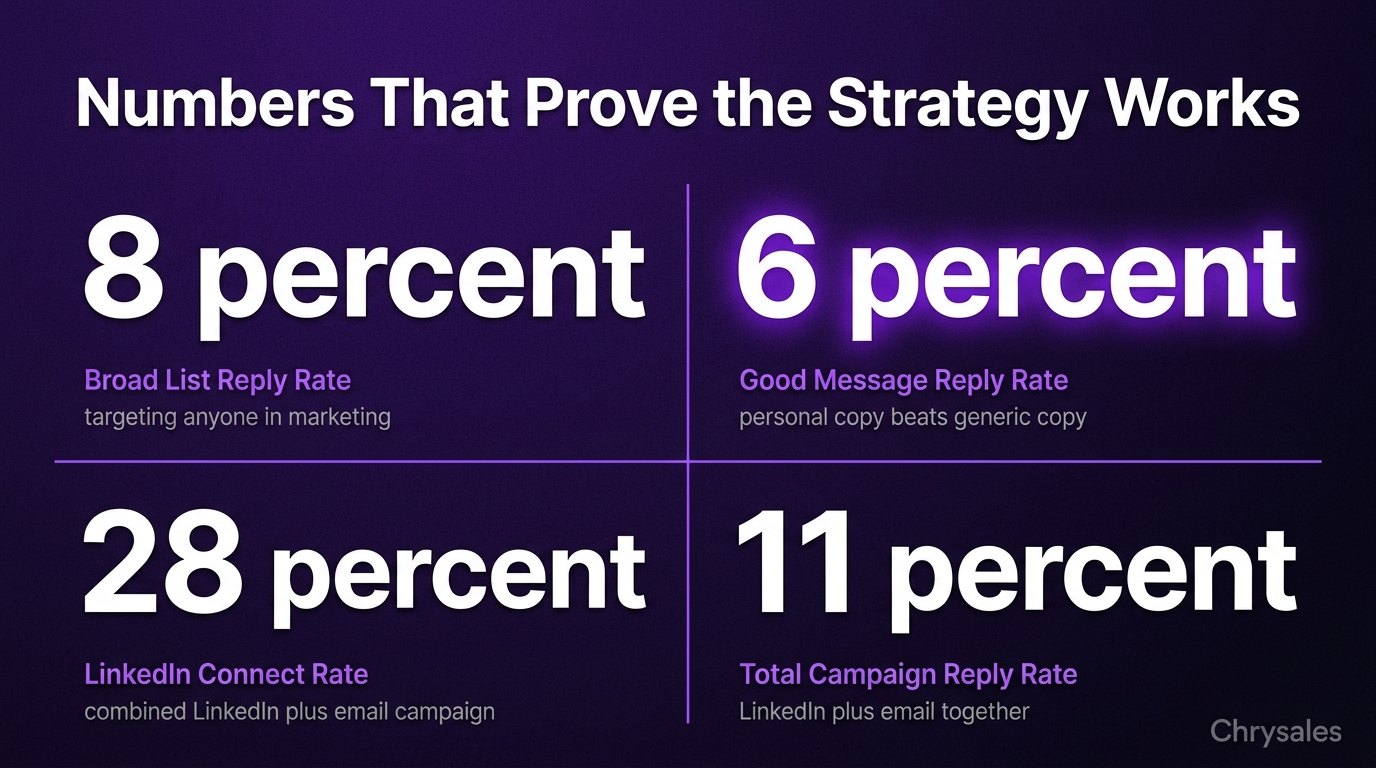
One tech company used Snov.io to run a combined LinkedIn and email campaign. LinkedIn connection rate was 28%, and 40% of those connections replied to follow-up emails. Total campaign reply rate was 11%, which is strong for cold outreach.
Zopto
Zopto is a cloud-based tool designed for B2B sales teams and agencies. It has advanced filtering for target lists, A/B testing for messages, and a built-in CRM for tracking leads. The tool integrates with HubSpot, Salesforce, and Pipedrive.
Pricing starts at $215 per month. It's expensive, but the platform includes dedicated account management and campaign strategy support. If you're running high-volume campaigns and need hands-on help, this is one of the few tools that offers it.
Phantombuster
Phantombuster is a general-purpose automation tool that works across LinkedIn, Twitter, Instagram, and more. For LinkedIn, it offers profile scrapers, connection request tools, and messaging bots. You build workflows by chaining actions together.
Pricing starts at $59 per month. The tool is flexible and powerful, but it requires technical setup. If you're comfortable with automation workflows, this is a strong option. If you want plug-and-play, pick something simpler.
Waalaxy
Waalaxy is a Chrome extension that combines LinkedIn outreach with email automation. It's designed for small teams and solo users who want simple, affordable automation. The tool pulls verified emails from LinkedIn profiles and adds them to email sequences automatically.
Pricing starts at $0 for limited features, with paid plans at $60 per month. The freemium model makes it easy to test before committing.
One marketing agency ran a campaign with Waalaxy targeting 300 prospects. They connected on LinkedIn first, then followed up with email two days later. Reply rate on LinkedIn was 6%, and email reply rate was 9%. Combined, they booked 14 calls in three weeks.
Closely
Closely is a cloud-based LinkedIn outreach platform with a focus on personalization and deliverability. The tool uses AI to analyze profiles and suggest message variations. It also tracks engagement closely, so you can see which messages drive the most replies.
Pricing starts at $99 per month. The platform is built for B2B sales teams running multiple campaigns with detailed tracking and optimization.
Salesflow
Salesflow is another cloud-based tool focused on B2B lead generation. It offers LinkedIn automation, email outreach, and team collaboration features. The tool includes campaign templates for different industries, which speeds up setup.
Pricing starts at $99 per month. The tool is built for agencies and sales teams managing outreach at scale. If you're running campaigns for clients or multiple products, the team features are useful.
Octopus CRM
Octopus CRM is a browser-based tool with a simple interface and low price. It handles connection requests, auto-messaging, profile visits, and endorsements. The tool also includes basic analytics and campaign tracking.
Pricing starts at $9.99 per month. It's one of the cheapest options, which makes it popular with solo consultants and small teams. The downside: it only works when your browser is open, and the safety features aren't as strong as cloud-based tools.
LinkedHelper
LinkedHelper is a desktop tool that runs on Windows. It offers LinkedIn automation, email outreach, and CRM features. The tool is known for deep customization and control over every action and timing.
Pricing is a one-time payment of around $150, plus optional monthly subscriptions for cloud features. If you want full control and don't mind manual setup, this is a strong option. If you want something quick and easy, skip it.
Skylead
Skylead combines LinkedIn and email outreach with a focus on multi-channel sequences. The tool includes Smart Sequences, which adjust automatically based on engagement. If a prospect clicks a link, the tool sends a different follow-up than if they ignored the message.
Pricing starts at $100 per month. The Smart Sequences feature is unique and works well for teams focused on conversion optimization.
WeConnect
WeConnect is a cloud-based tool built for agencies and sales teams. It offers LinkedIn automation, team collaboration, and campaign templates. The tool includes a feature called Smart Inbox, which consolidates all LinkedIn replies in one place.
Pricing starts at $49 per month. The tool is straightforward and reliable, with a focus on safety and deliverability.
Expandi.io (Not the Same as Expandi)
Expandi.io is a different tool with a similar name. It's a browser-based extension focused on LinkedIn outreach and profile scraping. The tool is simple and affordable, but it lacks the advanced features of cloud-based platforms.
Pricing starts at $29 per month. It's a budget option for small teams testing LinkedIn automation for the first time.
Kennected
Kennected is a cloud-based tool that combines LinkedIn automation with cold email and SMS outreach. The platform includes done-for-you campaign setup and copywriting support. It's built for teams that want a managed service, not just software.
Pricing starts at $89 per month, with higher tiers including managed services. If you want help building campaigns, this is one of the few tools that offers it as part of the package.
Scrupp
Scrupp is a LinkedIn profile scraper and data enrichment tool. It pulls profile data, finds emails, and exports everything to CSV. The tool is useful for building lists, but it doesn't send messages or connection requests.
Pricing starts at $39 per month. Use this if you need high-quality lists to feed into another outreach tool.
Linked Radar
Linked Radar is a browser-based tool focused on profile visits and connection requests. It's simple, affordable, and built for solo users. The tool doesn't include advanced messaging or multi-channel features.
Pricing starts at $15 per month. It's a basic tool for small-scale outreach.
Recruiterflow (For Recruiting Teams)
Recruiterflow is a LinkedIn automation tool built specifically for recruiting teams. It includes features for candidate sourcing, automated follow-ups, and applicant tracking. If you're hiring, not selling, this tool is built for your workflow.
Pricing starts at $99 per month per user. It integrates with ATS platforms and is designed for high-volume hiring campaigns.
Prospect.io
Prospect.io combines email finding, verification, and LinkedIn automation in one platform. The tool is built for B2B lead generation teams running multi-channel campaigns. It includes email warm-up features to improve deliverability.
Pricing starts at $99 per month. The email warm-up feature is unique and useful if you're sending cold emails alongside LinkedIn outreach.
Sales Navigator + CRM Integrations
LinkedIn Sales Navigator isn't an automation tool on its own, but most of the tools above integrate with it. Sales Navigator gives you better search filters, more InMail credits, and deeper profile insights. When paired with an automation tool, it makes targeting and list building much easier.
Pricing is $99 per month for Sales Navigator. If you're serious about LinkedIn outreach, this is worth the investment even before you pick an automation tool.
How to Use LinkedIn Automation Tools Safely (Without Getting Banned)
LinkedIn has built-in systems to detect automation. They track how many actions you take per day, how fast you send messages, and whether your activity looks human. If you trip the alarm, you get a warning, a temporary restriction, or a permanent ban. Here's how to stay safe.
Respect Daily Limits
LinkedIn allows around 100 to 150 connection requests per week for free accounts, and slightly more for Premium and Sales Navigator accounts. Most safe automation tools cap daily actions at 80 to 100. Don't push it. If a tool lets you send 300 requests per day, don't do it. Stick to 60 to 80 per day, and your account will last longer.
Watch out: New LinkedIn accounts have lower trust scores. If your account is less than six months old, cut limits in half for the first 30 days.
Randomize Timing and Actions
Human users don't send connection requests every 30 seconds for three hours straight. They log in, scroll, visit a few profiles, send some requests, log out, and come back later. Good automation tools randomize delays between actions. Look for tools that add 15 to 45 second random delays between each action. Also, pick tools that spread actions across the day, not all in one burst.
Personalize Every Message
Generic messages get lower reply rates and higher spam reports. LinkedIn tracks spam reports and uses them to flag accounts. Always use dynamic variables. At minimum, include the person's first name and company name in every message. Better: write different message templates for different job titles or industries.
One consulting firm tested generic vs. personalized messages on 1,000 prospects. Generic message reply rate: 1.8%. Personalized message reply rate: 6.3%. Same tool, same list, different copy.
Warm Up New Accounts
If you just created a LinkedIn account and immediately start sending 80 connection requests per day, LinkedIn will notice. Warm up the account first. Spend the first two weeks using LinkedIn manually. Post a few updates, engage with content, visit profiles, send a handful of connection requests by hand. After two weeks, start automation slowly. Begin with 20 actions per day, then increase by 10 every few days until you hit 60 to 80.
Use a Separate Account for High-Volume Campaigns
If you're running aggressive outreach campaigns, consider creating a second LinkedIn account. Use your personal account for networking and reputation building. Use the second account for outbound campaigns. This protects your main account. If the campaign account gets restricted, your personal brand stays intact.
Pro Tip: If you run a second account, don't connect it to the same email or phone number as your main account. LinkedIn can link accounts and ban both if one gets flagged.
How to Build a LinkedIn Automation Campaign That Actually Books Calls
Picking a tool is step one. Building a campaign that works is step two. Here's how to do it.
Start With a High-Quality List
Most LinkedIn outreach fails because the list is bad, not because the message is bad. If half your prospects aren't decision makers, or they work at companies that don't fit your offer, no message will save the campaign. Use LinkedIn Sales Navigator or advanced search filters to build your list, and you can also review account list builder tools compared to streamline your prospect research. Filter by job title, company size, industry, and location. Export the list or feed it directly into your automation tool.
A 30-person consulting firm tried LinkedIn outreach twice. First campaign: they targeted "anyone in marketing." Reply rate: 1.2%. Second campaign: they filtered for "VP of Marketing at 50 to 200 person SaaS companies in the U.S." Reply rate: 7.8%. Same message. Different list.
Write a Message That Starts a Conversation, Not a Pitch
Your first message should not be a pitch. It should be a short, friendly note that starts a conversation. Ask a question, mention something specific about their profile, or offer something useful.
Bad first message: "Hi [Name], I help companies like [Company] grow revenue with our proven sales system. Can we book a call?"
Better first message: "Hi [Name], saw your post about outbound challenges. We just built a lead scoring system for a SaaS company that cut their list cleanup time by 60%. Would a quick breakdown be useful?"
The second message mentions something specific, offers value, and asks a low-pressure question. Reply rate is almost always higher.
Use a Three-Step Sequence
Don't send one message and give up. Most people don't reply the first time. Use a three-step sequence:
- Connection request with a short note: "Hi [Name], connecting with other [job title]s in [industry]. Would love to stay in touch."
- First message (2 to 3 days after connection): Mention something specific, offer value, ask a question.
- Follow-up (4 to 5 days later if no reply): Short bump. "Hey [Name], know you're busy. Still curious if this would be useful?"
Three steps is enough. More than that starts to feel pushy. If you want to expand beyond LinkedIn, you can also explore multichannel vs omnichannel strategies to combine LinkedIn with email and other touchpoints for better results.
Track and Optimize
Every automation tool includes analytics. Track connection acceptance rate, reply rate, and call booking rate. If connection rate is below 25%, your targeting or request note is off. If reply rate is below 3%, your message needs work, and you can review how to improve LinkedIn reply rate in cold outreach for specific optimization strategies. Test different messages every 200 to 300 sends. Change one thing at a time: the hook, the question, the offer. See what moves the numbers.
When to Skip LinkedIn Automation Tools Entirely
LinkedIn automation tools are useful, but they're not always the right move. Here's when to skip them.
If your target audience is fewer than 500 people total, automation is overkill. Just send personalized messages by hand. It takes an hour, and the results are better.
If your offer isn't clear or your positioning is weak, automation scales the problem. Fix the offer first, then automate.
If you're in a heavily regulated industry, or your compliance team has strict rules about automated outreach, don't risk it. Manual outreach is safer.
If your LinkedIn profile looks empty, thin, or untrustworthy, fix it before you start outreach. People check your profile before they reply. A weak profile kills conversion no matter how good the message is.
Common mistake: Teams buy a tool, set up a campaign, and expect instant results. LinkedIn outreach takes time. Plan for 4 to 6 weeks before you see consistent results. If you need leads this week, run ads or cold email instead, and learn how to build a predictable sales pipeline that supports your long-term growth.
Frequently Asked Questions
Q: Are LinkedIn automation tools legal?
LinkedIn's terms of service ban automation, but millions of people use these tools every day without issues. The risk is account restrictions, not legal consequences. If you use safe daily limits, personalize messages, and avoid spammy behavior, most accounts stay active. Cloud-based tools with built-in safety features are lower risk than browser extensions.
Q: What's the best LinkedIn automation tool for small teams?
Dux-Soup and Waalaxy are both affordable and simple to set up. Dux-Soup starts at $14.99 per month and works as a browser extension. Waalaxy has a free tier and combines LinkedIn with email outreach. Both are good for small sales teams or solo consultants testing LinkedIn automation for the first time.
Q: How many connection requests can I send per day without getting banned?
Stick to 60 to 80 connection requests per day for established accounts. If your account is new, start with 20 per day and increase slowly. Most safe automation tools cap daily actions automatically. Never push past 100 requests per day, even if a tool allows it.
Q: Do I need LinkedIn Sales Navigator to use automation tools?
No, but it helps. Sales Navigator gives you better search filters, more profile views, and more InMail credits. Most automation tools work with free LinkedIn accounts, but targeting and list quality improve a lot with Sales Navigator. If you're serious about LinkedIn outreach, the $99 per month is worth it.
Q: Can I run LinkedIn automation on multiple accounts?
Yes. Tools like HeyReach and Expandi support multi-account management. Running multiple accounts spreads the outreach load and reduces the risk of any single account getting restricted. Make sure each account uses a different email and phone number. Don't connect them to the same device or IP address if possible.
Q: What reply rate should I expect from LinkedIn outreach?
Good campaigns average 5% to 10% reply rates. If you're below 3%, your targeting or message needs work. If you're above 10%, you've nailed it. Connection acceptance rates are usually 25% to 40%. If yours is lower, test a shorter or friendlier connection request note.
Q: Should I use LinkedIn automation for cold outreach or warm outreach?
Both. Automation works for cold outreach when your list is clean and your message is relevant. It also works for warm outreach to second-degree connections, event attendees, or people who engaged with your content. Warm outreach usually gets higher reply rates, but cold outreach scales better if your targeting is tight. You can also watch how to find clients who need your services right now to learn prospecting strategies that work alongside automation.
LinkedIn automation tools help you send connection requests and messages at scale while saving time, supporting lead generation, b2b sales, and client acquisition. LinkedIn automation tools can help you send hundreds of connection requests and messages every week without spending all day on the platform. But here's the thing nobody tells you: most teams pick a tool, blast out generic messages, and wonder why their reply rates stay below 2%. The tool isn't the problem. The list, the message, and the system around it are.
This guide covers 20+ top LinkedIn automation tools, what they actually do, and how to use them safely so your account doesn't get restricted halfway through a campaign.
What LinkedIn Automation Tools Actually Do (And What They Don't)
LinkedIn automation tools handle the repetitive parts of outreach. They send connection requests, follow up with messages, visit profiles, and track who responds. Some tools run in the cloud, meaning they work 24/7 without your browser open. Others run as browser extensions, which means you need your computer on and LinkedIn logged in.
Most tools let you build sequences. A sequence is a series of actions that happen automatically over days or weeks. For example: visit a profile on day one, send a connection request on day two, send a message three days after they accept. You set it up once, and the tool runs it for hundreds of people.
But here's what they don't do: they don't write good messages for you. They don't build a high-quality prospect list. They don't make your offer better. If your targeting is off or your message sounds like spam, automation just scales the problem faster.
Watch out: LinkedIn's official policy bans automation. The platform uses activity patterns to detect bots. Tools that send too many requests too fast, or that send the same message to everyone, get accounts flagged. The best tools mimic human behavior with random delays, daily limits, and personalization features.
Cloud-Based vs. Browser-Based Tools
Cloud-based tools run on remote servers. You connect your LinkedIn account once, and the tool operates in the background. You can close your laptop, and the sequences keep running. These tools are usually safer because they control sending limits and timing automatically.
Browser-based tools work as Chrome extensions. They only run when your browser is open and LinkedIn is logged in. They're often cheaper, but they can be riskier because they depend on your computer's activity patterns. If you run ten tabs and jump around profiles manually while the tool is running, LinkedIn might notice unusual behavior.
Personalization Features That Actually Matter
Dynamic variables are the simplest form of personalization. The tool pulls the person's first name, company name, or job title from their profile and drops it into your message. It's basic, but it works better than a completely generic message.
Advanced tools add conditional logic. You can write different messages based on job title, company size, or industry. For example, one message for marketing managers at agencies, another for sales directors at software companies. This takes more setup time, but reply rates go up.
AI-generated icebreakers are the newest feature. The tool scans a profile and writes a custom first line based on recent posts, shared connections, or job changes. Some tools do this well. Others generate lines that sound forced or robotic. Test before you send to 500 people.
The 20+ Best LinkedIn Automation Tools in 2026
Here's a breakdown of the top tools. Each has different strengths, pricing, and safety records. Pick based on what you need, not just what sounds cool.
Expandi
Expandi is a cloud-based tool built for agencies and B2B sales teams running multiple campaigns. It's known for smart sequences, strong safety features, and detailed analytics. You can build multi-step campaigns with personalized images, LinkedIn voice notes, and conditional messages based on engagement.
Pricing starts around $99 per month. The tool limits daily actions automatically to stay under LinkedIn's radar. Users report low ban rates compared to browser-based tools.
Pro Tip: Use Expandi's image personalization feature. It auto-generates images with the prospect's name or company logo. Weird, but reply rates go up 15-20% in testing.
HeyReach
HeyReach focuses on multi-account campaigns. If you run an agency or a sales team with multiple LinkedIn accounts, this tool lets you manage all of them from one dashboard. It rotates outreach across accounts, so no single profile sends too many requests in one day.
Pricing is around $79 per seat per month. The tool works best when you have three or more LinkedIn accounts to spread the load. This is ideal for lead generation agencies managing outreach for multiple clients. A 15-person consulting firm probably doesn't need this. A marketing agency running campaigns for ten clients does.
Meet Alfred
Meet Alfred combines LinkedIn, email, and Twitter outreach in one platform. You can set up sequences that connect on LinkedIn, follow up via email, and engage on Twitter, all in the same campaign. It's useful if your prospects are active across multiple channels.
Pricing is around $49 per month for basic plans. The tool runs as a desktop app, so it needs to stay open for sequences to run. This makes it slightly riskier than cloud-based tools, but the multi-channel feature is unique.
Watch out: Meet Alfred's LinkedIn limits are lower than cloud-based tools. Don't push past 100 actions per day, or you risk account restrictions.
Dux-Soup
Dux-Soup is a browser extension focused on simplicity and affordability. It's one of the oldest LinkedIn automation tools and has a large user base. The free version lets you auto-visit profiles and endorse skills. Paid plans add messaging, campaign tracking, and CRM integration.
Pricing starts at $14.99 per month. It's a good entry-level tool for small sales teams or solo consultants testing LinkedIn outreach for the first time. The downside: it only works when your browser is open. If you close Chrome, campaigns stop. Safety is decent if you stick to conservative daily limits.
Snov.io
Snov.io started as an email finder tool and added LinkedIn automation later. The platform combines email prospecting, LinkedIn outreach, and CRM features in one dashboard. You can find emails, verify them, and run LinkedIn campaigns from the same place.
Pricing starts at $39 per month. The tool is cloud-based for LinkedIn campaigns, so sequences run 24/7. It's a solid choice if you want LinkedIn and cold email automation in one platform.
One tech company used Snov.io to run a combined LinkedIn and email campaign. LinkedIn connection rate was 28%, and 40% of those connections replied to follow-up emails. Total campaign reply rate was 11%, which is strong for cold outreach.
Zopto
Zopto is a cloud-based tool designed for B2B sales teams and agencies. It has advanced filtering for target lists, A/B testing for messages, and a built-in CRM for tracking leads. The tool integrates with HubSpot, Salesforce, and Pipedrive.
Pricing starts at $215 per month. It's expensive, but the platform includes dedicated account management and campaign strategy support. If you're running high-volume campaigns and need hands-on help, this is one of the few tools that offers it.
Phantombuster
Phantombuster is a general-purpose automation tool that works across LinkedIn, Twitter, Instagram, and more. For LinkedIn, it offers profile scrapers, connection request tools, and messaging bots. You build workflows by chaining actions together.
Pricing starts at $59 per month. The tool is flexible and powerful, but it requires technical setup. If you're comfortable with automation workflows, this is a strong option. If you want plug-and-play, pick something simpler.
Waalaxy
Waalaxy is a Chrome extension that combines LinkedIn outreach with email automation. It's designed for small teams and solo users who want simple, affordable automation. The tool pulls verified emails from LinkedIn profiles and adds them to email sequences automatically.
Pricing starts at $0 for limited features, with paid plans at $60 per month. The freemium model makes it easy to test before committing.
One marketing agency ran a campaign with Waalaxy targeting 300 prospects. They connected on LinkedIn first, then followed up with email two days later. Reply rate on LinkedIn was 6%, and email reply rate was 9%. Combined, they booked 14 calls in three weeks.
Closely
Closely is a cloud-based LinkedIn outreach platform with a focus on personalization and deliverability. The tool uses AI to analyze profiles and suggest message variations. It also tracks engagement closely, so you can see which messages drive the most replies.
Pricing starts at $99 per month. The platform is built for B2B sales teams running multiple campaigns with detailed tracking and optimization.
Salesflow
Salesflow is another cloud-based tool focused on B2B lead generation. It offers LinkedIn automation, email outreach, and team collaboration features. The tool includes campaign templates for different industries, which speeds up setup.
Pricing starts at $99 per month. The tool is built for agencies and sales teams managing outreach at scale. If you're running campaigns for clients or multiple products, the team features are useful.
Octopus CRM
Octopus CRM is a browser-based tool with a simple interface and low price. It handles connection requests, auto-messaging, profile visits, and endorsements. The tool also includes basic analytics and campaign tracking.
Pricing starts at $9.99 per month. It's one of the cheapest options, which makes it popular with solo consultants and small teams. The downside: it only works when your browser is open, and the safety features aren't as strong as cloud-based tools.
LinkedHelper
LinkedHelper is a desktop tool that runs on Windows. It offers LinkedIn automation, email outreach, and CRM features. The tool is known for deep customization and control over every action and timing.
Pricing is a one-time payment of around $150, plus optional monthly subscriptions for cloud features. If you want full control and don't mind manual setup, this is a strong option. If you want something quick and easy, skip it.
Skylead
Skylead combines LinkedIn and email outreach with a focus on multi-channel sequences. The tool includes Smart Sequences, which adjust automatically based on engagement. If a prospect clicks a link, the tool sends a different follow-up than if they ignored the message.
Pricing starts at $100 per month. The Smart Sequences feature is unique and works well for teams focused on conversion optimization.
WeConnect
WeConnect is a cloud-based tool built for agencies and sales teams. It offers LinkedIn automation, team collaboration, and campaign templates. The tool includes a feature called Smart Inbox, which consolidates all LinkedIn replies in one place.
Pricing starts at $49 per month. The tool is straightforward and reliable, with a focus on safety and deliverability.
Expandi.io (Not the Same as Expandi)
Expandi.io is a different tool with a similar name. It's a browser-based extension focused on LinkedIn outreach and profile scraping. The tool is simple and affordable, but it lacks the advanced features of cloud-based platforms.
Pricing starts at $29 per month. It's a budget option for small teams testing LinkedIn automation for the first time.
Kennected
Kennected is a cloud-based tool that combines LinkedIn automation with cold email and SMS outreach. The platform includes done-for-you campaign setup and copywriting support. It's built for teams that want a managed service, not just software.
Pricing starts at $89 per month, with higher tiers including managed services. If you want help building campaigns, this is one of the few tools that offers it as part of the package.
Scrupp
Scrupp is a LinkedIn profile scraper and data enrichment tool. It pulls profile data, finds emails, and exports everything to CSV. The tool is useful for building lists, but it doesn't send messages or connection requests.
Pricing starts at $39 per month. Use this if you need high-quality lists to feed into another outreach tool.
Linked Radar
Linked Radar is a browser-based tool focused on profile visits and connection requests. It's simple, affordable, and built for solo users. The tool doesn't include advanced messaging or multi-channel features.
Pricing starts at $15 per month. It's a basic tool for small-scale outreach.
Recruiterflow (For Recruiting Teams)
Recruiterflow is a LinkedIn automation tool built specifically for recruiting teams. It includes features for candidate sourcing, automated follow-ups, and applicant tracking. If you're hiring, not selling, this tool is built for your workflow.
Pricing starts at $99 per month per user. It integrates with ATS platforms and is designed for high-volume hiring campaigns.
Prospect.io
Prospect.io combines email finding, verification, and LinkedIn automation in one platform. The tool is built for B2B lead generation teams running multi-channel campaigns. It includes email warm-up features to improve deliverability.
Pricing starts at $99 per month. The email warm-up feature is unique and useful if you're sending cold emails alongside LinkedIn outreach.
Sales Navigator + CRM Integrations
LinkedIn Sales Navigator isn't an automation tool on its own, but most of the tools above integrate with it. Sales Navigator gives you better search filters, more InMail credits, and deeper profile insights. When paired with an automation tool, it makes targeting and list building much easier.
Pricing is $99 per month for Sales Navigator. If you're serious about LinkedIn outreach, this is worth the investment even before you pick an automation tool.
How to Use LinkedIn Automation Tools Safely (Without Getting Banned)
LinkedIn has built-in systems to detect automation. They track how many actions you take per day, how fast you send messages, and whether your activity looks human. If you trip the alarm, you get a warning, a temporary restriction, or a permanent ban. Here's how to stay safe.
Respect Daily Limits
LinkedIn allows around 100 to 150 connection requests per week for free accounts, and slightly more for Premium and Sales Navigator accounts. Most safe automation tools cap daily actions at 80 to 100. Don't push it. If a tool lets you send 300 requests per day, don't do it. Stick to 60 to 80 per day, and your account will last longer.
Watch out: New LinkedIn accounts have lower trust scores. If your account is less than six months old, cut limits in half for the first 30 days.
Randomize Timing and Actions
Human users don't send connection requests every 30 seconds for three hours straight. They log in, scroll, visit a few profiles, send some requests, log out, and come back later. Good automation tools randomize delays between actions. Look for tools that add 15 to 45 second random delays between each action. Also, pick tools that spread actions across the day, not all in one burst.
Personalize Every Message
Generic messages get lower reply rates and higher spam reports. LinkedIn tracks spam reports and uses them to flag accounts. Always use dynamic variables. At minimum, include the person's first name and company name in every message. Better: write different message templates for different job titles or industries.
One consulting firm tested generic vs. personalized messages on 1,000 prospects. Generic message reply rate: 1.8%. Personalized message reply rate: 6.3%. Same tool, same list, different copy.
Warm Up New Accounts
If you just created a LinkedIn account and immediately start sending 80 connection requests per day, LinkedIn will notice. Warm up the account first. Spend the first two weeks using LinkedIn manually. Post a few updates, engage with content, visit profiles, send a handful of connection requests by hand. After two weeks, start automation slowly. Begin with 20 actions per day, then increase by 10 every few days until you hit 60 to 80.
Use a Separate Account for High-Volume Campaigns
If you're running aggressive outreach campaigns, consider creating a second LinkedIn account. Use your personal account for networking and reputation building. Use the second account for outbound campaigns. This protects your main account. If the campaign account gets restricted, your personal brand stays intact.
Pro Tip: If you run a second account, don't connect it to the same email or phone number as your main account. LinkedIn can link accounts and ban both if one gets flagged.
How to Build a LinkedIn Automation Campaign That Actually Books Calls
Picking a tool is step one. Building a campaign that works is step two. Here's how to do it.
Start With a High-Quality List
Most LinkedIn outreach fails because the list is bad, not because the message is bad. If half your prospects aren't decision makers, or they work at companies that don't fit your offer, no message will save the campaign. Use LinkedIn Sales Navigator or advanced search filters to build your list, and you can also review account list builder tools compared to streamline your prospect research. Filter by job title, company size, industry, and location. Export the list or feed it directly into your automation tool.
A 30-person consulting firm tried LinkedIn outreach twice. First campaign: they targeted "anyone in marketing." Reply rate: 1.2%. Second campaign: they filtered for "VP of Marketing at 50 to 200 person SaaS companies in the U.S." Reply rate: 7.8%. Same message. Different list.
Write a Message That Starts a Conversation, Not a Pitch
Your first message should not be a pitch. It should be a short, friendly note that starts a conversation. Ask a question, mention something specific about their profile, or offer something useful.
Bad first message: "Hi [Name], I help companies like [Company] grow revenue with our proven sales system. Can we book a call?"
Better first message: "Hi [Name], saw your post about outbound challenges. We just built a lead scoring system for a SaaS company that cut their list cleanup time by 60%. Would a quick breakdown be useful?"
The second message mentions something specific, offers value, and asks a low-pressure question. Reply rate is almost always higher.
Use a Three-Step Sequence
Don't send one message and give up. Most people don't reply the first time. Use a three-step sequence:
- Connection request with a short note: "Hi [Name], connecting with other [job title]s in [industry]. Would love to stay in touch."
- First message (2 to 3 days after connection): Mention something specific, offer value, ask a question.
- Follow-up (4 to 5 days later if no reply): Short bump. "Hey [Name], know you're busy. Still curious if this would be useful?"
Three steps is enough. More than that starts to feel pushy. If you want to expand beyond LinkedIn, you can also explore multichannel vs omnichannel strategies to combine LinkedIn with email and other touchpoints for better results.
Track and Optimize
Every automation tool includes analytics. Track connection acceptance rate, reply rate, and call booking rate. If connection rate is below 25%, your targeting or request note is off. If reply rate is below 3%, your message needs work, and you can review how to improve LinkedIn reply rate in cold outreach for specific optimization strategies. Test different messages every 200 to 300 sends. Change one thing at a time: the hook, the question, the offer. See what moves the numbers.
When to Skip LinkedIn Automation Tools Entirely
LinkedIn automation tools are useful, but they're not always the right move. Here's when to skip them.
If your target audience is fewer than 500 people total, automation is overkill. Just send personalized messages by hand. It takes an hour, and the results are better.
If your offer isn't clear or your positioning is weak, automation scales the problem. Fix the offer first, then automate.
If you're in a heavily regulated industry, or your compliance team has strict rules about automated outreach, don't risk it. Manual outreach is safer.
If your LinkedIn profile looks empty, thin, or untrustworthy, fix it before you start outreach. People check your profile before they reply. A weak profile kills conversion no matter how good the message is.
Common mistake: Teams buy a tool, set up a campaign, and expect instant results. LinkedIn outreach takes time. Plan for 4 to 6 weeks before you see consistent results. If you need leads this week, run ads or cold email instead, and learn how to build a predictable sales pipeline that supports your long-term growth.
Frequently Asked Questions
Q: Are LinkedIn automation tools legal?
LinkedIn's terms of service ban automation, but millions of people use these tools every day without issues. The risk is account restrictions, not legal consequences. If you use safe daily limits, personalize messages, and avoid spammy behavior, most accounts stay active. Cloud-based tools with built-in safety features are lower risk than browser extensions.
Q: What's the best LinkedIn automation tool for small teams?
Dux-Soup and Waalaxy are both affordable and simple to set up. Dux-Soup starts at $14.99 per month and works as a browser extension. Waalaxy has a free tier and combines LinkedIn with email outreach. Both are good for small sales teams or solo consultants testing LinkedIn automation for the first time.
Q: How many connection requests can I send per day without getting banned?
Stick to 60 to 80 connection requests per day for established accounts. If your account is new, start with 20 per day and increase slowly. Most safe automation tools cap daily actions automatically. Never push past 100 requests per day, even if a tool allows it.
Q: Do I need LinkedIn Sales Navigator to use automation tools?
No, but it helps. Sales Navigator gives you better search filters, more profile views, and more InMail credits. Most automation tools work with free LinkedIn accounts, but targeting and list quality improve a lot with Sales Navigator. If you're serious about LinkedIn outreach, the $99 per month is worth it.
Q: Can I run LinkedIn automation on multiple accounts?
Yes. Tools like HeyReach and Expandi support multi-account management. Running multiple accounts spreads the outreach load and reduces the risk of any single account getting restricted. Make sure each account uses a different email and phone number. Don't connect them to the same device or IP address if possible.
Q: What reply rate should I expect from LinkedIn outreach?
Good campaigns average 5% to 10% reply rates. If you're below 3%, your targeting or message needs work. If you're above 10%, you've nailed it. Connection acceptance rates are usually 25% to 40%. If yours is lower, test a shorter or friendlier connection request note.
Q: Should I use LinkedIn automation for cold outreach or warm outreach?
Both. Automation works for cold outreach when your list is clean and your message is relevant. It also works for warm outreach to second-degree connections, event attendees, or people who engaged with your content. Warm outreach usually gets higher reply rates, but cold outreach scales better if your targeting is tight. You can also watch how to find clients who need your services right now to learn prospecting strategies that work alongside automation.
Scaling Is Not Hard If You Have The Right Systems
If you’re serious about leveling up your scaling game, you need the right system, the right training, and the right team behind you. We're here to give you the exact tools and strategies top entrepreneurs use to dominate.

Discover the latest tips
View All.avif)
Chrysales was formed from the words "chrysalis" the stage where a caterpillar transforms into a butterfly and "sales".
It stands for one thing: sales transformation.Because scaling doesn’t happen by doing more of the same. Scaling only happens when you go through real transformation in your systems, your offer, team and the way you sell.
.avif)


