.avif)
How to Write a Linkedin Connection Request Message That Converts
A LinkedIn connection request message is a short note that gives someone a clear reason to connect, while your profile, timing, and targeting do most of the work. Picture this: you send 100 LinkedIn connection requests with carefully written notes. You get 12 acceptances. Meanwhile, someone else sends 100 blank requests and gets 58 acceptances. Feels backwards, right? Yet this happens all the time.
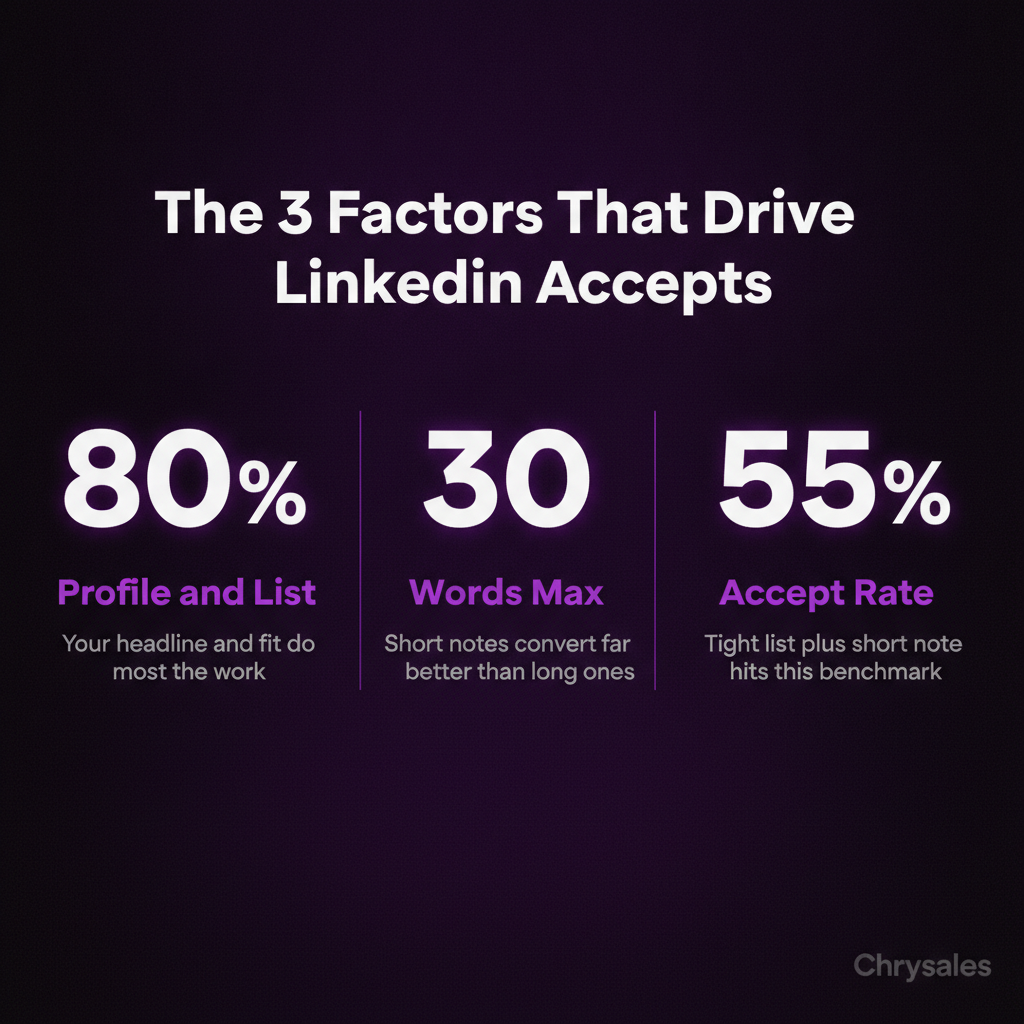
The truth is, most LinkedIn connection request messages fail because they're built on a broken assumption: that the note itself does the heavy lifting. It doesn't. Your targeting, timing, and profile do 80% of the work. The message just needs to not mess it up. Here's how to write one that actually works.
Why Most LinkedIn Connection Request Messages Tank Your Accept Rate
Most people write connection notes like they're sending cold emails. Big mistake. LinkedIn works different. When someone gets your connection request, they don't see your note first. They see your profile picture, headline, and maybe your company name. Then they decide whether to even read the note. If your profile looks irrelevant or spammy, your beautifully written message never gets read.
The Real Reason People Accept or Reject
Three things determine if someone accepts your LinkedIn connection request:
Profile relevance. Do you look like someone they'd actually want in their network? If you're selling HR software and they're a VP of Sales, probably not. If you work in B2B lead generation and they run a consulting firm, maybe.
Shared context. Mutual connections, same industry, same city, attended the same event. Any signal that says "we're in overlapping worlds."
Timing. You catch them right after they posted content, changed jobs, or got promoted. They're already active on LinkedIn that day.
The message itself? It's the last thing that matters. A bad message can kill a good connection request, but a good message can't save a bad one.
Watch out: If your acceptance rate is under 30%, the problem isn't your message. It's your list or your profile. Fix those first.
The 60% Acceptance Formula: What Actually Works
Here's the thing: the connection requests that hit 60% acceptance rates aren't clever or creative. They're simple, short, and built on strong targeting. The formula looks like this:
Tight targeting (people who actually make sense to connect with) + relevant profile (your headline and experience match their world) + short, specific note (2 sentences max, one clear reason to connect) = 55-65% acceptance rate.
Most teams get 15-25% because they skip the first two parts and write long notes trying to make up for bad targeting.
What the Message Should Actually Say
Your LinkedIn connection request message has one job: give a specific reason you're connecting that relates to them. Not your pitch. Not what you do. Not how you can help. Just a short, clear reason. Here's what works:
"Hey [Name], saw your post about scaling sales teams without burning out your closers. We work with a lot of consulting firms dealing with the same challenge. Would be good to connect."
That's it. 29 words. One specific reference to something they care about. One relevance signal. Done.
Compare that to most LinkedIn outreach templates people use:
"Hi [Name], I help B2B companies grow revenue through our proven sales system. I'd love to connect and share some insights that could help your business scale faster."
Sounds like a pitch. Feels like spam. Gets ignored. A 15-person consulting firm owner can smell the template from a mile away. They've seen 50 versions of it this month.
Pro Tip: If you can copy-paste your message to 100 different people and it still makes sense, it's too generic. Add one specific detail that only applies to that person.
The Biggest Mistakes Killing Your LinkedIn Prospecting
We see this all the time with new clients: they're doing way too much in the connection request message and not enough before they hit send.
Mistake 1: Long Notes That Try to Sell
Your connection note has a 300-character limit. That's about 50 words. If you're using all of it, you're writing too much. Long notes signal "I want something from you" before you're even connected. That drops acceptance rates fast.
Keep it under 30 words. Two sentences max. Sometimes one sentence is better.
Mistake 2: No Personalization Signal
Personalized LinkedIn messages don't mean using their first name. Everyone does that. It means referencing something specific to them. Their recent post. A mutual connection. Their company's recent news. Something that proves you didn't just scrape their profile from a list.
One marketing agency we worked with was sending 200 requests a week with zero personalization. Their acceptance rate was 11%. We cut their volume to 50 requests a week and added one personalized line to each. Acceptance rate jumped to 52% in three weeks, matching the LinkedIn connection request acceptance rate benchmarks for highly targeted outreach.
The math works out better too. 11% of 200 is 22 connections. 52% of 50 is 26 connections. Same result, way less work, and the people who accept are actually relevant.
Mistake 3: Targeting People Who Have Zero Reason to Connect
This is the big one. Most LinkedIn lead generation fails because the list is trash. If you're connecting with people who don't match your ideal client profile, no message saves you. A sales training company connecting with random small business owners? Bad fit. A B2B sales consultancy connecting with VPs of Sales at tech companies who just posted about hiring challenges? That's a fit.
Build your list around intent signals and relevance first. Message quality second. If you need help identifying the right prospects, you can learn how to find clients who need your services right now using intent signals and trigger events.
Common mistake: Sending connection requests to anyone with a certain job title. Job titles don't mean someone needs what you offer right now. Look for signals: recent posts about challenges you solve, company growth, new hires, funding rounds.
How to Build a LinkedIn Connection Request That Doesn't Sound Like Everyone Else's
Most LinkedIn outreach templates sound the same because they follow the same structure: compliment, pitch, ask. "Love your content on X. I help companies do Y. Let's connect." Flip it. Lead with shared context or a specific observation. Skip the pitch entirely.
The 3-Part Structure That Works
Part 1: Specific reference. Mention something real about them. A post, a mutual connection, a company milestone, an article they wrote.
Part 2: Relevance bridge. One sentence connecting why you're reaching out. This is where you mention what you do, but only as context.
Part 3: Simple ask (optional). Sometimes you don't even need this. "Would be good to connect" is enough.
Here's what that looks like:
"Hey Sarah, saw you're scaling the sales team at [Company]. We help B2B teams build repeatable client acquisition systems. Would be good to connect."
Or even simpler:
"Hey Mike, loved your post on fixing discovery calls. We work with a lot of agencies dealing with the same issue."
No hard ask. No pitch. Just a reason and a relevance signal. One consulting firm tried this and booked 8 calls in their first month just from accepted connections who replied asking what they do. The message didn't pitch. It just opened the door.
When to Skip the Message Entirely
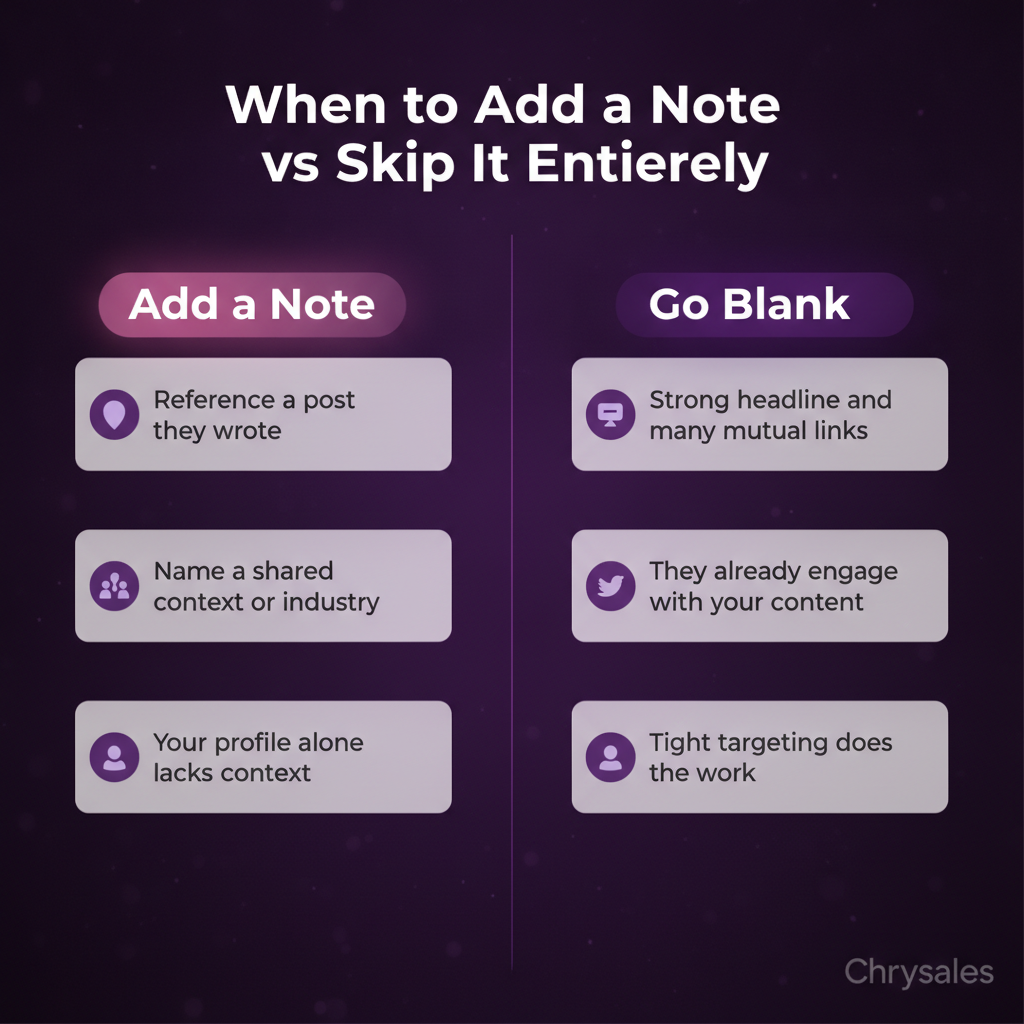
Here's something most people don't know: blank LinkedIn connection requests sometimes outperform messages. If your profile is strong and your targeting is tight, a blank request works fine. The person sees your headline, sees you're in their industry or have mutual connections, and accepts.
Adding a message only helps if it adds new information they can't get from your profile. If your message just repeats your headline or says something generic, skip it.
The Blank Request Test
Try this: send 25 connection requests with your best message. Send 25 blank requests to a similar audience. Track acceptance rates. If the blank requests perform within 5% of the messages, just go blank. Save yourself the time.
We've seen this work especially well for people with strong headlines and lots of mutual connections. The social proof does the work. The message becomes noise.
Pro Tip: If you're connecting with people who engage with your content, skip the note. They already know who you are. The request is just formalizing it.
How to Follow Up After They Accept (Without Being Annoying)
Getting the connection is step one. What you do next determines if this turns into a real conversation or just another dead LinkedIn connection. Most people send a pitch right after acceptance. Bad move. It burns the goodwill from the connection and screams "I just wanted to sell you something."
The First Message After Connection
Wait 24-48 hours after they accept. Then send a short message that's helpful, not salesy. Share a resource related to something they posted about. Ask a smart question about their business. Reference a challenge you know their type of company deals with.
"Hey [Name], thanks for connecting. Saw you mentioned scaling your sales team in your last post. We put together a simple hiring scorecard that a lot of B2B teams use to vet closers faster. Happy to send it over if useful."
Notice: no pitch. No "let's hop on a call." Just value and a soft offer. About 40% of people reply to this kind of message. From there, you can start a real conversation. To maximize your response rates, check out these proven tactics for how to get replies on LinkedIn with value-first follow-up messages.
Sequencing LinkedIn Outreach Into Your Sales System
A single LinkedIn connection request message won't fill your pipeline. But a system around LinkedIn prospecting can. Here's what that looks like:
- Target a specific list of 50-100 people who match your ideal client profile and show intent signals
- Engage with their content for a few days before sending requests (like, comment thoughtfully)
- Send personalized connection requests with specific references
- After acceptance, wait 1-2 days, then send a value-first message
- If they reply, move to a real conversation (not a pitch)
- If they don't reply, add them to your content audience and stay visible
This is how you turn LinkedIn from a random outreach channel into a predictable client acquisition system. The connection request is just one step. To see the full picture of how to use LinkedIn outreach to book qualified meetings, you need a complete system that takes prospects from connection to conversation to close.
One tech company we worked with used this exact sequence and booked 19 qualified calls in 8 weeks from LinkedIn alone. No ads. No cold email. Just smart targeting and a repeatable system. You can watch how to build a sales system so powerful clients come to you instead of chasing them through scattered outreach tactics.
Watch out: Don't automate this. LinkedIn cracks down on automation tools, and automated messages feel robotic. Personalized outreach works because it's actually personal. Cut corners here and your acceptance rate tanks.
Frequently Asked Questions
Q: How many LinkedIn connection requests should I send per week?
Send 20-50 per week if you're personalizing each one. Quality beats volume. If you're sending 100+ requests a week, you're probably using templates that hurt your acceptance rate. LinkedIn also limits you to around 100 requests per week depending on your account age and activity, so pushing past that can trigger restrictions. Focus on tighter targeting and better messages instead of higher volume.
Q: Should I mention my company or services in the connection request message?
Only if it adds context. A quick mention like "we work with consulting firms on sales systems" helps them understand why you're reaching out. But don't pitch. Don't list what you do or how you help. Just give enough info so they know you're relevant. If your headline already makes it obvious what you do, skip it in the message entirely.
Q: What's the best time to send LinkedIn connection requests?
Tuesday through Thursday, between 8-10 AM or 4-6 PM in their timezone, tends to perform best. People check LinkedIn during work hours, usually early morning or late afternoon. Avoid Mondays (everyone's busy) and weekends (most B2B professionals aren't active). Research on the best time to send LinkedIn connection requests shows that timing can improve acceptance rates by 10-15%. That said, timing matters less than targeting. A well-targeted request sent on Saturday still beats a bad one sent Tuesday morning.
Q: How do I personalize LinkedIn messages at scale without spending hours?
Use a research system. Spend 10 minutes scanning their recent posts, company news, or mutual connections before you send. Pick one specific detail and reference it in one sentence. That's enough. You don't need a paragraph of research. One agency we worked with batched this: 30 minutes of research on 15 people, then 15 minutes writing messages. They kept acceptance rates above 50% without burning hours per request.
Q: What do I do if my LinkedIn connection request acceptance rate is under 20%?
Fix your profile first. Update your headline to clearly show who you help and how. Add a professional photo. Make sure your experience section backs up your headline. Then audit your list. Are you targeting the right people? If your profile is strong and your list is tight, then test shorter messages with more specific personalization. Most low acceptance rates come from bad targeting or weak profiles, not bad messages. For a complete system that fixes all of these elements, see our guide on LinkedIn outreach strategy for B2B sales teams.
A LinkedIn connection request message is a short note that gives someone a clear reason to connect, while your profile, timing, and targeting do most of the work. Picture this: you send 100 LinkedIn connection requests with carefully written notes. You get 12 acceptances. Meanwhile, someone else sends 100 blank requests and gets 58 acceptances. Feels backwards, right? Yet this happens all the time.
The truth is, most LinkedIn connection request messages fail because they're built on a broken assumption: that the note itself does the heavy lifting. It doesn't. Your targeting, timing, and profile do 80% of the work. The message just needs to not mess it up. Here's how to write one that actually works.
Why Most LinkedIn Connection Request Messages Tank Your Accept Rate
Most people write connection notes like they're sending cold emails. Big mistake. LinkedIn works different. When someone gets your connection request, they don't see your note first. They see your profile picture, headline, and maybe your company name. Then they decide whether to even read the note. If your profile looks irrelevant or spammy, your beautifully written message never gets read.
The Real Reason People Accept or Reject
Three things determine if someone accepts your LinkedIn connection request:
Profile relevance. Do you look like someone they'd actually want in their network? If you're selling HR software and they're a VP of Sales, probably not. If you work in B2B lead generation and they run a consulting firm, maybe.
Shared context. Mutual connections, same industry, same city, attended the same event. Any signal that says "we're in overlapping worlds."
Timing. You catch them right after they posted content, changed jobs, or got promoted. They're already active on LinkedIn that day.
The message itself? It's the last thing that matters. A bad message can kill a good connection request, but a good message can't save a bad one.
Watch out: If your acceptance rate is under 30%, the problem isn't your message. It's your list or your profile. Fix those first.
The 60% Acceptance Formula: What Actually Works
Here's the thing: the connection requests that hit 60% acceptance rates aren't clever or creative. They're simple, short, and built on strong targeting. The formula looks like this:
Tight targeting (people who actually make sense to connect with) + relevant profile (your headline and experience match their world) + short, specific note (2 sentences max, one clear reason to connect) = 55-65% acceptance rate.
Most teams get 15-25% because they skip the first two parts and write long notes trying to make up for bad targeting.
What the Message Should Actually Say
Your LinkedIn connection request message has one job: give a specific reason you're connecting that relates to them. Not your pitch. Not what you do. Not how you can help. Just a short, clear reason. Here's what works:
"Hey [Name], saw your post about scaling sales teams without burning out your closers. We work with a lot of consulting firms dealing with the same challenge. Would be good to connect."
That's it. 29 words. One specific reference to something they care about. One relevance signal. Done.
Compare that to most LinkedIn outreach templates people use:
"Hi [Name], I help B2B companies grow revenue through our proven sales system. I'd love to connect and share some insights that could help your business scale faster."
Sounds like a pitch. Feels like spam. Gets ignored. A 15-person consulting firm owner can smell the template from a mile away. They've seen 50 versions of it this month.
Pro Tip: If you can copy-paste your message to 100 different people and it still makes sense, it's too generic. Add one specific detail that only applies to that person.
The Biggest Mistakes Killing Your LinkedIn Prospecting
We see this all the time with new clients: they're doing way too much in the connection request message and not enough before they hit send.
Mistake 1: Long Notes That Try to Sell
Your connection note has a 300-character limit. That's about 50 words. If you're using all of it, you're writing too much. Long notes signal "I want something from you" before you're even connected. That drops acceptance rates fast.
Keep it under 30 words. Two sentences max. Sometimes one sentence is better.
Mistake 2: No Personalization Signal
Personalized LinkedIn messages don't mean using their first name. Everyone does that. It means referencing something specific to them. Their recent post. A mutual connection. Their company's recent news. Something that proves you didn't just scrape their profile from a list.
One marketing agency we worked with was sending 200 requests a week with zero personalization. Their acceptance rate was 11%. We cut their volume to 50 requests a week and added one personalized line to each. Acceptance rate jumped to 52% in three weeks, matching the LinkedIn connection request acceptance rate benchmarks for highly targeted outreach.
The math works out better too. 11% of 200 is 22 connections. 52% of 50 is 26 connections. Same result, way less work, and the people who accept are actually relevant.
Mistake 3: Targeting People Who Have Zero Reason to Connect
This is the big one. Most LinkedIn lead generation fails because the list is trash. If you're connecting with people who don't match your ideal client profile, no message saves you. A sales training company connecting with random small business owners? Bad fit. A B2B sales consultancy connecting with VPs of Sales at tech companies who just posted about hiring challenges? That's a fit.
Build your list around intent signals and relevance first. Message quality second. If you need help identifying the right prospects, you can learn how to find clients who need your services right now using intent signals and trigger events.
Common mistake: Sending connection requests to anyone with a certain job title. Job titles don't mean someone needs what you offer right now. Look for signals: recent posts about challenges you solve, company growth, new hires, funding rounds.
How to Build a LinkedIn Connection Request That Doesn't Sound Like Everyone Else's
Most LinkedIn outreach templates sound the same because they follow the same structure: compliment, pitch, ask. "Love your content on X. I help companies do Y. Let's connect." Flip it. Lead with shared context or a specific observation. Skip the pitch entirely.
The 3-Part Structure That Works
Part 1: Specific reference. Mention something real about them. A post, a mutual connection, a company milestone, an article they wrote.
Part 2: Relevance bridge. One sentence connecting why you're reaching out. This is where you mention what you do, but only as context.
Part 3: Simple ask (optional). Sometimes you don't even need this. "Would be good to connect" is enough.
Here's what that looks like:
"Hey Sarah, saw you're scaling the sales team at [Company]. We help B2B teams build repeatable client acquisition systems. Would be good to connect."
Or even simpler:
"Hey Mike, loved your post on fixing discovery calls. We work with a lot of agencies dealing with the same issue."
No hard ask. No pitch. Just a reason and a relevance signal. One consulting firm tried this and booked 8 calls in their first month just from accepted connections who replied asking what they do. The message didn't pitch. It just opened the door.
When to Skip the Message Entirely
Here's something most people don't know: blank LinkedIn connection requests sometimes outperform messages. If your profile is strong and your targeting is tight, a blank request works fine. The person sees your headline, sees you're in their industry or have mutual connections, and accepts.
Adding a message only helps if it adds new information they can't get from your profile. If your message just repeats your headline or says something generic, skip it.
The Blank Request Test
Try this: send 25 connection requests with your best message. Send 25 blank requests to a similar audience. Track acceptance rates. If the blank requests perform within 5% of the messages, just go blank. Save yourself the time.
We've seen this work especially well for people with strong headlines and lots of mutual connections. The social proof does the work. The message becomes noise.
Pro Tip: If you're connecting with people who engage with your content, skip the note. They already know who you are. The request is just formalizing it.
How to Follow Up After They Accept (Without Being Annoying)
Getting the connection is step one. What you do next determines if this turns into a real conversation or just another dead LinkedIn connection. Most people send a pitch right after acceptance. Bad move. It burns the goodwill from the connection and screams "I just wanted to sell you something."
The First Message After Connection
Wait 24-48 hours after they accept. Then send a short message that's helpful, not salesy. Share a resource related to something they posted about. Ask a smart question about their business. Reference a challenge you know their type of company deals with.
"Hey [Name], thanks for connecting. Saw you mentioned scaling your sales team in your last post. We put together a simple hiring scorecard that a lot of B2B teams use to vet closers faster. Happy to send it over if useful."
Notice: no pitch. No "let's hop on a call." Just value and a soft offer. About 40% of people reply to this kind of message. From there, you can start a real conversation. To maximize your response rates, check out these proven tactics for how to get replies on LinkedIn with value-first follow-up messages.
Sequencing LinkedIn Outreach Into Your Sales System
A single LinkedIn connection request message won't fill your pipeline. But a system around LinkedIn prospecting can. Here's what that looks like:
- Target a specific list of 50-100 people who match your ideal client profile and show intent signals
- Engage with their content for a few days before sending requests (like, comment thoughtfully)
- Send personalized connection requests with specific references
- After acceptance, wait 1-2 days, then send a value-first message
- If they reply, move to a real conversation (not a pitch)
- If they don't reply, add them to your content audience and stay visible
This is how you turn LinkedIn from a random outreach channel into a predictable client acquisition system. The connection request is just one step. To see the full picture of how to use LinkedIn outreach to book qualified meetings, you need a complete system that takes prospects from connection to conversation to close.
One tech company we worked with used this exact sequence and booked 19 qualified calls in 8 weeks from LinkedIn alone. No ads. No cold email. Just smart targeting and a repeatable system. You can watch how to build a sales system so powerful clients come to you instead of chasing them through scattered outreach tactics.
Watch out: Don't automate this. LinkedIn cracks down on automation tools, and automated messages feel robotic. Personalized outreach works because it's actually personal. Cut corners here and your acceptance rate tanks.
Frequently Asked Questions
Q: How many LinkedIn connection requests should I send per week?
Send 20-50 per week if you're personalizing each one. Quality beats volume. If you're sending 100+ requests a week, you're probably using templates that hurt your acceptance rate. LinkedIn also limits you to around 100 requests per week depending on your account age and activity, so pushing past that can trigger restrictions. Focus on tighter targeting and better messages instead of higher volume.
Q: Should I mention my company or services in the connection request message?
Only if it adds context. A quick mention like "we work with consulting firms on sales systems" helps them understand why you're reaching out. But don't pitch. Don't list what you do or how you help. Just give enough info so they know you're relevant. If your headline already makes it obvious what you do, skip it in the message entirely.
Q: What's the best time to send LinkedIn connection requests?
Tuesday through Thursday, between 8-10 AM or 4-6 PM in their timezone, tends to perform best. People check LinkedIn during work hours, usually early morning or late afternoon. Avoid Mondays (everyone's busy) and weekends (most B2B professionals aren't active). Research on the best time to send LinkedIn connection requests shows that timing can improve acceptance rates by 10-15%. That said, timing matters less than targeting. A well-targeted request sent on Saturday still beats a bad one sent Tuesday morning.
Q: How do I personalize LinkedIn messages at scale without spending hours?
Use a research system. Spend 10 minutes scanning their recent posts, company news, or mutual connections before you send. Pick one specific detail and reference it in one sentence. That's enough. You don't need a paragraph of research. One agency we worked with batched this: 30 minutes of research on 15 people, then 15 minutes writing messages. They kept acceptance rates above 50% without burning hours per request.
Q: What do I do if my LinkedIn connection request acceptance rate is under 20%?
Fix your profile first. Update your headline to clearly show who you help and how. Add a professional photo. Make sure your experience section backs up your headline. Then audit your list. Are you targeting the right people? If your profile is strong and your list is tight, then test shorter messages with more specific personalization. Most low acceptance rates come from bad targeting or weak profiles, not bad messages. For a complete system that fixes all of these elements, see our guide on LinkedIn outreach strategy for B2B sales teams.
Scaling Is Not Hard If You Have The Right Systems
If you’re serious about leveling up your scaling game, you need the right system, the right training, and the right team behind you. We're here to give you the exact tools and strategies top entrepreneurs use to dominate.

Discover the latest tips
View All.avif)
Chrysales was formed from the words "chrysalis" the stage where a caterpillar transforms into a butterfly and "sales".
It stands for one thing: sales transformation.Because scaling doesn’t happen by doing more of the same. Scaling only happens when you go through real transformation in your systems, your offer, team and the way you sell.
.avif)


