.avif)
How to Send Cold Emails at Scale and Get Replies
Picture this: you spend three weeks building the perfect cold email. Every sentence sounds great. The subject line has a 9.5 out of 10 rating from your team. You hit send on 10,000 emails expecting a flood of replies. Two days later, you have 14 responses. Three are spam complaints. One is someone asking to unsubscribe. The rest are "not interested" replies.
Sound familiar? I've been there. Most people think the problem is the words they wrote. The real issue is usually everything that happens before you even open your email tool.
Here's what actually works when you want to send cold emails at scale without getting marked as spam or wasting weeks on dead leads.
The Infrastructure Nobody Talks About (But Everyone Needs)
Most teams try to send thousands of cold emails from one company domain and wonder why they end up in spam folders within 48 hours. The truth is simple: cold email deliverability depends more on your technical setup than your copywriting skills.
Set Up Multiple Sending Domains
You can't send 10,000 cold emails from your main business domain without risking your entire company email reputation. If your main domain is yourcompany.com, buy three to five variations like getyourcompany.com or tryyourcompany.com. These are called sending domains. When one gets flagged or hits sending limits, the others keep running. Your main domain stays clean for normal business emails.
Each sending domain needs its own DNS records set up correctly. That means SPF, DKIM, and DMARC records configured properly. Sounds technical, but most email platforms have guides that walk you through this in 10 minutes. Skip this step and your emails go straight to spam, no matter how good the words are.
Warm Up Your Inboxes Before You Send Anything
Fresh email accounts sending 200 emails on day one is a giant red flag to email providers. You need to warm up each inbox gradually. Start by sending 5 to 10 emails per day from each new account. Increase by 5 to 10 emails daily over three to four weeks until you hit your target volume. Tools like Instantly, Smartlead, or Lemlist can automate this warmup process by having your accounts email each other and mark messages as important.
Pro Tip: Set up at least three to five email accounts per sending domain. If you want to send 1,000 emails per day total, spread that across 15 accounts sending about 65 emails each. Smaller volume per account keeps you under spam radar.
We worked with a 20 person consulting firm that tried sending from two accounts right out of the gate. Their open rate was 8%. After setting up proper infrastructure with 12 warmed accounts across three domains, the same email copy got a 34% open rate.
Your List Quality Matters More Than Your Email Copy
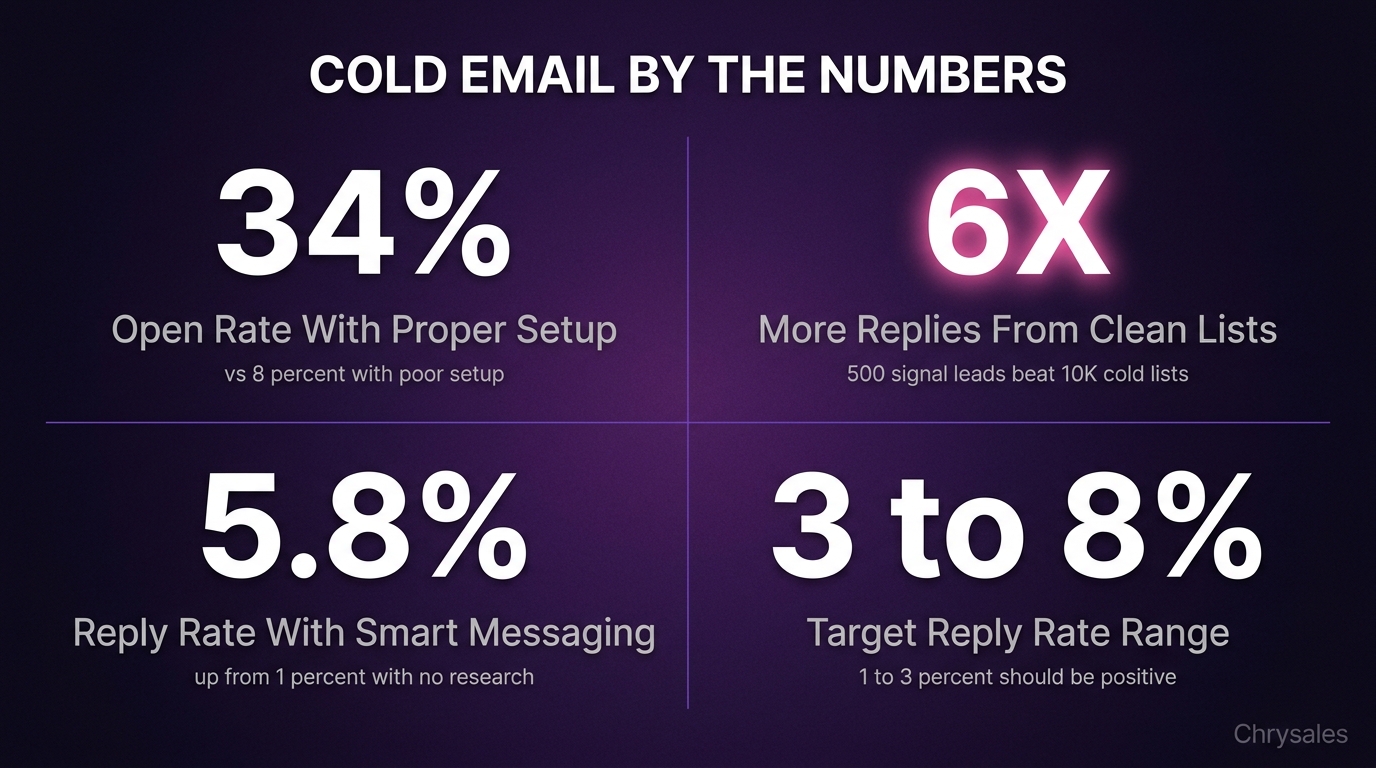
Here's the thing nobody tells you about how to send cold emails at scale: the list does 70% of the heavy lifting. You can write the world's best email, but if you're sending it to people who don't need what you sell, you're burning time and money.
Build Lists Based on Actual Buyer Signals
Stop buying generic email lists with 50,000 contacts for $200. Those lists are usually full of dead emails, job titles that don't match anymore, and people who get 40 cold emails per day. Instead, build smaller lists based on signals that someone might actually want to talk to you.
Good signals for B2B lead generation include companies that just raised funding, businesses posting job openings for roles your product helps with, or firms that recently expanded to a new office. A 500 person list built on real signals will outperform a 10,000 person list scraped from a random database every single time. You can watch 4 Ways To Find Clients Who Need Your Services Right Now for practical methods to identify these high-intent prospects.
Clean Your Data Before You Load It
Quick question: when was the last time you verified the email addresses in your outreach list? Sending emails to addresses that bounce hurts your sender reputation fast. Use an email verification tool like NeverBounce or ZeroBounce to clean your list first. Remove any email with a bounce risk over 5%.
Also scrub out anyone who unsubscribed from previous campaigns, people at companies with fewer than 10 employees if you sell enterprise solutions, or contacts whose LinkedIn profiles show they left the company. This takes an extra hour upfront but saves you from looking sloppy and tanking your deliverability.
Watch out: Sending to a list with a 15% to 20% bounce rate can get your domain blacklisted in under a week. Always verify first.
The Cold Email Copy Formula That Actually Gets Replies
Once your infrastructure is solid and your list is clean, the copy matters. But it's simpler than most people think. The goal isn't to sound clever. The goal is to make someone think "this might be relevant to me" and hit reply.
Start With Relevance, Not a Pitch
Most cold emails open with what the sender does. "We help companies automate their sales process." Nobody cares yet. They don't know you. Instead, open with something specific to them. Reference a recent hire they posted on LinkedIn. Mention a pain point common to their industry right now. Point to a result similar companies are seeing.
For example, instead of "We provide sales training for B2B companies," try "Saw your team just hired three new account execs. Most sales teams that size hit a wall around lead consistency in month two. Here's how a few consulting firms fixed that without hiring more people." The first version is about you. The second version is about their world. The second one gets replies.
Keep It Short and Easy to Skim
Your cold email should be readable in 15 seconds while someone is standing in line for coffee. That means four to six sentences max. Each sentence should be one clear idea. No jargon, no big words, no long explanations. Here's a structure that works:
- Line 1: Relevant observation or compliment about them
- Line 2: Quick problem statement they probably face
- Line 3: One-sentence proof you've solved this before
- Line 4: Simple ask (usually "worth a quick call?")
That's it. No five-paragraph essays. No attachments on the first email. No links to your full website. Just enough to make them curious. If you want deeper examples and frameworks for writing cold email copy that gets replies, we've broken down proven templates and messaging strategies.
Common mistake: Adding three different CTAs in one email. "Check out our site, book a call, or reply with your thoughts." Pick one ask. Make it easy to say yes.
Personalization at Scale Without Losing Your Mind
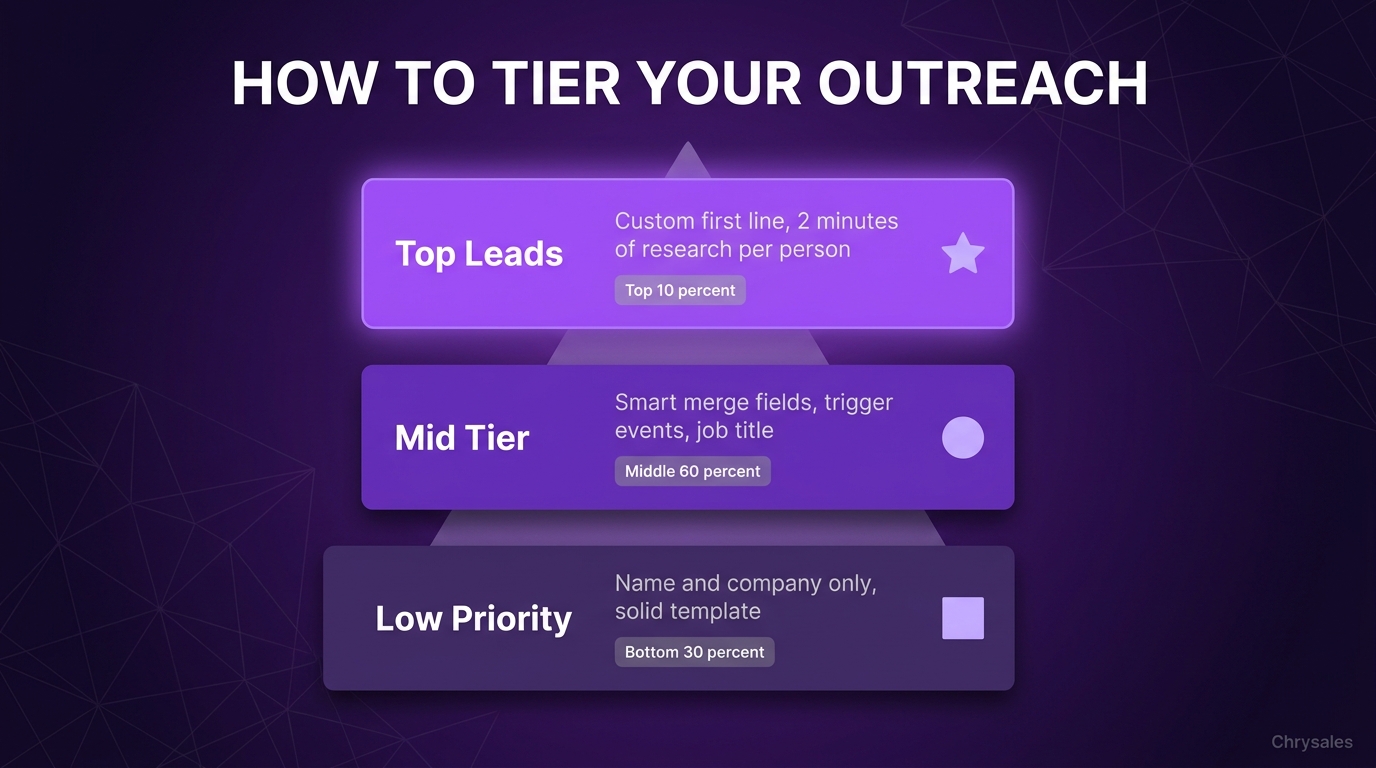
Everyone says "personalize your emails," but nobody explains how to do that when you're sending hundreds or thousands. You can't write a custom essay for every single person. The trick is tiered personalization based on how valuable the lead is.
Tier Your Personalization Effort
For your top 10% of leads, the high-value accounts you really want, write a custom first line. Spend two minutes researching each person. Find a recent post they made, a podcast they were on, a company milestone. Reference it in the opening sentence. The rest of the email can follow your template.
For the middle 60% of your list, use dynamic fields that pull relevant details from your CRM or spreadsheet. Insert their company name, industry, a recent trigger event, or their job title. It's not fully custom, but it's way better than a generic blast.
For the bottom 30%, use a solid template with no personalization beyond first name and company name. These are lower fit leads anyway. If they reply, great. If not, you didn't burn an hour per person.
Use Research Tools to Speed It Up
Manual research doesn't work at scale. Use tools like Clay, Phantombuster, or Apollo to pull in recent LinkedIn activity, company news, funding announcements, or hiring data. Feed that into your email tool as merge fields.
A 15 person marketing agency we worked with cut their research time from 30 minutes per lead to under two minutes using this method, and their reply rate went from 1.2% to 5.8%.
Testing and Tracking What Actually Moves the Needle
Look, the truth is your first campaign won't be perfect. Neither will your fifth. The teams that win at cold outreach treat it like a system that gets better over time. That means tracking real data and testing one thing at a time.
Track Reply Rate, Not Open Rate
Open rates are mostly useless now. Email clients auto load images whether someone actually read your email or not. The only metric that matters is reply rate. How many people responded in any way, positive or negative?
Aim for 3% to 8% reply rate for a decent B2B cold outreach strategy. According to recent cold email statistics and benchmarks, anything below 2% means something is broken, either your list, your copy, or your deliverability. Positive reply rate is the next level. That's replies where someone shows interest, asks a question, or agrees to a call. Shoot for 1% to 3% positive replies. If you're sending 1,000 emails per week and getting 20 to 30 positive replies, you're doing great.
Test One Variable at a Time
Don't change your subject line, your opening sentence, and your CTA all in the same test. You won't know what made the difference. Pick one thing to test per campaign. Run 200 to 300 emails with version A, 200 to 300 with version B. Compare reply rates. Keep the winner, test something new.
Common things worth testing:
- Subject line (question vs statement vs blank)
- Opening line (compliment vs pain point vs trigger event)
- Email length (three sentences vs six sentences)
- CTA (asking for a call vs asking for a reply vs asking for feedback)
A tech company tested two subject lines across 2,000 emails. "Quick question about [company name]'s sales team" got 4.1% replies. "Thoughts on this?" got 6.3% replies. Same email body. Just the subject line changed. That's a 50% lift from one tweak.
Pro Tip: Blank subject lines sometimes work incredibly well for client acquisition emails because they look like a reply to an ongoing thread. Test it.
What to Do When Replies Start Coming In
Getting replies is only half the battle. What happens next decides whether cold email becomes a real sales channel or just a curiosity.
Have a Response Process Ready
If someone replies, you need to get back to them within two hours if possible, same day at minimum. A lead that waits 24 hours for your reply is 10 times less likely to book a call than one you respond to in an hour. Set up notifications so replies don't sit in an inbox nobody checks.
Your first response should be short and focused on booking a time. Don't try to answer every question over email. Move to a call. Something like: "Thanks for the reply. Would Tuesday at 2pm or Wednesday at 10am work for a quick 15 minute call to see if this makes sense for you?"
Since multiple follow-ups can nearly double your total replies, you can use proven cold email follow-up templates instead of writing every touch from scratch.
Connect It to Your Full Sales System
Cold email isn't a magic button that prints money by itself. It's one part of a bigger sales system. The email gets the reply. The reply books the call. The call qualifies the lead. The follow up closes the deal. If any part of that chain is broken, the whole thing falls apart.
We see this all the time with new clients. They get great at cold email, book 20 calls per week, and close zero deals because their sales call structure is a mess or their offer isn't clear. Cold outreach feeds the top of your pipeline. You still need strong discovery questions, objection handling scripts, and a no brainer offer on the backend to turn replies into revenue. To understand how cold email fits into your broader outreach mix, see this breakdown of Cold Email vs Cold Calling: Which Makes You Money Faster for a full comparison.
Using AI and Automation Without Sounding Like a Robot
AI tools can speed up parts of the cold email process, but they can also make you sound like every other spammy email if you use them wrong. The key is using AI for research and setup, not for writing the actual emails word for word.
Where AI Helps: Research and Data Enrichment
AI is incredible at pulling data fast. Use it to research companies, find trigger events, scrape LinkedIn for recent posts, or score leads based on fit. Tools built on models like Gemini can analyze a prospect's website and spit out three relevant pain points in 10 seconds. That's useful. Feed those insights into your email, but write the actual message yourself.
AI can also help with A/B test analysis. Feed it your campaign data and ask what patterns are showing up in emails that got replies versus ones that didn't. It'll spot things faster than manual review.
Where AI Fails: Writing the Actual Email
Every AI written cold email sounds the same. The phrasing is stiff. The structure is predictable. People can tell. Use AI to draft an outline or pull in data points, but rewrite the email in your own voice. Add a sentence that sounds like how you'd actually talk. Cut the jargon. Make it feel human.
A 12 person consulting firm tried sending 1,000 fully AI written emails. Reply rate was 0.9%. They rewrote the emails in their own voice using the same research AI pulled. Reply rate jumped to 4.7%. Same list, same targeting, different voice.
Watch out: If your email includes phrases like "I hope this email finds you well" or "I wanted to reach out," it probably sounds like an AI template. Real people don't talk like that.
Common Mistakes That Kill Cold Email Campaigns
Even with good infrastructure, a clean list, and solid copy, a few mistakes can torpedo your results. Here are the big ones we see all the time.
Sending Too Much Volume Too Fast
You set up new domains and accounts, and you're excited to start sending. So you load up 5,000 contacts and blast them all in two days. Bad move. Email providers track sudden spikes in send volume. A new domain going from zero to 2,000 emails per day overnight screams spam.
Ramp up gradually. Start with 50 to 100 emails per day total across all accounts. Add 20% more volume each week. Slow and steady keeps you out of spam folders. For a comprehensive framework on outbound email marketing best practices that covers sending volume, technical setup, and compliance, we've mapped out the full strategy.
Ignoring Unsubscribes and Complaints
If someone replies asking to be removed, take them off your list immediately. If someone marks your email as spam, that's a signal to email providers that your content is unwanted. Too many spam complaints and your whole domain gets blacklisted.
Set up an easy unsubscribe process and honor it every time. It's not just good practice for sales automation, it's legally required in most places.
Not Following Up
Most people send one cold email and give up if they don't get a reply. The data says that's a huge mistake. A second or third follow up email, spaced five to seven days apart, can double your total reply rate. People are busy. Your first email might have landed when they were in back to back meetings. The second one might catch them at the right time.
Keep follow ups short and add new value each time. Don't just say "bumping this up." Reference something new, share a quick case study, or ask a different question.
How We Help Teams Build Cold Email Into a Full Sales System
At Chrysales, we don't just teach cold email tactics. We build the entire sales system around it so cold outreach actually turns into predictable revenue. That means connecting your cold email infrastructure to your offer, your sales call process, your objection scripts, and your follow up sequences.
We've worked with over 500 sales teams, and the ones that win treat cold email as one piece of a bigger client acquisition system, not a standalone hack. Once cold email is generating consistent replies, we show you how to build a sales system that actually scales so those replies turn into qualified opportunities and revenue.
We also help with the next steps most teams skip: what happens when you're getting 30 replies per week but don't have the team to handle them, or when you need to hire and train setters and closers who can convert those replies into deals. Our four step method covers lead generation, closing systems, automation, and hiring so cold email becomes a repeatable growth channel, not a one time experiment.
Frequently Asked Questions
Q: How many cold emails should I send per day to avoid getting marked as spam?
Start with 50 to 100 emails per day total if you're using new domains and accounts. Spread that volume across multiple email accounts so each one sends 15 to 30 emails max. Gradually increase by 10 to 20 emails per day each week as your accounts build a sending reputation. Never jump from zero to 500 emails overnight. Email providers track sudden volume spikes and flag them as suspicious. Slow growth keeps your deliverability high.
Q: What's a good reply rate for cold email campaigns?
Aim for 3% to 8% total reply rate, which includes both positive and negative responses. Of those, 1% to 3% should be positive replies where someone shows interest or agrees to talk. If you're below 2% total replies, something is off with your list quality, your copy, or your deliverability setup. Above 8% means you're doing great or your list is very well targeted. Track this weekly and test one variable at a time to improve.
Q: Should I use a tool like Instantly, Smartlead, or Lemlist for cold email at scale?
Yes, absolutely. These tools handle inbox warmup, sending rotation across multiple accounts, and deliverability monitoring automatically. Trying to manage 10 or 15 email accounts manually is a nightmare. Most platforms also include A/B testing, reply tracking, and CRM integrations. Pick one based on your budget and feature needs, but don't try to scale cold email without some kind of automation tool. Manual sending doesn't work past 50 emails per day.
Q: How long should my cold emails be?
Keep your cold emails between 50 and 100 words, which is about four to six sentences. People skim emails in 10 to 15 seconds. Long paragraphs get ignored. Get to the point fast: why you're reaching out, why it's relevant to them, and one simple ask. Save the details for the call. If your email takes more than 20 seconds to read, cut it in half.
Q: Can I send cold emails from my main business domain?
No, don't do this. Sending hundreds or thousands of cold emails from your main company domain risks damaging your entire email reputation. If you get flagged as spam or hit a high bounce rate, it affects all emails from that domain, including normal business correspondence with existing clients and partners. Always use separate sending domains that are variations of your main domain. This keeps your primary domain safe and lets you scale outreach without risk.
Q: How do I personalize cold emails when sending to hundreds of people?
Use a tiered approach. For your top 10% to 20% of high value leads, write a custom first line based on quick research like a recent LinkedIn post or company news. For the middle tier, use dynamic fields that pull in details like industry, company size, job title, or a relevant trigger event. For lower priority leads, stick to a solid template with just first name and company name. Research tools like Clay or Apollo can automate a lot of the data gathering so you're not spending 30 minutes per lead.
Q: What should I do if my cold emails are going to spam?
First, check your technical setup. Make sure SPF, DKIM, and DMARC records are configured correctly for all your sending domains. Next, verify your email list to remove hard bounces and invalid addresses. Lower your send volume and warm up your accounts more gradually. Also review your email copy for spam trigger words like "free," "guarantee," "click here," or excessive caps and exclamation points. If you've already been flagged, it might be time to start fresh with new sending domains and warmed accounts.
Picture this: you spend three weeks building the perfect cold email. Every sentence sounds great. The subject line has a 9.5 out of 10 rating from your team. You hit send on 10,000 emails expecting a flood of replies. Two days later, you have 14 responses. Three are spam complaints. One is someone asking to unsubscribe. The rest are "not interested" replies.
Sound familiar? I've been there. Most people think the problem is the words they wrote. The real issue is usually everything that happens before you even open your email tool.
Here's what actually works when you want to send cold emails at scale without getting marked as spam or wasting weeks on dead leads.
The Infrastructure Nobody Talks About (But Everyone Needs)
Most teams try to send thousands of cold emails from one company domain and wonder why they end up in spam folders within 48 hours. The truth is simple: cold email deliverability depends more on your technical setup than your copywriting skills.
Set Up Multiple Sending Domains
You can't send 10,000 cold emails from your main business domain without risking your entire company email reputation. If your main domain is yourcompany.com, buy three to five variations like getyourcompany.com or tryyourcompany.com. These are called sending domains. When one gets flagged or hits sending limits, the others keep running. Your main domain stays clean for normal business emails.
Each sending domain needs its own DNS records set up correctly. That means SPF, DKIM, and DMARC records configured properly. Sounds technical, but most email platforms have guides that walk you through this in 10 minutes. Skip this step and your emails go straight to spam, no matter how good the words are.
Warm Up Your Inboxes Before You Send Anything
Fresh email accounts sending 200 emails on day one is a giant red flag to email providers. You need to warm up each inbox gradually. Start by sending 5 to 10 emails per day from each new account. Increase by 5 to 10 emails daily over three to four weeks until you hit your target volume. Tools like Instantly, Smartlead, or Lemlist can automate this warmup process by having your accounts email each other and mark messages as important.
Pro Tip: Set up at least three to five email accounts per sending domain. If you want to send 1,000 emails per day total, spread that across 15 accounts sending about 65 emails each. Smaller volume per account keeps you under spam radar.
We worked with a 20 person consulting firm that tried sending from two accounts right out of the gate. Their open rate was 8%. After setting up proper infrastructure with 12 warmed accounts across three domains, the same email copy got a 34% open rate.
Your List Quality Matters More Than Your Email Copy
Here's the thing nobody tells you about how to send cold emails at scale: the list does 70% of the heavy lifting. You can write the world's best email, but if you're sending it to people who don't need what you sell, you're burning time and money.
Build Lists Based on Actual Buyer Signals
Stop buying generic email lists with 50,000 contacts for $200. Those lists are usually full of dead emails, job titles that don't match anymore, and people who get 40 cold emails per day. Instead, build smaller lists based on signals that someone might actually want to talk to you.
Good signals for B2B lead generation include companies that just raised funding, businesses posting job openings for roles your product helps with, or firms that recently expanded to a new office. A 500 person list built on real signals will outperform a 10,000 person list scraped from a random database every single time. You can watch 4 Ways To Find Clients Who Need Your Services Right Now for practical methods to identify these high-intent prospects.
Clean Your Data Before You Load It
Quick question: when was the last time you verified the email addresses in your outreach list? Sending emails to addresses that bounce hurts your sender reputation fast. Use an email verification tool like NeverBounce or ZeroBounce to clean your list first. Remove any email with a bounce risk over 5%.
Also scrub out anyone who unsubscribed from previous campaigns, people at companies with fewer than 10 employees if you sell enterprise solutions, or contacts whose LinkedIn profiles show they left the company. This takes an extra hour upfront but saves you from looking sloppy and tanking your deliverability.
Watch out: Sending to a list with a 15% to 20% bounce rate can get your domain blacklisted in under a week. Always verify first.
The Cold Email Copy Formula That Actually Gets Replies
Once your infrastructure is solid and your list is clean, the copy matters. But it's simpler than most people think. The goal isn't to sound clever. The goal is to make someone think "this might be relevant to me" and hit reply.
Start With Relevance, Not a Pitch
Most cold emails open with what the sender does. "We help companies automate their sales process." Nobody cares yet. They don't know you. Instead, open with something specific to them. Reference a recent hire they posted on LinkedIn. Mention a pain point common to their industry right now. Point to a result similar companies are seeing.
For example, instead of "We provide sales training for B2B companies," try "Saw your team just hired three new account execs. Most sales teams that size hit a wall around lead consistency in month two. Here's how a few consulting firms fixed that without hiring more people." The first version is about you. The second version is about their world. The second one gets replies.
Keep It Short and Easy to Skim
Your cold email should be readable in 15 seconds while someone is standing in line for coffee. That means four to six sentences max. Each sentence should be one clear idea. No jargon, no big words, no long explanations. Here's a structure that works:
- Line 1: Relevant observation or compliment about them
- Line 2: Quick problem statement they probably face
- Line 3: One-sentence proof you've solved this before
- Line 4: Simple ask (usually "worth a quick call?")
That's it. No five-paragraph essays. No attachments on the first email. No links to your full website. Just enough to make them curious. If you want deeper examples and frameworks for writing cold email copy that gets replies, we've broken down proven templates and messaging strategies.
Common mistake: Adding three different CTAs in one email. "Check out our site, book a call, or reply with your thoughts." Pick one ask. Make it easy to say yes.
Personalization at Scale Without Losing Your Mind
Everyone says "personalize your emails," but nobody explains how to do that when you're sending hundreds or thousands. You can't write a custom essay for every single person. The trick is tiered personalization based on how valuable the lead is.
Tier Your Personalization Effort
For your top 10% of leads, the high-value accounts you really want, write a custom first line. Spend two minutes researching each person. Find a recent post they made, a podcast they were on, a company milestone. Reference it in the opening sentence. The rest of the email can follow your template.
For the middle 60% of your list, use dynamic fields that pull relevant details from your CRM or spreadsheet. Insert their company name, industry, a recent trigger event, or their job title. It's not fully custom, but it's way better than a generic blast.
For the bottom 30%, use a solid template with no personalization beyond first name and company name. These are lower fit leads anyway. If they reply, great. If not, you didn't burn an hour per person.
Use Research Tools to Speed It Up
Manual research doesn't work at scale. Use tools like Clay, Phantombuster, or Apollo to pull in recent LinkedIn activity, company news, funding announcements, or hiring data. Feed that into your email tool as merge fields.
A 15 person marketing agency we worked with cut their research time from 30 minutes per lead to under two minutes using this method, and their reply rate went from 1.2% to 5.8%.
Testing and Tracking What Actually Moves the Needle
Look, the truth is your first campaign won't be perfect. Neither will your fifth. The teams that win at cold outreach treat it like a system that gets better over time. That means tracking real data and testing one thing at a time.
Track Reply Rate, Not Open Rate
Open rates are mostly useless now. Email clients auto load images whether someone actually read your email or not. The only metric that matters is reply rate. How many people responded in any way, positive or negative?
Aim for 3% to 8% reply rate for a decent B2B cold outreach strategy. According to recent cold email statistics and benchmarks, anything below 2% means something is broken, either your list, your copy, or your deliverability. Positive reply rate is the next level. That's replies where someone shows interest, asks a question, or agrees to a call. Shoot for 1% to 3% positive replies. If you're sending 1,000 emails per week and getting 20 to 30 positive replies, you're doing great.
Test One Variable at a Time
Don't change your subject line, your opening sentence, and your CTA all in the same test. You won't know what made the difference. Pick one thing to test per campaign. Run 200 to 300 emails with version A, 200 to 300 with version B. Compare reply rates. Keep the winner, test something new.
Common things worth testing:
- Subject line (question vs statement vs blank)
- Opening line (compliment vs pain point vs trigger event)
- Email length (three sentences vs six sentences)
- CTA (asking for a call vs asking for a reply vs asking for feedback)
A tech company tested two subject lines across 2,000 emails. "Quick question about [company name]'s sales team" got 4.1% replies. "Thoughts on this?" got 6.3% replies. Same email body. Just the subject line changed. That's a 50% lift from one tweak.
Pro Tip: Blank subject lines sometimes work incredibly well for client acquisition emails because they look like a reply to an ongoing thread. Test it.
What to Do When Replies Start Coming In
Getting replies is only half the battle. What happens next decides whether cold email becomes a real sales channel or just a curiosity.
Have a Response Process Ready
If someone replies, you need to get back to them within two hours if possible, same day at minimum. A lead that waits 24 hours for your reply is 10 times less likely to book a call than one you respond to in an hour. Set up notifications so replies don't sit in an inbox nobody checks.
Your first response should be short and focused on booking a time. Don't try to answer every question over email. Move to a call. Something like: "Thanks for the reply. Would Tuesday at 2pm or Wednesday at 10am work for a quick 15 minute call to see if this makes sense for you?"
Since multiple follow-ups can nearly double your total replies, you can use proven cold email follow-up templates instead of writing every touch from scratch.
Connect It to Your Full Sales System
Cold email isn't a magic button that prints money by itself. It's one part of a bigger sales system. The email gets the reply. The reply books the call. The call qualifies the lead. The follow up closes the deal. If any part of that chain is broken, the whole thing falls apart.
We see this all the time with new clients. They get great at cold email, book 20 calls per week, and close zero deals because their sales call structure is a mess or their offer isn't clear. Cold outreach feeds the top of your pipeline. You still need strong discovery questions, objection handling scripts, and a no brainer offer on the backend to turn replies into revenue. To understand how cold email fits into your broader outreach mix, see this breakdown of Cold Email vs Cold Calling: Which Makes You Money Faster for a full comparison.
Using AI and Automation Without Sounding Like a Robot
AI tools can speed up parts of the cold email process, but they can also make you sound like every other spammy email if you use them wrong. The key is using AI for research and setup, not for writing the actual emails word for word.
Where AI Helps: Research and Data Enrichment
AI is incredible at pulling data fast. Use it to research companies, find trigger events, scrape LinkedIn for recent posts, or score leads based on fit. Tools built on models like Gemini can analyze a prospect's website and spit out three relevant pain points in 10 seconds. That's useful. Feed those insights into your email, but write the actual message yourself.
AI can also help with A/B test analysis. Feed it your campaign data and ask what patterns are showing up in emails that got replies versus ones that didn't. It'll spot things faster than manual review.
Where AI Fails: Writing the Actual Email
Every AI written cold email sounds the same. The phrasing is stiff. The structure is predictable. People can tell. Use AI to draft an outline or pull in data points, but rewrite the email in your own voice. Add a sentence that sounds like how you'd actually talk. Cut the jargon. Make it feel human.
A 12 person consulting firm tried sending 1,000 fully AI written emails. Reply rate was 0.9%. They rewrote the emails in their own voice using the same research AI pulled. Reply rate jumped to 4.7%. Same list, same targeting, different voice.
Watch out: If your email includes phrases like "I hope this email finds you well" or "I wanted to reach out," it probably sounds like an AI template. Real people don't talk like that.
Common Mistakes That Kill Cold Email Campaigns
Even with good infrastructure, a clean list, and solid copy, a few mistakes can torpedo your results. Here are the big ones we see all the time.
Sending Too Much Volume Too Fast
You set up new domains and accounts, and you're excited to start sending. So you load up 5,000 contacts and blast them all in two days. Bad move. Email providers track sudden spikes in send volume. A new domain going from zero to 2,000 emails per day overnight screams spam.
Ramp up gradually. Start with 50 to 100 emails per day total across all accounts. Add 20% more volume each week. Slow and steady keeps you out of spam folders. For a comprehensive framework on outbound email marketing best practices that covers sending volume, technical setup, and compliance, we've mapped out the full strategy.
Ignoring Unsubscribes and Complaints
If someone replies asking to be removed, take them off your list immediately. If someone marks your email as spam, that's a signal to email providers that your content is unwanted. Too many spam complaints and your whole domain gets blacklisted.
Set up an easy unsubscribe process and honor it every time. It's not just good practice for sales automation, it's legally required in most places.
Not Following Up
Most people send one cold email and give up if they don't get a reply. The data says that's a huge mistake. A second or third follow up email, spaced five to seven days apart, can double your total reply rate. People are busy. Your first email might have landed when they were in back to back meetings. The second one might catch them at the right time.
Keep follow ups short and add new value each time. Don't just say "bumping this up." Reference something new, share a quick case study, or ask a different question.
How We Help Teams Build Cold Email Into a Full Sales System
At Chrysales, we don't just teach cold email tactics. We build the entire sales system around it so cold outreach actually turns into predictable revenue. That means connecting your cold email infrastructure to your offer, your sales call process, your objection scripts, and your follow up sequences.
We've worked with over 500 sales teams, and the ones that win treat cold email as one piece of a bigger client acquisition system, not a standalone hack. Once cold email is generating consistent replies, we show you how to build a sales system that actually scales so those replies turn into qualified opportunities and revenue.
We also help with the next steps most teams skip: what happens when you're getting 30 replies per week but don't have the team to handle them, or when you need to hire and train setters and closers who can convert those replies into deals. Our four step method covers lead generation, closing systems, automation, and hiring so cold email becomes a repeatable growth channel, not a one time experiment.
Frequently Asked Questions
Q: How many cold emails should I send per day to avoid getting marked as spam?
Start with 50 to 100 emails per day total if you're using new domains and accounts. Spread that volume across multiple email accounts so each one sends 15 to 30 emails max. Gradually increase by 10 to 20 emails per day each week as your accounts build a sending reputation. Never jump from zero to 500 emails overnight. Email providers track sudden volume spikes and flag them as suspicious. Slow growth keeps your deliverability high.
Q: What's a good reply rate for cold email campaigns?
Aim for 3% to 8% total reply rate, which includes both positive and negative responses. Of those, 1% to 3% should be positive replies where someone shows interest or agrees to talk. If you're below 2% total replies, something is off with your list quality, your copy, or your deliverability setup. Above 8% means you're doing great or your list is very well targeted. Track this weekly and test one variable at a time to improve.
Q: Should I use a tool like Instantly, Smartlead, or Lemlist for cold email at scale?
Yes, absolutely. These tools handle inbox warmup, sending rotation across multiple accounts, and deliverability monitoring automatically. Trying to manage 10 or 15 email accounts manually is a nightmare. Most platforms also include A/B testing, reply tracking, and CRM integrations. Pick one based on your budget and feature needs, but don't try to scale cold email without some kind of automation tool. Manual sending doesn't work past 50 emails per day.
Q: How long should my cold emails be?
Keep your cold emails between 50 and 100 words, which is about four to six sentences. People skim emails in 10 to 15 seconds. Long paragraphs get ignored. Get to the point fast: why you're reaching out, why it's relevant to them, and one simple ask. Save the details for the call. If your email takes more than 20 seconds to read, cut it in half.
Q: Can I send cold emails from my main business domain?
No, don't do this. Sending hundreds or thousands of cold emails from your main company domain risks damaging your entire email reputation. If you get flagged as spam or hit a high bounce rate, it affects all emails from that domain, including normal business correspondence with existing clients and partners. Always use separate sending domains that are variations of your main domain. This keeps your primary domain safe and lets you scale outreach without risk.
Q: How do I personalize cold emails when sending to hundreds of people?
Use a tiered approach. For your top 10% to 20% of high value leads, write a custom first line based on quick research like a recent LinkedIn post or company news. For the middle tier, use dynamic fields that pull in details like industry, company size, job title, or a relevant trigger event. For lower priority leads, stick to a solid template with just first name and company name. Research tools like Clay or Apollo can automate a lot of the data gathering so you're not spending 30 minutes per lead.
Q: What should I do if my cold emails are going to spam?
First, check your technical setup. Make sure SPF, DKIM, and DMARC records are configured correctly for all your sending domains. Next, verify your email list to remove hard bounces and invalid addresses. Lower your send volume and warm up your accounts more gradually. Also review your email copy for spam trigger words like "free," "guarantee," "click here," or excessive caps and exclamation points. If you've already been flagged, it might be time to start fresh with new sending domains and warmed accounts.
Scaling Is Not Hard If You Have The Right Systems
If you’re serious about leveling up your scaling game, you need the right system, the right training, and the right team behind you. We're here to give you the exact tools and strategies top entrepreneurs use to dominate.

Discover the latest tips
View All.avif)
Chrysales was formed from the words "chrysalis" the stage where a caterpillar transforms into a butterfly and "sales".
It stands for one thing: sales transformation.Because scaling doesn’t happen by doing more of the same. Scaling only happens when you go through real transformation in your systems, your offer, team and the way you sell.
.avif)


