.avif)
How to Build an AI Outbound Automation System
AI outbound automation is a system for sending targeted outreach, scoring leads, and booking meetings with less manual work. It works best when the list, offer, and follow up process are already strong.
We built a client an AI outbound automation system last quarter. It books 30 qualified meetings per month with zero manual prospecting.
The secret? It's not the AI tools. Most teams use the same tech stack we do.
The difference is what happens before you turn automation on. If you automate a broken sales process, you get broken results faster. If you automate a solid system, you get meetings while you sleep.
Here's exactly how we did it.
The Real Problem With AI Outbound Automation
Most teams jump straight to the tools. They sign up for Clay, connect Apollo, build a fancy workflow, and hit send on 500 emails.
Two weeks later, they have three replies and one angry unsubscribe.
The problem isn't the automation. It's that they automated the wrong things in the wrong order.
Think of your sales pipeline like a phone contact list. If half the numbers don't work, no message gets through. Doesn't matter how good your text is.
AI outbound automation amplifies whatever you feed it. Bad list, bad offer, bad timing? You just sent garbage at scale.
Here's what actually matters before you automate anything:
Get Your List Right First
Your list does 70% of the heavy lifting. A great message to the wrong person is still ignored. A decent message to the right person gets opened.
We spent two full weeks just building the list for this client. Not scraping LinkedIn for anyone with "VP" in their title. Real research.
We filtered by company size, recent funding rounds, tech stack, hiring patterns, and whether they already had a sales team.
A 200 person company that just did layoffs is not a hot lead. It's a bad fit, full stop.
Pro Tip: Before you automate, manually email 50 people from your list. If your reply rate is under 2%, your list is the problem, not your email copy.
Build an Offer People Actually Want
Most outbound emails fail because the offer is confusing or irrelevant.
"We help companies grow" means nothing. "We book 30 sales meetings a month for B2B consulting firms using a custom AI outbound sales system" is specific.
Your offer is the menu. Your sales call is the waiter. If the menu is confusing, the waiter has no chance.
For this client, we rebuilt their positioning before writing a single cold email. They were a consulting firm selling "business optimization." We repositioned them around one outcome: predictable client acquisition for tech consultancies.
Clear, specific, easy to say yes or no to.
The 4 Parts of an AI Outbound Sales System That Actually Works
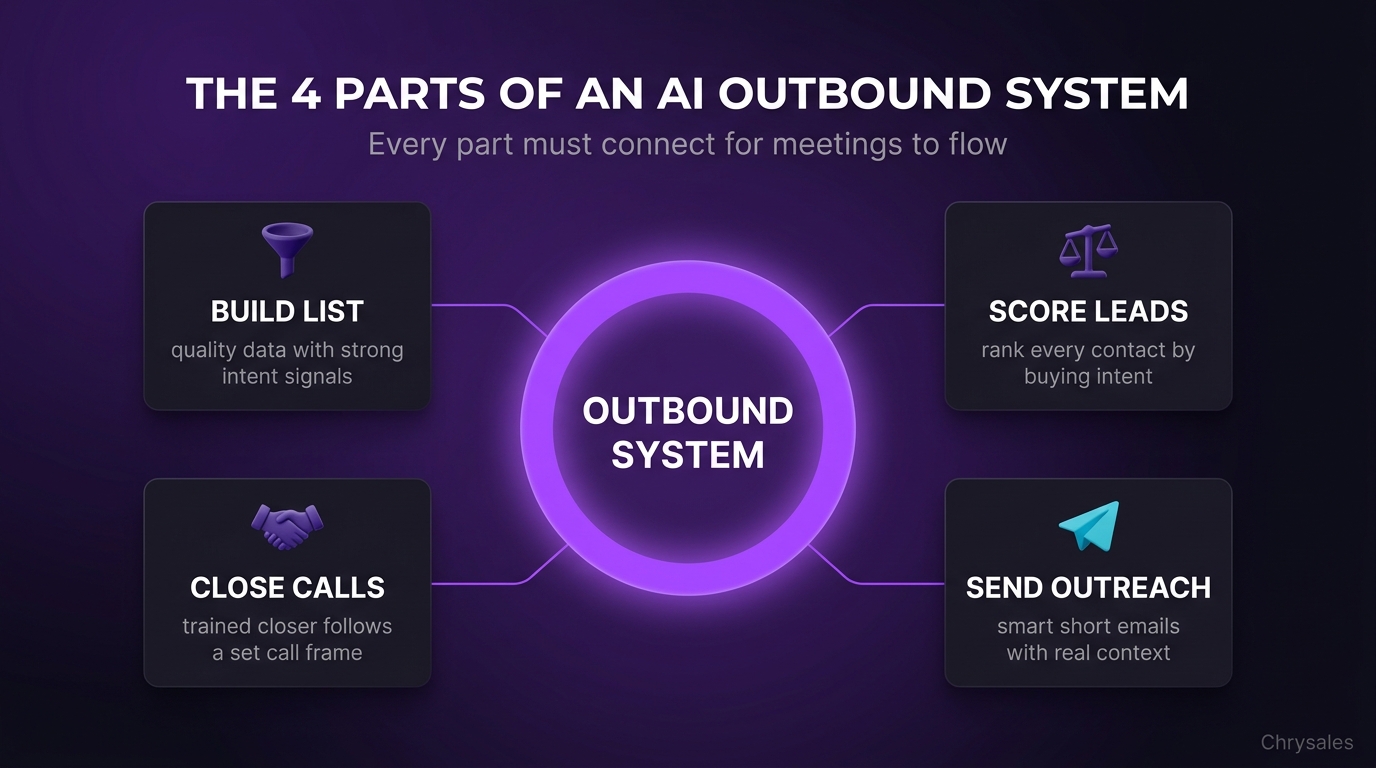
Here's the exact system we built. Four parts. No magic, just process.
Part 1: Data Collection and List Building
We didn't buy a list. We built one.
Here's the stack:
Apollo for base prospecting and contact discovery. LinkedIn Sales Navigator for layering in intent signals. Clay for pulling it all together and enriching each lead with 15 to 20 data points.
The data points matter. Not just name and email. We grabbed company headcount, recent LinkedIn posts, tech stack from BuiltWith, recent job postings, and funding history.
Why? Because a company hiring three SDRs right now is more likely to need sales training than one that hasn't posted a job in six months. That's a signal you can act on.
We set filtering rules. Companies between 20 and 150 employees. B2B only. Raised a seed round or Series A in the last 18 months. Hiring for at least one sales or marketing role in the past 60 days.
The result was a list of 1,200 companies. Not 10,000 random contacts. 1,200 companies that fit the profile and showed buying intent.
Part 2: AI Lead Scoring and Segmentation
Not every lead on the list is equal. Some are ready to talk today. Some need six months of nurture.
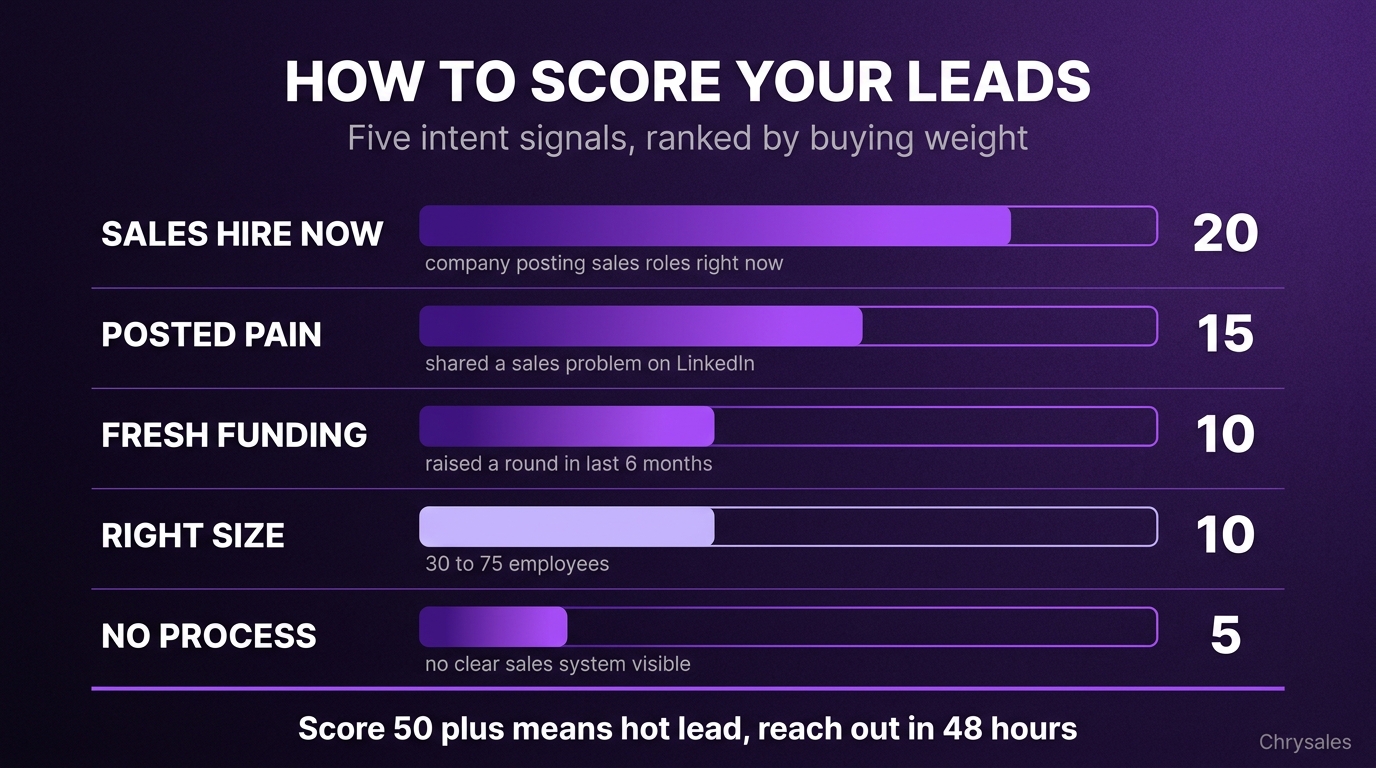
We built an AI powered prospecting model using a simple scoring system. Each lead got points for specific behaviors and attributes:
- Posted about sales challenges on LinkedIn in the last 30 days: +15 points
- Hiring for sales roles right now: +20 points
- Raised funding in the last six months: +10 points
- Company size 30 to 75 employees: +10 points
- No clear sales process visible on their site: +5 points
Leads scoring above 50 went into the high intent segment. Those got personalized outreach within 48 hours.
Leads between 30 and 50 went into a nurture sequence. Below 30 got dropped or revisited in 90 days.
Watch out: Don't over complicate scoring. Pick five to seven signals that actually correlate with buying intent. Test it on 100 leads before you scale.
Part 3: Automated Cold Outreach With Real Personalization
Here's where the AI outbound automation kicks in. But it's not sending the same template to everyone.
We used Clay to pull recent LinkedIn activity for each lead. If they posted about a hiring challenge, the email mentioned it. If they just raised a Series A, we referenced growth mode. If they posted about pipeline issues, we led with that.
The first line of every email was unique. Generated by AI, yes, but fed with real data about that specific person.
The rest of the email followed a simple structure:
- Personalized first line tied to something they care about
- One sentence about the specific problem we solve
- One sentence proof point with a real number
- Clear ask for a 15 minute call
No attachments. No links in the first email. No paragraphs. Just four to five short sentences.
We sent 40 emails per day per inbox. Across three inboxes, that's 120 per day, roughly 2,400 per month.
Reply rate sat between 8% and 12%, which aligns with industry benchmarks for effective cold email campaigns. About half of replies were positive or neutral. That's 100 to 140 interested replies per month.
Common mistake: Sending 500 emails a day from one inbox kills deliverability. Stick to 40 to 50 max per inbox. Warm up new domains for two weeks before you send cold emails.
Part 4: Handoff to a Human Sales Process
Automation books the meeting. Humans close the deal.
When someone replied with interest, the workflow tagged them in the CRM and sent a calendar link. Once they booked, a real person took over. Not a bot. A trained closer following a structured call framework.
This is the part most teams skip. They automate outreach but have no process for the call. The lead shows up, the rep wings it, the deal dies.
We built a 30 minute call structure for this client:
- First 10 minutes: discovery questions to understand their current sales process
- Next 10 minutes: present the custom offer tied to their answers
- Last 10 minutes: handle objections and book next steps or close
Every call followed the same script. Every objection had a pre built response.
That's how you turn 30 meetings into 12 to 15 closed deals per month.
How to Build Your Own AI Outbound Automation Workflow
You don't need a six figure budget to build this. Here's the step by step process we use for every client.
Step 1: Define Your Ideal Customer Profile
Write down the exact type of company you want to work with. Be specific.
Industry, company size, revenue range, growth stage, geography, tech stack.
Then add intent signals. What behaviors show they're ready to buy? Hiring? Fundraising? Posting about the problem you solve?
This takes one day. Don't skip it.
Step 2: Build Your List
Use Apollo or LinkedIn Sales Navigator to pull an initial list based on your ideal customer profile. Export it.
Then enrich it. Use Clay or a similar tool to add data points: recent posts, tech stack, employee growth rate, job openings.
Filter ruthlessly. Your list should shrink, not grow. Quality over quantity.
A clean list of 500 beats a messy list of 5,000.
Step 3: Score and Segment
Pick your scoring criteria. Five to seven signals max. Assign point values. Score every lead.
Segment into three buckets: high intent, medium intent, low intent.
Each bucket gets a different outreach strategy. High intent gets immediate personalized outreach. Medium intent gets a longer nurture sequence. Low intent gets dropped or revisited later.
Step 4: Write Your Outreach Sequence
Write three to five emails. First email is the most important. Keep it short. Four to five sentences max.
Use a proven structure that follows how to write cold emails that get replies:
- Personalized opener
- Problem you solve
- Proof it works
- Clear next step
Test it manually first. Send 50 emails by hand. Track open rates, reply rates, positive replies.
Tweak until your reply rate hits 5% or higher. Then automate.
Step 5: Set Up Automation Tools
Connect your tools. Most people use Clay for enrichment, Smartlead or Instantly for sending, and a CRM like HubSpot or Pipedrive for tracking.
Set daily send limits. 40 to 50 emails per inbox per day max. Spread volume across multiple domains if you're sending more.
Warm up new inboxes for two weeks before sending cold emails. Use a tool like Mailreach or Warmup Inbox.
Pro Tip: Always use a separate sending domain from your main business email. If your domain gets flagged, it won't kill your everyday communication.
Step 6: Monitor and Optimize
Check your numbers weekly. Open rate should be 40% plus. Reply rate should be 5% plus. Positive reply rate should be 2% to 3% minimum.
If open rate is low, your subject lines are weak or your domain reputation is bad. If reply rate is low, your targeting or message is off.
Change one thing at a time. Test for a week. Measure. Repeat.
One marketing agency we worked with had a 0.5% reply rate at first. We rebuilt their list, tightened their ideal customer profile, and rewrote the first email. Reply rate jumped to 4.2% in three weeks.
The Tech Stack You Actually Need
You don't need 15 tools. Here's what we use for every AI outbound sales automation build.
You can also watch an AI sales system in action to see how all these pieces fit together in real time.
Core Tools
Apollo or LinkedIn Sales Navigator for list building and lead sourcing. Apollo is cheaper and easier for most teams. Sales Nav is better if you need deep LinkedIn data.
Clay for data enrichment and workflow automation. Pulls data from 50 plus sources and lets you build conditional logic without code. This is the connective layer.
Smartlead or Instantly for email sending. Both handle inbox rotation, A/B testing, and deliverability monitoring. Smartlead has better analytics. Instantly is simpler to set up.
HubSpot or Pipedrive for CRM. Track every interaction. Tag leads by segment and score. Set up automations to notify your sales team when someone books a meeting.
AI Tools for Personalization
We use Gemini based workflows inside Clay to generate personalized first lines. Feed it the lead's recent LinkedIn post or company news, and it writes a natural opening sentence.
Some teams use ChatGPT or Claude API for this. Doesn't matter which. The key is feeding it real data, not generic prompts.
Watch out: AI generated copy can sound robotic if you don't edit it. Always review a sample batch before you send at scale.
Deliverability Tools
Warmup Inbox or Mailreach to warm up new sending domains. You need this. Cold inboxes get flagged fast.
Google Postmaster Tools and Microsoft SNDS to monitor domain reputation. If your sender score drops, pause and fix it before you keep sending.
Most teams ignore deliverability until it's too late. By then, your domain is burned and your emails land in spam.
Common Mistakes That Kill AI Outbound Systems
We see the same errors over and over. Here's what tanks most setups.
Mistake 1: Automating Before You Validate
Picture this: you spend two weeks building a perfect automated sales system. You flip it on, send 1,000 emails, and get four replies.
The mistake? You never tested the message on a small batch first.
Always send 50 to 100 emails manually before you automate. If it doesn't work by hand, automation won't save it.
Mistake 2: Ignoring Deliverability
Sending 500 emails a day from a brand new domain is like walking into a bank wearing a ski mask. You're getting flagged.
Warm up your domains. Start with 10 to 20 emails per day. Ramp up slowly over two weeks. Use dedicated sending domains separate from your main business email.
Following outbound email marketing best practices for domain reputation and send volume is critical to keeping your emails out of spam.
A 30 person consulting firm tried to speed run this last year. They burned three domains in a month. Their main business domain got flagged. It took six months to fix their sender reputation.
Mistake 3: Bad List, Good Copy
Your email could be Pulitzer level writing. If it goes to the wrong people, it's ignored.
Spend more time on the list than the copy. Filter hard. Use intent signals. Target companies showing signs they actually need what you sell.
One client came to us with a 0.3% reply rate. Their copy was fine. Their list was terrible. Half the contacts were outdated. The other half didn't match their ideal customer profile.
We rebuilt the list from scratch. Reply rate jumped to 6% with the same email template.
Mistake 4: No Human Follow Up Process
Booking the meeting is step one. Closing the deal is step two.
Most teams nail step one and fumble step two. You need a structured sales call process. Discovery questions. Offer positioning. Objection handling. A clear next step.
Hiring a salesperson without training them is like giving someone car keys and saying figure out how to drive. Build the system first. Then scale the people.
Why We Built This System for B2B Lead Generation
Most B2B sales systems fail because they treat outbound as a volume game. Send more emails, book more meetings, close more deals.
It doesn't work that way.
The companies winning at B2B lead generation treat outbound like a system. Every piece connects.
List quality feeds into message relevance. Message relevance drives reply rates. Reply rates turn into meetings. Meetings turn into deals only if you have a trained team and a clear sales process.
AI outbound automation just speeds up a system that already works. It doesn't fix a broken one.
We've trained over 500 sales teams in the last 12 years. The pattern is always the same. Teams struggling with client acquisition don't have a tool problem. They have a system problem.
That's why we start every engagement with the fundamentals. Build the list. Nail the offer. Structure the call. Train the team. Then, and only then, do we automate.
To see the full methodology behind this approach, learn how to build a sales system so powerful clients come to you without manual prospecting.
The result? Systems that book 20 to 40 meetings per month on autopilot. Not because the AI is magic. Because the system underneath is solid.
How Chrysales Builds Custom Sales Automation Systems
We don't sell software. We build the whole system with you. One on one.
Here's how it works.
We start with a discovery call to map your current sales process. What's working? What's broken? Where are the gaps?
Then we build. Custom list. Scored and segmented. Personalized outreach sequences tested and optimized for your market. Automated workflows that hand off warm leads to your team.
We train your closers on the exact call structure to turn meetings into deals. We build objection scripts, discovery frameworks, and pitch decks tailored to your offer.
If you need to hire, we find and train elite setters and closers. We don't hand you a job description and wish you luck. We source, interview, hire, and onboard the right people into your system.
The result is a sales system that's repeatable, predictable, and scalable. You know exactly how many emails turn into how many meetings turn into how many deals. Every week. Every month.
We've helped clients generate over €10M in revenue using this exact approach.
Companies like Amazon, Vodafone, Deutsche Börse, and Cloudification have worked with us to build a sales system that actually scales.
Our client satisfaction rate sits at 99.4% because we don't sell you a course and disappear. We build the system with you. One on one. Until it works.
If you're tired of winging your outbound sales and want a system that books meetings while you sleep, this is how you do it.
Frequently Asked Questions
Q: How long does it take to build an AI outbound automation system?
Most setups take four to six weeks from start to finish. Week one is list building and ideal customer profile work. Week two is writing and testing outreach sequences. Week three is setting up the automation stack and warming up domains. Week four is launching, monitoring, and optimizing.
Some teams move faster if they already have clean data and a clear offer. Others need eight weeks if we're rebuilding positioning or training a sales team at the same time.
Q: What's a realistic number of meetings to expect per month?
It depends on your market, offer, and list quality. Most B2B companies using a solid AI outbound sales system book 20 to 40 qualified meetings per month.
If your offer is strong and your ideal customer profile is tight, you can push higher. If your market is saturated or your offer needs work, you'll land closer to 10 to 15.
The key is keeping reply rates above 5%. Anything lower means your targeting or messaging needs fixing before you scale.
Q: Do I need to hire a sales team to make this work?
Not at first. You can start with one person handling the calls. As meeting volume grows, you'll want to add a dedicated closer or two.
We recommend building the system first with a small team, then scaling people once the process is proven.
Hiring before the system is ready just means more people guessing what to say on calls. Get the playbook working, then clone it across more reps.
Q: Can I use AI outbound automation if I'm in a niche industry?
Yes. Niche markets actually work better for this. Smaller lists mean you can personalize deeper. Less competition means your emails stand out more.
The key is nailing your ideal customer profile and using intent signals specific to your industry.
We've built systems for tech consultancies, SaaS companies, marketing agencies, and specialized B2B service firms. The process works across markets as long as you adapt the targeting and messaging to fit.
Q: What if my emails land in spam?
This is a deliverability issue, not a message issue. Check your domain reputation first using Google Postmaster Tools.
Make sure you're warming up new sending domains properly. Limit daily send volume to 40 to 50 emails per inbox. Use a separate domain for cold outreach so your main business email stays clean.
Avoid spammy words like "free," "guarantee," or "act now." And never buy email lists. Sending to outdated or unverified contacts kills your sender score fast.
Q: How much does it cost to set up an AI outbound sales automation system?
Tool costs run about $200 to $400 per month for the full stack: Clay, Smartlead or Instantly, Apollo, warmup tools, and CRM.
If you're building it yourself, budget four to six weeks of time. If you're working with a sales consulting partner like Chrysales, costs vary based on scope, but most engagements include list building, automation setup, sales training, and ongoing optimization.
The ROI comes fast. One new client per month typically covers the entire investment.
Q: How is this different from just hiring a lead generation agency?
Lead gen agencies usually sell you a list or book appointments without a system behind them. You get meetings, but no process to close them.
We build the entire sales system: positioning, outreach, automation, call structure, objection scripts, and team training.
You own the system. It runs inside your business. You're not dependent on an agency to keep feeding you leads.
That's the difference. You walk away with a repeatable process, not a one time batch of contacts.
AI outbound automation is a system for sending targeted outreach, scoring leads, and booking meetings with less manual work. It works best when the list, offer, and follow up process are already strong.
We built a client an AI outbound automation system last quarter. It books 30 qualified meetings per month with zero manual prospecting.
The secret? It's not the AI tools. Most teams use the same tech stack we do.
The difference is what happens before you turn automation on. If you automate a broken sales process, you get broken results faster. If you automate a solid system, you get meetings while you sleep.
Here's exactly how we did it.
The Real Problem With AI Outbound Automation
Most teams jump straight to the tools. They sign up for Clay, connect Apollo, build a fancy workflow, and hit send on 500 emails.
Two weeks later, they have three replies and one angry unsubscribe.
The problem isn't the automation. It's that they automated the wrong things in the wrong order.
Think of your sales pipeline like a phone contact list. If half the numbers don't work, no message gets through. Doesn't matter how good your text is.
AI outbound automation amplifies whatever you feed it. Bad list, bad offer, bad timing? You just sent garbage at scale.
Here's what actually matters before you automate anything:
Get Your List Right First
Your list does 70% of the heavy lifting. A great message to the wrong person is still ignored. A decent message to the right person gets opened.
We spent two full weeks just building the list for this client. Not scraping LinkedIn for anyone with "VP" in their title. Real research.
We filtered by company size, recent funding rounds, tech stack, hiring patterns, and whether they already had a sales team.
A 200 person company that just did layoffs is not a hot lead. It's a bad fit, full stop.
Pro Tip: Before you automate, manually email 50 people from your list. If your reply rate is under 2%, your list is the problem, not your email copy.
Build an Offer People Actually Want
Most outbound emails fail because the offer is confusing or irrelevant.
"We help companies grow" means nothing. "We book 30 sales meetings a month for B2B consulting firms using a custom AI outbound sales system" is specific.
Your offer is the menu. Your sales call is the waiter. If the menu is confusing, the waiter has no chance.
For this client, we rebuilt their positioning before writing a single cold email. They were a consulting firm selling "business optimization." We repositioned them around one outcome: predictable client acquisition for tech consultancies.
Clear, specific, easy to say yes or no to.
The 4 Parts of an AI Outbound Sales System That Actually Works
Here's the exact system we built. Four parts. No magic, just process.
Part 1: Data Collection and List Building
We didn't buy a list. We built one.
Here's the stack:
Apollo for base prospecting and contact discovery. LinkedIn Sales Navigator for layering in intent signals. Clay for pulling it all together and enriching each lead with 15 to 20 data points.
The data points matter. Not just name and email. We grabbed company headcount, recent LinkedIn posts, tech stack from BuiltWith, recent job postings, and funding history.
Why? Because a company hiring three SDRs right now is more likely to need sales training than one that hasn't posted a job in six months. That's a signal you can act on.
We set filtering rules. Companies between 20 and 150 employees. B2B only. Raised a seed round or Series A in the last 18 months. Hiring for at least one sales or marketing role in the past 60 days.
The result was a list of 1,200 companies. Not 10,000 random contacts. 1,200 companies that fit the profile and showed buying intent.
Part 2: AI Lead Scoring and Segmentation
Not every lead on the list is equal. Some are ready to talk today. Some need six months of nurture.
We built an AI powered prospecting model using a simple scoring system. Each lead got points for specific behaviors and attributes:
- Posted about sales challenges on LinkedIn in the last 30 days: +15 points
- Hiring for sales roles right now: +20 points
- Raised funding in the last six months: +10 points
- Company size 30 to 75 employees: +10 points
- No clear sales process visible on their site: +5 points
Leads scoring above 50 went into the high intent segment. Those got personalized outreach within 48 hours.
Leads between 30 and 50 went into a nurture sequence. Below 30 got dropped or revisited in 90 days.
Watch out: Don't over complicate scoring. Pick five to seven signals that actually correlate with buying intent. Test it on 100 leads before you scale.
Part 3: Automated Cold Outreach With Real Personalization
Here's where the AI outbound automation kicks in. But it's not sending the same template to everyone.
We used Clay to pull recent LinkedIn activity for each lead. If they posted about a hiring challenge, the email mentioned it. If they just raised a Series A, we referenced growth mode. If they posted about pipeline issues, we led with that.
The first line of every email was unique. Generated by AI, yes, but fed with real data about that specific person.
The rest of the email followed a simple structure:
- Personalized first line tied to something they care about
- One sentence about the specific problem we solve
- One sentence proof point with a real number
- Clear ask for a 15 minute call
No attachments. No links in the first email. No paragraphs. Just four to five short sentences.
We sent 40 emails per day per inbox. Across three inboxes, that's 120 per day, roughly 2,400 per month.
Reply rate sat between 8% and 12%, which aligns with industry benchmarks for effective cold email campaigns. About half of replies were positive or neutral. That's 100 to 140 interested replies per month.
Common mistake: Sending 500 emails a day from one inbox kills deliverability. Stick to 40 to 50 max per inbox. Warm up new domains for two weeks before you send cold emails.
Part 4: Handoff to a Human Sales Process
Automation books the meeting. Humans close the deal.
When someone replied with interest, the workflow tagged them in the CRM and sent a calendar link. Once they booked, a real person took over. Not a bot. A trained closer following a structured call framework.
This is the part most teams skip. They automate outreach but have no process for the call. The lead shows up, the rep wings it, the deal dies.
We built a 30 minute call structure for this client:
- First 10 minutes: discovery questions to understand their current sales process
- Next 10 minutes: present the custom offer tied to their answers
- Last 10 minutes: handle objections and book next steps or close
Every call followed the same script. Every objection had a pre built response.
That's how you turn 30 meetings into 12 to 15 closed deals per month.
How to Build Your Own AI Outbound Automation Workflow
You don't need a six figure budget to build this. Here's the step by step process we use for every client.
Step 1: Define Your Ideal Customer Profile
Write down the exact type of company you want to work with. Be specific.
Industry, company size, revenue range, growth stage, geography, tech stack.
Then add intent signals. What behaviors show they're ready to buy? Hiring? Fundraising? Posting about the problem you solve?
This takes one day. Don't skip it.
Step 2: Build Your List
Use Apollo or LinkedIn Sales Navigator to pull an initial list based on your ideal customer profile. Export it.
Then enrich it. Use Clay or a similar tool to add data points: recent posts, tech stack, employee growth rate, job openings.
Filter ruthlessly. Your list should shrink, not grow. Quality over quantity.
A clean list of 500 beats a messy list of 5,000.
Step 3: Score and Segment
Pick your scoring criteria. Five to seven signals max. Assign point values. Score every lead.
Segment into three buckets: high intent, medium intent, low intent.
Each bucket gets a different outreach strategy. High intent gets immediate personalized outreach. Medium intent gets a longer nurture sequence. Low intent gets dropped or revisited later.
Step 4: Write Your Outreach Sequence
Write three to five emails. First email is the most important. Keep it short. Four to five sentences max.
Use a proven structure that follows how to write cold emails that get replies:
- Personalized opener
- Problem you solve
- Proof it works
- Clear next step
Test it manually first. Send 50 emails by hand. Track open rates, reply rates, positive replies.
Tweak until your reply rate hits 5% or higher. Then automate.
Step 5: Set Up Automation Tools
Connect your tools. Most people use Clay for enrichment, Smartlead or Instantly for sending, and a CRM like HubSpot or Pipedrive for tracking.
Set daily send limits. 40 to 50 emails per inbox per day max. Spread volume across multiple domains if you're sending more.
Warm up new inboxes for two weeks before sending cold emails. Use a tool like Mailreach or Warmup Inbox.
Pro Tip: Always use a separate sending domain from your main business email. If your domain gets flagged, it won't kill your everyday communication.
Step 6: Monitor and Optimize
Check your numbers weekly. Open rate should be 40% plus. Reply rate should be 5% plus. Positive reply rate should be 2% to 3% minimum.
If open rate is low, your subject lines are weak or your domain reputation is bad. If reply rate is low, your targeting or message is off.
Change one thing at a time. Test for a week. Measure. Repeat.
One marketing agency we worked with had a 0.5% reply rate at first. We rebuilt their list, tightened their ideal customer profile, and rewrote the first email. Reply rate jumped to 4.2% in three weeks.
The Tech Stack You Actually Need
You don't need 15 tools. Here's what we use for every AI outbound sales automation build.
You can also watch an AI sales system in action to see how all these pieces fit together in real time.
Core Tools
Apollo or LinkedIn Sales Navigator for list building and lead sourcing. Apollo is cheaper and easier for most teams. Sales Nav is better if you need deep LinkedIn data.
Clay for data enrichment and workflow automation. Pulls data from 50 plus sources and lets you build conditional logic without code. This is the connective layer.
Smartlead or Instantly for email sending. Both handle inbox rotation, A/B testing, and deliverability monitoring. Smartlead has better analytics. Instantly is simpler to set up.
HubSpot or Pipedrive for CRM. Track every interaction. Tag leads by segment and score. Set up automations to notify your sales team when someone books a meeting.
AI Tools for Personalization
We use Gemini based workflows inside Clay to generate personalized first lines. Feed it the lead's recent LinkedIn post or company news, and it writes a natural opening sentence.
Some teams use ChatGPT or Claude API for this. Doesn't matter which. The key is feeding it real data, not generic prompts.
Watch out: AI generated copy can sound robotic if you don't edit it. Always review a sample batch before you send at scale.
Deliverability Tools
Warmup Inbox or Mailreach to warm up new sending domains. You need this. Cold inboxes get flagged fast.
Google Postmaster Tools and Microsoft SNDS to monitor domain reputation. If your sender score drops, pause and fix it before you keep sending.
Most teams ignore deliverability until it's too late. By then, your domain is burned and your emails land in spam.
Common Mistakes That Kill AI Outbound Systems
We see the same errors over and over. Here's what tanks most setups.
Mistake 1: Automating Before You Validate
Picture this: you spend two weeks building a perfect automated sales system. You flip it on, send 1,000 emails, and get four replies.
The mistake? You never tested the message on a small batch first.
Always send 50 to 100 emails manually before you automate. If it doesn't work by hand, automation won't save it.
Mistake 2: Ignoring Deliverability
Sending 500 emails a day from a brand new domain is like walking into a bank wearing a ski mask. You're getting flagged.
Warm up your domains. Start with 10 to 20 emails per day. Ramp up slowly over two weeks. Use dedicated sending domains separate from your main business email.
Following outbound email marketing best practices for domain reputation and send volume is critical to keeping your emails out of spam.
A 30 person consulting firm tried to speed run this last year. They burned three domains in a month. Their main business domain got flagged. It took six months to fix their sender reputation.
Mistake 3: Bad List, Good Copy
Your email could be Pulitzer level writing. If it goes to the wrong people, it's ignored.
Spend more time on the list than the copy. Filter hard. Use intent signals. Target companies showing signs they actually need what you sell.
One client came to us with a 0.3% reply rate. Their copy was fine. Their list was terrible. Half the contacts were outdated. The other half didn't match their ideal customer profile.
We rebuilt the list from scratch. Reply rate jumped to 6% with the same email template.
Mistake 4: No Human Follow Up Process
Booking the meeting is step one. Closing the deal is step two.
Most teams nail step one and fumble step two. You need a structured sales call process. Discovery questions. Offer positioning. Objection handling. A clear next step.
Hiring a salesperson without training them is like giving someone car keys and saying figure out how to drive. Build the system first. Then scale the people.
Why We Built This System for B2B Lead Generation
Most B2B sales systems fail because they treat outbound as a volume game. Send more emails, book more meetings, close more deals.
It doesn't work that way.
The companies winning at B2B lead generation treat outbound like a system. Every piece connects.
List quality feeds into message relevance. Message relevance drives reply rates. Reply rates turn into meetings. Meetings turn into deals only if you have a trained team and a clear sales process.
AI outbound automation just speeds up a system that already works. It doesn't fix a broken one.
We've trained over 500 sales teams in the last 12 years. The pattern is always the same. Teams struggling with client acquisition don't have a tool problem. They have a system problem.
That's why we start every engagement with the fundamentals. Build the list. Nail the offer. Structure the call. Train the team. Then, and only then, do we automate.
To see the full methodology behind this approach, learn how to build a sales system so powerful clients come to you without manual prospecting.
The result? Systems that book 20 to 40 meetings per month on autopilot. Not because the AI is magic. Because the system underneath is solid.
How Chrysales Builds Custom Sales Automation Systems
We don't sell software. We build the whole system with you. One on one.
Here's how it works.
We start with a discovery call to map your current sales process. What's working? What's broken? Where are the gaps?
Then we build. Custom list. Scored and segmented. Personalized outreach sequences tested and optimized for your market. Automated workflows that hand off warm leads to your team.
We train your closers on the exact call structure to turn meetings into deals. We build objection scripts, discovery frameworks, and pitch decks tailored to your offer.
If you need to hire, we find and train elite setters and closers. We don't hand you a job description and wish you luck. We source, interview, hire, and onboard the right people into your system.
The result is a sales system that's repeatable, predictable, and scalable. You know exactly how many emails turn into how many meetings turn into how many deals. Every week. Every month.
We've helped clients generate over €10M in revenue using this exact approach.
Companies like Amazon, Vodafone, Deutsche Börse, and Cloudification have worked with us to build a sales system that actually scales.
Our client satisfaction rate sits at 99.4% because we don't sell you a course and disappear. We build the system with you. One on one. Until it works.
If you're tired of winging your outbound sales and want a system that books meetings while you sleep, this is how you do it.
Frequently Asked Questions
Q: How long does it take to build an AI outbound automation system?
Most setups take four to six weeks from start to finish. Week one is list building and ideal customer profile work. Week two is writing and testing outreach sequences. Week three is setting up the automation stack and warming up domains. Week four is launching, monitoring, and optimizing.
Some teams move faster if they already have clean data and a clear offer. Others need eight weeks if we're rebuilding positioning or training a sales team at the same time.
Q: What's a realistic number of meetings to expect per month?
It depends on your market, offer, and list quality. Most B2B companies using a solid AI outbound sales system book 20 to 40 qualified meetings per month.
If your offer is strong and your ideal customer profile is tight, you can push higher. If your market is saturated or your offer needs work, you'll land closer to 10 to 15.
The key is keeping reply rates above 5%. Anything lower means your targeting or messaging needs fixing before you scale.
Q: Do I need to hire a sales team to make this work?
Not at first. You can start with one person handling the calls. As meeting volume grows, you'll want to add a dedicated closer or two.
We recommend building the system first with a small team, then scaling people once the process is proven.
Hiring before the system is ready just means more people guessing what to say on calls. Get the playbook working, then clone it across more reps.
Q: Can I use AI outbound automation if I'm in a niche industry?
Yes. Niche markets actually work better for this. Smaller lists mean you can personalize deeper. Less competition means your emails stand out more.
The key is nailing your ideal customer profile and using intent signals specific to your industry.
We've built systems for tech consultancies, SaaS companies, marketing agencies, and specialized B2B service firms. The process works across markets as long as you adapt the targeting and messaging to fit.
Q: What if my emails land in spam?
This is a deliverability issue, not a message issue. Check your domain reputation first using Google Postmaster Tools.
Make sure you're warming up new sending domains properly. Limit daily send volume to 40 to 50 emails per inbox. Use a separate domain for cold outreach so your main business email stays clean.
Avoid spammy words like "free," "guarantee," or "act now." And never buy email lists. Sending to outdated or unverified contacts kills your sender score fast.
Q: How much does it cost to set up an AI outbound sales automation system?
Tool costs run about $200 to $400 per month for the full stack: Clay, Smartlead or Instantly, Apollo, warmup tools, and CRM.
If you're building it yourself, budget four to six weeks of time. If you're working with a sales consulting partner like Chrysales, costs vary based on scope, but most engagements include list building, automation setup, sales training, and ongoing optimization.
The ROI comes fast. One new client per month typically covers the entire investment.
Q: How is this different from just hiring a lead generation agency?
Lead gen agencies usually sell you a list or book appointments without a system behind them. You get meetings, but no process to close them.
We build the entire sales system: positioning, outreach, automation, call structure, objection scripts, and team training.
You own the system. It runs inside your business. You're not dependent on an agency to keep feeding you leads.
That's the difference. You walk away with a repeatable process, not a one time batch of contacts.
Scaling Is Not Hard If You Have The Right Systems
If you’re serious about leveling up your scaling game, you need the right system, the right training, and the right team behind you. We're here to give you the exact tools and strategies top entrepreneurs use to dominate.

Discover the latest tips
View All.avif)
Chrysales was formed from the words "chrysalis" the stage where a caterpillar transforms into a butterfly and "sales".
It stands for one thing: sales transformation.Because scaling doesn’t happen by doing more of the same. Scaling only happens when you go through real transformation in your systems, your offer, team and the way you sell.
.avif)


