.avif)
How to Run Outbound AI Without Losing Real Replies
Running outbound AI means using smart tools to handle repetitive outreach tasks while keeping humans in charge of real conversations and deal closing. Most companies try AI outbound sales and watch their reply rates tank. The tool promised 10x results. Instead, you got a bunch of generic messages, spam folder placement, and prospects who feel like they're talking to a robot.
Here's the thing: AI outbound works when you use it to handle the boring stuff and let humans do what they're good at. The trick is knowing where to draw that line.
Why Most AI Outbound Sales Efforts Fail Before They Start
The first mistake happens before you send a single message. Teams grab an AI sales tool, load up a big list, and hit send. No list cleaning. No research. Just spray and pray with a tech upgrade.
Picture this: you spend two weeks setting up perfect AI personalization, but your list is full of people who left their jobs three months ago. That's not an outbound AI problem. That's a bad list problem.
AI can write 1,000 personalized cold emails in an hour. But if 400 of those addresses are wrong and 300 more are people who don't make buying decisions, you just wasted AI power on junk data. The best cold outreach automation in the world can't fix a broken list.
The List Does Most of the Heavy Lifting
Most cold emails flop because the list is bad, not the words. A 200-person company that just did layoffs is not a hot lead. It's a bad fit, full stop.
Before you turn on any outbound AI tool, run these checks:
- Job titles match actual decision makers
- Company size fits your ideal client profile
- Recent funding, hiring, or growth signals present
- Contact info verified in the last 90 days
- No mass opt-outs or spam traps
Pro Tip: If your list has a bounce rate over 5%, stop everything and clean it first. AI can't save bad data.
AI Personalization Doesn't Mean Real Personalization
AI personalization tools for outbound messaging can pull a company name, a recent LinkedIn post, or a job title and drop it into a template. That's not real personalization. That's mad libs.
Real personalization means you know why this person should care right now. A 30-person consulting firm we worked with last year tried an AI SDR tool that mentioned every prospect's recent LinkedIn activity. Reply rate was 0.8%. When they switched to AI that researched pain points and matched offers to real business problems, replies jumped to 4.2%.
The difference? One tool filled in blanks. The other tool helped a human understand the prospect before reaching out, much like the approach outlined in this guide to AI personalization for B2B outreach.
Where AI Outbound Shines and Where Humans Take Over
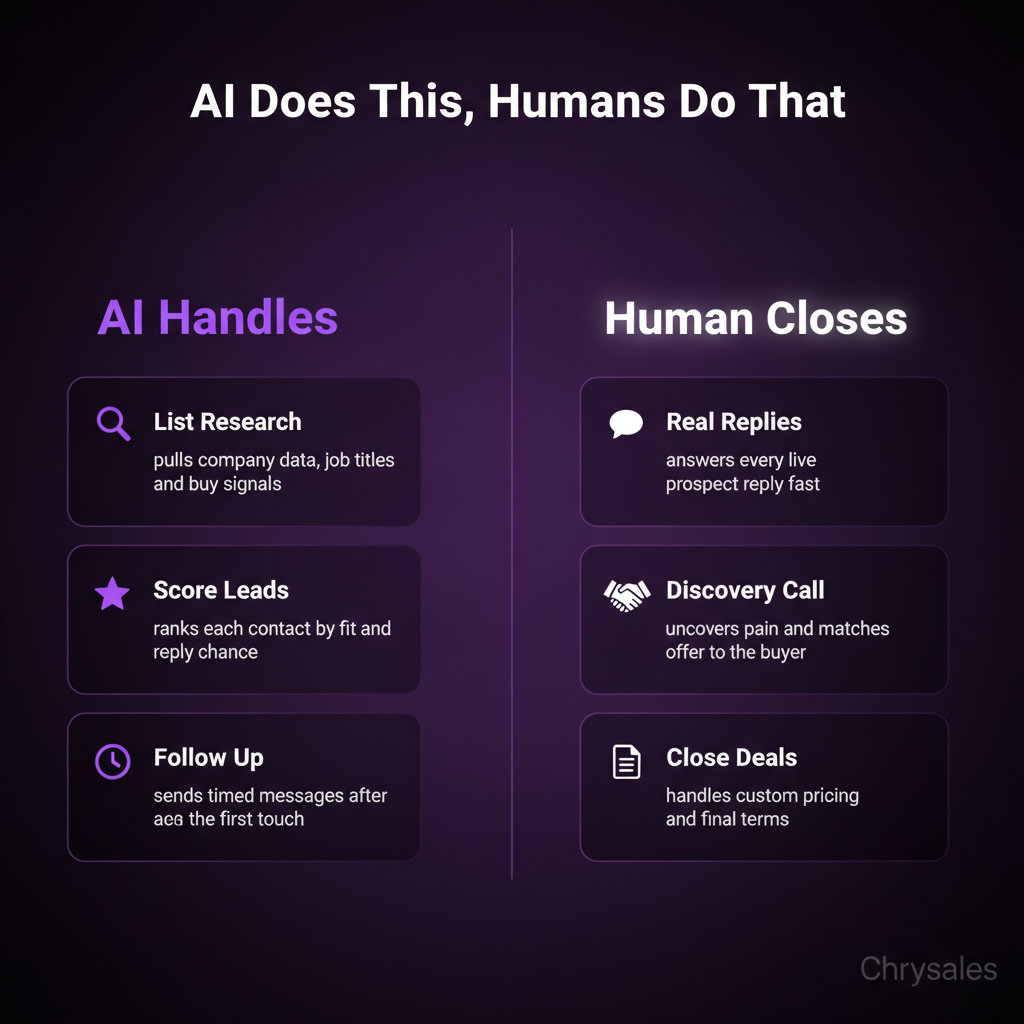
AI for outbound sales should handle three jobs: research, list scoring, and follow-up sequencing. Humans should handle offer writing, first touchpoints, and any real conversation.
Think of it like a relay race. AI runs the first two legs. A trained human closer runs the anchor.
AI Research and Lead Scoring
Most B2B sales teams waste hours manually digging through LinkedIn, company websites, and funding databases. AI can do that research in seconds.
Good outbound sales automation pulls:
- Recent company news and funding rounds
- Tech stack and tools the prospect already uses
- Team size and department structure
- Job openings that signal growing pains
- Competitive moves or market shifts
Then it scores each lead. A simple rule: anything scoring above 70 goes to the top of your call list. Anything under 40 gets a slow-drip nurture sequence.
Watch out: Don't let AI score on data points you don't actually care about. One client had their AI SDR scoring heavily on company revenue, but their best clients were always smaller teams with fast decision cycles. Revenue didn't predict fit.
AI Follow-Up Sequences That Don't Feel Robotic
Here's where outbound AI sales agents actually save time without killing trust. After a human sends the first message or makes the first call, AI can manage the follow-up.
Most people need 5 to 8 touches before they respond. Doing that manually for 200 prospects is a full-time job. AI handles it while your team focuses on live conversations.
A solid sequence looks like:
- Human sends personalized first email
- AI waits 3 days, sends a short follow-up referencing the first message
- AI waits 4 days, shares a relevant case study or insight
- AI waits 5 days, asks a single specific question
- Human jumps in if prospect replies at any stage
The key: every message has to sound like it came from the same person. If your first email is friendly and specific, the AI follow-ups need to match that tone. Most outbound sales automation tools let you set tone rules and approval steps. Use them. For more on structuring effective follow-ups, check out these cold email follow-up templates.
The Human Handoff in B2B Lead Generation
The moment a prospect replies or books a call, AI should step back. A trained human takes over.
Why? Because real objections, custom pricing, and deal structure can't be automated. AI voice agents for sales can handle basic appointment setting, but they fall apart when a prospect asks a hard question or wants to negotiate terms.
We see this all the time with new clients. They try to automate the whole sales process and wonder why deals die at the finish line. The truth is, people buy from people. AI gets them to the table. Humans close the deal.
Common mistake: Using AI to respond to every inbound reply. If someone takes the time to write back with a real question, a human should answer. Fast.
Building a B2B Outbound Strategy That Balances AI and Humans
Most teams build a 40-step workflow when 12 steps would do the job. Keep it simple. Your outbound AI system should have three layers: prospecting, outreach, and conversation. AI owns the first two. Humans own the third.
Layer One: AI Prospecting and List Building
Start with your ideal client profile. Feed that into your AI sales tools. Let the system pull lists, enrich contact data, and score leads based on fit signals.
Best AI for outbound prospecting in 2025 includes tools that integrate with LinkedIn, company databases, and intent signal platforms. The goal is a clean, scored list of 100 to 300 prospects who match your profile and show buying signals.
A marketing agency we worked with used to spend 10 hours a week building lists manually. After setting up AI prospecting, that dropped to 30 minutes of review time. The rest was automated.
Layer Two: Personalized Outbound at Scale
Once the list is ready, AI writes and sends the first few touches. But here's the catch: you have to give the AI good inputs.
That means:
- A strong positioning statement the AI can pull from
- 3 to 5 core pain points your offer solves
- Real case studies or results the AI can reference
- Tone guidelines so messages sound like a human wrote them
Then turn it on. Monitor reply rates daily for the first two weeks. If replies are under 2%, either the list is wrong or the messaging is off. Fix it fast. Understanding how to write cold emails that resonate is crucial before scaling your AI system.
Pro Tip: Run A/B tests on subject lines and opening sentences. AI makes testing easy because you can run multiple versions at once without extra work.
Layer Three: Human-Led Sales Conversations
When someone replies, books a call, or asks a question, that lead goes straight to a human. No more AI. This is where sales training and a real B2B sales system matter.
Your team needs:
- A discovery call structure that uncovers real pain
- Objection scripts for the top 5 to 7 pushbacks
- Pricing frameworks that make custom quotes easy
- A pitch that ties your offer directly to what the prospect said in discovery
AI can pull notes from past emails and surface key details before the call. But the actual conversation? That's a trained closer using a proven system.
One tech company we trained had closers winging every call. Inconsistent results. After building a repeatable call structure and training the team on it, close rates went from 18% to 34% in 90 days. Same leads. Better system. You can watch how to build a sales system so powerful clients come to you for a deeper walkthrough of this process.
How to Audit Your Current Outbound Before Adding AI
Before you buy another tool, check what you already have. Most companies have one of three problems: bad data, weak messaging, or no follow-up system. Adding AI to any of those just automates the problem.
Step One: Check Your List Quality
Pull your last 500 outbound contacts. Calculate:
- Bounce rate (should be under 5%)
- Job title accuracy (manually check 20 contacts)
- Company fit (do they match your ideal client profile?)
If more than 10% of your list is junk, pause outreach and clean it. You can use AI to help verify emails and enrich data, but you need a human to define what "good fit" actually means.
Step Two: Measure Current Reply and Booking Rates
If you're getting under 2% replies on cold outreach, AI won't magically fix that. You need better targeting or better messaging first.
If replies are decent but booking rates are low, the problem is your offer or your call-to-action. AI outbound sales agents can send more messages, but they can't make a weak offer strong.
Step Three: Map Where Humans Add the Most Value
Look at your last 20 deals. When did the prospect decide to buy? Usually it's during a live conversation. A demo. A discovery call. A pricing discussion.
That's where your humans should spend 80% of their time. Everything before that moment can be automated with the right system.
Email outbound automation, follow-up sequences, calendar booking, and lead scoring all run in the background. Your team focuses on live conversations that move deals forward, which is exactly what we cover in the only AI sales system you need in 2026.
Watch out: Don't automate anything that requires judgment. Custom pricing, multi-stakeholder deals, and technical objections need a human who knows your product and your market.
Common Pitfalls When Scaling AI Outbound Sales
Scaling too fast is the number one killer. You see a 5% reply rate on 100 emails and assume you can just 10x the volume. Then deliverability tanks and your domain gets flagged.
Deliverability Issues Kill Outbound Campaigns
Sending 5,000 emails a day from a new domain is a fast way to land in spam. Most email providers flag unusual volume spikes.
If you're planning to scale outbound AI, warm up your domain first. That means:
- Start with 50 emails a day for two weeks
- Gradually increase by 20% each week
- Monitor bounce rates and spam complaints daily
- Use multiple domains if you need high volume
One client tried to send 10,000 AI-generated cold emails in week one. By day three, Gmail and Outlook blocked their domain. It took 60 days to recover sender reputation. Following proven cold email deliverability and sending strategies is critical before scaling.
Over-Automating the Wrong Parts of Client Acquisition
Some teams try to automate discovery calls with AI voice agents. It rarely works well for complex B2B sales.
AI can book the call and answer basic questions. But it can't read tone, pivot based on hesitation, or negotiate terms on the fly.
The same goes for custom proposals and deal structuring. If every deal is different, you need a human building the proposal. AI can pull templates and past examples, but a trained closer has to tailor it.
Ignoring Feedback Loops
Your outbound AI system only gets better if you feed it data. Track what messages get replies. Note which prospects convert. Spot patterns in objections and questions.
Most teams set up automation and never look at the data again. That's a waste. Predictable client acquisition comes from iterating on what works and cutting what doesn't.
Pro Tip: Set a weekly 30-minute review. Look at reply rates, call booking rates, and any new objections that came up. Adjust your AI inputs based on what you learn.
Real Example: How a Consulting Firm Fixed Their Outbound with AI
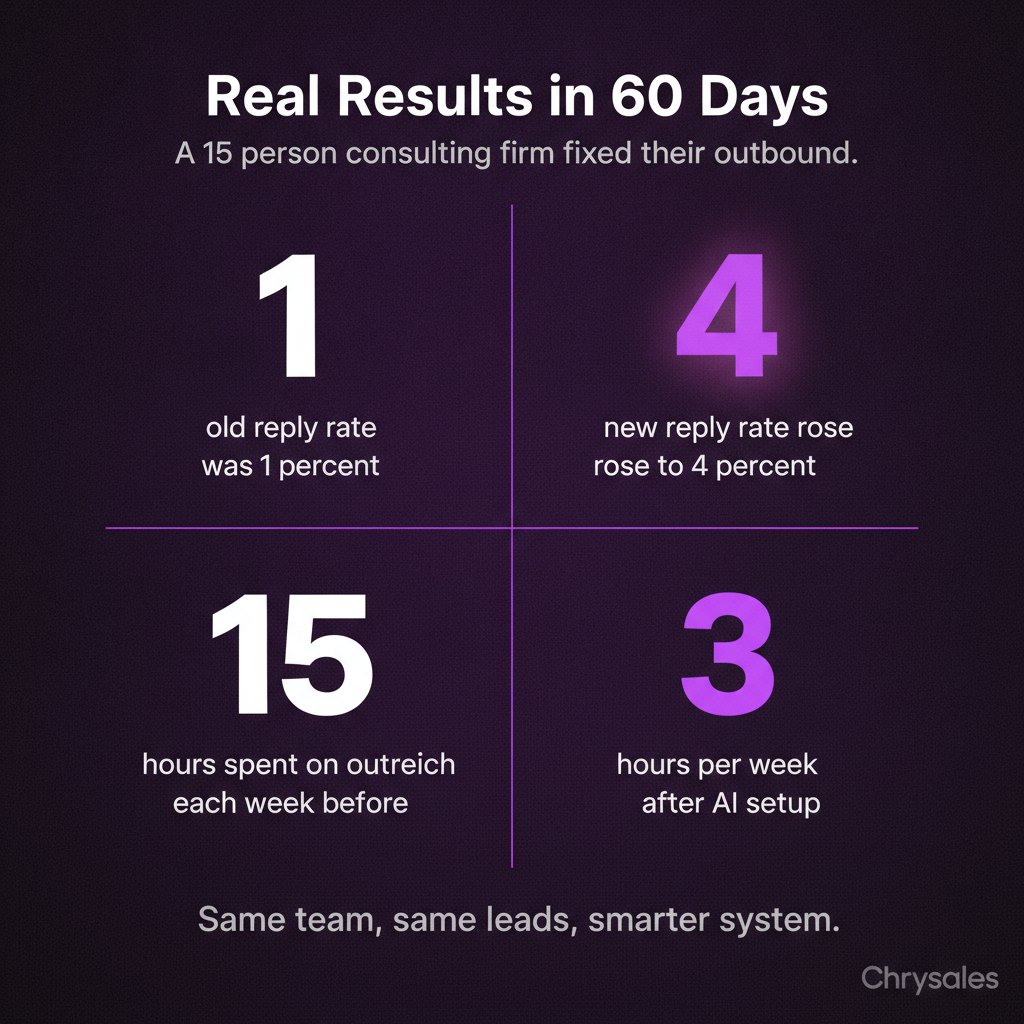
A 15-person consulting firm was doing cold outreach manually. Two people spent 15 hours a week on it. Reply rate hovered around 1.5%. Booked calls were rare.
They brought in AI for prospecting and list scoring. The system pulled 400 high-fit prospects in a week. Then they used AI personalization tools to write first-touch emails, but a human reviewed and approved every batch.
Follow-ups were fully automated. If a prospect didn't reply in three days, the AI sent a short follow-up. If no reply after five touches, the lead went into a long-term nurture sequence.
Results after 60 days: reply rate jumped to 4.1%, and they booked 18 calls. The team spent 3 hours a week managing the system instead of 15 hours doing manual outreach.
More importantly, the humans on the team spent their time on live calls and deal closing, not list building. The system worked because AI handled repetitive tasks and humans handled conversations. That's the model. Learn more by watching this breakdown of how an AI sales system can get you record revenue with unlimited demand.
Frequently Asked Questions
Q: Can AI completely replace human sales reps in outbound?
No. AI handles research, list scoring, and follow-up sequences, but it can't close complex B2B deals. Real objections, custom pricing, and multi-stakeholder sales need a trained human. AI gets prospects to the table. Humans close the deal. The best B2B outbound strategy uses both.
Q: What's the biggest mistake companies make with AI outbound sales?
Most teams automate before they fix the fundamentals. If your list is bad or your offer is weak, AI just scales the problem. Clean your data first. Test your messaging manually. Once you have a system that works at small scale, then automate it with AI.
Q: How long does it take to see results from AI outbound?
You should see reply rate changes in the first two weeks. If your outbound AI sales agent is set up correctly and your list is clean, expect 2% to 5% reply rates within 14 days. Booked calls and closed deals take longer, usually 30 to 90 days depending on your sales cycle.
Q: Do I need a big budget to use AI for outbound sales?
Not anymore. Most AI sales tools cost between $100 and $500 a month. The bigger cost is time. You need someone who understands your market to set up the system, define ideal client profiles, and write the messaging guidelines. If you skip that step, even cheap tools won't work.
Q: How do I keep AI messages from sounding robotic?
Give your AI clear tone rules and real examples to learn from. If your best cold emails are short and friendly, tell the AI to match that style. Avoid buzzwords and corporate jargon in your inputs. The AI mirrors what you feed it. If your templates sound human, the AI output will too.
Q: What's the difference between an AI SDR and email outbound automation?
An AI SDR handles more than just email. It can research prospects, score leads, personalize outreach across multiple channels, and manage follow-up sequences. Email outbound automation just sends pre-written emails on a schedule. AI SDR tools are smarter and adapt based on prospect behavior. Both are useful, but AI SDRs handle more of the B2B lead generation process end to end. Resources like this guide on using AI in B2B sales can help you understand the differences.
Q: Should I use AI voice agents for cold calling?
Only for simple appointment setting. AI voice agents work well for confirming meetings, following up on inbound leads, or asking basic qualifying questions. They fall apart when prospects ask detailed questions or want to negotiate. For real cold calling in B2B sales, a trained human still wins. Use AI voice agents as support, not as your main outbound strategy. The focus should be on building a sales system that actually scales with the right balance of automation and human touch.
Running outbound AI means using smart tools to handle repetitive outreach tasks while keeping humans in charge of real conversations and deal closing. Most companies try AI outbound sales and watch their reply rates tank. The tool promised 10x results. Instead, you got a bunch of generic messages, spam folder placement, and prospects who feel like they're talking to a robot.
Here's the thing: AI outbound works when you use it to handle the boring stuff and let humans do what they're good at. The trick is knowing where to draw that line.
Why Most AI Outbound Sales Efforts Fail Before They Start
The first mistake happens before you send a single message. Teams grab an AI sales tool, load up a big list, and hit send. No list cleaning. No research. Just spray and pray with a tech upgrade.
Picture this: you spend two weeks setting up perfect AI personalization, but your list is full of people who left their jobs three months ago. That's not an outbound AI problem. That's a bad list problem.
AI can write 1,000 personalized cold emails in an hour. But if 400 of those addresses are wrong and 300 more are people who don't make buying decisions, you just wasted AI power on junk data. The best cold outreach automation in the world can't fix a broken list.
The List Does Most of the Heavy Lifting
Most cold emails flop because the list is bad, not the words. A 200-person company that just did layoffs is not a hot lead. It's a bad fit, full stop.
Before you turn on any outbound AI tool, run these checks:
- Job titles match actual decision makers
- Company size fits your ideal client profile
- Recent funding, hiring, or growth signals present
- Contact info verified in the last 90 days
- No mass opt-outs or spam traps
Pro Tip: If your list has a bounce rate over 5%, stop everything and clean it first. AI can't save bad data.
AI Personalization Doesn't Mean Real Personalization
AI personalization tools for outbound messaging can pull a company name, a recent LinkedIn post, or a job title and drop it into a template. That's not real personalization. That's mad libs.
Real personalization means you know why this person should care right now. A 30-person consulting firm we worked with last year tried an AI SDR tool that mentioned every prospect's recent LinkedIn activity. Reply rate was 0.8%. When they switched to AI that researched pain points and matched offers to real business problems, replies jumped to 4.2%.
The difference? One tool filled in blanks. The other tool helped a human understand the prospect before reaching out, much like the approach outlined in this guide to AI personalization for B2B outreach.
Where AI Outbound Shines and Where Humans Take Over
AI for outbound sales should handle three jobs: research, list scoring, and follow-up sequencing. Humans should handle offer writing, first touchpoints, and any real conversation.
Think of it like a relay race. AI runs the first two legs. A trained human closer runs the anchor.
AI Research and Lead Scoring
Most B2B sales teams waste hours manually digging through LinkedIn, company websites, and funding databases. AI can do that research in seconds.
Good outbound sales automation pulls:
- Recent company news and funding rounds
- Tech stack and tools the prospect already uses
- Team size and department structure
- Job openings that signal growing pains
- Competitive moves or market shifts
Then it scores each lead. A simple rule: anything scoring above 70 goes to the top of your call list. Anything under 40 gets a slow-drip nurture sequence.
Watch out: Don't let AI score on data points you don't actually care about. One client had their AI SDR scoring heavily on company revenue, but their best clients were always smaller teams with fast decision cycles. Revenue didn't predict fit.
AI Follow-Up Sequences That Don't Feel Robotic
Here's where outbound AI sales agents actually save time without killing trust. After a human sends the first message or makes the first call, AI can manage the follow-up.
Most people need 5 to 8 touches before they respond. Doing that manually for 200 prospects is a full-time job. AI handles it while your team focuses on live conversations.
A solid sequence looks like:
- Human sends personalized first email
- AI waits 3 days, sends a short follow-up referencing the first message
- AI waits 4 days, shares a relevant case study or insight
- AI waits 5 days, asks a single specific question
- Human jumps in if prospect replies at any stage
The key: every message has to sound like it came from the same person. If your first email is friendly and specific, the AI follow-ups need to match that tone. Most outbound sales automation tools let you set tone rules and approval steps. Use them. For more on structuring effective follow-ups, check out these cold email follow-up templates.
The Human Handoff in B2B Lead Generation
The moment a prospect replies or books a call, AI should step back. A trained human takes over.
Why? Because real objections, custom pricing, and deal structure can't be automated. AI voice agents for sales can handle basic appointment setting, but they fall apart when a prospect asks a hard question or wants to negotiate terms.
We see this all the time with new clients. They try to automate the whole sales process and wonder why deals die at the finish line. The truth is, people buy from people. AI gets them to the table. Humans close the deal.
Common mistake: Using AI to respond to every inbound reply. If someone takes the time to write back with a real question, a human should answer. Fast.
Building a B2B Outbound Strategy That Balances AI and Humans
Most teams build a 40-step workflow when 12 steps would do the job. Keep it simple. Your outbound AI system should have three layers: prospecting, outreach, and conversation. AI owns the first two. Humans own the third.
Layer One: AI Prospecting and List Building
Start with your ideal client profile. Feed that into your AI sales tools. Let the system pull lists, enrich contact data, and score leads based on fit signals.
Best AI for outbound prospecting in 2025 includes tools that integrate with LinkedIn, company databases, and intent signal platforms. The goal is a clean, scored list of 100 to 300 prospects who match your profile and show buying signals.
A marketing agency we worked with used to spend 10 hours a week building lists manually. After setting up AI prospecting, that dropped to 30 minutes of review time. The rest was automated.
Layer Two: Personalized Outbound at Scale
Once the list is ready, AI writes and sends the first few touches. But here's the catch: you have to give the AI good inputs.
That means:
- A strong positioning statement the AI can pull from
- 3 to 5 core pain points your offer solves
- Real case studies or results the AI can reference
- Tone guidelines so messages sound like a human wrote them
Then turn it on. Monitor reply rates daily for the first two weeks. If replies are under 2%, either the list is wrong or the messaging is off. Fix it fast. Understanding how to write cold emails that resonate is crucial before scaling your AI system.
Pro Tip: Run A/B tests on subject lines and opening sentences. AI makes testing easy because you can run multiple versions at once without extra work.
Layer Three: Human-Led Sales Conversations
When someone replies, books a call, or asks a question, that lead goes straight to a human. No more AI. This is where sales training and a real B2B sales system matter.
Your team needs:
- A discovery call structure that uncovers real pain
- Objection scripts for the top 5 to 7 pushbacks
- Pricing frameworks that make custom quotes easy
- A pitch that ties your offer directly to what the prospect said in discovery
AI can pull notes from past emails and surface key details before the call. But the actual conversation? That's a trained closer using a proven system.
One tech company we trained had closers winging every call. Inconsistent results. After building a repeatable call structure and training the team on it, close rates went from 18% to 34% in 90 days. Same leads. Better system. You can watch how to build a sales system so powerful clients come to you for a deeper walkthrough of this process.
How to Audit Your Current Outbound Before Adding AI
Before you buy another tool, check what you already have. Most companies have one of three problems: bad data, weak messaging, or no follow-up system. Adding AI to any of those just automates the problem.
Step One: Check Your List Quality
Pull your last 500 outbound contacts. Calculate:
- Bounce rate (should be under 5%)
- Job title accuracy (manually check 20 contacts)
- Company fit (do they match your ideal client profile?)
If more than 10% of your list is junk, pause outreach and clean it. You can use AI to help verify emails and enrich data, but you need a human to define what "good fit" actually means.
Step Two: Measure Current Reply and Booking Rates
If you're getting under 2% replies on cold outreach, AI won't magically fix that. You need better targeting or better messaging first.
If replies are decent but booking rates are low, the problem is your offer or your call-to-action. AI outbound sales agents can send more messages, but they can't make a weak offer strong.
Step Three: Map Where Humans Add the Most Value
Look at your last 20 deals. When did the prospect decide to buy? Usually it's during a live conversation. A demo. A discovery call. A pricing discussion.
That's where your humans should spend 80% of their time. Everything before that moment can be automated with the right system.
Email outbound automation, follow-up sequences, calendar booking, and lead scoring all run in the background. Your team focuses on live conversations that move deals forward, which is exactly what we cover in the only AI sales system you need in 2026.
Watch out: Don't automate anything that requires judgment. Custom pricing, multi-stakeholder deals, and technical objections need a human who knows your product and your market.
Common Pitfalls When Scaling AI Outbound Sales
Scaling too fast is the number one killer. You see a 5% reply rate on 100 emails and assume you can just 10x the volume. Then deliverability tanks and your domain gets flagged.
Deliverability Issues Kill Outbound Campaigns
Sending 5,000 emails a day from a new domain is a fast way to land in spam. Most email providers flag unusual volume spikes.
If you're planning to scale outbound AI, warm up your domain first. That means:
- Start with 50 emails a day for two weeks
- Gradually increase by 20% each week
- Monitor bounce rates and spam complaints daily
- Use multiple domains if you need high volume
One client tried to send 10,000 AI-generated cold emails in week one. By day three, Gmail and Outlook blocked their domain. It took 60 days to recover sender reputation. Following proven cold email deliverability and sending strategies is critical before scaling.
Over-Automating the Wrong Parts of Client Acquisition
Some teams try to automate discovery calls with AI voice agents. It rarely works well for complex B2B sales.
AI can book the call and answer basic questions. But it can't read tone, pivot based on hesitation, or negotiate terms on the fly.
The same goes for custom proposals and deal structuring. If every deal is different, you need a human building the proposal. AI can pull templates and past examples, but a trained closer has to tailor it.
Ignoring Feedback Loops
Your outbound AI system only gets better if you feed it data. Track what messages get replies. Note which prospects convert. Spot patterns in objections and questions.
Most teams set up automation and never look at the data again. That's a waste. Predictable client acquisition comes from iterating on what works and cutting what doesn't.
Pro Tip: Set a weekly 30-minute review. Look at reply rates, call booking rates, and any new objections that came up. Adjust your AI inputs based on what you learn.
Real Example: How a Consulting Firm Fixed Their Outbound with AI
A 15-person consulting firm was doing cold outreach manually. Two people spent 15 hours a week on it. Reply rate hovered around 1.5%. Booked calls were rare.
They brought in AI for prospecting and list scoring. The system pulled 400 high-fit prospects in a week. Then they used AI personalization tools to write first-touch emails, but a human reviewed and approved every batch.
Follow-ups were fully automated. If a prospect didn't reply in three days, the AI sent a short follow-up. If no reply after five touches, the lead went into a long-term nurture sequence.
Results after 60 days: reply rate jumped to 4.1%, and they booked 18 calls. The team spent 3 hours a week managing the system instead of 15 hours doing manual outreach.
More importantly, the humans on the team spent their time on live calls and deal closing, not list building. The system worked because AI handled repetitive tasks and humans handled conversations. That's the model. Learn more by watching this breakdown of how an AI sales system can get you record revenue with unlimited demand.
Frequently Asked Questions
Q: Can AI completely replace human sales reps in outbound?
No. AI handles research, list scoring, and follow-up sequences, but it can't close complex B2B deals. Real objections, custom pricing, and multi-stakeholder sales need a trained human. AI gets prospects to the table. Humans close the deal. The best B2B outbound strategy uses both.
Q: What's the biggest mistake companies make with AI outbound sales?
Most teams automate before they fix the fundamentals. If your list is bad or your offer is weak, AI just scales the problem. Clean your data first. Test your messaging manually. Once you have a system that works at small scale, then automate it with AI.
Q: How long does it take to see results from AI outbound?
You should see reply rate changes in the first two weeks. If your outbound AI sales agent is set up correctly and your list is clean, expect 2% to 5% reply rates within 14 days. Booked calls and closed deals take longer, usually 30 to 90 days depending on your sales cycle.
Q: Do I need a big budget to use AI for outbound sales?
Not anymore. Most AI sales tools cost between $100 and $500 a month. The bigger cost is time. You need someone who understands your market to set up the system, define ideal client profiles, and write the messaging guidelines. If you skip that step, even cheap tools won't work.
Q: How do I keep AI messages from sounding robotic?
Give your AI clear tone rules and real examples to learn from. If your best cold emails are short and friendly, tell the AI to match that style. Avoid buzzwords and corporate jargon in your inputs. The AI mirrors what you feed it. If your templates sound human, the AI output will too.
Q: What's the difference between an AI SDR and email outbound automation?
An AI SDR handles more than just email. It can research prospects, score leads, personalize outreach across multiple channels, and manage follow-up sequences. Email outbound automation just sends pre-written emails on a schedule. AI SDR tools are smarter and adapt based on prospect behavior. Both are useful, but AI SDRs handle more of the B2B lead generation process end to end. Resources like this guide on using AI in B2B sales can help you understand the differences.
Q: Should I use AI voice agents for cold calling?
Only for simple appointment setting. AI voice agents work well for confirming meetings, following up on inbound leads, or asking basic qualifying questions. They fall apart when prospects ask detailed questions or want to negotiate. For real cold calling in B2B sales, a trained human still wins. Use AI voice agents as support, not as your main outbound strategy. The focus should be on building a sales system that actually scales with the right balance of automation and human touch.
Scaling Is Not Hard If You Have The Right Systems
If you’re serious about leveling up your scaling game, you need the right system, the right training, and the right team behind you. We're here to give you the exact tools and strategies top entrepreneurs use to dominate.

Discover the latest tips
View All.avif)
Chrysales was formed from the words "chrysalis" the stage where a caterpillar transforms into a butterfly and "sales".
It stands for one thing: sales transformation.Because scaling doesn’t happen by doing more of the same. Scaling only happens when you go through real transformation in your systems, your offer, team and the way you sell.
.avif)


