.avif)
How to Enrich Free Trial Signups with Clay Firmographic Data

Clay helps you enrich free trial signups with firmographic data so you can qualify, route, and personalize new signups based on who they actually are. It helps turn a name and email into a usable profile for lead generation and B2B sales.
Most cold outreach flops because the list is bad, not the words. Same goes for inbound. You get 50 free trial signups, send a generic nurture sequence, and watch half of them ghost. The problem? You didn't know who they were when they signed up. A solo freelancer gets the same message as a 200-person company. That's the trap.
Clay helps you enrich free trial signups with firmographic data the second someone joins, so you can qualify, route, and personalize based on who they actually are. Here's how to use it, step by step.
What Clay Actually Does (And Why It Matters for Inbound Lead Qualification)
Clay is a no-code data platform that pulls company and contact information from dozens of sources and drops it into a simple spreadsheet-like interface. Think of it as a research assistant that works in seconds instead of hours.
When someone signs up for your free trial, Clay can automatically grab their email, look up their company, pull firmographic data like employee count, industry, tech stack, and funding stage, then score and route them based on rules you set. No manual Googling. No waiting for a sales rep to dig around LinkedIn.
Why Firmographic Data Matters
Firmographic data is just fancy business information. Company size, industry, location, revenue range, technologies they use. It tells you if a lead is worth calling right away or nurturing over email.
Picture this: two people sign up for your product. One works at a 300 person tech company with fresh funding. The other is a solo consultant. Both are leads, but they need totally different sales motions. Firmographic data lets you split them instantly.
Pro Tip: Most teams treat all inbound signups the same. The companies that enrich signups within 60 seconds of registration book 3x more qualified meetings, because they route hot leads to reps before they cool off.
What Clay Can Enrich
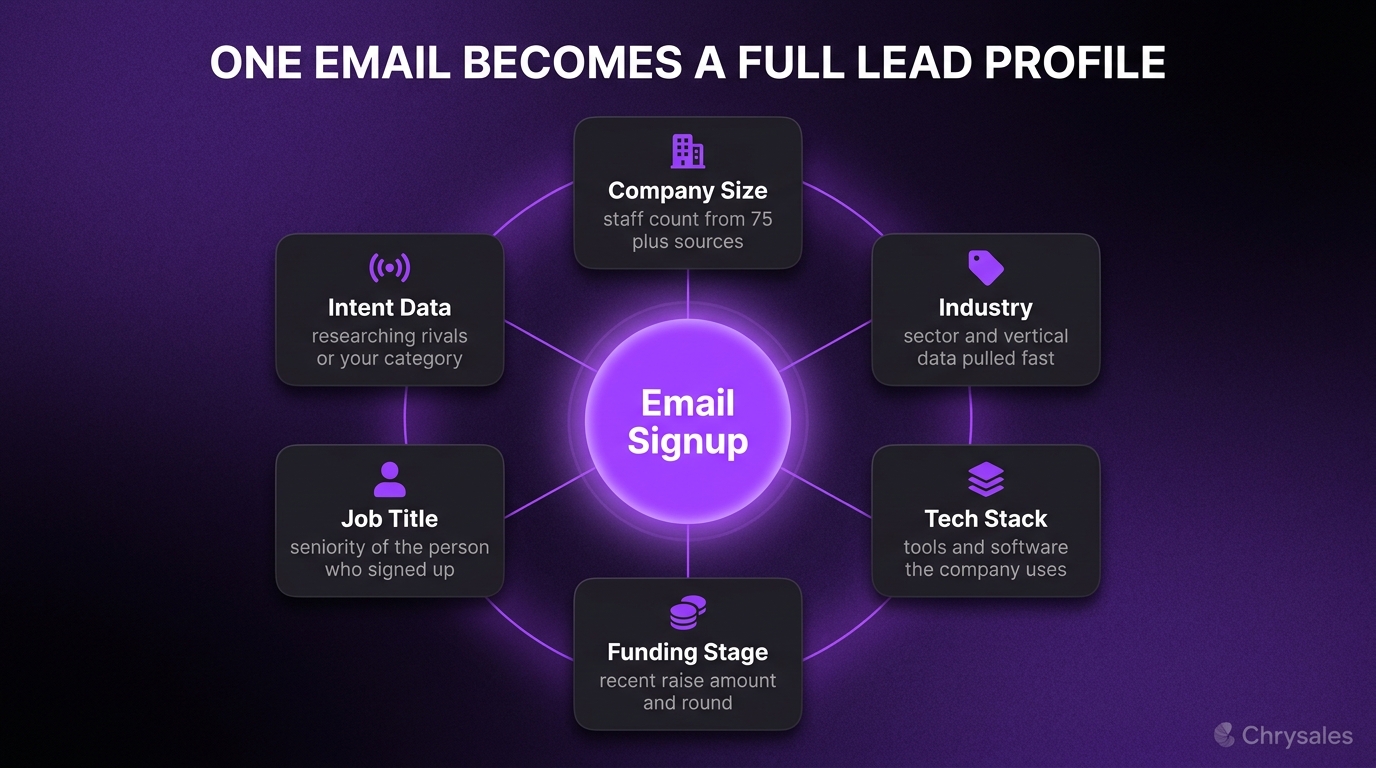
Clay pulls from over 75 data providers. Here's what you can grab:
- Company size (employee count)
- Industry and vertical
- Funding stage and amount raised
- Technology stack (what tools they use)
- Location and headquarters
- Revenue estimates
- Job title and seniority (for the person who signed up)
- LinkedIn URLs (company and personal)
- Social profiles
- Intent data (if they're researching competitors)
You don't need all of it. Pick the 4-5 fields that tell you if someone is a good fit.
How to Set Up Clay for Inbound Lead Enrichment (The Basic Workflow)
Here's the simplest version. You can make it fancier later, but this works right out of the gate.
Step 1: Connect Your Signup Data to Clay
Clay needs to know when someone signs up. You can send data into Clay in a few ways:
- Zapier or Make.com (if your signup form or app triggers webhooks)
- CSV import (manual, but fine for testing)
- Direct API connection (if you have a dev)
- CRM sync (HubSpot, Pipedrive, etc.)
Most people use Zapier. When someone fills out a free trial form, Zapier sends their email and name to a new row in a Clay table. That's it.
Step 2: Run Waterfall Enrichment
This is where Clay shines. Instead of picking one data provider and hoping it has the info, you set up a "waterfall." Clay checks the first provider. If it finds nothing, it moves to the next. If that one fails, it tries the next. You get the best data without manual work.
Here's a simple waterfall for company enrichment:
- Clearbit (fast, good for US companies)
- Apollo (solid B2B coverage)
- Hunter.io (backup for smaller companies)
If Clearbit finds the company, Clay stops and moves to the next column. If not, it tries Apollo. You save API credits and get better coverage.
Common Mistake: Running every enrichment provider at once. That burns through your Clay credits fast. Use waterfalls. Only pay when the previous source fails.
Step 3: Add Scoring Rules
Once you have firmographic data, score each lead. A simple rule might look like this:
- Company size 50-500 employees: +20 points
- Tech company or consulting firm: +15 points
- Raised funding in last 12 months: +10 points
- Job title contains "Head of" or "VP": +10 points
- Located in US or Western Europe: +5 points
Set a threshold. Anything above 40 points goes to sales. Below that goes to email nurture. Clay can calculate this in a formula column. You can make this fancier with AI-powered lead scoring, but start simple. Most teams build a 40-step workflow when 12 steps would do the job.
Step 4: Route Leads Based on Score
Clay can push enriched data back into your CRM or outreach tool. If someone scores high, send them to a "hot leads" list in HubSpot and assign them to a rep. If they score low, drop them into an email sequence in Instantly or Lemlist.
A 30 person consulting firm we worked with did this. They went from treating every signup the same to routing high-fit leads to calls within an hour. Booked 18 demos in the first month, up from 4 the month before.
Using AI in Clay to Personalize Outreach (Without Sounding Like a Robot)
Clay has AI columns powered by GPT-4 and other models. You can feed enriched data into a prompt and generate personalized email snippets, subject lines, or even full messages.
How AI Personalization Works in Clay
You write a prompt like this:
"Write a one sentence opener for an email to {{First Name}} at {{Company Name}}, a {{Industry}} company with {{Employee Count}} employees. Mention something specific about their industry."
Clay runs that prompt for every row. You get unique openers based on real data. Not just "Hi {{First Name}}, hope you're doing well."
Watch out: AI-generated messages can sound generic if your prompt is lazy. Give the AI specific instructions. Reference firmographic data. Make it sound like you did research, because technically you did.
Example AI Prompt for Enriched Trial Signups
"{{First Name}} works at {{Company Name}}, a {{Employee Count}} person company in {{Industry}}. Write a 2 sentence follow-up email mentioning why our tool fits companies in their stage and industry. Keep it casual and helpful, not salesy."
Feed that into Clay's AI column and you'll get personalized snippets you can review and send. One marketing agency tested this. Their reply rate on trial follow-ups went from 1.2% to 6.8% in two weeks. Same leads, better messages.
If you want to go deeper on using AI columns and enrichment data to personalize outreach at scale, you can explore our guide on the AI sales system for 2026.
Clay Integrations: Connecting Enrichment to Your Sales Stack

Clay works best when it sits between your signup form and your CRM or outreach tool. Here are the most common integrations for B2B sales teams.
CRM Enrichment Automation
Clay syncs with HubSpot, Pipedrive, Salesforce, and most CRMs. When a contact enters your CRM, Clay can enrich it automatically. You set up a two-way sync:
- New contact added to CRM
- Clay pulls firmographic data
- Clay pushes enriched fields back to CRM
- CRM triggers workflows based on new data
This is huge for inbound automation and B2B lead generation. You're not waiting for a rep to manually look up every signup.
Outbound Sales Personalization with Instantly or Lemlist
If you're doing cold outreach, Clay builds the list and personalizes it. Then you push it into Instantly, Lemlist, or Smartlead for sending. Workflow:
- Build target list in Clay (scrape LinkedIn, import CSVs, etc.)
- Enrich with firmographic data and intent signals
- Use AI columns to write personalized openers
- Push to Instantly with custom variables
- Instantly sends emails with dynamic fields
The combination of enrichment plus AI-personalized email sequencing is why most sales automation setups now include Clay. It handles the research and writing. The sending tool just executes.
Intent Data and GTM Automation
Clay integrates with intent data providers like Bombora and 6sense. If a company is researching your category, Clay can flag them and trigger outreach. This is next-level GTM automation for agencies and tech companies trying to catch buyers at the right time.
You can also connect Clay to Slack. When a high-score lead signs up, post a message in your sales channel. Reps see it instantly and can call within minutes.
Pro Tip: Don't connect every integration at once. Start with one CRM or outreach tool, get that workflow smooth, then add more.
Common Use Cases for Clay Beyond Free Trial Enrichment
Clay isn't just for inbound. Here are a few other ways B2B sales teams use it. For more concrete examples of how other teams use Clay for enrichment and routing, check out our Clay platform use cases and examples.
Building Outbound Prospect Lists
Scrape a list of target companies from LinkedIn Sales Navigator or Apollo. Import into Clay. Run waterfall enrichment to fill gaps. Score based on fit. Push to outreach.
This is the most popular use case. Clay becomes your prospecting engine for client acquisition and B2B lead generation.
Enriching Existing CRM Data
Most CRMs have old, incomplete data. Half the phone numbers don't work. Job titles are outdated. Clay can refresh your CRM in bulk. Upload your contact list, enrich it, push clean data back.
One tech company did this with 8,000 contacts. Found that 42% of their "target accounts" were now under 10 employees or had shut down. Saved weeks of wasted outreach.
Lead Routing and Qualification for Sales Teams
If you have multiple reps or regions, Clay can route leads based on location, company size, or industry. Enrich, score, assign. All automatic.
A consulting firm with three closers set this up. Leads in the US went to one rep, Europe to another, under 50 employees to a junior closer. Cut their lead response time from 6 hours to 20 minutes.
No-Code Data Platform Lead Enrichment for Agencies
Marketing agencies and consultancies use Clay to build custom prospecting tables for clients. It's a deliverable. "Here's 500 enriched leads, scored and ready to call."
You can charge for this. Some agencies build Clay tables as part of their client acquisition system, then hand off lists to the client's sales team.
Clay Alternatives (And When You Actually Need Clay)
Clay is powerful, but it's not always the right fit. Here are a few Clay.com alternatives and when to consider them. If you're deciding between Clay, Apollo, ZoomInfo, and other enrichment tools for your stack, you can read our comparison of account list builder tools compared.
Apollo.io
Apollo combines a database with enrichment and sending. If you want an all-in-one tool and don't need deep customization, Apollo is simpler. But it's less flexible than Clay for custom workflows.
Hunter.io and Lusha
Good for email finding and basic enrichment. Cheaper than Clay. But no AI columns, no waterfall logic, no custom automation. Fine for small teams doing manual outreach.
Cognism and ZoomInfo
Enterprise data providers with huge databases. Better for large sales teams with big budgets. Clay is more flexible and affordable for growing B2B companies and agencies.
When Clay Makes Sense
Use Clay if:
- You need custom workflows (inbound enrichment, lead scoring, routing)
- You want to combine multiple data sources in one place
- You're doing AI-powered personalization at scale
- You have a technical sales operator or agency who can build tables
Skip Clay if:
- You just need a simple contact database (use Apollo or Hunter)
- You have no one on your team comfortable with spreadsheets or no-code tools
- You're not doing outbound or inbound at scale yet
Pro Tip: Clay offers a clay.app enrich free trial. Start there. Build one simple table enriching 50 leads. See if it clicks before committing.
How Chrysales Uses Clay in Client Sales Systems
We build custom sales systems for B2B companies. Clay is one tool in the stack, but the tool alone doesn't fix your sales process. Here's how we use it with clients:
- ICP audit: Pull firmographic data on past customers. Find patterns (company size, industry, tech stack). Build a scoring model.
- Inbound qualification: Enrich free trial signups and inbound leads in real time. Route high-fit leads to reps, low-fit to nurture.
- Outbound list building: Scrape target accounts, enrich with waterfall logic, score based on fit, personalize with AI.
- CRM cleanup: Refresh old contact data. Remove bad fits. Focus reps on real opportunities.
We've trained over 500 sales teams and 1,000+ business owners. One thing we see all the time: people buy Clay, build one table, and then don't know what to do with the data. The enrichment is step one. You still need a sales call structure, objection scripts, offer positioning, and a way to close deals. That's the layer most content skips.
Clay gives you the data. A sales system tells you what to do with it. You can watch how to build a sales system around your enriched signups to see how to turn enriched inbound demand into a repeatable, systematized sales engine.
How to Get Started with Clay (Your First 30 Minutes)
Here's a simple plan if you're trying Clay for the first time.
Minute 1-5: Sign Up for the Free Trial
Go to clay.com. Sign up with your work email. You get 100 free credits to test enrichment. Enough for a small table.
Minute 6-15: Import 20-50 Leads
Use a CSV of recent signups or prospects. Just name, email, and company if you have it. Import into a new Clay table.
Minute 16-25: Run Basic Enrichment
Add a "Find Company" column using Clearbit or Apollo. Let Clay pull company size, industry, and location. Watch it fill in automatically.
Minute 26-30: Add One AI Column
Write a simple prompt like:
"Write a one sentence personalized opener for {{First Name}} at {{Company Name}} in {{Industry}}."
Run it. See what comes out. Tweak the prompt if needed.
That's it. You just enriched and personalized 20 leads in half an hour. No manual research. If it works, scale it. If it doesn't, you spent 30 minutes and zero dollars.
Watch out: Don't try to build the perfect table on day one. Start small. Add complexity as you learn. Most people overcomplicate it and quit.
Frequently Asked Questions
Q: How much does Clay cost after the free trial?
Clay pricing starts around $149/month for basic plans and scales based on how many credits (data lookups) you use. The clay.app enrich free trial gives you 100 credits to test. If you're enriching hundreds of leads per week, expect to pay $300-600/month depending on volume. Heavier users can hit $1,000+. Start small and scale.
Q: Can I use Clay without knowing how to code?
Yes. Clay is a no-code data platform. It looks like a spreadsheet. If you can use Google Sheets or Excel and understand basic formulas, you can use Clay. There's a learning curve for advanced stuff like AI columns and waterfall enrichment, but the basics are simple. Clay University has free tutorials that walk you through everything.
Q: What's the difference between Clay and Apollo for lead generation?
Apollo is a database with built-in sending. You search for leads, enrich them, and email them all in one tool. Clay is more flexible but doesn't send emails. It pulls data from many sources (including Apollo), lets you build custom workflows, run AI personalization, and push data to other tools. Use Apollo if you want simple all-in-one. Use Clay if you want custom automation and better data coverage.
Q: How accurate is the firmographic data Clay pulls?
It depends on the data provider. Clearbit and ZoomInfo are very accurate for mid-to-large US companies. Smaller companies and international firms have spottier data. That's why waterfall enrichment helps. You stack multiple providers, so if one fails, another fills the gap. Expect 70-85% coverage on average. Not perfect, but way better than manual research.
Q: Can I enrich inbound leads automatically as they sign up?
Yes. Connect Clay to your signup form via Zapier, Make, or a direct webhook. When someone submits the form, their email goes into Clay, enrichment runs, and enriched data flows back to your CRM or triggers a Slack alert. The whole process takes 10-30 seconds. This is one of the best use cases for inbound automation.
Q: Do I need Clay if I already use HubSpot or Salesforce?
Maybe. HubSpot and Salesforce have basic enrichment, but it's limited to one or two data sources. Clay gives you access to 75+ providers, waterfall logic, AI personalization, and custom scoring. If your CRM enrichment is working fine, stick with it. If you're getting incomplete data or need deeper personalization, Clay fills the gap. Many teams use both. Clay enriches, then pushes clean data into the CRM.
Q: Is Clay good for cold outreach or just inbound?
Both. Cold outbound is actually where most people start with Clay. You scrape a list from LinkedIn or a database, enrich it with firmographic data and intent signals, personalize with AI, then push it to an email tool like Instantly. Inbound enrichment is newer but growing fast. Clay works for any scenario where you need to turn a name or email into a full profile with company data.
Clay helps you enrich free trial signups with firmographic data so you can qualify, route, and personalize new signups based on who they actually are. It helps turn a name and email into a usable profile for lead generation and B2B sales.
Most cold outreach flops because the list is bad, not the words. Same goes for inbound. You get 50 free trial signups, send a generic nurture sequence, and watch half of them ghost. The problem? You didn't know who they were when they signed up. A solo freelancer gets the same message as a 200-person company. That's the trap.
Clay helps you enrich free trial signups with firmographic data the second someone joins, so you can qualify, route, and personalize based on who they actually are. Here's how to use it, step by step.
What Clay Actually Does (And Why It Matters for Inbound Lead Qualification)
Clay is a no-code data platform that pulls company and contact information from dozens of sources and drops it into a simple spreadsheet-like interface. Think of it as a research assistant that works in seconds instead of hours.
When someone signs up for your free trial, Clay can automatically grab their email, look up their company, pull firmographic data like employee count, industry, tech stack, and funding stage, then score and route them based on rules you set. No manual Googling. No waiting for a sales rep to dig around LinkedIn.
Why Firmographic Data Matters
Firmographic data is just fancy business information. Company size, industry, location, revenue range, technologies they use. It tells you if a lead is worth calling right away or nurturing over email.
Picture this: two people sign up for your product. One works at a 300 person tech company with fresh funding. The other is a solo consultant. Both are leads, but they need totally different sales motions. Firmographic data lets you split them instantly.
Pro Tip: Most teams treat all inbound signups the same. The companies that enrich signups within 60 seconds of registration book 3x more qualified meetings, because they route hot leads to reps before they cool off.
What Clay Can Enrich
Clay pulls from over 75 data providers. Here's what you can grab:
- Company size (employee count)
- Industry and vertical
- Funding stage and amount raised
- Technology stack (what tools they use)
- Location and headquarters
- Revenue estimates
- Job title and seniority (for the person who signed up)
- LinkedIn URLs (company and personal)
- Social profiles
- Intent data (if they're researching competitors)
You don't need all of it. Pick the 4-5 fields that tell you if someone is a good fit.
How to Set Up Clay for Inbound Lead Enrichment (The Basic Workflow)
Here's the simplest version. You can make it fancier later, but this works right out of the gate.
Step 1: Connect Your Signup Data to Clay
Clay needs to know when someone signs up. You can send data into Clay in a few ways:
- Zapier or Make.com (if your signup form or app triggers webhooks)
- CSV import (manual, but fine for testing)
- Direct API connection (if you have a dev)
- CRM sync (HubSpot, Pipedrive, etc.)
Most people use Zapier. When someone fills out a free trial form, Zapier sends their email and name to a new row in a Clay table. That's it.
Step 2: Run Waterfall Enrichment
This is where Clay shines. Instead of picking one data provider and hoping it has the info, you set up a "waterfall." Clay checks the first provider. If it finds nothing, it moves to the next. If that one fails, it tries the next. You get the best data without manual work.
Here's a simple waterfall for company enrichment:
- Clearbit (fast, good for US companies)
- Apollo (solid B2B coverage)
- Hunter.io (backup for smaller companies)
If Clearbit finds the company, Clay stops and moves to the next column. If not, it tries Apollo. You save API credits and get better coverage.
Common Mistake: Running every enrichment provider at once. That burns through your Clay credits fast. Use waterfalls. Only pay when the previous source fails.
Step 3: Add Scoring Rules
Once you have firmographic data, score each lead. A simple rule might look like this:
- Company size 50-500 employees: +20 points
- Tech company or consulting firm: +15 points
- Raised funding in last 12 months: +10 points
- Job title contains "Head of" or "VP": +10 points
- Located in US or Western Europe: +5 points
Set a threshold. Anything above 40 points goes to sales. Below that goes to email nurture. Clay can calculate this in a formula column. You can make this fancier with AI-powered lead scoring, but start simple. Most teams build a 40-step workflow when 12 steps would do the job.
Step 4: Route Leads Based on Score
Clay can push enriched data back into your CRM or outreach tool. If someone scores high, send them to a "hot leads" list in HubSpot and assign them to a rep. If they score low, drop them into an email sequence in Instantly or Lemlist.
A 30 person consulting firm we worked with did this. They went from treating every signup the same to routing high-fit leads to calls within an hour. Booked 18 demos in the first month, up from 4 the month before.
Using AI in Clay to Personalize Outreach (Without Sounding Like a Robot)
Clay has AI columns powered by GPT-4 and other models. You can feed enriched data into a prompt and generate personalized email snippets, subject lines, or even full messages.
How AI Personalization Works in Clay
You write a prompt like this:
"Write a one sentence opener for an email to {{First Name}} at {{Company Name}}, a {{Industry}} company with {{Employee Count}} employees. Mention something specific about their industry."
Clay runs that prompt for every row. You get unique openers based on real data. Not just "Hi {{First Name}}, hope you're doing well."
Watch out: AI-generated messages can sound generic if your prompt is lazy. Give the AI specific instructions. Reference firmographic data. Make it sound like you did research, because technically you did.
Example AI Prompt for Enriched Trial Signups
"{{First Name}} works at {{Company Name}}, a {{Employee Count}} person company in {{Industry}}. Write a 2 sentence follow-up email mentioning why our tool fits companies in their stage and industry. Keep it casual and helpful, not salesy."
Feed that into Clay's AI column and you'll get personalized snippets you can review and send. One marketing agency tested this. Their reply rate on trial follow-ups went from 1.2% to 6.8% in two weeks. Same leads, better messages.
If you want to go deeper on using AI columns and enrichment data to personalize outreach at scale, you can explore our guide on the AI sales system for 2026.
Clay Integrations: Connecting Enrichment to Your Sales Stack
Clay works best when it sits between your signup form and your CRM or outreach tool. Here are the most common integrations for B2B sales teams.
CRM Enrichment Automation
Clay syncs with HubSpot, Pipedrive, Salesforce, and most CRMs. When a contact enters your CRM, Clay can enrich it automatically. You set up a two-way sync:
- New contact added to CRM
- Clay pulls firmographic data
- Clay pushes enriched fields back to CRM
- CRM triggers workflows based on new data
This is huge for inbound automation and B2B lead generation. You're not waiting for a rep to manually look up every signup.
Outbound Sales Personalization with Instantly or Lemlist
If you're doing cold outreach, Clay builds the list and personalizes it. Then you push it into Instantly, Lemlist, or Smartlead for sending. Workflow:
- Build target list in Clay (scrape LinkedIn, import CSVs, etc.)
- Enrich with firmographic data and intent signals
- Use AI columns to write personalized openers
- Push to Instantly with custom variables
- Instantly sends emails with dynamic fields
The combination of enrichment plus AI-personalized email sequencing is why most sales automation setups now include Clay. It handles the research and writing. The sending tool just executes.
Intent Data and GTM Automation
Clay integrates with intent data providers like Bombora and 6sense. If a company is researching your category, Clay can flag them and trigger outreach. This is next-level GTM automation for agencies and tech companies trying to catch buyers at the right time.
You can also connect Clay to Slack. When a high-score lead signs up, post a message in your sales channel. Reps see it instantly and can call within minutes.
Pro Tip: Don't connect every integration at once. Start with one CRM or outreach tool, get that workflow smooth, then add more.
Common Use Cases for Clay Beyond Free Trial Enrichment
Clay isn't just for inbound. Here are a few other ways B2B sales teams use it. For more concrete examples of how other teams use Clay for enrichment and routing, check out our Clay platform use cases and examples.
Building Outbound Prospect Lists
Scrape a list of target companies from LinkedIn Sales Navigator or Apollo. Import into Clay. Run waterfall enrichment to fill gaps. Score based on fit. Push to outreach.
This is the most popular use case. Clay becomes your prospecting engine for client acquisition and B2B lead generation.
Enriching Existing CRM Data
Most CRMs have old, incomplete data. Half the phone numbers don't work. Job titles are outdated. Clay can refresh your CRM in bulk. Upload your contact list, enrich it, push clean data back.
One tech company did this with 8,000 contacts. Found that 42% of their "target accounts" were now under 10 employees or had shut down. Saved weeks of wasted outreach.
Lead Routing and Qualification for Sales Teams
If you have multiple reps or regions, Clay can route leads based on location, company size, or industry. Enrich, score, assign. All automatic.
A consulting firm with three closers set this up. Leads in the US went to one rep, Europe to another, under 50 employees to a junior closer. Cut their lead response time from 6 hours to 20 minutes.
No-Code Data Platform Lead Enrichment for Agencies
Marketing agencies and consultancies use Clay to build custom prospecting tables for clients. It's a deliverable. "Here's 500 enriched leads, scored and ready to call."
You can charge for this. Some agencies build Clay tables as part of their client acquisition system, then hand off lists to the client's sales team.
Clay Alternatives (And When You Actually Need Clay)
Clay is powerful, but it's not always the right fit. Here are a few Clay.com alternatives and when to consider them. If you're deciding between Clay, Apollo, ZoomInfo, and other enrichment tools for your stack, you can read our comparison of account list builder tools compared.
Apollo.io
Apollo combines a database with enrichment and sending. If you want an all-in-one tool and don't need deep customization, Apollo is simpler. But it's less flexible than Clay for custom workflows.
Hunter.io and Lusha
Good for email finding and basic enrichment. Cheaper than Clay. But no AI columns, no waterfall logic, no custom automation. Fine for small teams doing manual outreach.
Cognism and ZoomInfo
Enterprise data providers with huge databases. Better for large sales teams with big budgets. Clay is more flexible and affordable for growing B2B companies and agencies.
When Clay Makes Sense
Use Clay if:
- You need custom workflows (inbound enrichment, lead scoring, routing)
- You want to combine multiple data sources in one place
- You're doing AI-powered personalization at scale
- You have a technical sales operator or agency who can build tables
Skip Clay if:
- You just need a simple contact database (use Apollo or Hunter)
- You have no one on your team comfortable with spreadsheets or no-code tools
- You're not doing outbound or inbound at scale yet
Pro Tip: Clay offers a clay.app enrich free trial. Start there. Build one simple table enriching 50 leads. See if it clicks before committing.
How Chrysales Uses Clay in Client Sales Systems
We build custom sales systems for B2B companies. Clay is one tool in the stack, but the tool alone doesn't fix your sales process. Here's how we use it with clients:
- ICP audit: Pull firmographic data on past customers. Find patterns (company size, industry, tech stack). Build a scoring model.
- Inbound qualification: Enrich free trial signups and inbound leads in real time. Route high-fit leads to reps, low-fit to nurture.
- Outbound list building: Scrape target accounts, enrich with waterfall logic, score based on fit, personalize with AI.
- CRM cleanup: Refresh old contact data. Remove bad fits. Focus reps on real opportunities.
We've trained over 500 sales teams and 1,000+ business owners. One thing we see all the time: people buy Clay, build one table, and then don't know what to do with the data. The enrichment is step one. You still need a sales call structure, objection scripts, offer positioning, and a way to close deals. That's the layer most content skips.
Clay gives you the data. A sales system tells you what to do with it. You can watch how to build a sales system around your enriched signups to see how to turn enriched inbound demand into a repeatable, systematized sales engine.
How to Get Started with Clay (Your First 30 Minutes)
Here's a simple plan if you're trying Clay for the first time.
Minute 1-5: Sign Up for the Free Trial
Go to clay.com. Sign up with your work email. You get 100 free credits to test enrichment. Enough for a small table.
Minute 6-15: Import 20-50 Leads
Use a CSV of recent signups or prospects. Just name, email, and company if you have it. Import into a new Clay table.
Minute 16-25: Run Basic Enrichment
Add a "Find Company" column using Clearbit or Apollo. Let Clay pull company size, industry, and location. Watch it fill in automatically.
Minute 26-30: Add One AI Column
Write a simple prompt like:
"Write a one sentence personalized opener for {{First Name}} at {{Company Name}} in {{Industry}}."
Run it. See what comes out. Tweak the prompt if needed.
That's it. You just enriched and personalized 20 leads in half an hour. No manual research. If it works, scale it. If it doesn't, you spent 30 minutes and zero dollars.
Watch out: Don't try to build the perfect table on day one. Start small. Add complexity as you learn. Most people overcomplicate it and quit.
Frequently Asked Questions
Q: How much does Clay cost after the free trial?
Clay pricing starts around $149/month for basic plans and scales based on how many credits (data lookups) you use. The clay.app enrich free trial gives you 100 credits to test. If you're enriching hundreds of leads per week, expect to pay $300-600/month depending on volume. Heavier users can hit $1,000+. Start small and scale.
Q: Can I use Clay without knowing how to code?
Yes. Clay is a no-code data platform. It looks like a spreadsheet. If you can use Google Sheets or Excel and understand basic formulas, you can use Clay. There's a learning curve for advanced stuff like AI columns and waterfall enrichment, but the basics are simple. Clay University has free tutorials that walk you through everything.
Q: What's the difference between Clay and Apollo for lead generation?
Apollo is a database with built-in sending. You search for leads, enrich them, and email them all in one tool. Clay is more flexible but doesn't send emails. It pulls data from many sources (including Apollo), lets you build custom workflows, run AI personalization, and push data to other tools. Use Apollo if you want simple all-in-one. Use Clay if you want custom automation and better data coverage.
Q: How accurate is the firmographic data Clay pulls?
It depends on the data provider. Clearbit and ZoomInfo are very accurate for mid-to-large US companies. Smaller companies and international firms have spottier data. That's why waterfall enrichment helps. You stack multiple providers, so if one fails, another fills the gap. Expect 70-85% coverage on average. Not perfect, but way better than manual research.
Q: Can I enrich inbound leads automatically as they sign up?
Yes. Connect Clay to your signup form via Zapier, Make, or a direct webhook. When someone submits the form, their email goes into Clay, enrichment runs, and enriched data flows back to your CRM or triggers a Slack alert. The whole process takes 10-30 seconds. This is one of the best use cases for inbound automation.
Q: Do I need Clay if I already use HubSpot or Salesforce?
Maybe. HubSpot and Salesforce have basic enrichment, but it's limited to one or two data sources. Clay gives you access to 75+ providers, waterfall logic, AI personalization, and custom scoring. If your CRM enrichment is working fine, stick with it. If you're getting incomplete data or need deeper personalization, Clay fills the gap. Many teams use both. Clay enriches, then pushes clean data into the CRM.
Q: Is Clay good for cold outreach or just inbound?
Both. Cold outbound is actually where most people start with Clay. You scrape a list from LinkedIn or a database, enrich it with firmographic data and intent signals, personalize with AI, then push it to an email tool like Instantly. Inbound enrichment is newer but growing fast. Clay works for any scenario where you need to turn a name or email into a full profile with company data.
Scaling Is Not Hard If You Have The Right Systems
If you’re serious about leveling up your scaling game, you need the right system, the right training, and the right team behind you. We're here to give you the exact tools and strategies top entrepreneurs use to dominate.

Discover the latest tips
View All.avif)
Chrysales was formed from the words "chrysalis" the stage where a caterpillar transforms into a butterfly and "sales".
It stands for one thing: sales transformation.Because scaling doesn’t happen by doing more of the same. Scaling only happens when you go through real transformation in your systems, your offer, team and the way you sell.
.avif)


