.avif)
Clay B2B Saas Lead Enrichment Use Cases with Claygent
Clay B2B SaaS lead enrichment use cases show how teams use Claygent to research prospects, fill missing data, and support lead generation, b2b sales, and client acquisition. Most sales teams treat prospect research like homework. Manual. Tedious. The thing you do before the real work starts. But here's the reality: if your list is bad, nothing else matters. No cold email template or closing script will save you. Clay's AI agent, Claygent, flips this on its head by making lead enrichment fast, accurate, and repeatable. Instead of spending hours digging through LinkedIn profiles and company websites, you get clean, enriched data that feeds directly into your outbound campaigns. This isn't just a time saver. It's the difference between guessing who to call and knowing exactly who's ready to buy.
What Clay B2B Lead Enrichment Actually Does (and Why It Matters for Sales Teams)
Clay is a data enrichment platform built for B2B sales and GTM teams. Think of it as a smart spreadsheet that pulls information from dozens of sources automatically. Instead of manually researching companies, copying data into a CRM, and hoping it's current, Clay does the heavy lifting. Claygent is Clay's native AI agent. It browses the web, scrapes company data, reads LinkedIn bios, finds funding announcements, and summarizes everything in a table. All without you leaving the platform.
Why Sales Teams Care About This
Picture this: you have a list of 500 potential leads. Half the contact info is outdated. A quarter of the companies don't fit your ideal customer profile. You spend two weeks cleaning the list before you even send the first email. That's the old way. With Clay B2B lead enrichment, you upload the list, set Claygent loose, and it returns company size, recent funding rounds, tech stack details, job titles, and even recent news mentions. In minutes, not weeks.
Pro Tip: The better your data going into outreach, the higher your reply rate. A clean, enriched list can double your response rate overnight.
The Real Use Case: Feeding Your Sales System
Most teams treat enrichment like a one off task. But if you're building a repeatable automated sales system with Clay, enrichment is step one. It tells you who to call, what to say, and when to say it. Without it, you're shooting blind.
How Claygent Automates Prospect Research (Without the Manual Grind)
Manual research means opening 10 tabs per lead. LinkedIn profile. Company website. Crunchbase. Recent news. Twitter. Then copying everything into a spreadsheet. For one lead, that's 5 to 10 minutes. For 100 leads, it's a full day. Claygent does this in seconds. You give it a company name or domain, and it returns the data you need. Here's how it works in practice.
Step 1: Upload Your Lead List
Start with a CSV of company names, domains, or LinkedIn URLs. Upload it to Clay. The platform recognizes the columns and starts building a table.
Step 2: Tell Claygent What to Find
You write a prompt. Simple instructions like "Find the company's employee count and recent funding" or "Pull the CEO's LinkedIn bio and summarize their background." Claygent goes to work.
Step 3: Review and Export
Within minutes, Claygent fills in the missing data. You review it, filter out bad fits, and export the enriched list to your CRM or cold email tool.
Common mistake: Teams ask Claygent to find too much at once. Start with 3 to 5 data points per lead. You can always add more later.
Top Clay B2B SaaS Lead Enrichment Use Cases for Outbound Sales
Let's get specific. Here's what B2B sales teams actually use Claygent for when building client acquisition systems.
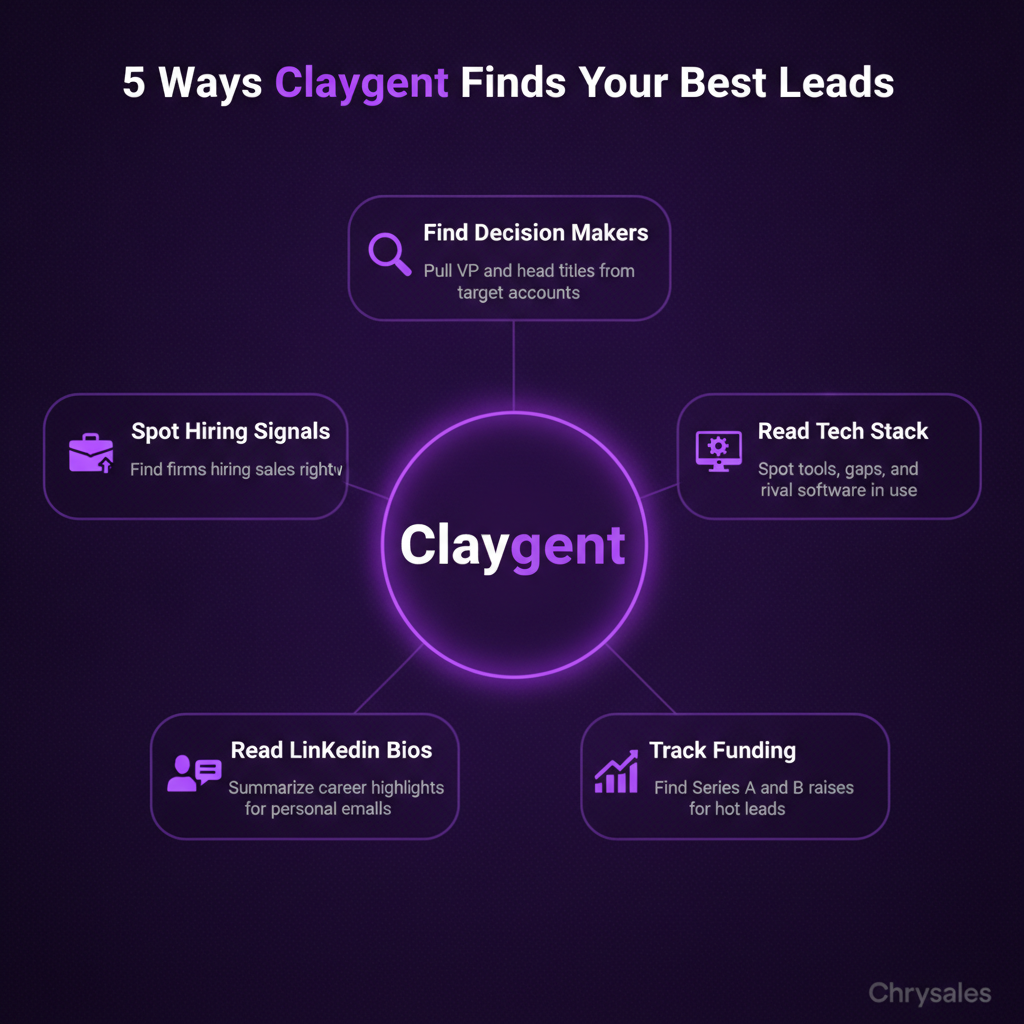
Use Case 1: Finding Decision Makers at Target Accounts
You have a list of 200 companies that fit your ICP. But you don't know who handles sales, marketing, or RevOps. Claygent can pull job titles from LinkedIn, identify the VP of Sales or Head of Growth, and return their contact info. A 30 person consulting firm tried this last quarter. They had a list of tech companies but no contacts. After running it through Clay, they booked 12 new calls in three weeks.
Use Case 2: Identifying Tech Stack and Tool Usage
If you sell to SaaS companies, knowing their tech stack is gold. Claygent scrapes company websites and tools like BuiltWith to find what software they use. This tells you if they're already using a competitor, what integrations they need, and where the gaps are. One marketing agency had a 0.5% reply rate on cold emails. After adding tech stack data and personalizing around it, their reply rate jumped to 4%.
Use Case 3: Pulling Recent Funding and Growth Signals
Companies that just raised a Series A or B are often hiring, expanding, and open to new vendors. Claygent searches Crunchbase, PitchBook, and news sites for funding announcements. You get the amount raised, the date, and who led the round. For more advanced techniques on targeting recently funded companies, read this guide on how to find recently funded companies.
Watch out: A 200 person company that just did layoffs is not a hot lead. It's a bad fit, full stop. Use funding data to qualify, not just to fill your list.
Use Case 4: Summarizing LinkedIn Bios for Personalized Outreach
Generic cold emails get ignored. Personalized ones get replies. Claygent reads LinkedIn bios, pulls career highlights, and summarizes them in one sentence. You use that sentence to open your email with something real. Instead of "Hi, I noticed your company," you write "Saw you led RevOps at [previous company] before joining [current company]. We help teams like yours build scalable sales systems."
Use Case 5: Monitoring Job Postings and Hiring Signals
If a company is hiring for sales roles, they probably need help building their sales process. Claygent scrapes LinkedIn and company career pages for open roles. You filter for companies hiring SDRs, Account Execs, or Sales Managers, then reach out with relevant offers. We worked with a tech company who used this to target SaaS startups hiring their first sales team. They closed three deals in two months.
How Clay Fits Into a Repeatable B2B Sales System
Here's the thing nobody tells you: enrichment isn't the end goal. It's the foundation. Clay B2B lead enrichment feeds the rest of your sales machine.
The Sales System Stack
Think of your sales pipeline like a phone contact list. If half the numbers don't work, no message gets through. Clay makes sure every number is current and correct. A solid B2B sales system has four layers:
- Lead generation: Finding the right companies and contacts (this is where Clay lives)
- Outreach: Cold emails, LinkedIn messages, calls (powered by the data Clay provides)
- Closing: Discovery calls, pitches, objection handling (easier when you know your prospect inside out)
- Scaling: Hiring and training sales teams to repeat the process (built on systems, not guesswork)
Clay doesn't replace your CRM or cold email tool. It makes them work better by feeding them clean, enriched data.
Pro Tip: Set a simple rule in Clay. Anything scoring above 70 on your ICP fit goes to the top of your call list. Anything below 50 gets dropped. For a complete walkthrough of ICP scoring, check out this step-by-step guide to Clay lead enrichment and scoring.
Automating Without Losing the Human Touch
Some teams worry that automation makes outreach feel robotic. The opposite is true. When you know more about your prospect, your outreach gets more personal, not less. Clay tells you the prospect just raised funding, hired a new VP of Sales, or posted a job for an SDR. You use that in your message. It feels timely and relevant because it is.
Clay vs Apollo and Other Lead Enrichment Tools: What Actually Matters
You'll hear a lot of debate about Clay versus Apollo, Demandbase, or even building your own setup with n8n. Here's the short version.
Apollo Is Simple, Clay Is Flexible
Apollo is a solid all in one tool. You get a database, enrichment, and email sending in one place. It's easy to set up. But enrichment quality drops when Apollo's database doesn't have the info you need. Clay wins on flexibility and enrichment depth. It pulls from multiple data providers, runs AI agents like Claygent, and lets you build custom workflows. If you're a technical GTM team or a sales focused B2B company, Clay gives you more control.
When to Use Clay Over Simpler Tools
If your sales process depends on hyper personalized outreach and accurate ICP targeting, Clay is worth it. If you're sending high volume generic emails and just need contact info, Apollo or ZoomInfo might be enough. Most teams building custom sales systems choose Clay because it fits into their unique process. It's not a one size fits all tool. It's a data layer you build on top of.
Common mistake: Teams assume they need to pick one tool. Use Apollo for simple prospecting. Use Clay when you need deep enrichment and AI powered research. They work together.
Setting Up Claygent for Your First Lead Enrichment Workflow
Let's make this concrete. Here's how to set up a basic Claygent workflow in under 30 minutes. You can also watch 4 Ways To Find Clients Who Need Your Services Right Now to see ICP-driven prospecting in action.
Step 1: Define Your ICP and Data Needs
Before you touch Clay, write down what makes a good lead. Company size? Industry? Tech stack? Recent funding? Job titles? Be specific. "SaaS companies" is too broad. "B2B SaaS companies with 20 to 100 employees, using HubSpot, and hiring for sales roles" is a real ICP. This guide on ICP marketing strategy provides a comprehensive framework for defining your ideal customer profile.
Step 2: Upload Your Starting List
Export a list of companies from LinkedIn Sales Navigator, your CRM, or a spreadsheet. Upload it to Clay. You'll start with company names or domains.
Step 3: Add Enrichment Steps with Claygent
Click "Add Enrichment" and choose Claygent. Write a prompt like "Find the company's employee count, recent funding round, and CEO LinkedIn profile." Claygent runs the search and fills in the data. Review the results. If something looks off, tweak the prompt and re run it.
Step 4: Score and Filter
Add a scoring column. Give points for company size, funding, tech stack match, and hiring signals. Anything above your threshold moves to the next stage. Everything else gets archived.
Step 5: Export and Plug Into Your Outbound System
Export the enriched, scored list to your cold email tool or CRM. Write personalized messages using the data Clay found. Hit send.
Pro Tip: Start small. Run 50 leads through the workflow first. Once it works, scale to 500 or 5,000.
Real Results: How B2B Teams Use Clay to Shorten Sales Cycles
The proof is in the outcomes. Teams using Clay B2B lead enrichment report faster qualification, higher reply rates, and shorter sales cycles.
Faster Qualification Means Fewer Wasted Calls
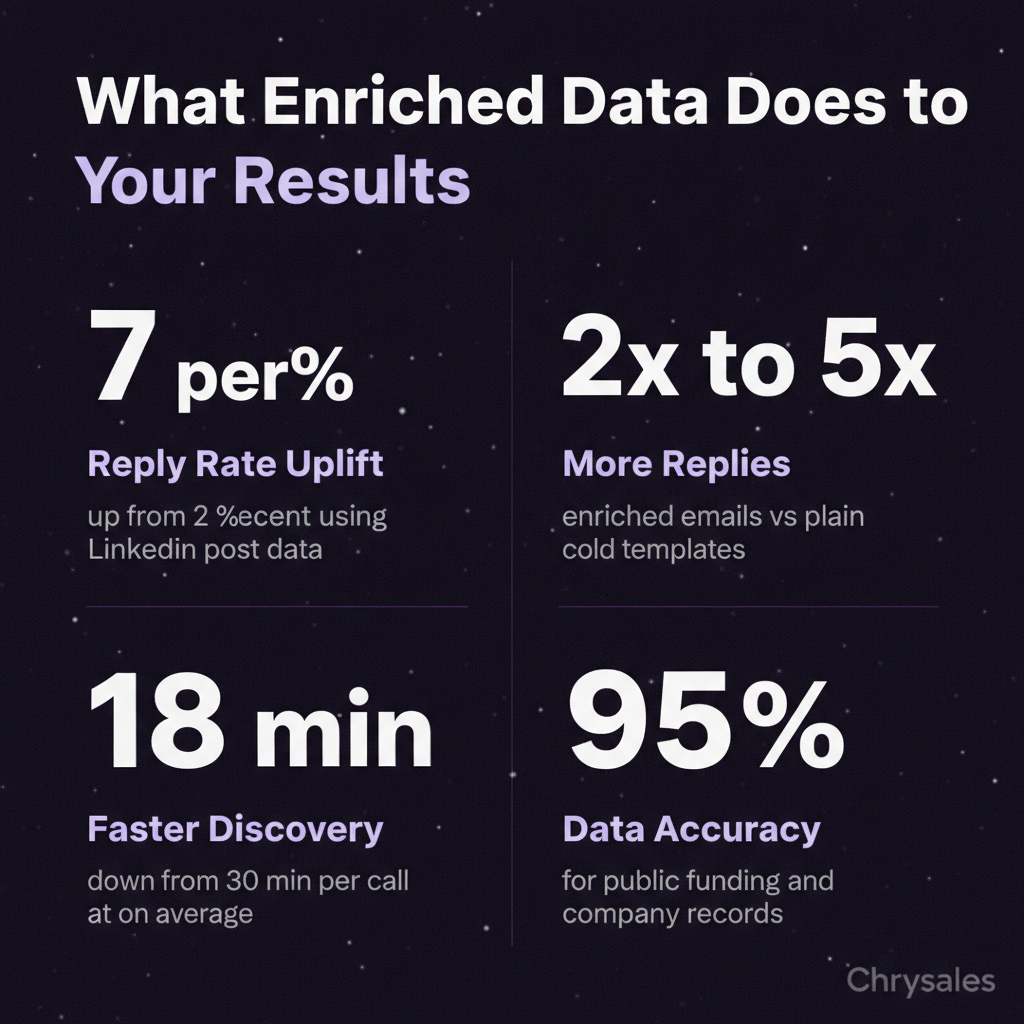
When you know a lead's tech stack, team size, and recent news before the first call, you skip the discovery dance. You qualify in 5 minutes instead of 20. One sales team cut their average discovery call time from 30 minutes to 18 minutes. That freed up 10 extra hours a week for closing calls.
Higher Reply Rates From Personalized Outreach
Generic cold emails get 1 to 2% reply rates. Personalized emails using enriched data get 5 to 10%. The difference is knowing what matters to the prospect. A 15 person consulting firm used Claygent to find recent LinkedIn posts from their prospects. They referenced the posts in their cold emails. Reply rate jumped from 2% to 7%. Learn more about expected benchmarks in our guide to cold email response rates and benchmarks.
Predictable Client Acquisition at Scale
When your lead generation process is built on enriched data, it's repeatable. You're not guessing. You're following a system. Chrysales helps B2B companies build these systems from scratch. We've trained over 500 sales teams to use tools like Clay as part of a larger sales framework. The result: predictable client acquisition that doesn't depend on hope or hustle.
Watch out: Tools don't build systems. You do. Clay gives you the data. You still need to write the outreach, run the calls, and close the deals.
How to Combine Clay with AI Powered Sales Workflows
Clay is part of a bigger shift: AI powered prospecting and sales automation. If you're not using AI to research leads, score opportunities, and personalize outreach, you're behind. Research shows that AI-powered features in sales automation platforms improve rep productivity by up to 40%.
Connecting Clay to Your CRM and Email Tools
Clay integrates with HubSpot, Salesforce, Apollo, Instantly, and most cold email platforms. Enriched data flows directly into your CRM. No manual imports. No copy paste. Set up a webhook or Zapier connection. Every time Clay enriches a new lead, it pushes the data to your CRM and tags it for outreach.
Using AI to Score Leads in Real Time
Claygent can also score leads based on custom criteria. You tell it what makes a good fit. It assigns a score. High scoring leads go to your sales team. Low scoring leads get archived. We've worked with clients who run this scoring workflow every week. It keeps their pipeline fresh and focused.
Building a Sales System That Runs on Enriched Data
Clay is the data layer. Your sales process sits on top. Discovery questions, pitch structure, objection scripts, follow up sequences, all built around what you know from enrichment. At Chrysales, we build custom sales systems that combine tools like Clay with 1 on 1 coaching and sales training. The goal is a repeatable, predictable process that any sales team can follow. We've helped generate over €10M in client revenue using this approach. You can also watch how an AI sales system gets you record revenue to see the full framework in action.
Frequently Asked Questions
Q: Is Claygent worth it for small sales teams or just enterprise companies?
Claygent works for any team doing outbound sales, whether you're a solo consultant or a 50 person agency. Small teams benefit the most because it replaces hours of manual research. You don't need a big budget. You need a clear ICP and a plan for what to do with the enriched data. If you're sending 50+ cold emails a week, it pays for itself in time saved.
Q: How accurate is the data Claygent pulls compared to manual research?
Claygent is as good as the sources it pulls from. For public data like funding rounds, employee count, and tech stacks, it's 85 to 95% accurate. For less public info like personal LinkedIn bios, it depends on profile completeness. Always spot check the first 10 to 20 results before scaling. Manual research is still more accurate for niche details, but Claygent is close enough for most outbound campaigns.
Q: Can I use Clay without knowing how to code or build automations?
Yes. Clay is built for non technical users. You don't need to write code. The interface is point and click. Claygent prompts are just plain English instructions. If you can write a Google search, you can use Claygent. Advanced users can build custom workflows with APIs and webhooks, but most sales teams stick to the simple setup. Explore more Clay platform use cases and examples to see what's possible without coding.
Q: How does Clay B2B lead enrichment improve cold email reply rates?
Clay gives you the context to personalize every message. Instead of "Hi, I saw your company," you reference a recent funding round, a new hire, or a LinkedIn post. That makes your email feel timely and relevant. Teams using enriched data report 2x to 5x higher reply rates compared to generic templates. The better your data, the better your message.
Q: What's the difference between using Clay for lead generation and hiring a lead gen agency?
Clay is a tool. You still do the work. A lead gen agency does the work for you but often lacks the custom process that fits your business. Clay gives you control and flexibility. You build the exact workflow you need. At Chrysales, we help B2B companies use Clay as part of a full sales system, combining enrichment with sales training, offer creation, and closing strategies. You get the tool and the know how to make it work.
Clay B2B SaaS lead enrichment use cases show how teams use Claygent to research prospects, fill missing data, and support lead generation, b2b sales, and client acquisition. Most sales teams treat prospect research like homework. Manual. Tedious. The thing you do before the real work starts. But here's the reality: if your list is bad, nothing else matters. No cold email template or closing script will save you. Clay's AI agent, Claygent, flips this on its head by making lead enrichment fast, accurate, and repeatable. Instead of spending hours digging through LinkedIn profiles and company websites, you get clean, enriched data that feeds directly into your outbound campaigns. This isn't just a time saver. It's the difference between guessing who to call and knowing exactly who's ready to buy.
What Clay B2B Lead Enrichment Actually Does (and Why It Matters for Sales Teams)
Clay is a data enrichment platform built for B2B sales and GTM teams. Think of it as a smart spreadsheet that pulls information from dozens of sources automatically. Instead of manually researching companies, copying data into a CRM, and hoping it's current, Clay does the heavy lifting. Claygent is Clay's native AI agent. It browses the web, scrapes company data, reads LinkedIn bios, finds funding announcements, and summarizes everything in a table. All without you leaving the platform.
Why Sales Teams Care About This
Picture this: you have a list of 500 potential leads. Half the contact info is outdated. A quarter of the companies don't fit your ideal customer profile. You spend two weeks cleaning the list before you even send the first email. That's the old way. With Clay B2B lead enrichment, you upload the list, set Claygent loose, and it returns company size, recent funding rounds, tech stack details, job titles, and even recent news mentions. In minutes, not weeks.
Pro Tip: The better your data going into outreach, the higher your reply rate. A clean, enriched list can double your response rate overnight.
The Real Use Case: Feeding Your Sales System
Most teams treat enrichment like a one off task. But if you're building a repeatable automated sales system with Clay, enrichment is step one. It tells you who to call, what to say, and when to say it. Without it, you're shooting blind.
How Claygent Automates Prospect Research (Without the Manual Grind)
Manual research means opening 10 tabs per lead. LinkedIn profile. Company website. Crunchbase. Recent news. Twitter. Then copying everything into a spreadsheet. For one lead, that's 5 to 10 minutes. For 100 leads, it's a full day. Claygent does this in seconds. You give it a company name or domain, and it returns the data you need. Here's how it works in practice.
Step 1: Upload Your Lead List
Start with a CSV of company names, domains, or LinkedIn URLs. Upload it to Clay. The platform recognizes the columns and starts building a table.
Step 2: Tell Claygent What to Find
You write a prompt. Simple instructions like "Find the company's employee count and recent funding" or "Pull the CEO's LinkedIn bio and summarize their background." Claygent goes to work.
Step 3: Review and Export
Within minutes, Claygent fills in the missing data. You review it, filter out bad fits, and export the enriched list to your CRM or cold email tool.
Common mistake: Teams ask Claygent to find too much at once. Start with 3 to 5 data points per lead. You can always add more later.
Top Clay B2B SaaS Lead Enrichment Use Cases for Outbound Sales
Let's get specific. Here's what B2B sales teams actually use Claygent for when building client acquisition systems.
Use Case 1: Finding Decision Makers at Target Accounts
You have a list of 200 companies that fit your ICP. But you don't know who handles sales, marketing, or RevOps. Claygent can pull job titles from LinkedIn, identify the VP of Sales or Head of Growth, and return their contact info. A 30 person consulting firm tried this last quarter. They had a list of tech companies but no contacts. After running it through Clay, they booked 12 new calls in three weeks.
Use Case 2: Identifying Tech Stack and Tool Usage
If you sell to SaaS companies, knowing their tech stack is gold. Claygent scrapes company websites and tools like BuiltWith to find what software they use. This tells you if they're already using a competitor, what integrations they need, and where the gaps are. One marketing agency had a 0.5% reply rate on cold emails. After adding tech stack data and personalizing around it, their reply rate jumped to 4%.
Use Case 3: Pulling Recent Funding and Growth Signals
Companies that just raised a Series A or B are often hiring, expanding, and open to new vendors. Claygent searches Crunchbase, PitchBook, and news sites for funding announcements. You get the amount raised, the date, and who led the round. For more advanced techniques on targeting recently funded companies, read this guide on how to find recently funded companies.
Watch out: A 200 person company that just did layoffs is not a hot lead. It's a bad fit, full stop. Use funding data to qualify, not just to fill your list.
Use Case 4: Summarizing LinkedIn Bios for Personalized Outreach
Generic cold emails get ignored. Personalized ones get replies. Claygent reads LinkedIn bios, pulls career highlights, and summarizes them in one sentence. You use that sentence to open your email with something real. Instead of "Hi, I noticed your company," you write "Saw you led RevOps at [previous company] before joining [current company]. We help teams like yours build scalable sales systems."
Use Case 5: Monitoring Job Postings and Hiring Signals
If a company is hiring for sales roles, they probably need help building their sales process. Claygent scrapes LinkedIn and company career pages for open roles. You filter for companies hiring SDRs, Account Execs, or Sales Managers, then reach out with relevant offers. We worked with a tech company who used this to target SaaS startups hiring their first sales team. They closed three deals in two months.
How Clay Fits Into a Repeatable B2B Sales System
Here's the thing nobody tells you: enrichment isn't the end goal. It's the foundation. Clay B2B lead enrichment feeds the rest of your sales machine.
The Sales System Stack
Think of your sales pipeline like a phone contact list. If half the numbers don't work, no message gets through. Clay makes sure every number is current and correct. A solid B2B sales system has four layers:
- Lead generation: Finding the right companies and contacts (this is where Clay lives)
- Outreach: Cold emails, LinkedIn messages, calls (powered by the data Clay provides)
- Closing: Discovery calls, pitches, objection handling (easier when you know your prospect inside out)
- Scaling: Hiring and training sales teams to repeat the process (built on systems, not guesswork)
Clay doesn't replace your CRM or cold email tool. It makes them work better by feeding them clean, enriched data.
Pro Tip: Set a simple rule in Clay. Anything scoring above 70 on your ICP fit goes to the top of your call list. Anything below 50 gets dropped. For a complete walkthrough of ICP scoring, check out this step-by-step guide to Clay lead enrichment and scoring.
Automating Without Losing the Human Touch
Some teams worry that automation makes outreach feel robotic. The opposite is true. When you know more about your prospect, your outreach gets more personal, not less. Clay tells you the prospect just raised funding, hired a new VP of Sales, or posted a job for an SDR. You use that in your message. It feels timely and relevant because it is.
Clay vs Apollo and Other Lead Enrichment Tools: What Actually Matters
You'll hear a lot of debate about Clay versus Apollo, Demandbase, or even building your own setup with n8n. Here's the short version.
Apollo Is Simple, Clay Is Flexible
Apollo is a solid all in one tool. You get a database, enrichment, and email sending in one place. It's easy to set up. But enrichment quality drops when Apollo's database doesn't have the info you need. Clay wins on flexibility and enrichment depth. It pulls from multiple data providers, runs AI agents like Claygent, and lets you build custom workflows. If you're a technical GTM team or a sales focused B2B company, Clay gives you more control.
When to Use Clay Over Simpler Tools
If your sales process depends on hyper personalized outreach and accurate ICP targeting, Clay is worth it. If you're sending high volume generic emails and just need contact info, Apollo or ZoomInfo might be enough. Most teams building custom sales systems choose Clay because it fits into their unique process. It's not a one size fits all tool. It's a data layer you build on top of.
Common mistake: Teams assume they need to pick one tool. Use Apollo for simple prospecting. Use Clay when you need deep enrichment and AI powered research. They work together.
Setting Up Claygent for Your First Lead Enrichment Workflow
Let's make this concrete. Here's how to set up a basic Claygent workflow in under 30 minutes. You can also watch 4 Ways To Find Clients Who Need Your Services Right Now to see ICP-driven prospecting in action.
Step 1: Define Your ICP and Data Needs
Before you touch Clay, write down what makes a good lead. Company size? Industry? Tech stack? Recent funding? Job titles? Be specific. "SaaS companies" is too broad. "B2B SaaS companies with 20 to 100 employees, using HubSpot, and hiring for sales roles" is a real ICP. This guide on ICP marketing strategy provides a comprehensive framework for defining your ideal customer profile.
Step 2: Upload Your Starting List
Export a list of companies from LinkedIn Sales Navigator, your CRM, or a spreadsheet. Upload it to Clay. You'll start with company names or domains.
Step 3: Add Enrichment Steps with Claygent
Click "Add Enrichment" and choose Claygent. Write a prompt like "Find the company's employee count, recent funding round, and CEO LinkedIn profile." Claygent runs the search and fills in the data. Review the results. If something looks off, tweak the prompt and re run it.
Step 4: Score and Filter
Add a scoring column. Give points for company size, funding, tech stack match, and hiring signals. Anything above your threshold moves to the next stage. Everything else gets archived.
Step 5: Export and Plug Into Your Outbound System
Export the enriched, scored list to your cold email tool or CRM. Write personalized messages using the data Clay found. Hit send.
Pro Tip: Start small. Run 50 leads through the workflow first. Once it works, scale to 500 or 5,000.
Real Results: How B2B Teams Use Clay to Shorten Sales Cycles
The proof is in the outcomes. Teams using Clay B2B lead enrichment report faster qualification, higher reply rates, and shorter sales cycles.
Faster Qualification Means Fewer Wasted Calls
When you know a lead's tech stack, team size, and recent news before the first call, you skip the discovery dance. You qualify in 5 minutes instead of 20. One sales team cut their average discovery call time from 30 minutes to 18 minutes. That freed up 10 extra hours a week for closing calls.
Higher Reply Rates From Personalized Outreach
Generic cold emails get 1 to 2% reply rates. Personalized emails using enriched data get 5 to 10%. The difference is knowing what matters to the prospect. A 15 person consulting firm used Claygent to find recent LinkedIn posts from their prospects. They referenced the posts in their cold emails. Reply rate jumped from 2% to 7%. Learn more about expected benchmarks in our guide to cold email response rates and benchmarks.
Predictable Client Acquisition at Scale
When your lead generation process is built on enriched data, it's repeatable. You're not guessing. You're following a system. Chrysales helps B2B companies build these systems from scratch. We've trained over 500 sales teams to use tools like Clay as part of a larger sales framework. The result: predictable client acquisition that doesn't depend on hope or hustle.
Watch out: Tools don't build systems. You do. Clay gives you the data. You still need to write the outreach, run the calls, and close the deals.
How to Combine Clay with AI Powered Sales Workflows
Clay is part of a bigger shift: AI powered prospecting and sales automation. If you're not using AI to research leads, score opportunities, and personalize outreach, you're behind. Research shows that AI-powered features in sales automation platforms improve rep productivity by up to 40%.
Connecting Clay to Your CRM and Email Tools
Clay integrates with HubSpot, Salesforce, Apollo, Instantly, and most cold email platforms. Enriched data flows directly into your CRM. No manual imports. No copy paste. Set up a webhook or Zapier connection. Every time Clay enriches a new lead, it pushes the data to your CRM and tags it for outreach.
Using AI to Score Leads in Real Time
Claygent can also score leads based on custom criteria. You tell it what makes a good fit. It assigns a score. High scoring leads go to your sales team. Low scoring leads get archived. We've worked with clients who run this scoring workflow every week. It keeps their pipeline fresh and focused.
Building a Sales System That Runs on Enriched Data
Clay is the data layer. Your sales process sits on top. Discovery questions, pitch structure, objection scripts, follow up sequences, all built around what you know from enrichment. At Chrysales, we build custom sales systems that combine tools like Clay with 1 on 1 coaching and sales training. The goal is a repeatable, predictable process that any sales team can follow. We've helped generate over €10M in client revenue using this approach. You can also watch how an AI sales system gets you record revenue to see the full framework in action.
Frequently Asked Questions
Q: Is Claygent worth it for small sales teams or just enterprise companies?
Claygent works for any team doing outbound sales, whether you're a solo consultant or a 50 person agency. Small teams benefit the most because it replaces hours of manual research. You don't need a big budget. You need a clear ICP and a plan for what to do with the enriched data. If you're sending 50+ cold emails a week, it pays for itself in time saved.
Q: How accurate is the data Claygent pulls compared to manual research?
Claygent is as good as the sources it pulls from. For public data like funding rounds, employee count, and tech stacks, it's 85 to 95% accurate. For less public info like personal LinkedIn bios, it depends on profile completeness. Always spot check the first 10 to 20 results before scaling. Manual research is still more accurate for niche details, but Claygent is close enough for most outbound campaigns.
Q: Can I use Clay without knowing how to code or build automations?
Yes. Clay is built for non technical users. You don't need to write code. The interface is point and click. Claygent prompts are just plain English instructions. If you can write a Google search, you can use Claygent. Advanced users can build custom workflows with APIs and webhooks, but most sales teams stick to the simple setup. Explore more Clay platform use cases and examples to see what's possible without coding.
Q: How does Clay B2B lead enrichment improve cold email reply rates?
Clay gives you the context to personalize every message. Instead of "Hi, I saw your company," you reference a recent funding round, a new hire, or a LinkedIn post. That makes your email feel timely and relevant. Teams using enriched data report 2x to 5x higher reply rates compared to generic templates. The better your data, the better your message.
Q: What's the difference between using Clay for lead generation and hiring a lead gen agency?
Clay is a tool. You still do the work. A lead gen agency does the work for you but often lacks the custom process that fits your business. Clay gives you control and flexibility. You build the exact workflow you need. At Chrysales, we help B2B companies use Clay as part of a full sales system, combining enrichment with sales training, offer creation, and closing strategies. You get the tool and the know how to make it work.
Scaling Is Not Hard If You Have The Right Systems
If you’re serious about leveling up your scaling game, you need the right system, the right training, and the right team behind you. We're here to give you the exact tools and strategies top entrepreneurs use to dominate.

Discover the latest tips
View All.avif)
Chrysales was formed from the words "chrysalis" the stage where a caterpillar transforms into a butterfly and "sales".
It stands for one thing: sales transformation.Because scaling doesn’t happen by doing more of the same. Scaling only happens when you go through real transformation in your systems, your offer, team and the way you sell.
.avif)


