.avif)
Why Most B2B Video Content Gets Zero Leads
Video content for B2B is short content made to get attention, answer a buyer problem, and support lead generation, b2b sales, and client acquisition. Picture this: you spend three days filming, editing, and posting a video about your service. You hit publish. Ten views. Two likes. Zero leads. Most video content for B2B dies this way. Not because the production quality is bad. Not because video doesn't work. It dies because the video was built for the wrong reason, sent to the wrong people, or said nothing worth remembering. The good news? Once you know what kills B2B video content, fixing it is straightforward.
The Real Problem: Most B2B Videos Solve the Wrong Problem
Here's the thing nobody tells you about video content for B2B. The format isn't the issue. The message is. Most companies make videos because they heard video performs well. So they film something generic about "what we do" or "our values." Then they wonder why nobody watches past the first five seconds. The truth is simpler. B2B buyers watch videos that solve a problem they're actively thinking about. If your video talks about you instead of their problem, they click away. Fast.
What Actually Makes Someone Watch
Think of your sales pipeline like a contact list. If you text the wrong message to the right person, they ignore it. If you text the right message to the wrong person, same result. Video works the exact same way. A video gets watched when:
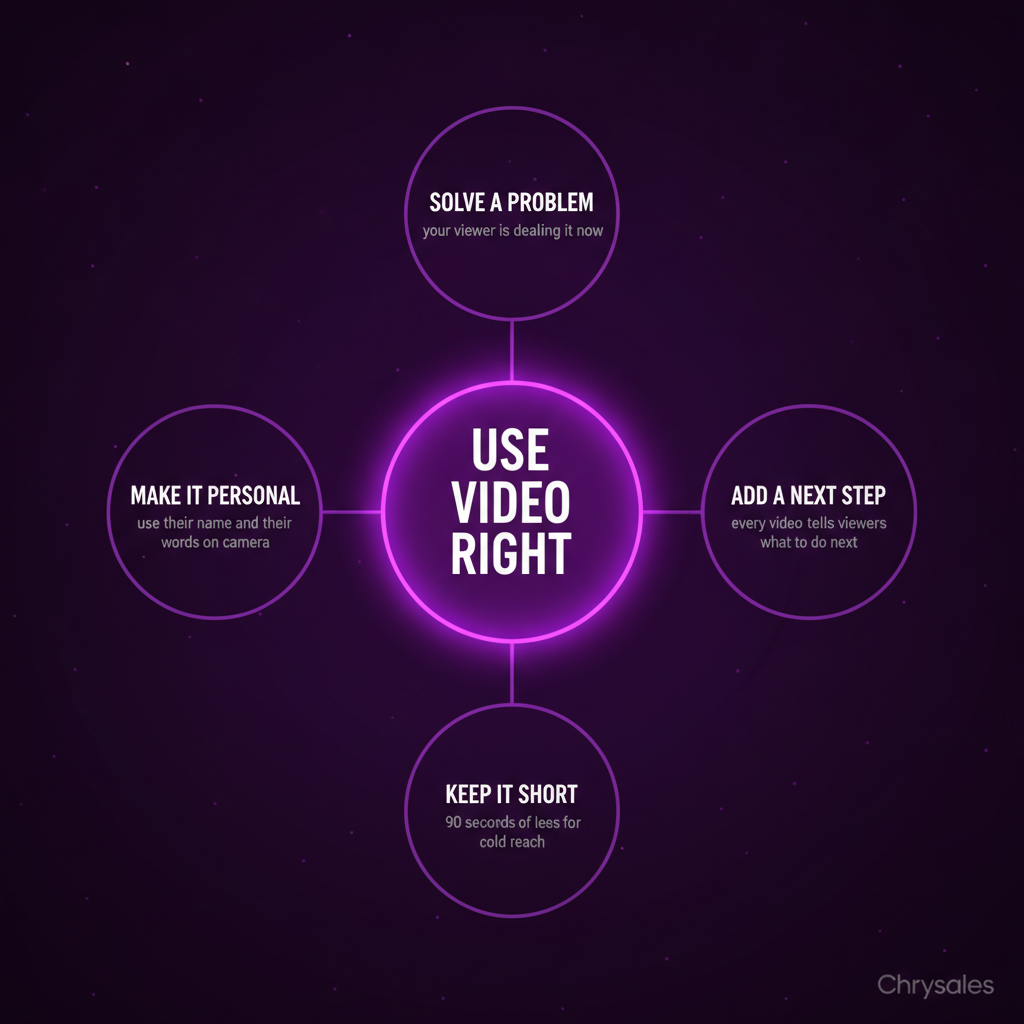
- The topic matches a problem your viewer is dealing with right now
- The first five seconds tell them exactly what they'll learn
- The video is short enough that watching feels easy
A 90 second video explaining how to fix a broken outreach process beats a 10 minute brand story video every single time. Not because short is always better. Because specific problems beat vague stories.
Common mistake: Making a video about your company history or mission when your audience wants to know how you solve their problem.
Why B2B Sales Teams Struggle with Video (Even When They Try)
Most B2B teams think video means making polished marketing content. Film a talking head. Add captions. Post on LinkedIn. Hope something happens. That approach misses the biggest opportunity in B2B video: using it inside your actual sales process.
Video as a Sales Tool, Not Just a Marketing Asset
Here's what most content about B2B video marketing misses. Video doesn't just generate leads at the top of the funnel. It closes deals in the middle and bottom. A 60 second video sent after a discovery call, summarizing what you heard and what you'll build for them? That moves deals forward. A quick Loom walking through a proposal? Way better than a 12 page PDF most people skim.
We see this all the time with new clients. They're spending hours editing social videos that get 40 views. Meanwhile, their sales reps are sending walls of text in follow up emails that get ignored. Swap one follow up email per week for a two minute personalized video. You'll close more deals than any viral LinkedIn post ever will.
The Async Video Advantage
Most sales calls end with "I'll send you some info." Then you email a PDF. The person skims it. Or doesn't open it at all. Now imagine this instead. You send a three minute video walking through exactly what you discussed on the call, what the next steps are, and what they can expect. You're looking at the camera. You're referencing specific things they said.
That video does two things a PDF can't:
- It reminds them you're a real person, not a logo
- It answers questions they didn't ask on the call but were thinking about
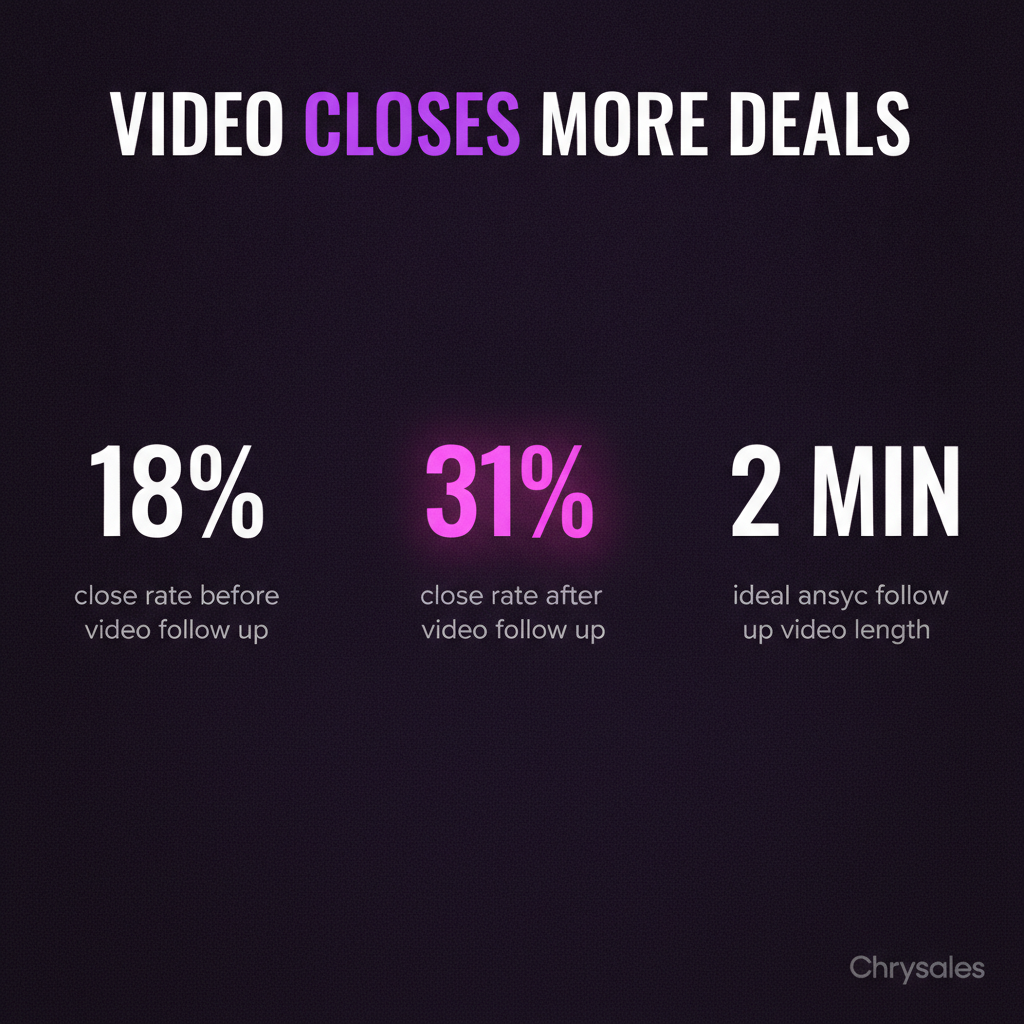
A 15 person consulting firm we worked with started doing this last year. Their close rate jumped from 18% to 31% in two months, consistent with research showing personalized follow-up dramatically improves conversion rates. Same offers. Same pricing. They just replaced follow up emails with short async videos.
Pro Tip: Record one personalized video per warm lead after every discovery call. Keep it under three minutes. Walk through what you heard, what you recommend, and why it fits.
The Short Form Video Trap (And How to Avoid It)
Everyone says you need short form video for B2B. LinkedIn pushes it. Instagram pushes it. TikTok exists. So you make a 30 second video with text overlays and trending audio. Post it. Get 200 views, three comments, zero leads. Here's why: short form video works, but only if it does one specific job. It needs to stop someone mid scroll and make them want to know more. That's it. If your short video tries to explain your whole service, it fails. If it tries to be funny but isn't, it fails.
What Actually Works in Short Form B2B Video
Short form video is the top of the funnel. It's not where you close deals. It's where you get attention. The best short form B2B videos do one of three things:
- Teach one micro lesson in 60 seconds (how to write a cold email subject line, how to score a lead, how to structure a discovery call)
- Share one counterintuitive take (why most sales training fails, why you should email less not more)
- Show a real result in 15 seconds (this email got a 22% reply rate, here's the whole thing)
A 30 person marketing agency tried this approach. They posted three short videos per week. Each video taught one tiny lesson about lead generation. In six weeks, they booked 11 qualified calls from LinkedIn alone. None of the videos had great production. They just answered real questions. For a deeper dive on turning these clips into actual pipeline, check out our guide on short-form video strategy for B2B leads.
Watch out: If your short form video needs someone to read three paragraphs of caption text to understand it, the video isn't doing its job.
The Lead Generation Side of Video (Where Most Content Gets It Wrong)
Most blogs about B2B video strategy talk about awareness and engagement. That's fine. But if video isn't helping you book calls or generate leads, it's just a hobby. Here's the part that actually matters for client acquisition: your video needs a next step.
Video Without a Clear CTA Is Just Entertainment
Think about the last five B2B videos you watched on LinkedIn. How many of them ended with a clear "here's what to do next"? Probably one. Maybe none. Most video content for B2B ends with "follow for more" or nothing at all. That's a waste. Every video you make should have one of three goals:
- Get someone to click a link (to a landing page, a guide, a calendar)
- Get someone to comment or DM you
- Get someone to watch the next video in a sequence
If your video doesn't make the next step obvious, people watch it, nod, and scroll away. No lead. No call. No deal. A tech company we worked with was posting weekly videos about sales automation. Good content. Zero calls booked. We added one line at the end of every video: "If you want the full breakdown, link is in the comments." Calls went from zero to four per month. Same videos. Just told people what to do next. To design a complete path from video view to booked call, explore our framework for building a content sales funnel for B2B leads.
Video in Cold Outreach and Lead Gen Sequences
Here's where video content for B2B gets really useful. Most cold emails are text. Walls of it. Your email looks like everyone else's. Now picture this: your cold email is three sentences and a video thumbnail. The video is 45 seconds. You explain who you help, the problem you solve, and one result you got for a similar company. That's it. Your reply rate will double, as detailed in case studies on video in cold email sales outreach. Not because video is magic. Because it's different, and it shows effort.
One quick rule: keep outreach videos under 60 seconds. Any longer and nobody clicks play. The goal isn't to explain everything. It's to get a reply.
Common mistake: Recording a five minute video explanation in your first outreach email. Keep it short. Save the long videos for after they reply.
Video Testimonials and Social Proof (The Highest ROI Format)
If you only make one type of video this year, make it customer testimonials. Here's why: a prospect reading a case study on your site thinks "yeah, but will it work for me?" A prospect watching a three minute video of someone like them explaining exactly what you did and how it helped? That answers 80% of their objections before they even talk to you.
How to Use Testimonial Videos in Your Sales Process
Most companies put testimonial videos on their homepage and call it done. That's fine. But the real power is in using them during active deals. Let's say you're talking to a consulting firm about building their sales system. They're worried it'll take too long to see results. You send them a two minute video of another consulting firm explaining how they booked 20 calls in the first month. That worry disappears.
We've worked with clients from Amazon to small tech startups. The ones who use testimonial videos in their sales process close faster. Period. Here's the simple way to do it:
- Record 3 5 client testimonial videos (each 2 4 minutes)
- Ask each client to explain the problem they had, what you built, and the result
- Keep the videos conversational, not scripted
- Send the most relevant video to prospects based on their objection or industry
One marketing agency recorded four testimonial videos last quarter. They started sending one video in every proposal email. Close rate went from 24% to 38%, mirroring the impact shown in research on why customer testimonials work in B2B video marketing. Same proposals. Same pricing. They just added proof.
Pro Tip: When you ask a client for a testimonial video, give them three questions to answer. Don't script it word for word. Let them talk naturally.
AI and Automation in B2B Video (The Smart Way to Scale)
You've probably heard about AI video tools. Some of them are good. Most of them make your video look like a robot made it. Here's the truth: AI helps most with the stuff around the video. Not the video itself. To see how AI fits into a broader strategy for staying competitive, you can watch this breakdown on surviving the AI era that kills most businesses.
Where AI Actually Helps with Video Content
AI is great for:
- Writing video scripts faster (give it the topic, let it draft an outline, then rewrite it in your voice)
- Generating captions and subtitles automatically
- Analyzing which videos perform best and why
- Personalizing video thumbnails or intro text at scale
AI is not great for:
- Replacing you on camera (people can tell, and it feels weird)
- Making creative decisions about what to say
- Understanding what your specific audience cares about
A 20 person IT consulting firm we worked with uses AI to draft video scripts. They feed the AI three bullet points about what the video should cover. The AI writes a rough script. Then they rewrite it to sound like them. Cuts their video prep time in half. But they still film the videos themselves. Because their buyers want to see a real person, not an AI avatar.
Video in Your Automated Sales System
If you're building a sales system that runs without you babysitting it, video fits in perfectly. Here's how:
- Automated email sequence sends a welcome video after someone downloads your lead magnet
- Your CRM triggers a personalized video email three days after a discovery call
- A Slack or email alert reminds your team to record a quick follow up video for every high intent lead
You're not replacing human touch. You're using video to add it at scale. One thing we do at Chrysales is build systems where video is baked into the follow up process. Not optional. Required. Every lead over a certain score gets a video. That structure is what makes it predictable. If you want to understand how video touchpoints fit into a repeatable process, watch how to build a sales system so powerful clients come to you, or read our full guide on how to build a sales system that actually scales.
Watch out: Don't automate the actual video content. Automate when it gets sent and to whom. The video itself should still feel personal.
How to Actually Get Engagement on B2B Video Content
Let's be honest. Most B2B videos get 30 views and die. Here's why, and how to fix it.
Distribution Matters More Than Production
You can film the best video in the world. If you post it once and move on, nobody sees it. The companies getting real engagement on video do this:
- Post the video natively on LinkedIn (not a YouTube link, upload the video file directly)
- Write a short, punchy caption that explains what the video covers in one sentence
- Reply to every comment in the first two hours
- Share the video again a week later with a different caption
- Clip the best 20 seconds and post it as a separate short video
A consulting firm we know posted a five minute video about cold email mistakes. Got 180 views. Then they clipped the best 60 seconds, posted it separately three days later. That clip got 1,400 views and booked two calls. Same content. Different format. Way better result.
The Platform Specific Rules
LinkedIn wants you to upload video directly. Instagram wants short vertical video. YouTube wants longer, searchable content. If you're posting the same video the same way on every platform, you're losing reach. Here's the simple version:
- LinkedIn: 1 3 minute videos, uploaded natively, teach something specific
- Instagram/TikTok: 15 60 seconds, vertical, one quick insight
- YouTube: 5 15 minutes, searchable title, goes deep on one topic
You don't need to be on every platform. Pick one or two where your buyers actually spend time. Do those well. For longer-form content that converts viewers into qualified leads, read our guide on using YouTube for B2B lead generation.
Frequently Asked Questions
Q: How long should a B2B video be?
It depends on the goal. For cold outreach or social media, keep it under 90 seconds. For testimonials or case studies, 2 4 minutes works. For deep tutorials or sales presentations, 5 10 minutes is fine. The rule is simple: make it as short as possible while still being useful. If you can explain it in 60 seconds, don't take three minutes.
Q: Do I need expensive equipment to make good B2B video content?
No. Most successful B2B videos are filmed on a phone or webcam. Good lighting and clear audio matter more than a fancy camera. If people can see your face clearly and hear you without straining, that's enough. A $30 ring light and a quiet room beat a $5,000 camera in a noisy office every time.
Q: Should I use video in cold emails or just on social media?
Both. Video in cold outreach works when it's short, personal, and relevant. A 45 second video explaining why you're reaching out and what you can help with gets way more replies than a text only email. On social media, video builds awareness. In outreach, it books calls. Use both for different parts of your sales process.
Q: How often should I post B2B video content?
Consistency beats frequency. Posting one solid video per week is better than posting three mediocre ones. If you can only make one video every two weeks, do that. The key is showing up regularly so your audience knows to expect your content. Most teams that post once a week see better results than teams that post daily for two weeks and then disappear.
Q: Can video really help close deals or is it just for marketing?
Video closes deals. A personalized video walking through a proposal, summarizing a discovery call, or answering objections moves deals forward faster than text emails. Testimonial videos handle objections before prospects even bring them up. The companies treating video as a sales tool, not just a marketing asset, see the biggest ROI. Use it in follow ups, proposals, and late stage nurture sequences.
Video content for B2B is short content made to get attention, answer a buyer problem, and support lead generation, b2b sales, and client acquisition. Picture this: you spend three days filming, editing, and posting a video about your service. You hit publish. Ten views. Two likes. Zero leads. Most video content for B2B dies this way. Not because the production quality is bad. Not because video doesn't work. It dies because the video was built for the wrong reason, sent to the wrong people, or said nothing worth remembering. The good news? Once you know what kills B2B video content, fixing it is straightforward.
The Real Problem: Most B2B Videos Solve the Wrong Problem
Here's the thing nobody tells you about video content for B2B. The format isn't the issue. The message is. Most companies make videos because they heard video performs well. So they film something generic about "what we do" or "our values." Then they wonder why nobody watches past the first five seconds. The truth is simpler. B2B buyers watch videos that solve a problem they're actively thinking about. If your video talks about you instead of their problem, they click away. Fast.
What Actually Makes Someone Watch
Think of your sales pipeline like a contact list. If you text the wrong message to the right person, they ignore it. If you text the right message to the wrong person, same result. Video works the exact same way. A video gets watched when:
- The topic matches a problem your viewer is dealing with right now
- The first five seconds tell them exactly what they'll learn
- The video is short enough that watching feels easy
A 90 second video explaining how to fix a broken outreach process beats a 10 minute brand story video every single time. Not because short is always better. Because specific problems beat vague stories.
Common mistake: Making a video about your company history or mission when your audience wants to know how you solve their problem.
Why B2B Sales Teams Struggle with Video (Even When They Try)
Most B2B teams think video means making polished marketing content. Film a talking head. Add captions. Post on LinkedIn. Hope something happens. That approach misses the biggest opportunity in B2B video: using it inside your actual sales process.
Video as a Sales Tool, Not Just a Marketing Asset
Here's what most content about B2B video marketing misses. Video doesn't just generate leads at the top of the funnel. It closes deals in the middle and bottom. A 60 second video sent after a discovery call, summarizing what you heard and what you'll build for them? That moves deals forward. A quick Loom walking through a proposal? Way better than a 12 page PDF most people skim.
We see this all the time with new clients. They're spending hours editing social videos that get 40 views. Meanwhile, their sales reps are sending walls of text in follow up emails that get ignored. Swap one follow up email per week for a two minute personalized video. You'll close more deals than any viral LinkedIn post ever will.
The Async Video Advantage
Most sales calls end with "I'll send you some info." Then you email a PDF. The person skims it. Or doesn't open it at all. Now imagine this instead. You send a three minute video walking through exactly what you discussed on the call, what the next steps are, and what they can expect. You're looking at the camera. You're referencing specific things they said.
That video does two things a PDF can't:
- It reminds them you're a real person, not a logo
- It answers questions they didn't ask on the call but were thinking about
A 15 person consulting firm we worked with started doing this last year. Their close rate jumped from 18% to 31% in two months, consistent with research showing personalized follow-up dramatically improves conversion rates. Same offers. Same pricing. They just replaced follow up emails with short async videos.
Pro Tip: Record one personalized video per warm lead after every discovery call. Keep it under three minutes. Walk through what you heard, what you recommend, and why it fits.
The Short Form Video Trap (And How to Avoid It)
Everyone says you need short form video for B2B. LinkedIn pushes it. Instagram pushes it. TikTok exists. So you make a 30 second video with text overlays and trending audio. Post it. Get 200 views, three comments, zero leads. Here's why: short form video works, but only if it does one specific job. It needs to stop someone mid scroll and make them want to know more. That's it. If your short video tries to explain your whole service, it fails. If it tries to be funny but isn't, it fails.
What Actually Works in Short Form B2B Video
Short form video is the top of the funnel. It's not where you close deals. It's where you get attention. The best short form B2B videos do one of three things:
- Teach one micro lesson in 60 seconds (how to write a cold email subject line, how to score a lead, how to structure a discovery call)
- Share one counterintuitive take (why most sales training fails, why you should email less not more)
- Show a real result in 15 seconds (this email got a 22% reply rate, here's the whole thing)
A 30 person marketing agency tried this approach. They posted three short videos per week. Each video taught one tiny lesson about lead generation. In six weeks, they booked 11 qualified calls from LinkedIn alone. None of the videos had great production. They just answered real questions. For a deeper dive on turning these clips into actual pipeline, check out our guide on short-form video strategy for B2B leads.
Watch out: If your short form video needs someone to read three paragraphs of caption text to understand it, the video isn't doing its job.
The Lead Generation Side of Video (Where Most Content Gets It Wrong)
Most blogs about B2B video strategy talk about awareness and engagement. That's fine. But if video isn't helping you book calls or generate leads, it's just a hobby. Here's the part that actually matters for client acquisition: your video needs a next step.
Video Without a Clear CTA Is Just Entertainment
Think about the last five B2B videos you watched on LinkedIn. How many of them ended with a clear "here's what to do next"? Probably one. Maybe none. Most video content for B2B ends with "follow for more" or nothing at all. That's a waste. Every video you make should have one of three goals:
- Get someone to click a link (to a landing page, a guide, a calendar)
- Get someone to comment or DM you
- Get someone to watch the next video in a sequence
If your video doesn't make the next step obvious, people watch it, nod, and scroll away. No lead. No call. No deal. A tech company we worked with was posting weekly videos about sales automation. Good content. Zero calls booked. We added one line at the end of every video: "If you want the full breakdown, link is in the comments." Calls went from zero to four per month. Same videos. Just told people what to do next. To design a complete path from video view to booked call, explore our framework for building a content sales funnel for B2B leads.
Video in Cold Outreach and Lead Gen Sequences
Here's where video content for B2B gets really useful. Most cold emails are text. Walls of it. Your email looks like everyone else's. Now picture this: your cold email is three sentences and a video thumbnail. The video is 45 seconds. You explain who you help, the problem you solve, and one result you got for a similar company. That's it. Your reply rate will double, as detailed in case studies on video in cold email sales outreach. Not because video is magic. Because it's different, and it shows effort.
One quick rule: keep outreach videos under 60 seconds. Any longer and nobody clicks play. The goal isn't to explain everything. It's to get a reply.
Common mistake: Recording a five minute video explanation in your first outreach email. Keep it short. Save the long videos for after they reply.
Video Testimonials and Social Proof (The Highest ROI Format)
If you only make one type of video this year, make it customer testimonials. Here's why: a prospect reading a case study on your site thinks "yeah, but will it work for me?" A prospect watching a three minute video of someone like them explaining exactly what you did and how it helped? That answers 80% of their objections before they even talk to you.
How to Use Testimonial Videos in Your Sales Process
Most companies put testimonial videos on their homepage and call it done. That's fine. But the real power is in using them during active deals. Let's say you're talking to a consulting firm about building their sales system. They're worried it'll take too long to see results. You send them a two minute video of another consulting firm explaining how they booked 20 calls in the first month. That worry disappears.
We've worked with clients from Amazon to small tech startups. The ones who use testimonial videos in their sales process close faster. Period. Here's the simple way to do it:
- Record 3 5 client testimonial videos (each 2 4 minutes)
- Ask each client to explain the problem they had, what you built, and the result
- Keep the videos conversational, not scripted
- Send the most relevant video to prospects based on their objection or industry
One marketing agency recorded four testimonial videos last quarter. They started sending one video in every proposal email. Close rate went from 24% to 38%, mirroring the impact shown in research on why customer testimonials work in B2B video marketing. Same proposals. Same pricing. They just added proof.
Pro Tip: When you ask a client for a testimonial video, give them three questions to answer. Don't script it word for word. Let them talk naturally.
AI and Automation in B2B Video (The Smart Way to Scale)
You've probably heard about AI video tools. Some of them are good. Most of them make your video look like a robot made it. Here's the truth: AI helps most with the stuff around the video. Not the video itself. To see how AI fits into a broader strategy for staying competitive, you can watch this breakdown on surviving the AI era that kills most businesses.
Where AI Actually Helps with Video Content
AI is great for:
- Writing video scripts faster (give it the topic, let it draft an outline, then rewrite it in your voice)
- Generating captions and subtitles automatically
- Analyzing which videos perform best and why
- Personalizing video thumbnails or intro text at scale
AI is not great for:
- Replacing you on camera (people can tell, and it feels weird)
- Making creative decisions about what to say
- Understanding what your specific audience cares about
A 20 person IT consulting firm we worked with uses AI to draft video scripts. They feed the AI three bullet points about what the video should cover. The AI writes a rough script. Then they rewrite it to sound like them. Cuts their video prep time in half. But they still film the videos themselves. Because their buyers want to see a real person, not an AI avatar.
Video in Your Automated Sales System
If you're building a sales system that runs without you babysitting it, video fits in perfectly. Here's how:
- Automated email sequence sends a welcome video after someone downloads your lead magnet
- Your CRM triggers a personalized video email three days after a discovery call
- A Slack or email alert reminds your team to record a quick follow up video for every high intent lead
You're not replacing human touch. You're using video to add it at scale. One thing we do at Chrysales is build systems where video is baked into the follow up process. Not optional. Required. Every lead over a certain score gets a video. That structure is what makes it predictable. If you want to understand how video touchpoints fit into a repeatable process, watch how to build a sales system so powerful clients come to you, or read our full guide on how to build a sales system that actually scales.
Watch out: Don't automate the actual video content. Automate when it gets sent and to whom. The video itself should still feel personal.
How to Actually Get Engagement on B2B Video Content
Let's be honest. Most B2B videos get 30 views and die. Here's why, and how to fix it.
Distribution Matters More Than Production
You can film the best video in the world. If you post it once and move on, nobody sees it. The companies getting real engagement on video do this:
- Post the video natively on LinkedIn (not a YouTube link, upload the video file directly)
- Write a short, punchy caption that explains what the video covers in one sentence
- Reply to every comment in the first two hours
- Share the video again a week later with a different caption
- Clip the best 20 seconds and post it as a separate short video
A consulting firm we know posted a five minute video about cold email mistakes. Got 180 views. Then they clipped the best 60 seconds, posted it separately three days later. That clip got 1,400 views and booked two calls. Same content. Different format. Way better result.
The Platform Specific Rules
LinkedIn wants you to upload video directly. Instagram wants short vertical video. YouTube wants longer, searchable content. If you're posting the same video the same way on every platform, you're losing reach. Here's the simple version:
- LinkedIn: 1 3 minute videos, uploaded natively, teach something specific
- Instagram/TikTok: 15 60 seconds, vertical, one quick insight
- YouTube: 5 15 minutes, searchable title, goes deep on one topic
You don't need to be on every platform. Pick one or two where your buyers actually spend time. Do those well. For longer-form content that converts viewers into qualified leads, read our guide on using YouTube for B2B lead generation.
Frequently Asked Questions
Q: How long should a B2B video be?
It depends on the goal. For cold outreach or social media, keep it under 90 seconds. For testimonials or case studies, 2 4 minutes works. For deep tutorials or sales presentations, 5 10 minutes is fine. The rule is simple: make it as short as possible while still being useful. If you can explain it in 60 seconds, don't take three minutes.
Q: Do I need expensive equipment to make good B2B video content?
No. Most successful B2B videos are filmed on a phone or webcam. Good lighting and clear audio matter more than a fancy camera. If people can see your face clearly and hear you without straining, that's enough. A $30 ring light and a quiet room beat a $5,000 camera in a noisy office every time.
Q: Should I use video in cold emails or just on social media?
Both. Video in cold outreach works when it's short, personal, and relevant. A 45 second video explaining why you're reaching out and what you can help with gets way more replies than a text only email. On social media, video builds awareness. In outreach, it books calls. Use both for different parts of your sales process.
Q: How often should I post B2B video content?
Consistency beats frequency. Posting one solid video per week is better than posting three mediocre ones. If you can only make one video every two weeks, do that. The key is showing up regularly so your audience knows to expect your content. Most teams that post once a week see better results than teams that post daily for two weeks and then disappear.
Q: Can video really help close deals or is it just for marketing?
Video closes deals. A personalized video walking through a proposal, summarizing a discovery call, or answering objections moves deals forward faster than text emails. Testimonial videos handle objections before prospects even bring them up. The companies treating video as a sales tool, not just a marketing asset, see the biggest ROI. Use it in follow ups, proposals, and late stage nurture sequences.
Scaling Is Not Hard If You Have The Right Systems
If you’re serious about leveling up your scaling game, you need the right system, the right training, and the right team behind you. We're here to give you the exact tools and strategies top entrepreneurs use to dominate.

Discover the latest tips
View All.avif)
Chrysales was formed from the words "chrysalis" the stage where a caterpillar transforms into a butterfly and "sales".
It stands for one thing: sales transformation.Because scaling doesn’t happen by doing more of the same. Scaling only happens when you go through real transformation in your systems, your offer, team and the way you sell.
.avif)


