.avif)
How to Build an Automated Sales System with Clay
An automated sales system uses Clay to collect leads, enrich data, score prospects, and send them into outreach tools with less manual work. Picture this: you spend three hours every morning manually pulling LinkedIn profiles, copying them into a spreadsheet, finding emails one by one, then writing personalized cold emails by hand. By noon, you've reached 40 people. The next day, you do it again.
Most teams run outbound this way for months before they realize the math doesn't work. I built an automated sales system using Clay that handles all of that in the background while I focus on closing deals. Here's exactly how I set it up, step by step, and what you need to know before you build your own.
Why Most Automated Outbound Systems Fail Before They Even Start
Most people jump straight into building workflows without fixing the foundation. They automate a broken process and wonder why results don't improve. The truth is, automation only speeds up what you're already doing. If your list is bad, your offer is confusing, or your message doesn't land, automating it just means you'll annoy more people faster.
The Three Things That Kill Automated Sales Systems
Bad list quality. You can have the best email copy in the world, but if you're reaching out to people who aren't buyers, it doesn't matter. A 200-person company that just did layoffs is not a hot lead. It's a bad fit, full stop.
Generic messaging at scale. Automation doesn't mean you send the same email to 10,000 people. It means you send the right email to the right person at the right time, automatically. If your system can't tell the difference between a VP at a Series B startup and a junior manager at an enterprise company, you're just spamming.
No follow-up sequences. One email rarely works. Most replies come from email three, four, or five. If your automated sales system sends one message and stops, you're leaving 80% of your potential replies on the table, a pattern confirmed by sales follow-up statistics across thousands of campaigns.
Pro Tip: Before you automate anything, manually reach out to 50 people first. See what works. Then automate that exact process.
What Clay Actually Does in an Automated Sales System
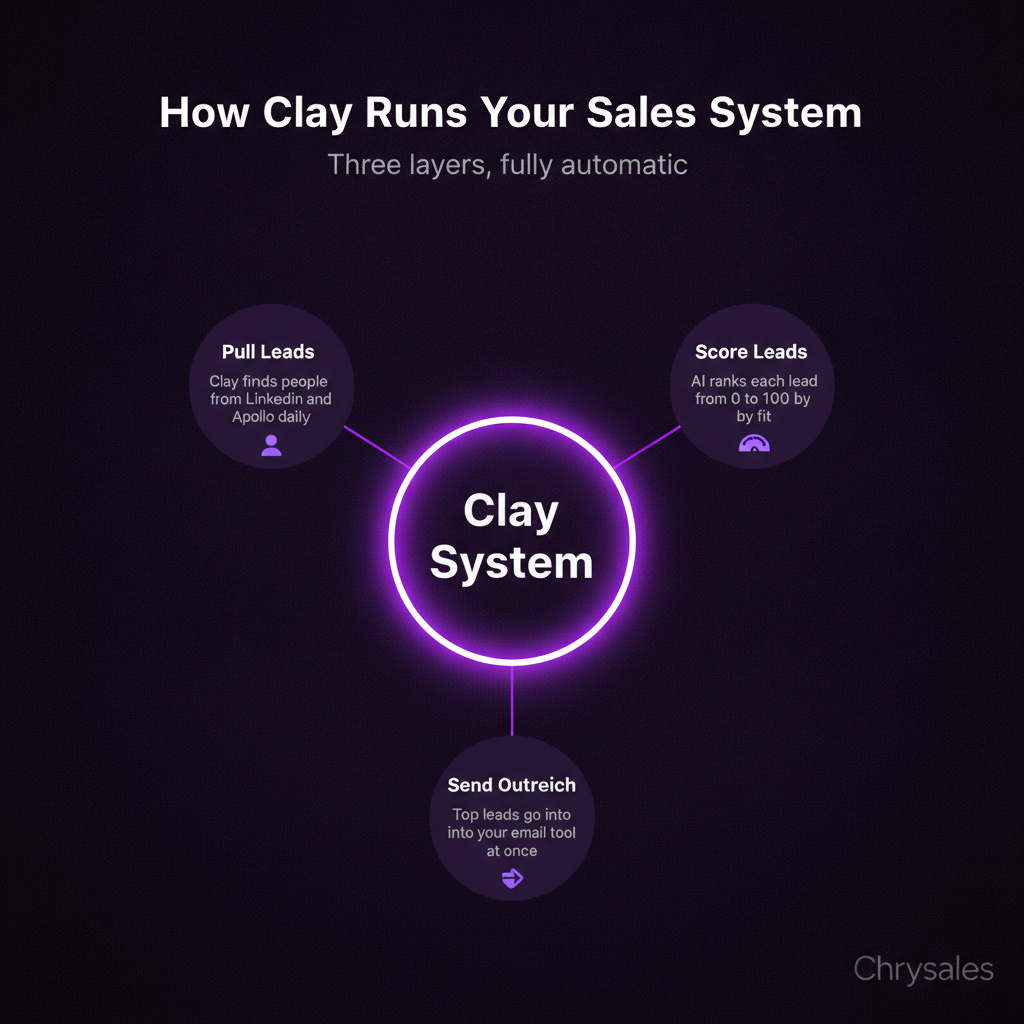
Clay is a data enrichment and workflow tool. Think of it as the brain that connects your data sources, cleans them up, scores leads, and pushes the good ones into your outreach tool. It's not a CRM. It's not an email sender. It's the layer in between that makes sure your CRM gets clean data and your emails go to the right people.
How Clay Fits Into the Bigger Picture
Your automated sales system needs three layers. Clay handles the first two.
Layer 1: Data collection. Clay pulls data from LinkedIn, Apollo, company websites, job boards, and other sources. You tell it what kind of company and person you want, and it builds the list automatically.
Layer 2: Enrichment and scoring. Clay adds missing emails, validates them, checks if someone recently changed jobs, finds their company's tech stack, and scores each lead based on fit. This is where bad leads get filtered out before they ever see an email.
Layer 3: Outreach and follow-up. Clay doesn't send emails. You connect it to tools like Instantly, Smartlead, or your CRM. Clay feeds the clean, scored leads into those tools, which handle the actual sending and follow-up sequences.
Most teams try to do all three layers in one tool. That's like using a hammer to fix a car. Clay does one thing really well: it makes sure the right people get into your outreach system. For more practical inspiration on what else you can automate with Clay beyond the workflow in this post, check out these Clay platform use cases and examples.
The Exact Clay Workflow I Built for Automated Prospecting
Here's the setup I use. This runs every day, automatically, without me touching it. It finds 50 to 100 new qualified leads per week, scores them, and pushes the best ones into my outreach tool.
Step 1: Define Your Ideal Customer Profile in Clay
I start by telling Clay exactly who I want to reach. For my setup, I'm targeting B2B companies with 15 to 200 employees in tech, consulting, or marketing. I want to find people with titles like Head of Sales, VP of Revenue, or Founder.
Clay lets you build this as a filter. You can use data from LinkedIn Sales Navigator, Apollo, or other sources. I pull from LinkedIn and Apollo together because one source alone misses too many people.
Watch out: Don't make your filters too narrow. If you say "must have exactly 50 employees, Series A funded, in SaaS, in Berlin," you'll end up with 12 leads. Start broader, then score and filter later.
Step 2: Pull and Enrich Data Automatically
Once Clay knows who you want, it starts pulling profiles. Every morning, it searches for people who match my filters and adds them to a table. Then it enriches each row with extra data: verified email, company revenue, recent funding, tech stack, and whether they recently posted on LinkedIn.
This is where Clay shines. Instead of manually looking up each person's email, Clay checks five different email finders at once and picks the one with the highest confidence score. If someone's email doesn't verify, Clay skips them. No bounces, no wasted sends.
A 30-person consulting firm tried this last quarter. They were manually building lists and getting 15% bounce rates. After switching to Clay's automated enrichment, their bounce rate dropped to under 2%.
Step 3: Score Leads With AI and Push the Best Ones Forward
Not every lead that matches your filters is a good fit. Some companies are hiring. Some are shrinking. Some just closed a big funding round and are ready to spend. Some are in cost-cutting mode.
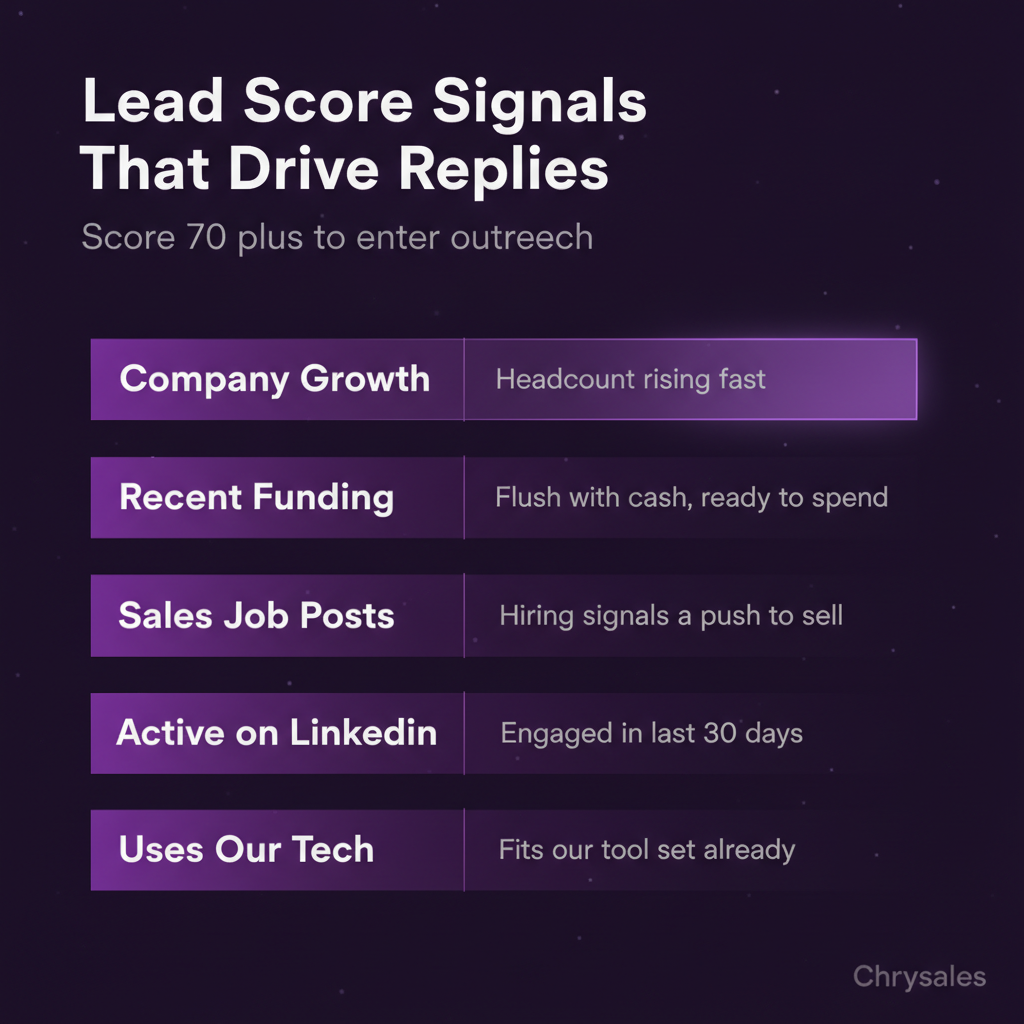
Clay lets you build a scoring system using AI. I use a simple 0 to 100 scale based on signals like:
- Company headcount is growing
- Recent funding or acquisition
- Job posts for sales roles
- Active on LinkedIn in the last 30 days
- Uses tech we integrate with
Set a simple rule: anything scoring above 70 goes to the top of your outreach list. Anything below 50 gets deprioritized or skipped.
Pro Tip: You don't need a perfect score on day one. Start with three or four signals that matter most to your business. Add more as you learn what correlates with closed deals.
Step 4: Connect Clay to Your Outreach Tool
Once Clay scores your leads, it pushes them into your email tool or CRM. I use Instantly for cold email, but you can connect Clay to Smartlead, Lemlist, HubSpot, or anything with an API.
Clay sends the lead's name, email, company, and a few personalization fields like recent LinkedIn activity or company news. Your email tool uses those fields to write personalized intros automatically.
Here's what that looks like in practice. Clay finds a VP of Sales at a 40-person marketing agency. It sees they recently posted about hiring a new Account Executive. Clay scores them 85, tags them as "hiring mode," and pushes them into Instantly.
Instantly pulls that tag and sends an email referencing their recent hire and offering help scaling the sales team. The VP replies because the message feels relevant.
That's the whole point of an automated sales system. It's not about sending 10,000 generic emails. It's about sending 100 highly relevant ones.
Common Mistakes I See When Teams Build Their First Automated Sales System
Most teams mess up one of three things when they start automating outbound. These mistakes are easy to avoid once you know what to watch for.
Automating Too Much Too Fast
You don't need a 40-step workflow on day one. Start with the basics: pull leads, enrich emails, send a three-email sequence. Get that working. Then add scoring. Then add AI personalization. Then add follow-up triggers based on replies.
We worked with a tech company that built a massive Clay workflow with 12 data sources, AI personalization, and Slack notifications before they even tested if their offer was good. They automated a bad message to a bad list. Six weeks in, zero replies. They had to scrap it and start over.
Common mistake: Building workflows for edge cases that rarely happen. Focus on the main path first.
Ignoring Email Deliverability
If your emails land in spam, your automated sales system is useless. Clay gets you clean emails, but deliverability depends on your sending setup.
Warm up your domains. Don't send 500 emails on day one from a brand-new domain. Spread your sends across multiple domains. Keep your daily volume under 50 emails per domain.
One marketing agency had a 0.5% reply rate. After fixing their list and warming up three new domains, it jumped to 4%. Same emails. Same offer. Different setup.
Not Tracking What Actually Converts
Open rates and reply rates are nice, but they don't pay the bills. Track how many leads book calls, how many show up, and how many close.
If your automated sales system books 20 calls a month but only one closes, the problem isn't the automation. It's your offer, your sales process, or your targeting.
Set up tracking from the start. Tag leads in your CRM based on where they came from. After three months, you'll see patterns. Maybe leads from LinkedIn convert better than leads from Apollo. Maybe VPs reply more than Directors. Use that data to tune your filters and scoring in Clay.
How to Scale Your Automated Sales System Without Breaking It
Once your system works, the temptation is to crank the volume to max. Don't. Scaling too fast kills deliverability, burns through your list, and floods your calendar with unqualified calls. To understand the broader principles behind scaling a sales engine beyond just one automated workflow, read our guide on how to build a sales system that actually scales.
Add Volume Slowly
If you're sending 50 emails a day and getting good replies, bump it to 75 for two weeks. Watch your bounce rate, spam rate, and reply quality. If everything holds steady, bump to 100. If your replies drop or your emails start landing in spam, pull back.
Pro Tip: Spread your volume across multiple sending addresses. Three domains sending 50 emails each is safer than one domain sending 150.
Build Separate Workflows for Different Segments
Not every lead should get the same sequence. A VP at a 100-person company has different problems than a founder at a 10-person startup.
Build separate Clay workflows for each segment. Different filters, different scoring, different messaging.
This sounds like more work, but it's not. Once you build one workflow, copying and tweaking it for a new segment takes 20 minutes. The reply rate lift is worth it.
Use AI to Personalize at Scale
Clay integrates with AI tools like OpenAI and Anthropic. You can build prompts that write custom first lines based on recent LinkedIn posts, company news, or job changes.
This is where automated outreach starts feeling less automated and more like 1 on 1 research. For a complete breakdown of how to architect an AI-first sales stack, explore the only AI sales system you need in 2026.
Here's a simple prompt I use: "Write a one sentence personalized intro for this person based on their recent LinkedIn post: [post text]."
Clay runs that for every lead automatically. The emails feel personal because they are. Just automated.
A 15-person consulting firm used AI personalization in Clay and saw their reply rate jump from 2% to 6% in one month, a pattern consistent with B2B cold email reply rates jumping 2-3x when AI personalization replaces templates. Same list size. Same offer. Better intros.
How Chrysales Uses Automated Sales Systems With Clients
We've built automated outbound systems for over 500 sales teams. The ones that work all follow the same pattern: clean data, tight targeting, simple workflows, and constant tuning.
Most teams overcomplicate it. They add 15 data sources, five AI tools, and complex branching logic before they've even tested their offer.
We start simple. Pull leads that match your ideal customer profile. Enrich and score them. Send a short sequence. Track replies and bookings.
Once that works, we add layers: AI personalization, follow-up triggers, CRM syncing, lead scoring based on website visits.
The goal isn't to automate everything. It's to automate the repetitive parts so you can focus on the parts that matter: talking to qualified leads, closing deals, and building relationships. If you want to see a visual, step-by-step breakdown of an AI-powered automated sales system similar to the Clay setup in this article, watch AI sales system get you record revenue (unlimited demand).
Watch out: Automation doesn't replace good sales skills. It just gets you in front of more of the right people. If you can't close a deal on the phone, automating your outreach won't help.
What to Do After Your Automated Sales System Is Running
Once your system is live and sending emails, the work shifts. You're not building anymore. You're tuning. Small changes to your filters, your scoring, or your messaging can double your results.
Review Your Data Every Two Weeks
Look at reply rates, bounce rates, and booking rates by segment. If one segment is crushing it and another is dead, adjust your filters. Maybe one industry responds better. Maybe one job title converts faster.
Test One Thing at a Time
Change your subject line. Wait two weeks. Check results. Then change your first line. Wait two weeks. Check again. If you change five things at once, you won't know what worked.
Keep Your List Fresh
Markets change. People switch jobs. Companies shut down. If your list is six months old, half of it is probably stale.
Set Clay to refresh your data every month. Re verify emails. Check for job changes. Remove dead leads. To see how AI-driven outbound systems compare with more traditional outbound and how to avoid common pitfalls, read about building an AI outbound automation system.
Frequently Asked Questions
Q: How long does it take to set up an automated sales system in Clay?
If you already know your ideal customer profile and have your offer dialed in, you can build a basic Clay workflow in a few hours. The first time takes longer because you're learning the tool. Most people get a working system running within a week. The real time investment is tuning it over the first month as you learn what messaging and targeting actually convert.
Q: Do I need technical skills to build this, or can anyone do it?
You don't need to code, but you do need to be comfortable with tools like spreadsheets, filters, and basic logic. If you've used Zapier or Airtable before, Clay will feel familiar. The interface is drag and drop. The tricky part isn't the tool, it's knowing what data matters and how to score leads properly. That comes from understanding your sales process first. If you're looking to understand how better sales systems and automation help founders break through revenue plateaus, watch why most founders are stuck at $10k/month (fix it today).
Q: What's the difference between Clay and just using LinkedIn Sales Navigator?
Sales Navigator finds people. Clay finds people, verifies their emails, scores them, adds extra data like tech stack and recent activity, and pushes them into your outreach tool automatically. Sales Navigator is manual. You still have to copy data, find emails, and send messages one by one. Clay connects all those steps into one automated workflow that runs in the background.
Q: How much does it cost to run an automated outbound system like this?
Clay starts around $150 per month depending on how many leads you enrich. Add an email tool like Instantly or Smartlead, which runs $30 to $100 per month. If you use Apollo or LinkedIn Sales Navigator for data, that's another $50 to $100. Total monthly cost is usually $200 to $400, which is less than one hour of sales time for most B2B companies. The ROI kicks in fast if your offers and messaging are solid.
Q: Can I use this same setup for warm outreach or just cold leads?
You can use Clay for both. Warm outreach works even better because you're starting with people who already know you or engaged with your content. Set up a workflow that pulls people who liked your LinkedIn posts, visited your website, or downloaded a lead magnet. Enrich their data, score them, and send a short follow up. The system works the same way, just with a warmer list and higher reply rates.
An automated sales system uses Clay to collect leads, enrich data, score prospects, and send them into outreach tools with less manual work. Picture this: you spend three hours every morning manually pulling LinkedIn profiles, copying them into a spreadsheet, finding emails one by one, then writing personalized cold emails by hand. By noon, you've reached 40 people. The next day, you do it again.
Most teams run outbound this way for months before they realize the math doesn't work. I built an automated sales system using Clay that handles all of that in the background while I focus on closing deals. Here's exactly how I set it up, step by step, and what you need to know before you build your own.
Why Most Automated Outbound Systems Fail Before They Even Start
Most people jump straight into building workflows without fixing the foundation. They automate a broken process and wonder why results don't improve. The truth is, automation only speeds up what you're already doing. If your list is bad, your offer is confusing, or your message doesn't land, automating it just means you'll annoy more people faster.
The Three Things That Kill Automated Sales Systems
Bad list quality. You can have the best email copy in the world, but if you're reaching out to people who aren't buyers, it doesn't matter. A 200-person company that just did layoffs is not a hot lead. It's a bad fit, full stop.
Generic messaging at scale. Automation doesn't mean you send the same email to 10,000 people. It means you send the right email to the right person at the right time, automatically. If your system can't tell the difference between a VP at a Series B startup and a junior manager at an enterprise company, you're just spamming.
No follow-up sequences. One email rarely works. Most replies come from email three, four, or five. If your automated sales system sends one message and stops, you're leaving 80% of your potential replies on the table, a pattern confirmed by sales follow-up statistics across thousands of campaigns.
Pro Tip: Before you automate anything, manually reach out to 50 people first. See what works. Then automate that exact process.
What Clay Actually Does in an Automated Sales System
Clay is a data enrichment and workflow tool. Think of it as the brain that connects your data sources, cleans them up, scores leads, and pushes the good ones into your outreach tool. It's not a CRM. It's not an email sender. It's the layer in between that makes sure your CRM gets clean data and your emails go to the right people.
How Clay Fits Into the Bigger Picture
Your automated sales system needs three layers. Clay handles the first two.
Layer 1: Data collection. Clay pulls data from LinkedIn, Apollo, company websites, job boards, and other sources. You tell it what kind of company and person you want, and it builds the list automatically.
Layer 2: Enrichment and scoring. Clay adds missing emails, validates them, checks if someone recently changed jobs, finds their company's tech stack, and scores each lead based on fit. This is where bad leads get filtered out before they ever see an email.
Layer 3: Outreach and follow-up. Clay doesn't send emails. You connect it to tools like Instantly, Smartlead, or your CRM. Clay feeds the clean, scored leads into those tools, which handle the actual sending and follow-up sequences.
Most teams try to do all three layers in one tool. That's like using a hammer to fix a car. Clay does one thing really well: it makes sure the right people get into your outreach system. For more practical inspiration on what else you can automate with Clay beyond the workflow in this post, check out these Clay platform use cases and examples.
The Exact Clay Workflow I Built for Automated Prospecting
Here's the setup I use. This runs every day, automatically, without me touching it. It finds 50 to 100 new qualified leads per week, scores them, and pushes the best ones into my outreach tool.
Step 1: Define Your Ideal Customer Profile in Clay
I start by telling Clay exactly who I want to reach. For my setup, I'm targeting B2B companies with 15 to 200 employees in tech, consulting, or marketing. I want to find people with titles like Head of Sales, VP of Revenue, or Founder.
Clay lets you build this as a filter. You can use data from LinkedIn Sales Navigator, Apollo, or other sources. I pull from LinkedIn and Apollo together because one source alone misses too many people.
Watch out: Don't make your filters too narrow. If you say "must have exactly 50 employees, Series A funded, in SaaS, in Berlin," you'll end up with 12 leads. Start broader, then score and filter later.
Step 2: Pull and Enrich Data Automatically
Once Clay knows who you want, it starts pulling profiles. Every morning, it searches for people who match my filters and adds them to a table. Then it enriches each row with extra data: verified email, company revenue, recent funding, tech stack, and whether they recently posted on LinkedIn.
This is where Clay shines. Instead of manually looking up each person's email, Clay checks five different email finders at once and picks the one with the highest confidence score. If someone's email doesn't verify, Clay skips them. No bounces, no wasted sends.
A 30-person consulting firm tried this last quarter. They were manually building lists and getting 15% bounce rates. After switching to Clay's automated enrichment, their bounce rate dropped to under 2%.
Step 3: Score Leads With AI and Push the Best Ones Forward
Not every lead that matches your filters is a good fit. Some companies are hiring. Some are shrinking. Some just closed a big funding round and are ready to spend. Some are in cost-cutting mode.
Clay lets you build a scoring system using AI. I use a simple 0 to 100 scale based on signals like:
- Company headcount is growing
- Recent funding or acquisition
- Job posts for sales roles
- Active on LinkedIn in the last 30 days
- Uses tech we integrate with
Set a simple rule: anything scoring above 70 goes to the top of your outreach list. Anything below 50 gets deprioritized or skipped.
Pro Tip: You don't need a perfect score on day one. Start with three or four signals that matter most to your business. Add more as you learn what correlates with closed deals.
Step 4: Connect Clay to Your Outreach Tool
Once Clay scores your leads, it pushes them into your email tool or CRM. I use Instantly for cold email, but you can connect Clay to Smartlead, Lemlist, HubSpot, or anything with an API.
Clay sends the lead's name, email, company, and a few personalization fields like recent LinkedIn activity or company news. Your email tool uses those fields to write personalized intros automatically.
Here's what that looks like in practice. Clay finds a VP of Sales at a 40-person marketing agency. It sees they recently posted about hiring a new Account Executive. Clay scores them 85, tags them as "hiring mode," and pushes them into Instantly.
Instantly pulls that tag and sends an email referencing their recent hire and offering help scaling the sales team. The VP replies because the message feels relevant.
That's the whole point of an automated sales system. It's not about sending 10,000 generic emails. It's about sending 100 highly relevant ones.
Common Mistakes I See When Teams Build Their First Automated Sales System
Most teams mess up one of three things when they start automating outbound. These mistakes are easy to avoid once you know what to watch for.
Automating Too Much Too Fast
You don't need a 40-step workflow on day one. Start with the basics: pull leads, enrich emails, send a three-email sequence. Get that working. Then add scoring. Then add AI personalization. Then add follow-up triggers based on replies.
We worked with a tech company that built a massive Clay workflow with 12 data sources, AI personalization, and Slack notifications before they even tested if their offer was good. They automated a bad message to a bad list. Six weeks in, zero replies. They had to scrap it and start over.
Common mistake: Building workflows for edge cases that rarely happen. Focus on the main path first.
Ignoring Email Deliverability
If your emails land in spam, your automated sales system is useless. Clay gets you clean emails, but deliverability depends on your sending setup.
Warm up your domains. Don't send 500 emails on day one from a brand-new domain. Spread your sends across multiple domains. Keep your daily volume under 50 emails per domain.
One marketing agency had a 0.5% reply rate. After fixing their list and warming up three new domains, it jumped to 4%. Same emails. Same offer. Different setup.
Not Tracking What Actually Converts
Open rates and reply rates are nice, but they don't pay the bills. Track how many leads book calls, how many show up, and how many close.
If your automated sales system books 20 calls a month but only one closes, the problem isn't the automation. It's your offer, your sales process, or your targeting.
Set up tracking from the start. Tag leads in your CRM based on where they came from. After three months, you'll see patterns. Maybe leads from LinkedIn convert better than leads from Apollo. Maybe VPs reply more than Directors. Use that data to tune your filters and scoring in Clay.
How to Scale Your Automated Sales System Without Breaking It
Once your system works, the temptation is to crank the volume to max. Don't. Scaling too fast kills deliverability, burns through your list, and floods your calendar with unqualified calls. To understand the broader principles behind scaling a sales engine beyond just one automated workflow, read our guide on how to build a sales system that actually scales.
Add Volume Slowly
If you're sending 50 emails a day and getting good replies, bump it to 75 for two weeks. Watch your bounce rate, spam rate, and reply quality. If everything holds steady, bump to 100. If your replies drop or your emails start landing in spam, pull back.
Pro Tip: Spread your volume across multiple sending addresses. Three domains sending 50 emails each is safer than one domain sending 150.
Build Separate Workflows for Different Segments
Not every lead should get the same sequence. A VP at a 100-person company has different problems than a founder at a 10-person startup.
Build separate Clay workflows for each segment. Different filters, different scoring, different messaging.
This sounds like more work, but it's not. Once you build one workflow, copying and tweaking it for a new segment takes 20 minutes. The reply rate lift is worth it.
Use AI to Personalize at Scale
Clay integrates with AI tools like OpenAI and Anthropic. You can build prompts that write custom first lines based on recent LinkedIn posts, company news, or job changes.
This is where automated outreach starts feeling less automated and more like 1 on 1 research. For a complete breakdown of how to architect an AI-first sales stack, explore the only AI sales system you need in 2026.
Here's a simple prompt I use: "Write a one sentence personalized intro for this person based on their recent LinkedIn post: [post text]."
Clay runs that for every lead automatically. The emails feel personal because they are. Just automated.
A 15-person consulting firm used AI personalization in Clay and saw their reply rate jump from 2% to 6% in one month, a pattern consistent with B2B cold email reply rates jumping 2-3x when AI personalization replaces templates. Same list size. Same offer. Better intros.
How Chrysales Uses Automated Sales Systems With Clients
We've built automated outbound systems for over 500 sales teams. The ones that work all follow the same pattern: clean data, tight targeting, simple workflows, and constant tuning.
Most teams overcomplicate it. They add 15 data sources, five AI tools, and complex branching logic before they've even tested their offer.
We start simple. Pull leads that match your ideal customer profile. Enrich and score them. Send a short sequence. Track replies and bookings.
Once that works, we add layers: AI personalization, follow-up triggers, CRM syncing, lead scoring based on website visits.
The goal isn't to automate everything. It's to automate the repetitive parts so you can focus on the parts that matter: talking to qualified leads, closing deals, and building relationships. If you want to see a visual, step-by-step breakdown of an AI-powered automated sales system similar to the Clay setup in this article, watch AI sales system get you record revenue (unlimited demand).
Watch out: Automation doesn't replace good sales skills. It just gets you in front of more of the right people. If you can't close a deal on the phone, automating your outreach won't help.
What to Do After Your Automated Sales System Is Running
Once your system is live and sending emails, the work shifts. You're not building anymore. You're tuning. Small changes to your filters, your scoring, or your messaging can double your results.
Review Your Data Every Two Weeks
Look at reply rates, bounce rates, and booking rates by segment. If one segment is crushing it and another is dead, adjust your filters. Maybe one industry responds better. Maybe one job title converts faster.
Test One Thing at a Time
Change your subject line. Wait two weeks. Check results. Then change your first line. Wait two weeks. Check again. If you change five things at once, you won't know what worked.
Keep Your List Fresh
Markets change. People switch jobs. Companies shut down. If your list is six months old, half of it is probably stale.
Set Clay to refresh your data every month. Re verify emails. Check for job changes. Remove dead leads. To see how AI-driven outbound systems compare with more traditional outbound and how to avoid common pitfalls, read about building an AI outbound automation system.
Frequently Asked Questions
Q: How long does it take to set up an automated sales system in Clay?
If you already know your ideal customer profile and have your offer dialed in, you can build a basic Clay workflow in a few hours. The first time takes longer because you're learning the tool. Most people get a working system running within a week. The real time investment is tuning it over the first month as you learn what messaging and targeting actually convert.
Q: Do I need technical skills to build this, or can anyone do it?
You don't need to code, but you do need to be comfortable with tools like spreadsheets, filters, and basic logic. If you've used Zapier or Airtable before, Clay will feel familiar. The interface is drag and drop. The tricky part isn't the tool, it's knowing what data matters and how to score leads properly. That comes from understanding your sales process first. If you're looking to understand how better sales systems and automation help founders break through revenue plateaus, watch why most founders are stuck at $10k/month (fix it today).
Q: What's the difference between Clay and just using LinkedIn Sales Navigator?
Sales Navigator finds people. Clay finds people, verifies their emails, scores them, adds extra data like tech stack and recent activity, and pushes them into your outreach tool automatically. Sales Navigator is manual. You still have to copy data, find emails, and send messages one by one. Clay connects all those steps into one automated workflow that runs in the background.
Q: How much does it cost to run an automated outbound system like this?
Clay starts around $150 per month depending on how many leads you enrich. Add an email tool like Instantly or Smartlead, which runs $30 to $100 per month. If you use Apollo or LinkedIn Sales Navigator for data, that's another $50 to $100. Total monthly cost is usually $200 to $400, which is less than one hour of sales time for most B2B companies. The ROI kicks in fast if your offers and messaging are solid.
Q: Can I use this same setup for warm outreach or just cold leads?
You can use Clay for both. Warm outreach works even better because you're starting with people who already know you or engaged with your content. Set up a workflow that pulls people who liked your LinkedIn posts, visited your website, or downloaded a lead magnet. Enrich their data, score them, and send a short follow up. The system works the same way, just with a warmer list and higher reply rates.
Scaling Is Not Hard If You Have The Right Systems
If you’re serious about leveling up your scaling game, you need the right system, the right training, and the right team behind you. We're here to give you the exact tools and strategies top entrepreneurs use to dominate.

Discover the latest tips
View All.avif)
Chrysales was formed from the words "chrysalis" the stage where a caterpillar transforms into a butterfly and "sales".
It stands for one thing: sales transformation.Because scaling doesn’t happen by doing more of the same. Scaling only happens when you go through real transformation in your systems, your offer, team and the way you sell.
.avif)


