.avif)
What Is Saas Software and How Does It Work?
SaaS software is a way of delivering programs over the internet so you can access them online instead of installing them on your computer. It uses a subscription model, with the company handling updates, security, and maintenance.
Quick question: when's the last time you downloaded software from a CD? Probably never, or at least not in years. That shift, from installing programs on your computer to just opening a browser tab, is SaaS in action.
SaaS software stands for Software as a Service, and it's basically any tool you access online instead of installing. Think Gmail, Zoom, or Salesforce. You log in, you use it, you pay a monthly fee. No downloads, no IT team needed to set it up. It's simple, and that simplicity is why SaaS has taken over the business world.
What SaaS Software Actually Means
SaaS software is a way of delivering programs over the internet. Instead of buying a CD or downloading a huge file to your computer, you access everything through a web browser or app. The software lives on someone else's servers, usually in the cloud, and you just log in to use it.
Here's the thing: SaaS isn't new tech. It's a business model for delivering software as a service. Companies host the software, manage updates, handle security, and you just pay a subscription, usually monthly or yearly. You're renting access, not buying a product you own forever.
How SaaS Software Works
The software runs on the provider's servers. You access it through the internet. Updates happen automatically. If the company adds a new feature, you get it without doing anything. If there's a bug fix, it rolls out to everyone at once.
Picture this: you're using a project management tool. The company behind it releases an update overnight. You open the tool the next morning, and the new feature is just there. No download, no installation screen, no IT person needed. That's how SaaS software works.
Examples You Already Use
Most tools you use for work are SaaS software:
- Google Workspace: Gmail, Docs, Sheets. All browser-based.
- Slack: Team chat that lives online.
- Zoom: Video calls without installing bulky software.
- Salesforce: CRM for managing customer data.
- HubSpot: Marketing and sales tools in one place.
If you log in through a browser and pay monthly, it's probably SaaS.
Why SaaS Software Beats Old-School Programs
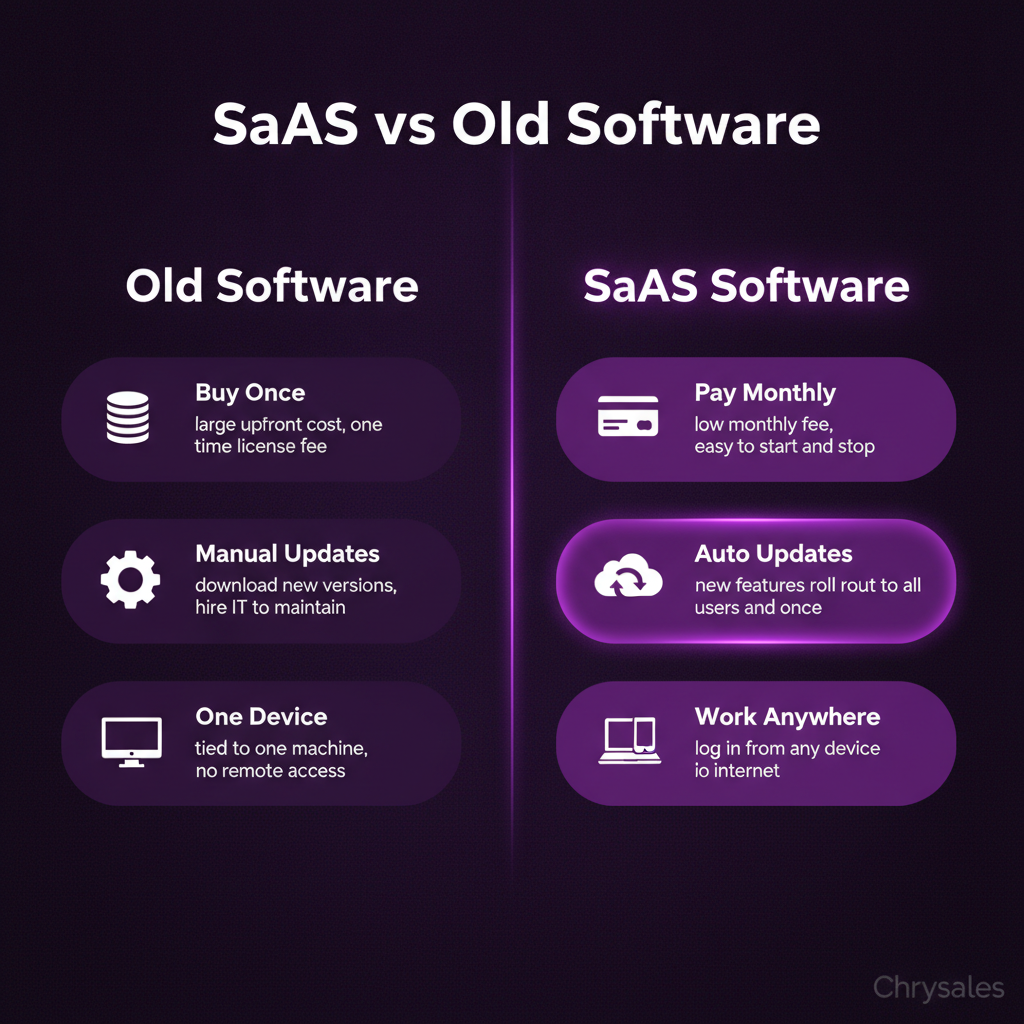
Before SaaS, buying software meant paying thousands upfront, installing it on every computer, and hiring someone to maintain it. Updates? You had to buy a whole new version. Backing up data? Your problem.
SaaS software flips that. You pay as you go. The company handles maintenance. Updates are free and automatic. Data backs up to the cloud. If your laptop dies, your work doesn't.
Lower Upfront Costs
Traditional software might cost $10,000 for a license. SaaS software charges $50 a month per user. For a 10-person team, that's $500 a month instead of a massive one-time payment. Easier on the budget, especially for growing B2B companies.
Access From Anywhere
SaaS software lives online, so you can access it from any device. Work from your laptop at the office, check something on your phone during lunch, log in from a coffee shop. As long as you have internet, you're good.
Pro Tip: Teams working remotely rely on SaaS software because everyone can access the same tools without being in the same building.
Automatic Updates and Security
The company behind the SaaS software handles updates and security patches. You don't have to think about it. Compare that to old software, where you'd have to manually download updates or pay for an upgrade.
One marketing agency we worked with used to run outdated CRM software. They had to hire someone just to manage updates. They switched to a SaaS CRM, and that whole headache disappeared.
How SaaS Software Changed B2B Sales
SaaS didn't just change software. It changed how businesses sell. Before SaaS, selling software meant long sales cycles, demos on-site, and custom installs. Now, buyers can sign up online in minutes.
Recurring Revenue Model
SaaS companies don't make all their money upfront. They make it monthly or yearly through subscriptions. That's called recurring revenue, and it's huge for business stability.
Think of it like this: a gym membership versus buying gym equipment. The gym gets monthly payments from hundreds of people. The equipment store makes one sale and hopes you come back years later. SaaS software is the gym membership model.
Faster Customer Acquisition
With SaaS software, you can sign up without talking to anyone. Free trials let you test the tool before paying. That lowers the barrier to entry and speeds up client acquisition.
For B2B sales teams, this changes everything. Instead of cold calling and setting up demos, you can run ads that send people to a free trial. The product sells itself if it's good.
Watch out: Faster signups also mean faster churn. If someone can cancel as easily as they signed up, you need a solid onboarding process to keep them.
Scaling Without Friction
SaaS software scales easily. Adding a new user usually means clicking a button and paying a bit more per month. No new hardware, no new installs.
A 15-person consulting firm can start with 5 licenses and add 10 more as they grow. Try doing that with old software where you had to buy and install new copies every time.
Common Types of SaaS Software
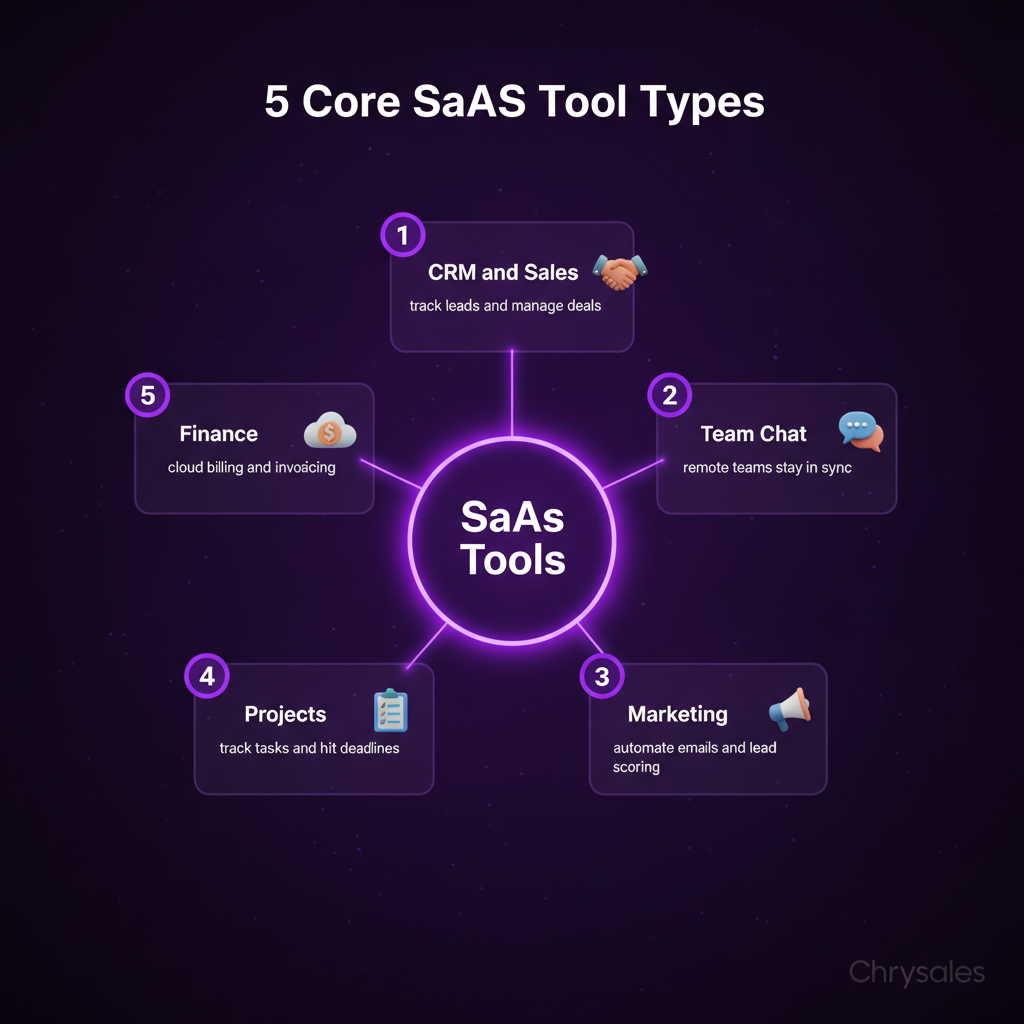
SaaS software covers almost every business function. Here are the big categories:
CRM and Sales Tools
Customer relationship management tools like Salesforce and other SaaS platforms help teams track leads, manage pipelines, and close deals. These are core to B2B lead generation and sales training.
Communication and Collaboration
Slack, Zoom, Microsoft Teams. These tools let teams work together, especially remotely. Most companies use at least one.
Marketing Automation
Tools like Mailchimp, ActiveCampaign, and HubSpot automate email campaigns, landing pages, and lead scoring. Great for teams focused on client acquisition and B2B sales.
Project Management
Asana, Monday, Trello. These help teams organize tasks, track progress, and hit deadlines.
Accounting and Finance
QuickBooks, Xero, FreshBooks. Cloud-based accounting software that syncs with your bank and handles invoicing.
Common mistake: Teams buy SaaS software for every little task and end up with 15 subscriptions they don't use. Audit your tools every quarter. Cut what you're not using.
How SaaS Software Fits Into B2B Sales Systems
SaaS software is a tool, not a strategy. A lot of teams think buying a CRM or automation platform will fix their sales problems. It won't. The system comes first, the tool supports it.
Building a Sales System First
Before picking SaaS software, figure out your sales process. What does lead generation look like? How do you qualify leads? What's your pitch? How do you handle objections?
Once you have a clear process, you pick tools that fit. Most teams do it backward. They buy Salesforce, then try to force their process into it.
Here's what that looks like in practice: one tech company we worked with had Salesforce but no clear sales process. Their reps were logging random notes and guessing at next steps. We built them a custom sales system first, with discovery questions, call scripts, and a follow-up cadence. Then we mapped that into their CRM. Suddenly the tool was useful.
You can also watch how to build a sales system so powerful clients come to you for a deeper walkthrough of this approach.
Using SaaS for Lead Generation and Outreach
Cold outreach depends on good data. SaaS tools like Apollo, ZoomInfo, and Hunter pull contact lists. Other tools like Lemlist and Instantly automate email sequences.
But here's the thing: the list does most of the heavy lifting. A bad list means bad results, no matter how good the SaaS software is. Focus on targeting the right companies and decision-makers before automating anything.
Pro Tip: Use SaaS lead scoring tools to rank your leads. Anything scoring above 70 goes to the top of your call list.
Automating Without Losing the Human Touch
SaaS software can automate follow-ups, send reminders, and trigger emails. But automation without personalization feels robotic. People can tell when a message is generic.
The best teams automate the boring stuff (data entry, scheduling, reminders) and keep the human touch on the actual conversations. Your SaaS software should free up time, not replace real relationship building.
Picking the Right SaaS Software for Your Team
Not all SaaS software is created equal. Some tools are bloated with features you'll never use. Others are too basic. Here's how to choose.
Start With Your Actual Needs
Don't pick a tool because it's popular. Pick it because it solves a specific problem. Need better email open rates? Look at tools built for cold outreach. Need to track deal stages? Get a simple CRM.
Most teams overbuy. They sign up for enterprise plans with 50 features when they only need 5. Start small. You can always upgrade.
Test Before Committing
Most SaaS software offers free trials. Use them. Test the tool with your actual workflow. If it feels clunky or confusing, move on.
Your team won't use a tool they don't like, no matter how many features it has. A 30-person consulting firm tried three different project management tools before landing on one that fit. The first two looked great in demos but were a pain in daily use. Testing saved them from a year-long contract they'd regret.
Check Integration Options
Your SaaS tools should talk to each other. If your CRM doesn't sync with your email tool, you'll waste time copying data manually. Look for tools that integrate with what you already use.
Watch out: Some SaaS companies charge extra for integrations. Factor that into your budget before signing up.
Look at Support and Training
When something breaks or you have a question, can you get help fast? Some SaaS providers offer live chat, others make you submit a ticket and wait three days.
Good support matters, especially during onboarding. If your team gets stuck in the first week, they'll give up on the tool.
SaaS Software and AI in Sales
AI is everywhere in SaaS software now. From lead scoring to writing email drafts, AI tools are changing how sales teams work.
AI for Lead Generation
SaaS tools like Clay and Instantly use AI to find leads, score them, and suggest who to reach out to first. This speeds up B2B lead generation and helps teams focus on the best opportunities.
AI can analyze thousands of data points (company size, recent funding, job postings) and surface the leads most likely to convert. That's way faster than manual research.
AI for Outreach and Personalization
Some SaaS software uses AI to write personalized email subject lines or suggest follow-up times. Tools like Lavender analyze your emails and give feedback on tone and structure.
But here's the catch: AI-generated emails can sound generic if you're not careful. The best use of AI is to draft a starting point, then personalize it yourself. Full automation without human review usually flops.
Pro Tip: Use AI to research prospects fast, then write your own message. AI is great for pulling info from LinkedIn or company websites. Writing the actual pitch? Still better done by a human.
For more on how to leverage these capabilities, check out our AI sales enablement guide for strategies on implementing AI into your sales workflow.
AI for Sales Training and Coaching
Some SaaS platforms analyze sales calls and give feedback. They flag things like talk-to-listen ratio, how many questions you asked, or if you mentioned pricing too early.
This is huge for sales training. Instead of guessing what went wrong on a call, you get data. One tech company used an AI call analysis tool and realized their reps were pitching before understanding the prospect's problem. Fixing that one thing doubled their close rate.
You can also see how an AI sales system drives record revenue through automated lead generation to understand the full potential of these tools in action.
Common SaaS Software Mistakes Teams Make
Most mistakes with SaaS software come down to buying too much or setting it up wrong.
Buying Before Building a System
SaaS software won't fix a broken process. If your sales team doesn't know how to qualify leads or handle objections, a new CRM won't help. Build the system first, then add the tools.
Instead of jumping into tools, focus on how to build a sales system that actually scales before investing in any SaaS platform.
Not Training the Team
You can't just hand someone a SaaS tool and expect them to figure it out. Set aside time for onboarding and training. Walk through how the tool fits into the daily workflow.
One marketing agency bought an automation platform and told their team to "just use it." Six months later, only two people were logging in. The tool wasn't the problem. Lack of training was.
Letting Tools Pile Up
It's easy to sign up for free trials and forget to cancel. Next thing you know, you're paying for six tools that do the same thing.
Audit your SaaS subscriptions every quarter. Cut what you're not using.
Ignoring Data Security
SaaS software stores your data on someone else's servers. That's convenient, but it also means you need to trust the provider. Check their security policies. Make sure they encrypt data and comply with regulations like GDPR if you're working internationally.
Common mistake: Teams sign up for cheap SaaS tools without checking security. Then they realize the provider doesn't back up data or has weak password policies. Do your homework before putting client data in a new tool.
Frequently Asked Questions
Q: Is SaaS software the same as cloud software?
Not exactly. All SaaS software is cloud-based, but not all cloud software is SaaS. SaaS means you access it through a browser and pay a subscription. Cloud software could also mean something you install that stores data in the cloud. SaaS is a specific type of cloud delivery model focused on subscription access.
Q: Can small teams afford SaaS software?
Yes. Most SaaS tools have pricing tiers based on team size. You can start with a basic plan and upgrade as you grow. SaaS actually makes expensive tools affordable because you pay monthly instead of buying a huge license upfront. Even solo consultants use SaaS for CRM, email, and project management.
Q: What happens to my data if I cancel a SaaS subscription?
It depends on the provider. Most let you export your data before you cancel. Some keep it for 30 days in case you change your mind. Always check the cancellation policy before signing up, and back up your data regularly just in case.
Q: How do I know if a SaaS tool is secure?
Look for providers that encrypt data, offer two-factor authentication, and comply with industry standards like SOC 2 or ISO 27001. Read their security documentation. If they're vague about security, that's a red flag. Reputable SaaS companies are transparent about how they protect your data.
Q: Can SaaS software replace an entire sales team?
No. SaaS software automates tasks and makes teams more efficient, but it doesn't replace the human side of sales. Tools can send emails, track leads, and schedule calls, but closing deals still requires real conversations, relationship building, and understanding client needs. Use SaaS to support your team, not replace them.
SaaS software is a way of delivering programs over the internet so you can access them online instead of installing them on your computer. It uses a subscription model, with the company handling updates, security, and maintenance.
Quick question: when's the last time you downloaded software from a CD? Probably never, or at least not in years. That shift, from installing programs on your computer to just opening a browser tab, is SaaS in action.
SaaS software stands for Software as a Service, and it's basically any tool you access online instead of installing. Think Gmail, Zoom, or Salesforce. You log in, you use it, you pay a monthly fee. No downloads, no IT team needed to set it up. It's simple, and that simplicity is why SaaS has taken over the business world.
What SaaS Software Actually Means
SaaS software is a way of delivering programs over the internet. Instead of buying a CD or downloading a huge file to your computer, you access everything through a web browser or app. The software lives on someone else's servers, usually in the cloud, and you just log in to use it.
Here's the thing: SaaS isn't new tech. It's a business model for delivering software as a service. Companies host the software, manage updates, handle security, and you just pay a subscription, usually monthly or yearly. You're renting access, not buying a product you own forever.
How SaaS Software Works
The software runs on the provider's servers. You access it through the internet. Updates happen automatically. If the company adds a new feature, you get it without doing anything. If there's a bug fix, it rolls out to everyone at once.
Picture this: you're using a project management tool. The company behind it releases an update overnight. You open the tool the next morning, and the new feature is just there. No download, no installation screen, no IT person needed. That's how SaaS software works.
Examples You Already Use
Most tools you use for work are SaaS software:
- Google Workspace: Gmail, Docs, Sheets. All browser-based.
- Slack: Team chat that lives online.
- Zoom: Video calls without installing bulky software.
- Salesforce: CRM for managing customer data.
- HubSpot: Marketing and sales tools in one place.
If you log in through a browser and pay monthly, it's probably SaaS.
Why SaaS Software Beats Old-School Programs
Before SaaS, buying software meant paying thousands upfront, installing it on every computer, and hiring someone to maintain it. Updates? You had to buy a whole new version. Backing up data? Your problem.
SaaS software flips that. You pay as you go. The company handles maintenance. Updates are free and automatic. Data backs up to the cloud. If your laptop dies, your work doesn't.
Lower Upfront Costs
Traditional software might cost $10,000 for a license. SaaS software charges $50 a month per user. For a 10-person team, that's $500 a month instead of a massive one-time payment. Easier on the budget, especially for growing B2B companies.
Access From Anywhere
SaaS software lives online, so you can access it from any device. Work from your laptop at the office, check something on your phone during lunch, log in from a coffee shop. As long as you have internet, you're good.
Pro Tip: Teams working remotely rely on SaaS software because everyone can access the same tools without being in the same building.
Automatic Updates and Security
The company behind the SaaS software handles updates and security patches. You don't have to think about it. Compare that to old software, where you'd have to manually download updates or pay for an upgrade.
One marketing agency we worked with used to run outdated CRM software. They had to hire someone just to manage updates. They switched to a SaaS CRM, and that whole headache disappeared.
How SaaS Software Changed B2B Sales
SaaS didn't just change software. It changed how businesses sell. Before SaaS, selling software meant long sales cycles, demos on-site, and custom installs. Now, buyers can sign up online in minutes.
Recurring Revenue Model
SaaS companies don't make all their money upfront. They make it monthly or yearly through subscriptions. That's called recurring revenue, and it's huge for business stability.
Think of it like this: a gym membership versus buying gym equipment. The gym gets monthly payments from hundreds of people. The equipment store makes one sale and hopes you come back years later. SaaS software is the gym membership model.
Faster Customer Acquisition
With SaaS software, you can sign up without talking to anyone. Free trials let you test the tool before paying. That lowers the barrier to entry and speeds up client acquisition.
For B2B sales teams, this changes everything. Instead of cold calling and setting up demos, you can run ads that send people to a free trial. The product sells itself if it's good.
Watch out: Faster signups also mean faster churn. If someone can cancel as easily as they signed up, you need a solid onboarding process to keep them.
Scaling Without Friction
SaaS software scales easily. Adding a new user usually means clicking a button and paying a bit more per month. No new hardware, no new installs.
A 15-person consulting firm can start with 5 licenses and add 10 more as they grow. Try doing that with old software where you had to buy and install new copies every time.
Common Types of SaaS Software
SaaS software covers almost every business function. Here are the big categories:
CRM and Sales Tools
Customer relationship management tools like Salesforce and other SaaS platforms help teams track leads, manage pipelines, and close deals. These are core to B2B lead generation and sales training.
Communication and Collaboration
Slack, Zoom, Microsoft Teams. These tools let teams work together, especially remotely. Most companies use at least one.
Marketing Automation
Tools like Mailchimp, ActiveCampaign, and HubSpot automate email campaigns, landing pages, and lead scoring. Great for teams focused on client acquisition and B2B sales.
Project Management
Asana, Monday, Trello. These help teams organize tasks, track progress, and hit deadlines.
Accounting and Finance
QuickBooks, Xero, FreshBooks. Cloud-based accounting software that syncs with your bank and handles invoicing.
Common mistake: Teams buy SaaS software for every little task and end up with 15 subscriptions they don't use. Audit your tools every quarter. Cut what you're not using.
How SaaS Software Fits Into B2B Sales Systems
SaaS software is a tool, not a strategy. A lot of teams think buying a CRM or automation platform will fix their sales problems. It won't. The system comes first, the tool supports it.
Building a Sales System First
Before picking SaaS software, figure out your sales process. What does lead generation look like? How do you qualify leads? What's your pitch? How do you handle objections?
Once you have a clear process, you pick tools that fit. Most teams do it backward. They buy Salesforce, then try to force their process into it.
Here's what that looks like in practice: one tech company we worked with had Salesforce but no clear sales process. Their reps were logging random notes and guessing at next steps. We built them a custom sales system first, with discovery questions, call scripts, and a follow-up cadence. Then we mapped that into their CRM. Suddenly the tool was useful.
You can also watch how to build a sales system so powerful clients come to you for a deeper walkthrough of this approach.
Using SaaS for Lead Generation and Outreach
Cold outreach depends on good data. SaaS tools like Apollo, ZoomInfo, and Hunter pull contact lists. Other tools like Lemlist and Instantly automate email sequences.
But here's the thing: the list does most of the heavy lifting. A bad list means bad results, no matter how good the SaaS software is. Focus on targeting the right companies and decision-makers before automating anything.
Pro Tip: Use SaaS lead scoring tools to rank your leads. Anything scoring above 70 goes to the top of your call list.
Automating Without Losing the Human Touch
SaaS software can automate follow-ups, send reminders, and trigger emails. But automation without personalization feels robotic. People can tell when a message is generic.
The best teams automate the boring stuff (data entry, scheduling, reminders) and keep the human touch on the actual conversations. Your SaaS software should free up time, not replace real relationship building.
Picking the Right SaaS Software for Your Team
Not all SaaS software is created equal. Some tools are bloated with features you'll never use. Others are too basic. Here's how to choose.
Start With Your Actual Needs
Don't pick a tool because it's popular. Pick it because it solves a specific problem. Need better email open rates? Look at tools built for cold outreach. Need to track deal stages? Get a simple CRM.
Most teams overbuy. They sign up for enterprise plans with 50 features when they only need 5. Start small. You can always upgrade.
Test Before Committing
Most SaaS software offers free trials. Use them. Test the tool with your actual workflow. If it feels clunky or confusing, move on.
Your team won't use a tool they don't like, no matter how many features it has. A 30-person consulting firm tried three different project management tools before landing on one that fit. The first two looked great in demos but were a pain in daily use. Testing saved them from a year-long contract they'd regret.
Check Integration Options
Your SaaS tools should talk to each other. If your CRM doesn't sync with your email tool, you'll waste time copying data manually. Look for tools that integrate with what you already use.
Watch out: Some SaaS companies charge extra for integrations. Factor that into your budget before signing up.
Look at Support and Training
When something breaks or you have a question, can you get help fast? Some SaaS providers offer live chat, others make you submit a ticket and wait three days.
Good support matters, especially during onboarding. If your team gets stuck in the first week, they'll give up on the tool.
SaaS Software and AI in Sales
AI is everywhere in SaaS software now. From lead scoring to writing email drafts, AI tools are changing how sales teams work.
AI for Lead Generation
SaaS tools like Clay and Instantly use AI to find leads, score them, and suggest who to reach out to first. This speeds up B2B lead generation and helps teams focus on the best opportunities.
AI can analyze thousands of data points (company size, recent funding, job postings) and surface the leads most likely to convert. That's way faster than manual research.
AI for Outreach and Personalization
Some SaaS software uses AI to write personalized email subject lines or suggest follow-up times. Tools like Lavender analyze your emails and give feedback on tone and structure.
But here's the catch: AI-generated emails can sound generic if you're not careful. The best use of AI is to draft a starting point, then personalize it yourself. Full automation without human review usually flops.
Pro Tip: Use AI to research prospects fast, then write your own message. AI is great for pulling info from LinkedIn or company websites. Writing the actual pitch? Still better done by a human.
For more on how to leverage these capabilities, check out our AI sales enablement guide for strategies on implementing AI into your sales workflow.
AI for Sales Training and Coaching
Some SaaS platforms analyze sales calls and give feedback. They flag things like talk-to-listen ratio, how many questions you asked, or if you mentioned pricing too early.
This is huge for sales training. Instead of guessing what went wrong on a call, you get data. One tech company used an AI call analysis tool and realized their reps were pitching before understanding the prospect's problem. Fixing that one thing doubled their close rate.
You can also see how an AI sales system drives record revenue through automated lead generation to understand the full potential of these tools in action.
Common SaaS Software Mistakes Teams Make
Most mistakes with SaaS software come down to buying too much or setting it up wrong.
Buying Before Building a System
SaaS software won't fix a broken process. If your sales team doesn't know how to qualify leads or handle objections, a new CRM won't help. Build the system first, then add the tools.
Instead of jumping into tools, focus on how to build a sales system that actually scales before investing in any SaaS platform.
Not Training the Team
You can't just hand someone a SaaS tool and expect them to figure it out. Set aside time for onboarding and training. Walk through how the tool fits into the daily workflow.
One marketing agency bought an automation platform and told their team to "just use it." Six months later, only two people were logging in. The tool wasn't the problem. Lack of training was.
Letting Tools Pile Up
It's easy to sign up for free trials and forget to cancel. Next thing you know, you're paying for six tools that do the same thing.
Audit your SaaS subscriptions every quarter. Cut what you're not using.
Ignoring Data Security
SaaS software stores your data on someone else's servers. That's convenient, but it also means you need to trust the provider. Check their security policies. Make sure they encrypt data and comply with regulations like GDPR if you're working internationally.
Common mistake: Teams sign up for cheap SaaS tools without checking security. Then they realize the provider doesn't back up data or has weak password policies. Do your homework before putting client data in a new tool.
Frequently Asked Questions
Q: Is SaaS software the same as cloud software?
Not exactly. All SaaS software is cloud-based, but not all cloud software is SaaS. SaaS means you access it through a browser and pay a subscription. Cloud software could also mean something you install that stores data in the cloud. SaaS is a specific type of cloud delivery model focused on subscription access.
Q: Can small teams afford SaaS software?
Yes. Most SaaS tools have pricing tiers based on team size. You can start with a basic plan and upgrade as you grow. SaaS actually makes expensive tools affordable because you pay monthly instead of buying a huge license upfront. Even solo consultants use SaaS for CRM, email, and project management.
Q: What happens to my data if I cancel a SaaS subscription?
It depends on the provider. Most let you export your data before you cancel. Some keep it for 30 days in case you change your mind. Always check the cancellation policy before signing up, and back up your data regularly just in case.
Q: How do I know if a SaaS tool is secure?
Look for providers that encrypt data, offer two-factor authentication, and comply with industry standards like SOC 2 or ISO 27001. Read their security documentation. If they're vague about security, that's a red flag. Reputable SaaS companies are transparent about how they protect your data.
Q: Can SaaS software replace an entire sales team?
No. SaaS software automates tasks and makes teams more efficient, but it doesn't replace the human side of sales. Tools can send emails, track leads, and schedule calls, but closing deals still requires real conversations, relationship building, and understanding client needs. Use SaaS to support your team, not replace them.
Scaling Is Not Hard If You Have The Right Systems
If you’re serious about leveling up your scaling game, you need the right system, the right training, and the right team behind you. We're here to give you the exact tools and strategies top entrepreneurs use to dominate.

Discover the latest tips
View All.avif)
Chrysales was formed from the words "chrysalis" the stage where a caterpillar transforms into a butterfly and "sales".
It stands for one thing: sales transformation.Because scaling doesn’t happen by doing more of the same. Scaling only happens when you go through real transformation in your systems, your offer, team and the way you sell.
.avif)


