
HubSpot lead scoring: a simple setup for a small B2B team
For a small team, HubSpot lead scoring works best in two parts: company fit and the person's interest. Subtract points for people who will never buy. Then pick one cutoff, the score at which a lead goes to a rep, and check it against won deals after four to six weeks.
One condition comes first. HubSpot's help pages list the scoring tool only for its Professional and Enterprise plans, as of November 2026. On Free or Starter, a simple sheet does the job for now.
Which HubSpot plan has lead scoring?
You need Marketing Hub or Sales Hub on the Professional or Enterprise plan. That is what HubSpot's lead scoring overview lists, as of November 2026.
Check which hub you pay for. To score people (HubSpot calls them contacts), you need Marketing Hub. Sales Hub alone scores companies and deals.
How many scores you can build also depends on your plan, so look in your own account.
Skip the AI options for now. Scores built by AI need Marketing Hub Enterprise and at least 50 past contacts to learn from. Predictive scoring is an Enterprise feature too.
Old guides may send you to the "HubSpot score" property. HubSpot's old scoring stopped updating on August 31, 2025, as a community announcement explains.
Score two things: fit and interest
Fit is who the lead is, like their job title or company size. Interest is what they do, like visiting your website or subscribing to your newsletter. HubSpot's help pages call this second half engagement.
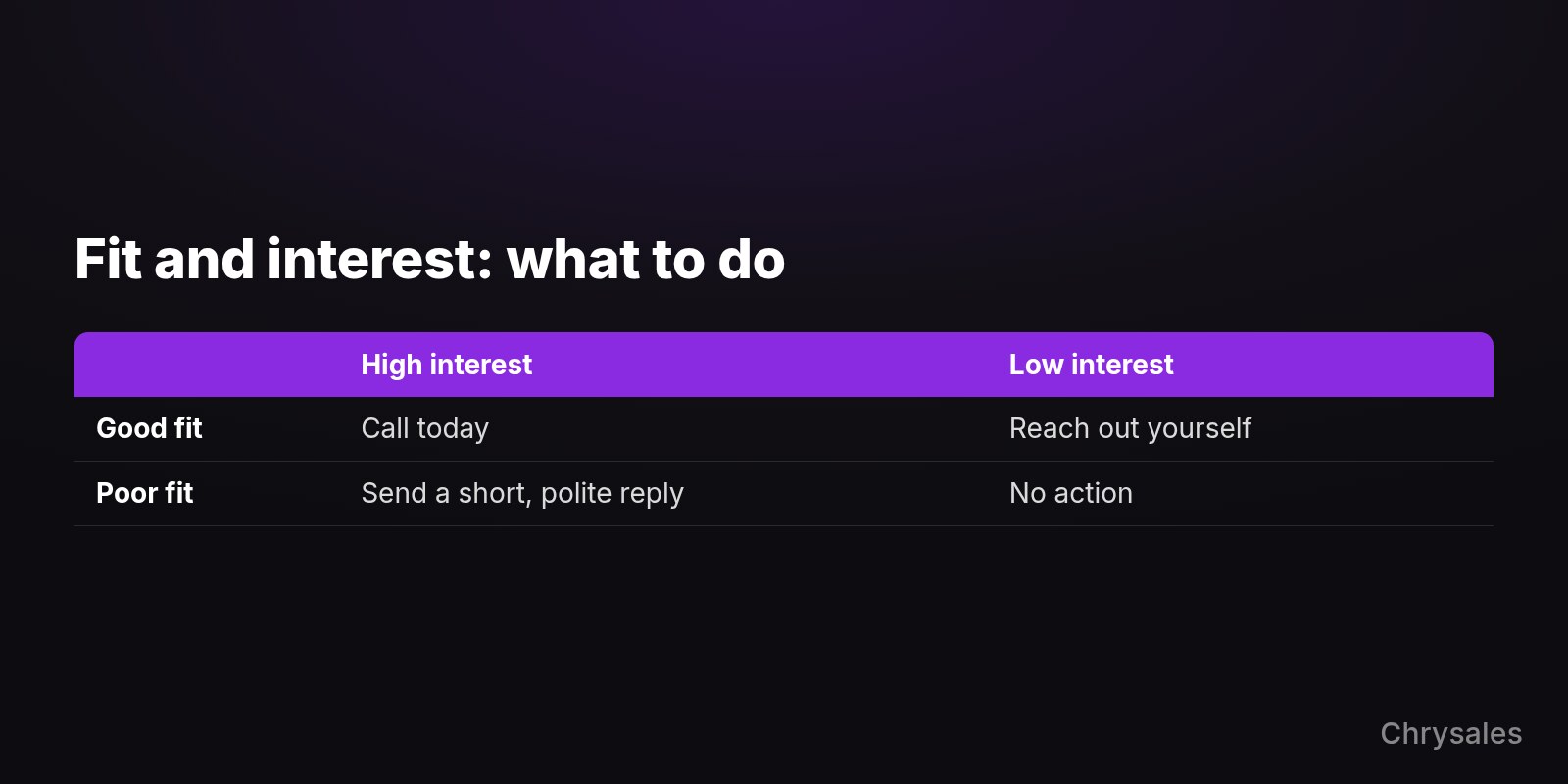
A good fit who is active gets a call today. A good fit who is quiet is worth a message from you.
A poor fit gets a polite reply at most. HubSpot can also join both into one label, like A1 for a strong fit who is very active.
Start with fit, but don't stop there. CMO Kipp Bodnar writes that HubSpot started with fit and added intent later, because even well-matched leads didn't convert if they weren't engaging. Still, a quiet lead who fits beats a keen one who will never buy.
If you can't yet say who fits, write down your ideal client first.
In this video, Sabir shows how a strict ideal client profile and four criteria keep your time on prospects who can actually buy.
A starter score for a small team
Start with about six rules inside HubSpot's default maximum of 100 points. Give most weight to fit, the rest to strong buying signals, and subtract for people who will never buy.
Here is an example to adapt for a 12-person B2B company selling a monthly service. The numbers are a starting point, not data.
| Signal | Points | Why |
|---|---|---|
| Company size you serve | +25 | They can afford you |
| Role that decides | +20 | They can say yes |
| Country you sell in | +15 | You can serve them |
| Asked for a call | +25 | Clear buying signal |
| Visited your pricing page | +15 | Comparing options |
| Student, job seeker or competitor | -40 | Will never buy |
Fit can reach 60 and interest 40, so fit counts more.
Email opens earn nothing here, because an open says little about buying. A download form gets no points either. Jeff Pedowitz sees a form fill as a data capture event, not a purchase intent signal and advises weighting it only modestly.
The minus rule matters just as much, and HubSpot lets any rule add or subtract points. Howard Sewell warns that when companies ignore negative scores, junk leads slip through and sales confidence suffers.
Then set one cutoff: in this example, 65 or more counts as High. Say the founder of a 40-person company in your market visits your pricing page. That's 25 + 20 + 15 + 15 = 75, so a rep calls.
Above the cutoff, set one owner per lead who calls the same day. Bodnar warns: "The more complicated your lead scoring model, the less likely your sales team is to use it." So keep it short.
Check the score against real deals
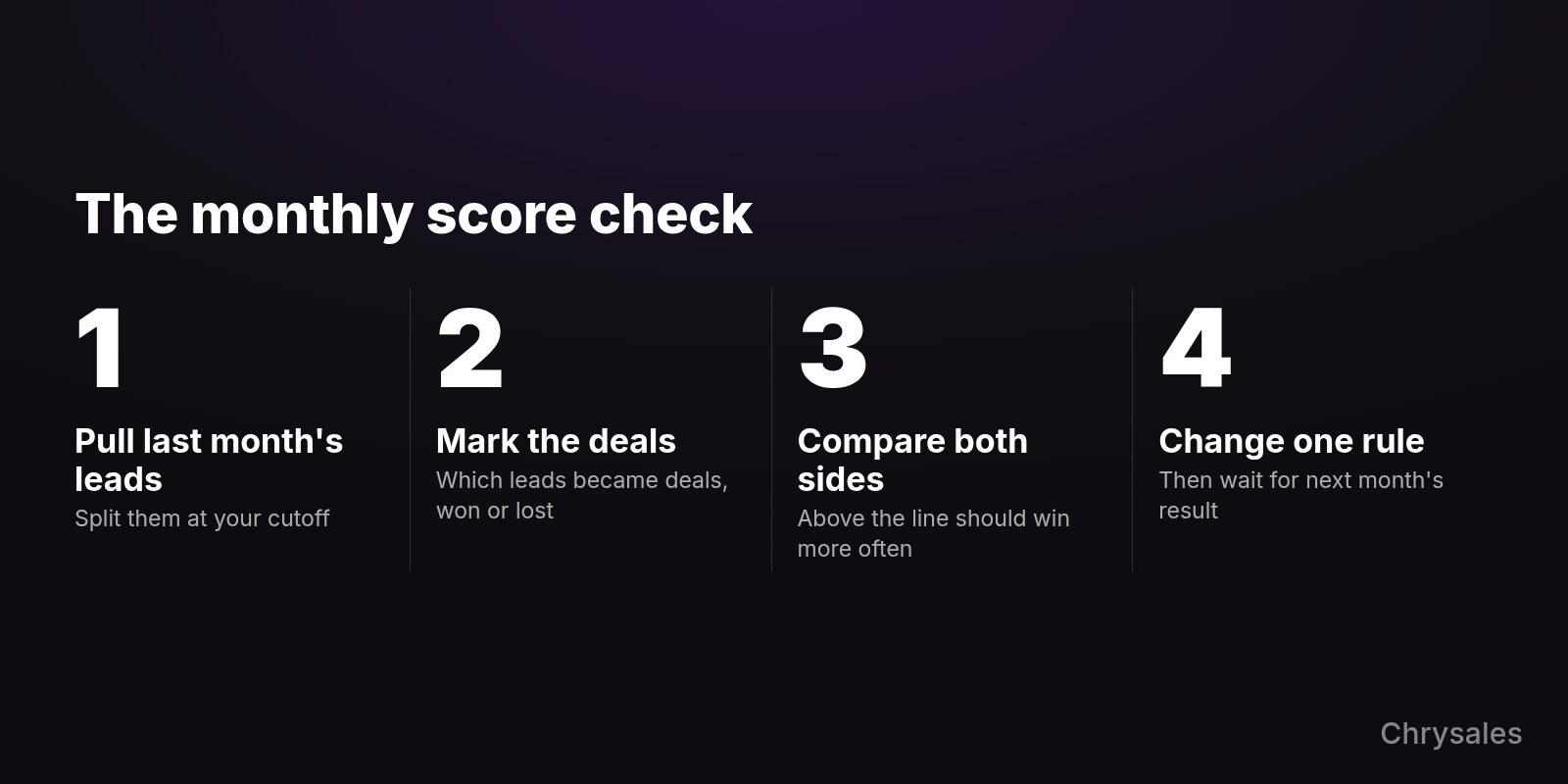
A score is a guess until you test it. Test it before launch, then compare it with won and lost deals after four to six weeks.
Before launch, HubSpot lets you test records or preview how scores spread. If almost everyone lands in High, your rules are too generous.
After that, check once a month which of last month's leads became deals. Leads above your cutoff should turn into deals more often than leads below it, the same test Pedowitz suggests. Your discovery call notes show why a high scorer still wasn't a fit.
Change one rule at a time, so you know what moved the result. You can also let interest fade every 1, 3, 6 or 12 months, so an old click doesn't keep a lead hot.
Your team also has to trust the number. As Pedowitz says, "A lead scoring model that sales doesn't trust is worse than no scoring model at all."
Gusto shows what to look for. In a test reported by HG Insights, Gusto's high-scoring leads converted 15% better when a rep called, and low scorers showed no lift. The numbers are vendor-reported, but they make the point: a score shows where a rep's call changes the outcome.
When a score isn't worth it yet
If only a handful of leads come in each week, you may not need a score yet. Read each lead yourself and keep a simple sheet.
Rework offers a rough guide: under 200 marketing qualified leads a month, sorting by hand is almost always faster and more accurate. A marketing qualified lead is someone marketing thinks is ready for sales.
Any cutoff also has a hard edge. Nik Koutsoukos of HG Insights names the problem: "A lead at 74 gets nothing." Check leads just under your line weekly.
When leads turn into deals, set up your deal stages so a good lead keeps moving after the first call.
Conclusion: Start with fit and one cutoff
Start small, with these five moves:
- Confirm your plan. Scoring people needs Marketing Hub Professional or Enterprise.
- Write three fit rules from your ideal client, plus one minus rule.
- Add one or two strong interest signals, like a request for a call.
- Set one cutoff and give every lead above it one owner.
- Book time in four to six weeks to compare the score with your won deals.
Not sure what should count as a good lead, or what happens once one crosses the line? On a free strategy call, Chrysales can map your lead flow and the follow-up routine around your score with you. Talk through your lead score on a free call
For a small team, HubSpot lead scoring works best in two parts: company fit and the person's interest. Subtract points for people who will never buy. Then pick one cutoff, the score at which a lead goes to a rep, and check it against won deals after four to six weeks.
One condition comes first. HubSpot's help pages list the scoring tool only for its Professional and Enterprise plans, as of November 2026. On Free or Starter, a simple sheet does the job for now.
Which HubSpot plan has lead scoring?
You need Marketing Hub or Sales Hub on the Professional or Enterprise plan. That is what HubSpot's lead scoring overview lists, as of November 2026.
Check which hub you pay for. To score people (HubSpot calls them contacts), you need Marketing Hub. Sales Hub alone scores companies and deals.
How many scores you can build also depends on your plan, so look in your own account.
Skip the AI options for now. Scores built by AI need Marketing Hub Enterprise and at least 50 past contacts to learn from. Predictive scoring is an Enterprise feature too.
Old guides may send you to the "HubSpot score" property. HubSpot's old scoring stopped updating on August 31, 2025, as a community announcement explains.
Score two things: fit and interest
Fit is who the lead is, like their job title or company size. Interest is what they do, like visiting your website or subscribing to your newsletter. HubSpot's help pages call this second half engagement.
A good fit who is active gets a call today. A good fit who is quiet is worth a message from you.
A poor fit gets a polite reply at most. HubSpot can also join both into one label, like A1 for a strong fit who is very active.
Start with fit, but don't stop there. CMO Kipp Bodnar writes that HubSpot started with fit and added intent later, because even well-matched leads didn't convert if they weren't engaging. Still, a quiet lead who fits beats a keen one who will never buy.
If you can't yet say who fits, write down your ideal client first.
In this video, Sabir shows how a strict ideal client profile and four criteria keep your time on prospects who can actually buy.
A starter score for a small team
Start with about six rules inside HubSpot's default maximum of 100 points. Give most weight to fit, the rest to strong buying signals, and subtract for people who will never buy.
Here is an example to adapt for a 12-person B2B company selling a monthly service. The numbers are a starting point, not data.
| Signal | Points | Why |
|---|---|---|
| Company size you serve | +25 | They can afford you |
| Role that decides | +20 | They can say yes |
| Country you sell in | +15 | You can serve them |
| Asked for a call | +25 | Clear buying signal |
| Visited your pricing page | +15 | Comparing options |
| Student, job seeker or competitor | -40 | Will never buy |
Fit can reach 60 and interest 40, so fit counts more.
Email opens earn nothing here, because an open says little about buying. A download form gets no points either. Jeff Pedowitz sees a form fill as a data capture event, not a purchase intent signal and advises weighting it only modestly.
The minus rule matters just as much, and HubSpot lets any rule add or subtract points. Howard Sewell warns that when companies ignore negative scores, junk leads slip through and sales confidence suffers.
Then set one cutoff: in this example, 65 or more counts as High. Say the founder of a 40-person company in your market visits your pricing page. That's 25 + 20 + 15 + 15 = 75, so a rep calls.
Above the cutoff, set one owner per lead who calls the same day. Bodnar warns: "The more complicated your lead scoring model, the less likely your sales team is to use it." So keep it short.
Check the score against real deals
A score is a guess until you test it. Test it before launch, then compare it with won and lost deals after four to six weeks.
Before launch, HubSpot lets you test records or preview how scores spread. If almost everyone lands in High, your rules are too generous.
After that, check once a month which of last month's leads became deals. Leads above your cutoff should turn into deals more often than leads below it, the same test Pedowitz suggests. Your discovery call notes show why a high scorer still wasn't a fit.
Change one rule at a time, so you know what moved the result. You can also let interest fade every 1, 3, 6 or 12 months, so an old click doesn't keep a lead hot.
Your team also has to trust the number. As Pedowitz says, "A lead scoring model that sales doesn't trust is worse than no scoring model at all."
Gusto shows what to look for. In a test reported by HG Insights, Gusto's high-scoring leads converted 15% better when a rep called, and low scorers showed no lift. The numbers are vendor-reported, but they make the point: a score shows where a rep's call changes the outcome.
When a score isn't worth it yet
If only a handful of leads come in each week, you may not need a score yet. Read each lead yourself and keep a simple sheet.
Rework offers a rough guide: under 200 marketing qualified leads a month, sorting by hand is almost always faster and more accurate. A marketing qualified lead is someone marketing thinks is ready for sales.
Any cutoff also has a hard edge. Nik Koutsoukos of HG Insights names the problem: "A lead at 74 gets nothing." Check leads just under your line weekly.
When leads turn into deals, set up your deal stages so a good lead keeps moving after the first call.
Conclusion: Start with fit and one cutoff
Start small, with these five moves:
- Confirm your plan. Scoring people needs Marketing Hub Professional or Enterprise.
- Write three fit rules from your ideal client, plus one minus rule.
- Add one or two strong interest signals, like a request for a call.
- Set one cutoff and give every lead above it one owner.
- Book time in four to six weeks to compare the score with your won deals.
Not sure what should count as a good lead, or what happens once one crosses the line? On a free strategy call, Chrysales can map your lead flow and the follow-up routine around your score with you. Talk through your lead score on a free call
Scaling Is Not Hard If You Have The Right Systems
If you’re serious about leveling up your scaling game, you need the right system, the right training, and the right team behind you. We're here to give you the exact tools and strategies top entrepreneurs use to dominate.

Discover the latest tips
View All
Chrysales was formed from the words "chrysalis" the stage where a caterpillar transforms into a butterfly and "sales".
It stands for one thing: sales transformation.Because scaling doesn’t happen by doing more of the same. Scaling only happens when you go through real transformation in your systems, your offer, team and the way you sell.


