.avif)
How Do Spam Email Filters Work Against Cold Outreach?
Spam email filters are software systems that scan incoming email and decide whether it goes to the inbox, spam folder, or gets blocked completely. Picture this: you spend two hours writing the perfect cold email. You hit send to 500 people. You get three replies. Not three meetings. Three total responses. One is an unsubscribe. One says "not interested." The third is an out-of-office auto-reply.
What happened? Your emails never made it to the inbox. Spam email filters caught them before anyone saw them.
Most sales teams think their offer is the problem. Usually, it's not. The real issue is that your emails are being flagged as spam before anyone reads a single word. Here's how those filters actually work, and what you can do about it.
What Spam Email Filters Actually Do
Spam email filters are software systems that sit between the sender and the inbox. They scan every incoming email and decide: inbox, spam folder, or block it completely. Think of them like bouncers at a club. They check IDs, look for red flags, and decide who gets in.
Most people think spam filters just look for certain words like "free money" or "click here now." That's part of it, but it's way more complex than that. Modern spam filters use a mix of content analysis, sender reputation tracking, engagement patterns, and authentication checks. They're not checking one thing. They're checking dozens of signals at the same time.
Here's what they're actually looking at:
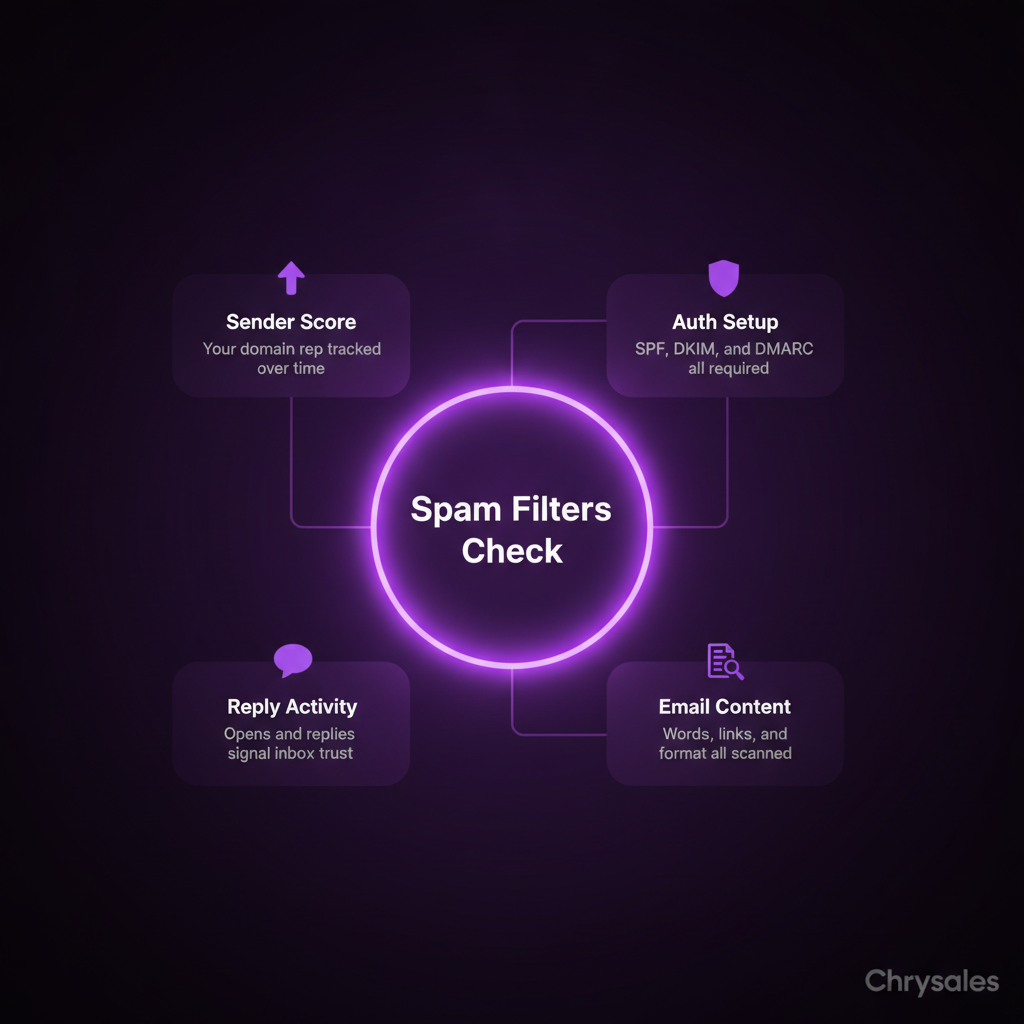
- Who you are (your domain reputation and sender score)
- How you're sending (authentication protocols like SPF, DKIM, and DMARC)
- What you're saying (content, links, images, formatting)
- How people respond (open rates, reply rates, spam complaints)
If too many signals look bad, your email gets flagged. One bad signal might slide. Five bad signals? You're in the spam folder.
Why This Matters for B2B Sales
When your cold outreach lands in spam, your entire sales system breaks. No one sees your offer. No one books a call. Your lead generation dies before it starts.
We see this all the time with new clients. They've got a solid offer, good targeting, and decent copy. But their emails never reach the inbox. Fixing deliverability alone can triple reply rates without changing a single word of the message.
Pro Tip: Check your spam placement before scaling any cold email campaign. Send test emails to Gmail, Outlook, and a few corporate domains. If more than 20% land in spam, fix your setup before sending to your full list.
How Sender Reputation Controls Email Deliverability
Your sender reputation is a score that email providers assign to your domain and IP address. It's like a credit score for email. Send good emails that people engage with? Your score goes up. Send emails people ignore or mark as spam? Your score tanks.
Email providers like Gmail and Outlook track this over time. They're watching:
- How many emails you send per day
- How many people open your emails
- How many people reply
- How many people mark you as spam
- How many emails bounce (invalid addresses)
If you send 1,000 cold emails from a brand new domain in one day, that's a massive red flag. New domains have no reputation yet. Sending high volume right away looks like a spam bot.
The Warm-Up Period Most Teams Skip
This is where most B2B sales teams mess up. They buy a new domain, load up 5,000 contacts, and blast emails on day one. Spam filters see this and immediately block the domain. You need to warm up your domain first.
Here's what a proper warm-up looks like:
- Start with 10 to 20 emails per day for the first week
- Gradually increase by 10 to 15 percent each week
- Send to engaged contacts first (people who are likely to open and reply)
- Keep your bounce rate under 2%
- Avoid spam complaints at all costs
A 30 person consulting firm we worked with last year had a 1% reply rate on cold outreach. We checked their setup and found they'd been sending from a domain that was three weeks old with no warm up. We set up a proper warm up process and fixed their authentication. Reply rate jumped to 5.2% with the same email copy. The message didn't change. The deliverability did.
Watch out: Buying aged domains with existing reputation sounds like a shortcut, but those domains often have bad history you can't see. Start fresh and warm up properly.
SPF, DKIM, and DMARC: The Authentication Protocols That Matter
If sender reputation is your credit score, authentication protocols are your ID. They prove you are who you say you are. Without them, spam filters assume you're a scammer and block you.
There are three main authentication protocols: SPF, DKIM, and DMARC. They sound technical, but the concept is simple. They're records in your domain settings that tell email providers "yes, this email really came from this domain."
SPF (Sender Policy Framework)
SPF is a list of IP addresses that are allowed to send emails from your domain. When you send an email, the receiving server checks your SPF record. If your IP is on the list, you pass. If not, you fail.
Setting up SPF is straightforward. You add a TXT record to your domain's DNS settings that lists which mail servers can send on your behalf. Most email providers give you the exact record to copy and paste. It takes about five minutes.
DKIM (DomainKeys Identified Mail)
DKIM adds a digital signature to your emails. It's like a wax seal on an envelope. The receiving server checks the signature against a public key in your DNS. If it matches, the email is verified as authentic.
This stops spammers from pretending to be you. Even if they spoof your "from" address, they can't fake the DKIM signature without access to your private key.
DMARC (Domain-based Message Authentication, Reporting, and Conformance)
DMARC ties SPF and DKIM together and tells receiving servers what to do if an email fails authentication. You set a policy: quarantine (send to spam), reject (block completely), or none (just monitor).
DMARC also sends you reports showing who's sending emails from your domain. If someone's trying to spoof you, you'll see it.
Common mistake: Setting up SPF but skipping DKIM and DMARC. Email providers check all three. If you only have one, your deliverability still suffers. For a complete setup guide, read this explanation of SPF, DKIM, and DMARC setup.
Content Signals That Trigger Spam Filters
Even with perfect authentication and a clean sender reputation, your email content can still get you flagged. Spam filters scan the words, links, formatting, and structure of every email. Certain patterns scream "spam."
Here's what spam filters hate:
- ALL CAPS SUBJECT LINES or excessive exclamation points!!!
- Misleading subject lines that don't match the email body
- Too many links (more than 2 to 3 in a short email looks suspicious)
- Links to sketchy domains or URL shorteners
- Heavy image to text ratio (an email that's mostly images with little text)
- Spammy trigger words like "act now," "limited time," "100% free," "guaranteed income"
- No plain text version (sending HTML only emails)
- Broken or messy HTML code
Pro Tip: Run your cold emails through a spam checker tool before sending. Tools like Mail Tester or GlockApps score your email and show you what's triggering filters. Fix the issues before you hit send to your real list.
The Link Problem in Cold Outreach
Links are tricky in cold emails. You need them to book meetings or share resources. But too many links, or links to the wrong places, tank your deliverability. Spam filters see a cold email packed with links and assume you're phishing.
Best practice: keep it to one or two links max in your first cold email. If you're linking to a calendar booking page, make sure it's on a clean domain with HTTPS. Avoid link shorteners like bit.ly. They're heavily abused by spammers, so filters flag them.
One marketing agency we worked with was including four links in every cold email: website, case study, calendar, and LinkedIn. Their spam rate was 60%. We cut it down to just the calendar link in the first email and moved everything else to the follow up sequence. Spam rate dropped to 12%.
Engagement Rates and How Filters Learn from Behavior
Here's the thing: spam email filters don't just check your setup once and move on. They watch how people interact with your emails over time. If people open, read, and reply, filters learn that your emails are wanted. If people delete without opening or mark you as spam, filters learn the opposite.
This is where cold email gets hard. You're reaching out to people who didn't ask to hear from you. By definition, engagement will be lower than a newsletter someone subscribed to. But if it's too low, you trigger spam filters.
What "Good" Engagement Looks Like
Most sales teams obsess over reply rates. That matters, but spam filters care about a broader set of signals:
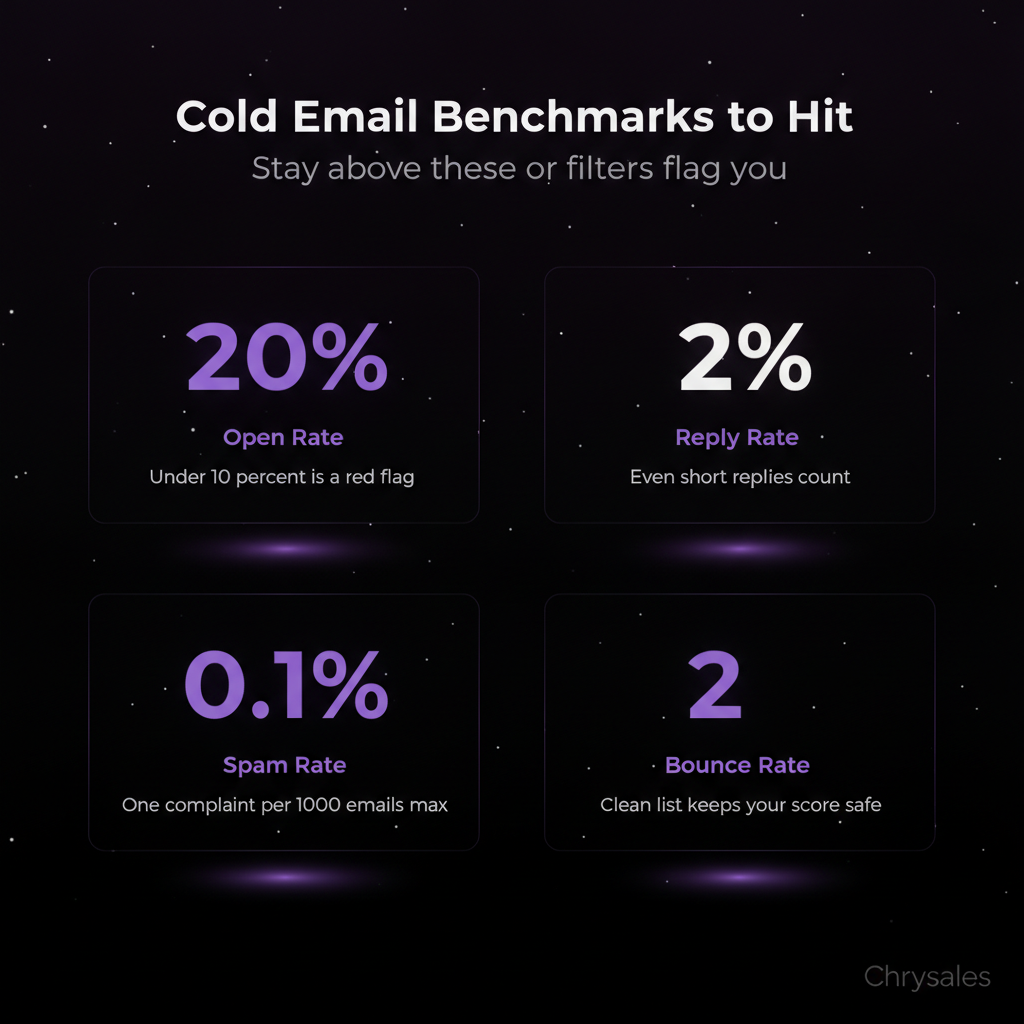
- Open rate above 15 to 20% (under 10% is a red flag)
- Reply rate above 1 to 2% (even a short reply counts)
- Spam complaint rate under 0.1% (one complaint per 1,000 emails is the limit)
- Bounce rate under 2% (too many bad addresses kills your sender score)
If you're sending to a bad list full of dead emails and uninterested contacts, your engagement tanks. Spam filters notice and start blocking you. This is why list quality matters more than email copy. A great message sent to the wrong people still gets you flagged.
To maintain healthy engagement and avoid filters, use structured follow-up sequences that keep recipients engaged without triggering spam alerts.
Watch out: Buying email lists is the fastest way to destroy your sender reputation. Those lists are full of outdated contacts, spam traps, and people who never opted in. Even one spam trap on your list can blacklist your domain.
What Happens When You Get Blacklisted
Blacklists are databases of domains and IPs known to send spam. Email providers check these lists and automatically block anything on them. If you land on a blacklist, your emails don't just go to spam. They get rejected before they even reach the inbox.
There are dozens of public blacklists. Some are stricter than others. Landing on a major one like Spamhaus or Barracuda can kill your cold outreach overnight. Getting off a blacklist is possible, but it's slow and painful. You have to request removal, prove you've fixed the issue, and wait.
How You End Up Blacklisted
It usually happens when you ignore all the other stuff we've covered. Here's the typical path:
- You send high volume from a new domain with no warm up
- Your emails have no authentication or bad authentication
- Your list is low quality with high bounce rates
- People mark you as spam because your targeting is off
- Spam filters flag you and add you to a blacklist
Once you're on a list, every email provider that checks that list will block you. Your domain is burned. Some companies just abandon the domain and start over. That's expensive and avoidable.
To understand how blacklists impact deliverability and recovery options, check this detailed guide on blocklist remediation.
Common mistake: Assuming you'll never get blacklisted because you're a "real business" sending "real emails." Spam filters don't care about your intentions. They care about signals. If your signals look like spam, you get treated like spam.
How Chrysales Builds Cold Outreach That Avoids Spam Filters
We've trained over 500 sales teams, and poor email deliverability is one of the top three issues we see. Most teams focus on writing better emails. That's backwards. If your emails don't reach the inbox, the words don't matter.
Our approach starts with the technical setup. We make sure SPF, DKIM, and DMARC are configured correctly. We set up proper domain warm up schedules. We clean the contact list and remove bad addresses before sending a single email. This is basic infrastructure, but most teams skip it or set it up wrong.
Then we build the cold outreach system around deliverability. We structure email sequences to keep engagement high and spam complaints low. First email: short, personalized, one clear call to action, minimal links. Follow ups add value without being pushy. We track bounce rates, spam complaints, and open rates in real time. If something drops, we adjust before it tanks the whole campaign.
We also train teams on list quality and targeting. Sending to the right people is half the battle. A 15 person consulting firm with a tight, well researched list of 300 contacts will outperform a company blasting 10,000 random emails every time. Better targeting means better engagement. Better engagement means better deliverability. It compounds.
For a complete framework on building scalable outreach systems, review our guide on outbound email marketing best practices that tie together authentication, content, and engagement.
Pro Tip: If you're serious about cold outreach, set up a separate domain for prospecting. Use your main domain for transactional emails and customer communication. If your prospecting domain gets flagged, your main domain stays clean.
Once your deliverability is locked in and your emails reliably hit the inbox, watch how an AI-driven sales system can turn well-delivered outreach into predictable revenue to see what's possible when you layer automation on top of solid fundamentals.
Frequently Asked Questions
Q: What's the fastest way to fix emails going to spam?
Check your authentication first. Log into your domain DNS settings and verify SPF, DKIM, and DMARC are set up correctly. Use a tool like MXToolbox to scan for issues. If authentication is fine, check your content. Remove extra links, avoid spammy words, and simplify your HTML. Then test again. If spam placement doesn't improve within a week, your sender reputation may be damaged. In that case, slow down sending, warm up the domain again, and focus on high engagement contacts.
Q: Can I just use a different email address if mine gets blacklisted?
Switching to a new email address on the same domain doesn't help. Blacklists track domains and IP addresses, not individual inboxes. If your domain is blacklisted, every email from that domain is blocked. You'd need to either get removed from the blacklist or switch to an entirely new domain. Prevention is way easier than fixing a burned domain, so focus on proper setup and list quality from the start.
Q: How long does it take to warm up a new domain for cold outreach?
Plan for 4 to 6 weeks minimum. Start with 10 to 20 emails per day in week one. Increase by 10 to 15 percent each week. By week six, you should be able to send 200 to 300 emails per day safely. Rushing this process triggers spam filters and damages your sender reputation before you even get started. Patience here pays off long term.
Q: Do spam filters treat B2B emails differently than consumer emails?
Not really. Spam email filters apply the same rules whether you're sending to Gmail, Outlook, or a corporate domain. Some corporate email systems add extra layers of filtering, but the core signals are the same: authentication, sender reputation, content, and engagement. B2B emails often have lower open rates than consumer emails, so you need to be extra careful with list quality and targeting to keep engagement above the threshold.
Q: Is it safe to use cold email for client acquisition, or is it too risky?
Cold email works if you do it right. The risk comes from ignoring deliverability and list quality. Set up authentication, warm up your domain, send to well researched contacts, and keep your content clean. Done properly, cold email is one of the most reliable channels for B2B lead generation. We've helped clients generate over €10M in revenue using cold outreach as a core part of their sales system. The key is treating it like a system, not a one off campaign.
Spam email filters are software systems that scan incoming email and decide whether it goes to the inbox, spam folder, or gets blocked completely. Picture this: you spend two hours writing the perfect cold email. You hit send to 500 people. You get three replies. Not three meetings. Three total responses. One is an unsubscribe. One says "not interested." The third is an out-of-office auto-reply.
What happened? Your emails never made it to the inbox. Spam email filters caught them before anyone saw them.
Most sales teams think their offer is the problem. Usually, it's not. The real issue is that your emails are being flagged as spam before anyone reads a single word. Here's how those filters actually work, and what you can do about it.
What Spam Email Filters Actually Do
Spam email filters are software systems that sit between the sender and the inbox. They scan every incoming email and decide: inbox, spam folder, or block it completely. Think of them like bouncers at a club. They check IDs, look for red flags, and decide who gets in.
Most people think spam filters just look for certain words like "free money" or "click here now." That's part of it, but it's way more complex than that. Modern spam filters use a mix of content analysis, sender reputation tracking, engagement patterns, and authentication checks. They're not checking one thing. They're checking dozens of signals at the same time.
Here's what they're actually looking at:
- Who you are (your domain reputation and sender score)
- How you're sending (authentication protocols like SPF, DKIM, and DMARC)
- What you're saying (content, links, images, formatting)
- How people respond (open rates, reply rates, spam complaints)
If too many signals look bad, your email gets flagged. One bad signal might slide. Five bad signals? You're in the spam folder.
Why This Matters for B2B Sales
When your cold outreach lands in spam, your entire sales system breaks. No one sees your offer. No one books a call. Your lead generation dies before it starts.
We see this all the time with new clients. They've got a solid offer, good targeting, and decent copy. But their emails never reach the inbox. Fixing deliverability alone can triple reply rates without changing a single word of the message.
Pro Tip: Check your spam placement before scaling any cold email campaign. Send test emails to Gmail, Outlook, and a few corporate domains. If more than 20% land in spam, fix your setup before sending to your full list.
How Sender Reputation Controls Email Deliverability
Your sender reputation is a score that email providers assign to your domain and IP address. It's like a credit score for email. Send good emails that people engage with? Your score goes up. Send emails people ignore or mark as spam? Your score tanks.
Email providers like Gmail and Outlook track this over time. They're watching:
- How many emails you send per day
- How many people open your emails
- How many people reply
- How many people mark you as spam
- How many emails bounce (invalid addresses)
If you send 1,000 cold emails from a brand new domain in one day, that's a massive red flag. New domains have no reputation yet. Sending high volume right away looks like a spam bot.
The Warm-Up Period Most Teams Skip
This is where most B2B sales teams mess up. They buy a new domain, load up 5,000 contacts, and blast emails on day one. Spam filters see this and immediately block the domain. You need to warm up your domain first.
Here's what a proper warm-up looks like:
- Start with 10 to 20 emails per day for the first week
- Gradually increase by 10 to 15 percent each week
- Send to engaged contacts first (people who are likely to open and reply)
- Keep your bounce rate under 2%
- Avoid spam complaints at all costs
A 30 person consulting firm we worked with last year had a 1% reply rate on cold outreach. We checked their setup and found they'd been sending from a domain that was three weeks old with no warm up. We set up a proper warm up process and fixed their authentication. Reply rate jumped to 5.2% with the same email copy. The message didn't change. The deliverability did.
Watch out: Buying aged domains with existing reputation sounds like a shortcut, but those domains often have bad history you can't see. Start fresh and warm up properly.
SPF, DKIM, and DMARC: The Authentication Protocols That Matter
If sender reputation is your credit score, authentication protocols are your ID. They prove you are who you say you are. Without them, spam filters assume you're a scammer and block you.
There are three main authentication protocols: SPF, DKIM, and DMARC. They sound technical, but the concept is simple. They're records in your domain settings that tell email providers "yes, this email really came from this domain."
SPF (Sender Policy Framework)
SPF is a list of IP addresses that are allowed to send emails from your domain. When you send an email, the receiving server checks your SPF record. If your IP is on the list, you pass. If not, you fail.
Setting up SPF is straightforward. You add a TXT record to your domain's DNS settings that lists which mail servers can send on your behalf. Most email providers give you the exact record to copy and paste. It takes about five minutes.
DKIM (DomainKeys Identified Mail)
DKIM adds a digital signature to your emails. It's like a wax seal on an envelope. The receiving server checks the signature against a public key in your DNS. If it matches, the email is verified as authentic.
This stops spammers from pretending to be you. Even if they spoof your "from" address, they can't fake the DKIM signature without access to your private key.
DMARC (Domain-based Message Authentication, Reporting, and Conformance)
DMARC ties SPF and DKIM together and tells receiving servers what to do if an email fails authentication. You set a policy: quarantine (send to spam), reject (block completely), or none (just monitor).
DMARC also sends you reports showing who's sending emails from your domain. If someone's trying to spoof you, you'll see it.
Common mistake: Setting up SPF but skipping DKIM and DMARC. Email providers check all three. If you only have one, your deliverability still suffers. For a complete setup guide, read this explanation of SPF, DKIM, and DMARC setup.
Content Signals That Trigger Spam Filters
Even with perfect authentication and a clean sender reputation, your email content can still get you flagged. Spam filters scan the words, links, formatting, and structure of every email. Certain patterns scream "spam."
Here's what spam filters hate:
- ALL CAPS SUBJECT LINES or excessive exclamation points!!!
- Misleading subject lines that don't match the email body
- Too many links (more than 2 to 3 in a short email looks suspicious)
- Links to sketchy domains or URL shorteners
- Heavy image to text ratio (an email that's mostly images with little text)
- Spammy trigger words like "act now," "limited time," "100% free," "guaranteed income"
- No plain text version (sending HTML only emails)
- Broken or messy HTML code
Pro Tip: Run your cold emails through a spam checker tool before sending. Tools like Mail Tester or GlockApps score your email and show you what's triggering filters. Fix the issues before you hit send to your real list.
The Link Problem in Cold Outreach
Links are tricky in cold emails. You need them to book meetings or share resources. But too many links, or links to the wrong places, tank your deliverability. Spam filters see a cold email packed with links and assume you're phishing.
Best practice: keep it to one or two links max in your first cold email. If you're linking to a calendar booking page, make sure it's on a clean domain with HTTPS. Avoid link shorteners like bit.ly. They're heavily abused by spammers, so filters flag them.
One marketing agency we worked with was including four links in every cold email: website, case study, calendar, and LinkedIn. Their spam rate was 60%. We cut it down to just the calendar link in the first email and moved everything else to the follow up sequence. Spam rate dropped to 12%.
Engagement Rates and How Filters Learn from Behavior
Here's the thing: spam email filters don't just check your setup once and move on. They watch how people interact with your emails over time. If people open, read, and reply, filters learn that your emails are wanted. If people delete without opening or mark you as spam, filters learn the opposite.
This is where cold email gets hard. You're reaching out to people who didn't ask to hear from you. By definition, engagement will be lower than a newsletter someone subscribed to. But if it's too low, you trigger spam filters.
What "Good" Engagement Looks Like
Most sales teams obsess over reply rates. That matters, but spam filters care about a broader set of signals:
- Open rate above 15 to 20% (under 10% is a red flag)
- Reply rate above 1 to 2% (even a short reply counts)
- Spam complaint rate under 0.1% (one complaint per 1,000 emails is the limit)
- Bounce rate under 2% (too many bad addresses kills your sender score)
If you're sending to a bad list full of dead emails and uninterested contacts, your engagement tanks. Spam filters notice and start blocking you. This is why list quality matters more than email copy. A great message sent to the wrong people still gets you flagged.
To maintain healthy engagement and avoid filters, use structured follow-up sequences that keep recipients engaged without triggering spam alerts.
Watch out: Buying email lists is the fastest way to destroy your sender reputation. Those lists are full of outdated contacts, spam traps, and people who never opted in. Even one spam trap on your list can blacklist your domain.
What Happens When You Get Blacklisted
Blacklists are databases of domains and IPs known to send spam. Email providers check these lists and automatically block anything on them. If you land on a blacklist, your emails don't just go to spam. They get rejected before they even reach the inbox.
There are dozens of public blacklists. Some are stricter than others. Landing on a major one like Spamhaus or Barracuda can kill your cold outreach overnight. Getting off a blacklist is possible, but it's slow and painful. You have to request removal, prove you've fixed the issue, and wait.
How You End Up Blacklisted
It usually happens when you ignore all the other stuff we've covered. Here's the typical path:
- You send high volume from a new domain with no warm up
- Your emails have no authentication or bad authentication
- Your list is low quality with high bounce rates
- People mark you as spam because your targeting is off
- Spam filters flag you and add you to a blacklist
Once you're on a list, every email provider that checks that list will block you. Your domain is burned. Some companies just abandon the domain and start over. That's expensive and avoidable.
To understand how blacklists impact deliverability and recovery options, check this detailed guide on blocklist remediation.
Common mistake: Assuming you'll never get blacklisted because you're a "real business" sending "real emails." Spam filters don't care about your intentions. They care about signals. If your signals look like spam, you get treated like spam.
How Chrysales Builds Cold Outreach That Avoids Spam Filters
We've trained over 500 sales teams, and poor email deliverability is one of the top three issues we see. Most teams focus on writing better emails. That's backwards. If your emails don't reach the inbox, the words don't matter.
Our approach starts with the technical setup. We make sure SPF, DKIM, and DMARC are configured correctly. We set up proper domain warm up schedules. We clean the contact list and remove bad addresses before sending a single email. This is basic infrastructure, but most teams skip it or set it up wrong.
Then we build the cold outreach system around deliverability. We structure email sequences to keep engagement high and spam complaints low. First email: short, personalized, one clear call to action, minimal links. Follow ups add value without being pushy. We track bounce rates, spam complaints, and open rates in real time. If something drops, we adjust before it tanks the whole campaign.
We also train teams on list quality and targeting. Sending to the right people is half the battle. A 15 person consulting firm with a tight, well researched list of 300 contacts will outperform a company blasting 10,000 random emails every time. Better targeting means better engagement. Better engagement means better deliverability. It compounds.
For a complete framework on building scalable outreach systems, review our guide on outbound email marketing best practices that tie together authentication, content, and engagement.
Pro Tip: If you're serious about cold outreach, set up a separate domain for prospecting. Use your main domain for transactional emails and customer communication. If your prospecting domain gets flagged, your main domain stays clean.
Once your deliverability is locked in and your emails reliably hit the inbox, watch how an AI-driven sales system can turn well-delivered outreach into predictable revenue to see what's possible when you layer automation on top of solid fundamentals.
Frequently Asked Questions
Q: What's the fastest way to fix emails going to spam?
Check your authentication first. Log into your domain DNS settings and verify SPF, DKIM, and DMARC are set up correctly. Use a tool like MXToolbox to scan for issues. If authentication is fine, check your content. Remove extra links, avoid spammy words, and simplify your HTML. Then test again. If spam placement doesn't improve within a week, your sender reputation may be damaged. In that case, slow down sending, warm up the domain again, and focus on high engagement contacts.
Q: Can I just use a different email address if mine gets blacklisted?
Switching to a new email address on the same domain doesn't help. Blacklists track domains and IP addresses, not individual inboxes. If your domain is blacklisted, every email from that domain is blocked. You'd need to either get removed from the blacklist or switch to an entirely new domain. Prevention is way easier than fixing a burned domain, so focus on proper setup and list quality from the start.
Q: How long does it take to warm up a new domain for cold outreach?
Plan for 4 to 6 weeks minimum. Start with 10 to 20 emails per day in week one. Increase by 10 to 15 percent each week. By week six, you should be able to send 200 to 300 emails per day safely. Rushing this process triggers spam filters and damages your sender reputation before you even get started. Patience here pays off long term.
Q: Do spam filters treat B2B emails differently than consumer emails?
Not really. Spam email filters apply the same rules whether you're sending to Gmail, Outlook, or a corporate domain. Some corporate email systems add extra layers of filtering, but the core signals are the same: authentication, sender reputation, content, and engagement. B2B emails often have lower open rates than consumer emails, so you need to be extra careful with list quality and targeting to keep engagement above the threshold.
Q: Is it safe to use cold email for client acquisition, or is it too risky?
Cold email works if you do it right. The risk comes from ignoring deliverability and list quality. Set up authentication, warm up your domain, send to well researched contacts, and keep your content clean. Done properly, cold email is one of the most reliable channels for B2B lead generation. We've helped clients generate over €10M in revenue using cold outreach as a core part of their sales system. The key is treating it like a system, not a one off campaign.
Scaling Is Not Hard If You Have The Right Systems
If you’re serious about leveling up your scaling game, you need the right system, the right training, and the right team behind you. We're here to give you the exact tools and strategies top entrepreneurs use to dominate.

Discover the latest tips
View All.avif)
Chrysales was formed from the words "chrysalis" the stage where a caterpillar transforms into a butterfly and "sales".
It stands for one thing: sales transformation.Because scaling doesn’t happen by doing more of the same. Scaling only happens when you go through real transformation in your systems, your offer, team and the way you sell.
.avif)


