.avif)
Clay Platform Use Cases for B2B Lead Generation
Clay platform use cases and examples show how B2B teams use the Clay platform for lead generation, b2b sales, and client acquisition. These clay platform use cases and examples cover data enrichment, workflow automation, and personalized outreach for b2b lead generation.
A 20-person tech consulting firm spent three weeks manually pulling data from five different sources to build one decent prospect list. By the time the list was ready, half the leads had already moved companies or closed their hiring windows. The team knew there had to be a faster way. That's when they started using Clay. Within a week, they had a system that pulled data from 10 sources automatically, scored every lead, and flagged the best 200 prospects in real time.
The Clay platform use cases and examples in this guide show how B2B sales teams are now doing what used to take weeks in minutes, without hiring more people or buying more tools.
What Clay Actually Does and Why B2B Sales Teams Use It
Clay is a data enrichment and workflow automation platform built for B2B sales and marketing teams. It connects to dozens of data providers, runs automated research tasks, and helps teams build personalized outreach at scale without manual copy-paste work.
Most sales teams hit the same wall. They need prospect data. Email addresses. Phone numbers. Company funding status. Hiring activity. Tech stack details. Buying signals. But pulling all that information manually from LinkedIn, Crunchbase, job boards, and company websites takes forever.
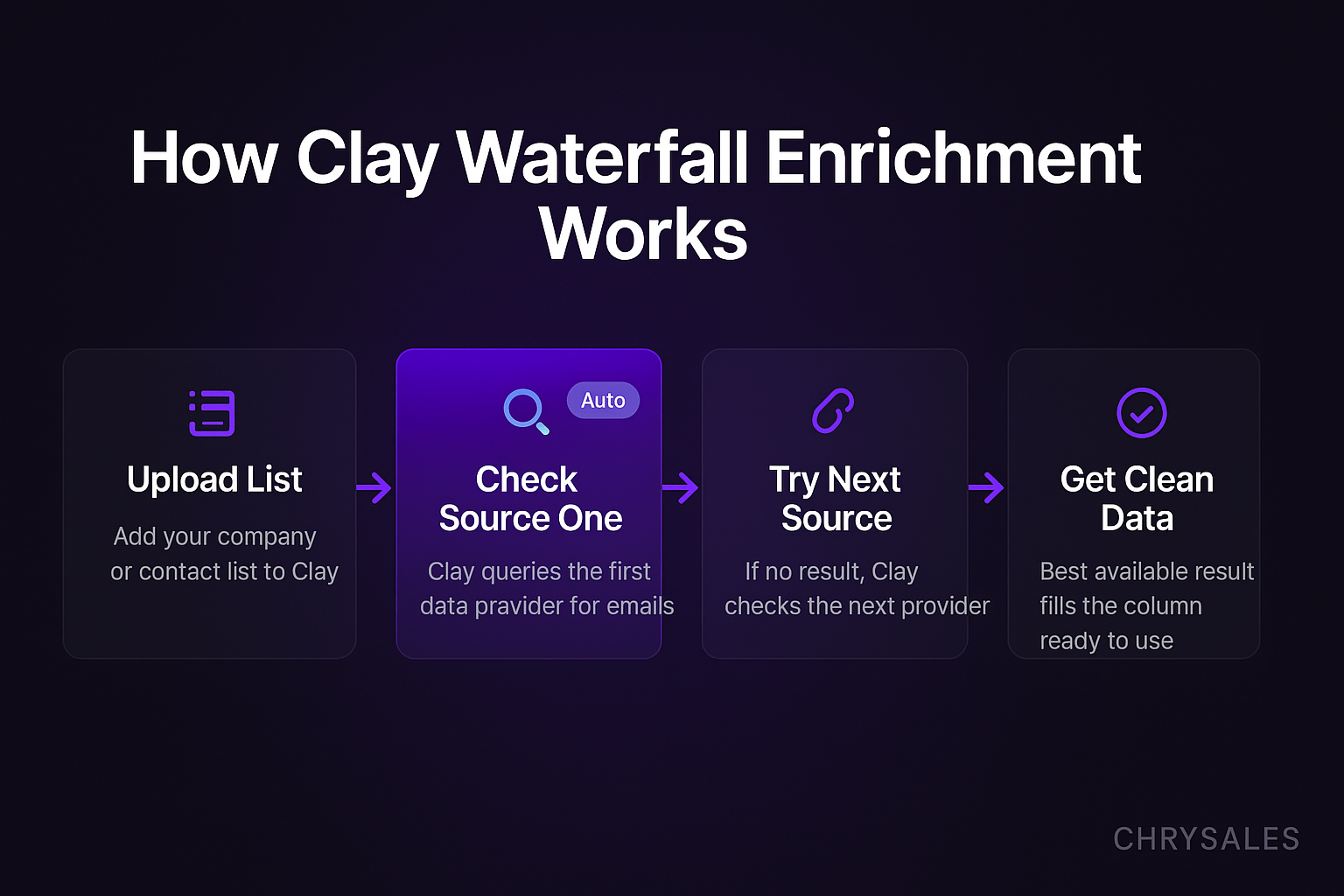
Clay solves this by letting teams set up what's called a waterfall enrichment process. The platform checks one data source. If it doesn't find what you need, it automatically checks the next one, then the next, until it gets a result or runs out of options.
How Waterfall Enrichment Works in Practice
Here's a simple example. You upload a list of 500 companies. You want the VP of Sales email for each one. Clay checks Apollo first. If Apollo doesn't have it, Clay checks Prospeo. If Prospeo doesn't have it, Clay checks Hunter. If Hunter doesn't have it, Clay checks Datagma. You set this once. Clay runs it automatically for all 500 companies. The result is a single column with the best available email for each prospect, sourced from whichever provider had it first.
This approach saves time and money. Instead of subscribing to five tools and checking each one manually, you set up Clay to do it once and let it run. Most B2B lead generation workflows now use this method because it turns a 10-hour task into a 10-minute setup.
Why Growing B2B Companies Choose Clay Over Traditional Tools
Traditional CRM enrichment tools like ZoomInfo or Clearbit charge per contact and lock you into one data source. Clay gives access to 75+ data providers through one interface. You pay for what you use. Teams running high-volume outbound sales or building complex GTM workflows prefer Clay because it's flexible. You can pull job postings, scrape websites, track news mentions, score leads based on custom rules, and trigger personalized email sequences all in one place.
A 15-person consulting firm recently moved from a legacy data tool to Clay and cut their lead research time by 60%. They used to spend eight hours a week pulling data. Now they spend two hours setting up workflows and letting Clay handle the rest.
Top Clay Use Cases for Lead Generation and Client Acquisition
The Clay platform use cases and examples that drive the most value for B2B sales teams fall into a few clear categories. Each one addresses a specific bottleneck in the sales process.
Building Hyper-Targeted Prospect Lists with Multiple Filters
Most sales teams start with a broad market. They need to narrow it down to a list of companies that match their ideal customer profile. Clay pulls firmographic data like company size, industry, location, revenue, funding stage, and employee count. Then it applies filters.
For example, a sales training consultancy might want:
- B2B SaaS companies
- 20 to 100 employees
- Raised a Series A in the last 12 months
- Headquarters in North America or Europe
- Hiring at least two sales roles in the last 30 days
Clay can pull all of this data, apply the filters, and return a scored list of 200 companies that fit every criterion. This is what makes client acquisition predictable. You're not guessing. You're working from a list of companies that look exactly like your best customers.
Waterfall Enrichment for Contact Data
Once you have the company list, you need contact details. Clay runs waterfall enrichment to find email addresses, phone numbers, LinkedIn profiles, and job titles. It checks multiple providers in sequence until it finds verified data.
This is one of the most common Clay platform use cases and examples because it eliminates manual prospecting work. A marketing agency used this method to build a list of 1,000 decision makers at mid-market SaaS companies in under two hours. Before Clay, the same task took their team three weeks.
Personalized Cold Email Campaigns at Scale
Generic cold emails get ignored. Personalized emails get replies. But personalizing 500 emails by hand is impossible. Clay solves this by pulling unique data points for each prospect and using them to customize email copy automatically.
For example:
- Mention a recent funding round
- Reference a job posting the company just published
- Call out a technology the company uses
- Highlight a recent press mention or product launch
Clay pulls this information from sources like Crunchbase, job boards, company websites, and news feeds. Then it feeds the data into email templates with dynamic fields. The result is 500 unique emails that look hand-written but were generated in minutes. This is a core part of how modern B2B outbound sales works.
Pro Tip: Use Clay to pull hiring activity as a personalization signal. If a company is hiring three sales reps, they probably need sales training or a better sales system. That's a warm opening line for outreach.
Scoring Leads Based on Buying Signals
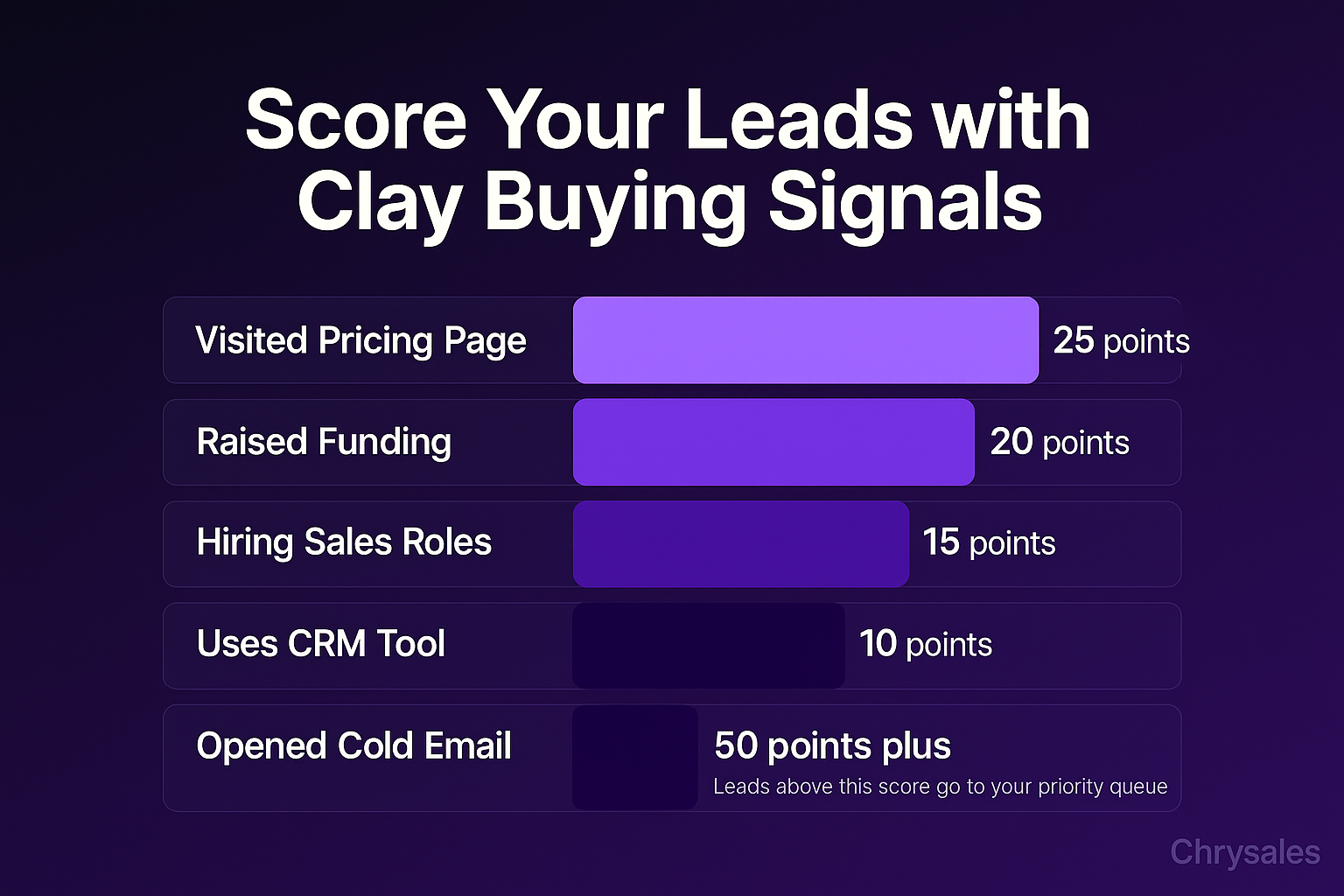
Not all prospects are equally ready to buy. Clay helps teams prioritize by building custom lead scoring tables. You define the signals that matter. For example:
- Company raised funding in the last six months: 20 points
- Hiring for sales roles: 15 points
- Uses Salesforce or HubSpot: 10 points
- Visited your pricing page: 25 points
- Opened your cold email: 10 points
Clay calculates the score for each lead automatically. Anything above 50 points goes to the priority queue. Anything below stays in nurture. This is how lean sales teams focus their time on the best opportunities instead of chasing every lead equally.
Automated CRM Enrichment and Data Hygiene
Most CRMs are full of incomplete records. Missing emails. Old job titles. Dead companies. Clay can enrich CRM data automatically by pulling fresh information and updating fields in real time. Sales reps stop wasting time on bad data. Follow-up sequences hit the right people. This improves close rates because reps are working from accurate information.
A 40-person tech services company used Clay to clean and enrich 8,000 CRM records in one weekend. Manual cleanup would have taken months. The enriched data helped their sales team book 40% more meetings in the next quarter.
How Clay Fits Into a Complete Sales System
Clay is powerful, but it's not a sales system on its own. It's a data and automation layer that feeds into the rest of your sales process. The best results come when teams use Clay as part of a larger framework.
The Role of Clay in a Predictable Client Acquisition System
A complete sales system includes positioning, offer creation, lead generation, outreach, discovery, closing, and follow-up. Clay handles the lead generation and outreach prep work. It finds the right people, enriches their data, scores them, and personalizes the first message. But it doesn't replace the need for a strong offer, a clear pitch, or good objection handling. Those still require coaching, training, and process design.
At Chrysales, we've trained over 500 sales teams and generated over €10 million in client revenue by building a sales system that actually scales. Clay makes the front end of the pipeline faster and more accurate. But the backend, where deals actually close, still depends on skilled sales conversations and a system that's repeatable.
Clay Workflows That Connect to Sales Training and Coaching
Here's how a well-designed sales system uses Clay. The platform builds the lead list, enriches contact data, and scores prospects based on fit. Then it triggers a personalized outreach sequence. The sequence books a discovery call. At that point, the sales rep takes over. They use a structured discovery framework, ask the right questions, handle objections with pre-built scripts, and close using a no-brainer offer.
Clay doesn't teach your team how to run a discovery call or handle price objections. That requires sales training. But it does make sure the people showing up on those calls are high-fit, well-researched prospects who are more likely to convert. This is why B2B sales teams that combine Clay with strong sales coaching see the biggest lift in results.
Watch out: Some teams over-automate and forget that sales is still a relationship business. Clay can get you the meeting, but your team still has to close the deal. Invest in both automation and training.
Advanced Clay AI Agent Use Cases for GTM Teams
Clay introduced AI-powered features that let teams build more intelligent workflows. These Clay AI agent capabilities go beyond basic data enrichment. They analyze unstructured data, generate insights, and trigger actions based on context.
Using Clay AI to Analyze Company News and Trigger Outreach
Clay can scrape news feeds, press releases, and company blogs. Then it uses AI to detect relevant events like product launches, executive hires, funding announcements, or office expansions. When it finds a trigger, it automatically adds the company to an outreach sequence and personalizes the message around that event.
For example, a sales consulting firm set up a Clay workflow to monitor tech companies for VP of Sales hires. Whenever a company hired a new VP of Sales, Clay flagged it and sent a personalized email offering sales team onboarding and training. The timing was perfect because new VPs often want to revamp sales processes in their first 90 days. This one workflow generated 15 qualified leads in the first month.
Building Custom ICP Scoring with AI-Powered Data Analysis
Clay's AI features can analyze a set of your best customers and identify patterns. Then it scores new prospects based on how closely they match those patterns. This goes beyond simple firmographic filters. The AI looks at combinations of signals like tech stack, hiring velocity, recent funding, competitor usage, and market positioning.
One consulting firm used this method to build a lookalike audience model. They uploaded 50 of their best clients. Clay analyzed the data and identified common traits. Then it scored 10,000 prospects and surfaced the top 200 that looked most similar to existing customers. You can also watch how an AI sales system generates record revenue through similar approaches to workflow automation. The resulting outreach campaign had a 12% reply rate, compared to 3% from their previous generic campaigns.
Clay for Job Change Tracking and Relationship Reactivation
Sales reps often lose touch with prospects when they change jobs. Clay tracks job changes automatically. When a contact moves to a new company, Clay updates the record, pulls the new company data, and triggers a reactivation email. This keeps relationships warm and opens new sales opportunities at the new company.
A marketing agency used this Clay use case to reactivate 80 cold leads who had changed jobs in the last six months. The campaign brought in four new clients worth over $200,000 in annual contract value.
Choosing the Right Clay Workflows for Your Business Size and Goals
Not every Clay workflow makes sense for every business. Early-stage companies with low outreach volume might not need complex multi-step enrichment. High-volume outbound teams will get the most value from advanced scoring and AI-driven personalization.
When Clay Makes Sense for Small Sales Teams
If your team sends fewer than 100 cold emails a week, Clay might be overkill. The platform has a learning curve. Setting up workflows takes time. The cost per lead can be high if you're only enriching a few hundred contacts a month. In that case, a simpler tool like Apollo or Hunter might work better.
But if your team is scaling outbound, testing new markets, or building a repeatable prospecting process, Clay pays off quickly. A 10-person consulting firm used Clay to test three different verticals in one month. They built separate lead lists, ran personalized outreach for each, and tracked reply rates. The data showed which vertical had the best fit. This saved them months of trial and error.
When to Invest in Clay for High-Volume Outbound
Teams sending 500+ emails a week, running account-based marketing campaigns, or managing multi-touch sequences get the most value from Clay. The platform's waterfall enrichment, AI personalization, and automated scoring turn high-volume outreach into a system instead of a grind.
A 30-person marketing agency runs 10,000 cold emails a month using Clay. They enrich every lead with data from six providers, score each one, personalize subject lines and opening sentences, and track engagement. The result is a 9% meeting-book rate, which is 3x higher than industry averages.
Pro Tip: Start with one simple Clay workflow. Test it. Measure results. Then add complexity. Most teams build workflows that are too complicated on the first try and end up confused.
Common Mistakes Teams Make When Using Clay
Clay is flexible, which means it's easy to build workflows that look impressive but don't drive results. Here are the mistakes we see most often.
Over-Complicating Workflows with Too Many Steps
Some teams build 40-step workflows when 12 would work fine. Each extra step adds cost, slows down the process, and creates more places for things to break. Keep workflows simple. Pull the data you actually need. Skip the nice-to-have fields. Focus on what drives decisions.
Using Too Many Data Providers and Blowing the Budget
Clay charges based on credits. Each data provider lookup costs credits. If you set up a waterfall with 10 providers and most leads resolve in the first two, you're wasting money. Test which providers give you the best hit rates for your market. Then trim the rest.
Ignoring Data Hygiene and Scoring Accuracy
Automated enrichment only works if the data is clean going in. If you upload a messy list with duplicate domains, misspelled company names, or outdated LinkedIn URLs, Clay will return bad data. Clean your lists first. Use consistent formatting. Check a sample before running the full workflow.
Forgetting That Personalization Still Requires a Good Message
Clay can insert a prospect's company name, recent funding round, and job title into an email. But if the underlying message is weak, the email still fails. Personalization is not a substitute for a strong offer, clear positioning, and good copywriting. Teams that combine Clay's data with a well-designed sales message see 5x better results than teams that rely on automation alone.
Integrating Clay with Your Sales Stack
Clay works best when it connects to the other tools your team already uses. Most B2B sales teams run a stack that includes a CRM, an email platform, and a meeting scheduler. Clay integrates with all of them.
Clay and CRM Enrichment for Salesforce and HubSpot
Clay can push enriched data directly into Salesforce or HubSpot. When a new lead enters your CRM, Clay pulls missing fields like email, phone, job title, company size, and tech stack. This keeps your CRM up to date without manual data entry. Sales reps always have the information they need before they pick up the phone.
A 25-person tech consulting firm used this integration to enrich 5,000 inbound leads that came through their website. The enriched data helped their sales team qualify leads faster and route them to the right rep based on company size and industry.
Connecting Clay to Cold Email Tools Like Instantly and Lemlist
Clay builds the list and personalizes the data. Then it exports the enriched leads to email automation tools like Instantly, Lemlist, or Smartlead. Those tools handle the sending, tracking, and follow-up sequences. This combination is the core of modern automated prospecting workflows.
One marketing agency used Clay to build hyper-targeted lists for three different buyer personas. Then they connected each list to a separate email sequence in Instantly. The result was three parallel campaigns, each speaking directly to a specific role with relevant pain points. Reply rates jumped from 4% to 11%.
Using Clay with Zapier and Make for Custom Automations
For teams that want full control, Clay integrates with Zapier and Make. This lets you build custom workflows that connect Clay to Slack, Airtable, Google Sheets, or any other tool in your stack.
For example, when Clay finds a high-scoring lead, it can send a Slack notification to the sales team, add the lead to a Google Sheet, and create a task in your project management tool. This level of automation is what separates top-performing sales teams from everyone else. The best teams plug in the most efficient sales system to scale by making data flow automatically from one tool to the next, and reps only touch the highest-value tasks.
How Chrysales Uses Clay in Client Sales Systems
At Chrysales, we build custom sales systems for B2B businesses. We've trained over 1,000 business owners and 500 sales teams, and we've helped clients generate over €10 million in revenue. Clay is one of the tools we use to build the lead generation layer of those systems. Here's how it fits into our 4-step methodology.
First, we help clients learn their market, ideal customer profile, and positioning. Second, we build repeatable systems for lead generation, outreach, and closing. Third, we automate the parts of the process that don't require human judgment. Fourth, we help clients hire and train elite sales talent to scale.
Clay supports steps two and three. We use it to build automated prospecting workflows, enrich lead data, score prospects, and personalize outreach. But we also teach clients how to run discovery calls, handle objections, design no-brainer offers, and close deals. The combination of automation and coaching is what creates predictable client acquisition.
We work with IT companies, consulting firms, and marketing agencies that need a sales system they can run without hiring five SDRs. Clay helps them do more with less. But it's the custom training, scripts, and frameworks that turn leads into clients. Tools are part of the system. Not the whole system. To learn more about advanced AI sales approaches, explore AI sales prospecting strategies or see how to survive the AI era in sales.
Frequently Asked Questions
Q: What is Clay and how is it different from other lead generation tools?
Clay is a data enrichment and workflow automation platform that connects to over 75 data providers. Unlike tools like ZoomInfo or Apollo, which are single-source databases, Clay uses waterfall enrichment to pull data from multiple sources automatically. This gives you better data coverage, lower costs, and more flexibility. It also includes AI-powered features for personalization, scoring, and trigger-based outreach.
Q: What are the most common Clay platform use cases for B2B sales teams?
The top use cases include building hyper-targeted prospect lists, enriching contact data with waterfall lookups, personalizing cold email campaigns at scale, scoring leads based on buying signals, cleaning and enriching CRM data, tracking job changes for relationship reactivation, and triggering outreach based on company news or hiring activity. Most teams start with basic enrichment and add complexity as they learn the platform.
Q: How much does Clay cost and is it worth it for small sales teams?
Clay pricing is credit-based. You pay for the data lookups and enrichments you use. For teams sending fewer than 100 emails a week, the cost per lead can be high compared to simpler tools. But for teams running high-volume outbound, testing multiple markets, or building complex scoring workflows, Clay pays for itself quickly. Most agencies and consulting firms with serious outbound programs see ROI within the first month.
Q: Can Clay replace my CRM or email automation tool?
No. Clay is a data enrichment and workflow tool, not a CRM or email sender. It pulls and organizes data, scores leads, and personalizes outreach. But it doesn't manage relationships, track deals, or send email sequences at scale. Clay works best when integrated with a CRM like Salesforce or HubSpot and an email tool like Instantly or Lemlist. It feeds data into those tools and makes them more effective.
Q: Do I need technical skills to use Clay or can non-technical sales teams use it?
Clay has a learning curve, but you don't need coding skills to build basic workflows. The interface is visual and similar to tools like Airtable. You build tables, add data sources, apply filters, and set up enrichment waterfalls using drag-and-drop actions. Advanced use cases like API integrations and custom AI prompts require some technical knowledge, but most sales teams can get value from Clay without a developer. That said, training or coaching helps teams avoid common mistakes and build workflows that actually drive results.
Q: How does Clay help with cold email personalization at scale?
Clay pulls unique data points for each prospect, like recent funding, job postings, tech stack, news mentions, or LinkedIn activity. Then it inserts those data points into email templates using dynamic fields. For example, one prospect gets an email mentioning their Series A raise, another gets an email referencing a VP of Sales hire, and a third gets a message about a recent product launch. Each email looks custom, but the process is automated. This is how modern B2B lead generation teams send hundreds of personalized emails without writing each one by hand.
Q: What results can I expect if I start using Clay for outbound sales?
Results depend on your offer, market, and sales process. But teams that combine Clay with strong messaging and follow-up typically see 2-3x higher reply rates compared to generic outreach. One consulting firm went from a 3% reply rate to 12% after using Clay to build scored, personalized campaigns. A marketing agency cut lead research time by 60% and booked 40% more meetings in the first quarter. Clay makes the top of the funnel faster and more accurate. But closing deals still depends on your team's ability to run discovery calls, handle objections, and deliver value. Teams that combine powerful tools like Clay with the only AI sales system you need in 2026 see the strongest results because tools work best when paired with sales training and a repeatable system.
Clay platform use cases and examples show how B2B teams use the Clay platform for lead generation, b2b sales, and client acquisition. These clay platform use cases and examples cover data enrichment, workflow automation, and personalized outreach for b2b lead generation.
A 20-person tech consulting firm spent three weeks manually pulling data from five different sources to build one decent prospect list. By the time the list was ready, half the leads had already moved companies or closed their hiring windows. The team knew there had to be a faster way. That's when they started using Clay. Within a week, they had a system that pulled data from 10 sources automatically, scored every lead, and flagged the best 200 prospects in real time.
The Clay platform use cases and examples in this guide show how B2B sales teams are now doing what used to take weeks in minutes, without hiring more people or buying more tools.
What Clay Actually Does and Why B2B Sales Teams Use It
Clay is a data enrichment and workflow automation platform built for B2B sales and marketing teams. It connects to dozens of data providers, runs automated research tasks, and helps teams build personalized outreach at scale without manual copy-paste work.
Most sales teams hit the same wall. They need prospect data. Email addresses. Phone numbers. Company funding status. Hiring activity. Tech stack details. Buying signals. But pulling all that information manually from LinkedIn, Crunchbase, job boards, and company websites takes forever.
Clay solves this by letting teams set up what's called a waterfall enrichment process. The platform checks one data source. If it doesn't find what you need, it automatically checks the next one, then the next, until it gets a result or runs out of options.
How Waterfall Enrichment Works in Practice
Here's a simple example. You upload a list of 500 companies. You want the VP of Sales email for each one. Clay checks Apollo first. If Apollo doesn't have it, Clay checks Prospeo. If Prospeo doesn't have it, Clay checks Hunter. If Hunter doesn't have it, Clay checks Datagma. You set this once. Clay runs it automatically for all 500 companies. The result is a single column with the best available email for each prospect, sourced from whichever provider had it first.
This approach saves time and money. Instead of subscribing to five tools and checking each one manually, you set up Clay to do it once and let it run. Most B2B lead generation workflows now use this method because it turns a 10-hour task into a 10-minute setup.
Why Growing B2B Companies Choose Clay Over Traditional Tools
Traditional CRM enrichment tools like ZoomInfo or Clearbit charge per contact and lock you into one data source. Clay gives access to 75+ data providers through one interface. You pay for what you use. Teams running high-volume outbound sales or building complex GTM workflows prefer Clay because it's flexible. You can pull job postings, scrape websites, track news mentions, score leads based on custom rules, and trigger personalized email sequences all in one place.
A 15-person consulting firm recently moved from a legacy data tool to Clay and cut their lead research time by 60%. They used to spend eight hours a week pulling data. Now they spend two hours setting up workflows and letting Clay handle the rest.
Top Clay Use Cases for Lead Generation and Client Acquisition
The Clay platform use cases and examples that drive the most value for B2B sales teams fall into a few clear categories. Each one addresses a specific bottleneck in the sales process.
Building Hyper-Targeted Prospect Lists with Multiple Filters
Most sales teams start with a broad market. They need to narrow it down to a list of companies that match their ideal customer profile. Clay pulls firmographic data like company size, industry, location, revenue, funding stage, and employee count. Then it applies filters.
For example, a sales training consultancy might want:
- B2B SaaS companies
- 20 to 100 employees
- Raised a Series A in the last 12 months
- Headquarters in North America or Europe
- Hiring at least two sales roles in the last 30 days
Clay can pull all of this data, apply the filters, and return a scored list of 200 companies that fit every criterion. This is what makes client acquisition predictable. You're not guessing. You're working from a list of companies that look exactly like your best customers.
Waterfall Enrichment for Contact Data
Once you have the company list, you need contact details. Clay runs waterfall enrichment to find email addresses, phone numbers, LinkedIn profiles, and job titles. It checks multiple providers in sequence until it finds verified data.
This is one of the most common Clay platform use cases and examples because it eliminates manual prospecting work. A marketing agency used this method to build a list of 1,000 decision makers at mid-market SaaS companies in under two hours. Before Clay, the same task took their team three weeks.
Personalized Cold Email Campaigns at Scale
Generic cold emails get ignored. Personalized emails get replies. But personalizing 500 emails by hand is impossible. Clay solves this by pulling unique data points for each prospect and using them to customize email copy automatically.
For example:
- Mention a recent funding round
- Reference a job posting the company just published
- Call out a technology the company uses
- Highlight a recent press mention or product launch
Clay pulls this information from sources like Crunchbase, job boards, company websites, and news feeds. Then it feeds the data into email templates with dynamic fields. The result is 500 unique emails that look hand-written but were generated in minutes. This is a core part of how modern B2B outbound sales works.
Pro Tip: Use Clay to pull hiring activity as a personalization signal. If a company is hiring three sales reps, they probably need sales training or a better sales system. That's a warm opening line for outreach.
Scoring Leads Based on Buying Signals
Not all prospects are equally ready to buy. Clay helps teams prioritize by building custom lead scoring tables. You define the signals that matter. For example:
- Company raised funding in the last six months: 20 points
- Hiring for sales roles: 15 points
- Uses Salesforce or HubSpot: 10 points
- Visited your pricing page: 25 points
- Opened your cold email: 10 points
Clay calculates the score for each lead automatically. Anything above 50 points goes to the priority queue. Anything below stays in nurture. This is how lean sales teams focus their time on the best opportunities instead of chasing every lead equally.
Automated CRM Enrichment and Data Hygiene
Most CRMs are full of incomplete records. Missing emails. Old job titles. Dead companies. Clay can enrich CRM data automatically by pulling fresh information and updating fields in real time. Sales reps stop wasting time on bad data. Follow-up sequences hit the right people. This improves close rates because reps are working from accurate information.
A 40-person tech services company used Clay to clean and enrich 8,000 CRM records in one weekend. Manual cleanup would have taken months. The enriched data helped their sales team book 40% more meetings in the next quarter.
How Clay Fits Into a Complete Sales System
Clay is powerful, but it's not a sales system on its own. It's a data and automation layer that feeds into the rest of your sales process. The best results come when teams use Clay as part of a larger framework.
The Role of Clay in a Predictable Client Acquisition System
A complete sales system includes positioning, offer creation, lead generation, outreach, discovery, closing, and follow-up. Clay handles the lead generation and outreach prep work. It finds the right people, enriches their data, scores them, and personalizes the first message. But it doesn't replace the need for a strong offer, a clear pitch, or good objection handling. Those still require coaching, training, and process design.
At Chrysales, we've trained over 500 sales teams and generated over €10 million in client revenue by building a sales system that actually scales. Clay makes the front end of the pipeline faster and more accurate. But the backend, where deals actually close, still depends on skilled sales conversations and a system that's repeatable.
Clay Workflows That Connect to Sales Training and Coaching
Here's how a well-designed sales system uses Clay. The platform builds the lead list, enriches contact data, and scores prospects based on fit. Then it triggers a personalized outreach sequence. The sequence books a discovery call. At that point, the sales rep takes over. They use a structured discovery framework, ask the right questions, handle objections with pre-built scripts, and close using a no-brainer offer.
Clay doesn't teach your team how to run a discovery call or handle price objections. That requires sales training. But it does make sure the people showing up on those calls are high-fit, well-researched prospects who are more likely to convert. This is why B2B sales teams that combine Clay with strong sales coaching see the biggest lift in results.
Watch out: Some teams over-automate and forget that sales is still a relationship business. Clay can get you the meeting, but your team still has to close the deal. Invest in both automation and training.
Advanced Clay AI Agent Use Cases for GTM Teams
Clay introduced AI-powered features that let teams build more intelligent workflows. These Clay AI agent capabilities go beyond basic data enrichment. They analyze unstructured data, generate insights, and trigger actions based on context.
Using Clay AI to Analyze Company News and Trigger Outreach
Clay can scrape news feeds, press releases, and company blogs. Then it uses AI to detect relevant events like product launches, executive hires, funding announcements, or office expansions. When it finds a trigger, it automatically adds the company to an outreach sequence and personalizes the message around that event.
For example, a sales consulting firm set up a Clay workflow to monitor tech companies for VP of Sales hires. Whenever a company hired a new VP of Sales, Clay flagged it and sent a personalized email offering sales team onboarding and training. The timing was perfect because new VPs often want to revamp sales processes in their first 90 days. This one workflow generated 15 qualified leads in the first month.
Building Custom ICP Scoring with AI-Powered Data Analysis
Clay's AI features can analyze a set of your best customers and identify patterns. Then it scores new prospects based on how closely they match those patterns. This goes beyond simple firmographic filters. The AI looks at combinations of signals like tech stack, hiring velocity, recent funding, competitor usage, and market positioning.
One consulting firm used this method to build a lookalike audience model. They uploaded 50 of their best clients. Clay analyzed the data and identified common traits. Then it scored 10,000 prospects and surfaced the top 200 that looked most similar to existing customers. You can also watch how an AI sales system generates record revenue through similar approaches to workflow automation. The resulting outreach campaign had a 12% reply rate, compared to 3% from their previous generic campaigns.
Clay for Job Change Tracking and Relationship Reactivation
Sales reps often lose touch with prospects when they change jobs. Clay tracks job changes automatically. When a contact moves to a new company, Clay updates the record, pulls the new company data, and triggers a reactivation email. This keeps relationships warm and opens new sales opportunities at the new company.
A marketing agency used this Clay use case to reactivate 80 cold leads who had changed jobs in the last six months. The campaign brought in four new clients worth over $200,000 in annual contract value.
Choosing the Right Clay Workflows for Your Business Size and Goals
Not every Clay workflow makes sense for every business. Early-stage companies with low outreach volume might not need complex multi-step enrichment. High-volume outbound teams will get the most value from advanced scoring and AI-driven personalization.
When Clay Makes Sense for Small Sales Teams
If your team sends fewer than 100 cold emails a week, Clay might be overkill. The platform has a learning curve. Setting up workflows takes time. The cost per lead can be high if you're only enriching a few hundred contacts a month. In that case, a simpler tool like Apollo or Hunter might work better.
But if your team is scaling outbound, testing new markets, or building a repeatable prospecting process, Clay pays off quickly. A 10-person consulting firm used Clay to test three different verticals in one month. They built separate lead lists, ran personalized outreach for each, and tracked reply rates. The data showed which vertical had the best fit. This saved them months of trial and error.
When to Invest in Clay for High-Volume Outbound
Teams sending 500+ emails a week, running account-based marketing campaigns, or managing multi-touch sequences get the most value from Clay. The platform's waterfall enrichment, AI personalization, and automated scoring turn high-volume outreach into a system instead of a grind.
A 30-person marketing agency runs 10,000 cold emails a month using Clay. They enrich every lead with data from six providers, score each one, personalize subject lines and opening sentences, and track engagement. The result is a 9% meeting-book rate, which is 3x higher than industry averages.
Pro Tip: Start with one simple Clay workflow. Test it. Measure results. Then add complexity. Most teams build workflows that are too complicated on the first try and end up confused.
Common Mistakes Teams Make When Using Clay
Clay is flexible, which means it's easy to build workflows that look impressive but don't drive results. Here are the mistakes we see most often.
Over-Complicating Workflows with Too Many Steps
Some teams build 40-step workflows when 12 would work fine. Each extra step adds cost, slows down the process, and creates more places for things to break. Keep workflows simple. Pull the data you actually need. Skip the nice-to-have fields. Focus on what drives decisions.
Using Too Many Data Providers and Blowing the Budget
Clay charges based on credits. Each data provider lookup costs credits. If you set up a waterfall with 10 providers and most leads resolve in the first two, you're wasting money. Test which providers give you the best hit rates for your market. Then trim the rest.
Ignoring Data Hygiene and Scoring Accuracy
Automated enrichment only works if the data is clean going in. If you upload a messy list with duplicate domains, misspelled company names, or outdated LinkedIn URLs, Clay will return bad data. Clean your lists first. Use consistent formatting. Check a sample before running the full workflow.
Forgetting That Personalization Still Requires a Good Message
Clay can insert a prospect's company name, recent funding round, and job title into an email. But if the underlying message is weak, the email still fails. Personalization is not a substitute for a strong offer, clear positioning, and good copywriting. Teams that combine Clay's data with a well-designed sales message see 5x better results than teams that rely on automation alone.
Integrating Clay with Your Sales Stack
Clay works best when it connects to the other tools your team already uses. Most B2B sales teams run a stack that includes a CRM, an email platform, and a meeting scheduler. Clay integrates with all of them.
Clay and CRM Enrichment for Salesforce and HubSpot
Clay can push enriched data directly into Salesforce or HubSpot. When a new lead enters your CRM, Clay pulls missing fields like email, phone, job title, company size, and tech stack. This keeps your CRM up to date without manual data entry. Sales reps always have the information they need before they pick up the phone.
A 25-person tech consulting firm used this integration to enrich 5,000 inbound leads that came through their website. The enriched data helped their sales team qualify leads faster and route them to the right rep based on company size and industry.
Connecting Clay to Cold Email Tools Like Instantly and Lemlist
Clay builds the list and personalizes the data. Then it exports the enriched leads to email automation tools like Instantly, Lemlist, or Smartlead. Those tools handle the sending, tracking, and follow-up sequences. This combination is the core of modern automated prospecting workflows.
One marketing agency used Clay to build hyper-targeted lists for three different buyer personas. Then they connected each list to a separate email sequence in Instantly. The result was three parallel campaigns, each speaking directly to a specific role with relevant pain points. Reply rates jumped from 4% to 11%.
Using Clay with Zapier and Make for Custom Automations
For teams that want full control, Clay integrates with Zapier and Make. This lets you build custom workflows that connect Clay to Slack, Airtable, Google Sheets, or any other tool in your stack.
For example, when Clay finds a high-scoring lead, it can send a Slack notification to the sales team, add the lead to a Google Sheet, and create a task in your project management tool. This level of automation is what separates top-performing sales teams from everyone else. The best teams plug in the most efficient sales system to scale by making data flow automatically from one tool to the next, and reps only touch the highest-value tasks.
How Chrysales Uses Clay in Client Sales Systems
At Chrysales, we build custom sales systems for B2B businesses. We've trained over 1,000 business owners and 500 sales teams, and we've helped clients generate over €10 million in revenue. Clay is one of the tools we use to build the lead generation layer of those systems. Here's how it fits into our 4-step methodology.
First, we help clients learn their market, ideal customer profile, and positioning. Second, we build repeatable systems for lead generation, outreach, and closing. Third, we automate the parts of the process that don't require human judgment. Fourth, we help clients hire and train elite sales talent to scale.
Clay supports steps two and three. We use it to build automated prospecting workflows, enrich lead data, score prospects, and personalize outreach. But we also teach clients how to run discovery calls, handle objections, design no-brainer offers, and close deals. The combination of automation and coaching is what creates predictable client acquisition.
We work with IT companies, consulting firms, and marketing agencies that need a sales system they can run without hiring five SDRs. Clay helps them do more with less. But it's the custom training, scripts, and frameworks that turn leads into clients. Tools are part of the system. Not the whole system. To learn more about advanced AI sales approaches, explore AI sales prospecting strategies or see how to survive the AI era in sales.
Frequently Asked Questions
Q: What is Clay and how is it different from other lead generation tools?
Clay is a data enrichment and workflow automation platform that connects to over 75 data providers. Unlike tools like ZoomInfo or Apollo, which are single-source databases, Clay uses waterfall enrichment to pull data from multiple sources automatically. This gives you better data coverage, lower costs, and more flexibility. It also includes AI-powered features for personalization, scoring, and trigger-based outreach.
Q: What are the most common Clay platform use cases for B2B sales teams?
The top use cases include building hyper-targeted prospect lists, enriching contact data with waterfall lookups, personalizing cold email campaigns at scale, scoring leads based on buying signals, cleaning and enriching CRM data, tracking job changes for relationship reactivation, and triggering outreach based on company news or hiring activity. Most teams start with basic enrichment and add complexity as they learn the platform.
Q: How much does Clay cost and is it worth it for small sales teams?
Clay pricing is credit-based. You pay for the data lookups and enrichments you use. For teams sending fewer than 100 emails a week, the cost per lead can be high compared to simpler tools. But for teams running high-volume outbound, testing multiple markets, or building complex scoring workflows, Clay pays for itself quickly. Most agencies and consulting firms with serious outbound programs see ROI within the first month.
Q: Can Clay replace my CRM or email automation tool?
No. Clay is a data enrichment and workflow tool, not a CRM or email sender. It pulls and organizes data, scores leads, and personalizes outreach. But it doesn't manage relationships, track deals, or send email sequences at scale. Clay works best when integrated with a CRM like Salesforce or HubSpot and an email tool like Instantly or Lemlist. It feeds data into those tools and makes them more effective.
Q: Do I need technical skills to use Clay or can non-technical sales teams use it?
Clay has a learning curve, but you don't need coding skills to build basic workflows. The interface is visual and similar to tools like Airtable. You build tables, add data sources, apply filters, and set up enrichment waterfalls using drag-and-drop actions. Advanced use cases like API integrations and custom AI prompts require some technical knowledge, but most sales teams can get value from Clay without a developer. That said, training or coaching helps teams avoid common mistakes and build workflows that actually drive results.
Q: How does Clay help with cold email personalization at scale?
Clay pulls unique data points for each prospect, like recent funding, job postings, tech stack, news mentions, or LinkedIn activity. Then it inserts those data points into email templates using dynamic fields. For example, one prospect gets an email mentioning their Series A raise, another gets an email referencing a VP of Sales hire, and a third gets a message about a recent product launch. Each email looks custom, but the process is automated. This is how modern B2B lead generation teams send hundreds of personalized emails without writing each one by hand.
Q: What results can I expect if I start using Clay for outbound sales?
Results depend on your offer, market, and sales process. But teams that combine Clay with strong messaging and follow-up typically see 2-3x higher reply rates compared to generic outreach. One consulting firm went from a 3% reply rate to 12% after using Clay to build scored, personalized campaigns. A marketing agency cut lead research time by 60% and booked 40% more meetings in the first quarter. Clay makes the top of the funnel faster and more accurate. But closing deals still depends on your team's ability to run discovery calls, handle objections, and deliver value. Teams that combine powerful tools like Clay with the only AI sales system you need in 2026 see the strongest results because tools work best when paired with sales training and a repeatable system.
Scaling Is Not Hard If You Have The Right Systems
If you’re serious about leveling up your scaling game, you need the right system, the right training, and the right team behind you. We're here to give you the exact tools and strategies top entrepreneurs use to dominate.

Discover the latest tips
View All.avif)
Chrysales was formed from the words "chrysalis" the stage where a caterpillar transforms into a butterfly and "sales".
It stands for one thing: sales transformation.Because scaling doesn’t happen by doing more of the same. Scaling only happens when you go through real transformation in your systems, your offer, team and the way you sell.
.avif)


